You have a story in your head. A setting, two or three characters, an ending that should land. What you lack is not the idea. It is a camera, actors, a sound engineer and three free weeks. Learning how to make a movie with AI removes that shopping list. You write, the machine builds the shots, you fix what does not work.
The word movie is misleading though. Current video models render a few seconds at a time, never a feature film in one go. A film stays an assembly job: dozens of shots that have to hold together, with the same faces, the same light and the same story. That assembly decides the final quality. For a smaller first attempt, our method for building a short film scene by scene applies the same logic on a shorter format.
The short answer
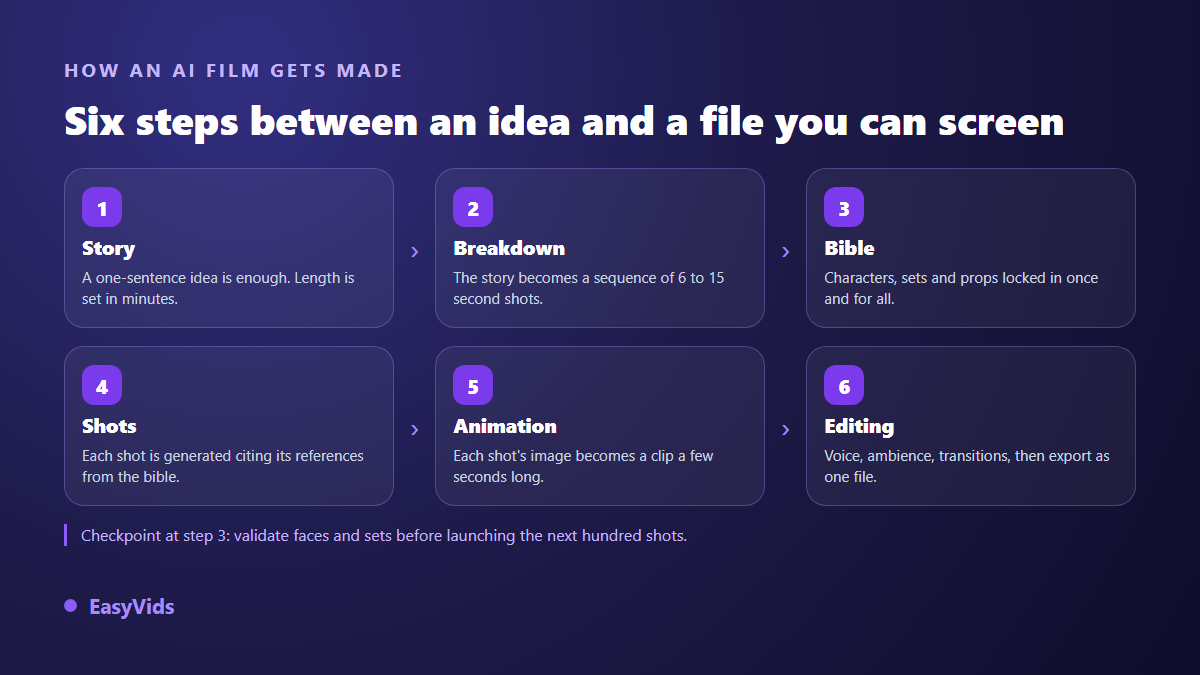
Making a movie with AI comes down to five moves. Write the story. Cut it into shots of a few seconds. Lock visual references for your characters and settings. Generate each shot from those references. Assemble everything with voice, music and editing. None of it needs equipment, and only one step really needs judgement: the shot breakdown. If the production chain is still unfamiliar, our complete guide to AI video generators lays the groundwork before you start a long project.
What making a movie with AI really means
In studios you can reach from a browser, one generated shot usually runs four to fifteen seconds. A few engines reach thirty. Nobody produces ten straight minutes, and compute power is not the whole story: past a few seconds a model loses track of what it is showing. Hands deform, sets rearrange themselves. The workaround is as old as cinema itself. You shoot short takes, then you cut them together.
Your film will therefore be a series of separately generated shots, assembled afterwards. That constraint hides an advantage. A failed shot is redone on its own, without touching the rest. A line that lands badly is rewritten without restarting the whole production. You work like an editor, able to revisit any single element.
Step 1: the story comes before the images
The beginner move is to open a generator and type a shot description. You get one nice image, then a second one with no connection to it. Start from the text instead. One sentence is enough to launch the writing, and it beats a text copied from somewhere else, because the machine then writes for the ear: short sentences, a sharp hook, a narration rhythm.
Set the length in minutes rather than in words. One minute of narration runs to roughly a thousand characters read aloud. Thinking in duration gives you a script calibrated for the film you want, instead of a text you will have to cut down in the edit. Tone, language and your own instructions are set at the same moment, before the first image exists.
Step 2: break the story into shots
The breakdown is what separates a film from a narrated slideshow. Every shot pairs a fragment of text, a visual and a piece of voice. On our own productions, around 110 characters of narration give 6 seconds of voice over. That benchmark lets you aim at a duration without rendering anything to check. Automatic splitting does the bulk of the work, but the cuts are worth adjusting by hand, and that is where rhythm is won.
- One shot per idea: the moment a sentence brings in a new place, object or emotion, cut.
- Six to fifteen seconds per shot. Shorter and the viewer never sees the image, longer and attention drifts.
- Titles and cards are shots in their own right, never glued to the next sentence.
- Dialogue is split line by line, otherwise two characters end up speaking inside one shot.
- Read the breakdown aloud before generating: a clumsy cut is heard long before it is seen.
Step 3: the bible, or why your lead keeps changing face
Here is the point where most generated films fall apart. Describing the same character in every shot is not enough. A dark haired woman in her thirties produces a different woman on every call, because the description is far too thin to rebuild a precise face. The model fills the gaps its own way, and fills them differently each time.
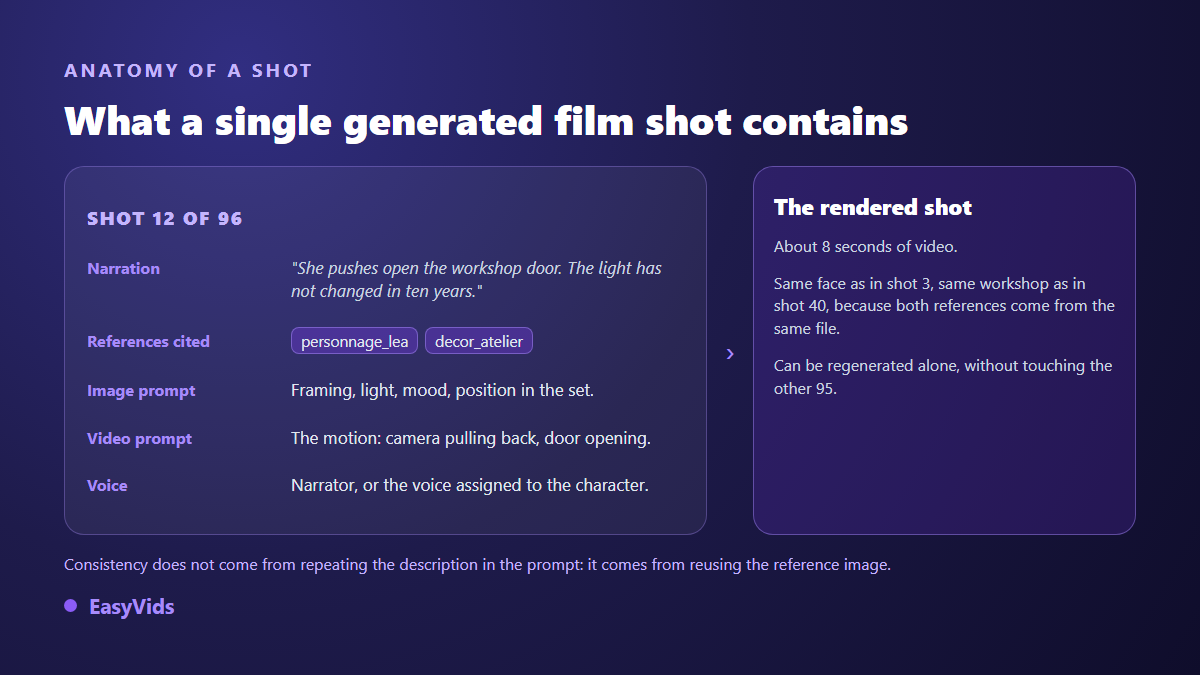
The method that works is to build a bible first: one reference image per character, per setting and per important object, generated once, approved, then reused. Each shot then cites the references it needs. Faces stop drifting because they no longer come from text, they come from a file. The full mechanism is covered in our method for keeping the same character across shots.
That bible deserves a real checkpoint. Look at every reference, regenerate the ones you dislike, and swap one for your own photograph when you have it: a real product or location shot is reused as it is, with no generation involved. Five minutes there save you from redoing eighty shots later.
Step 4: generate the shots, then animate them
Generation happens in two passes. First the still image of each shot, with its references and a prompt describing framing, light and where the characters stand. Then the animation: that still becomes a short clip, driven by a second prompt that only talks about movement, the camera's and the subject's.
The two pass approach is practical. A still is judged in a second and regenerated for almost nothing. An animated clip costs more time and more compute. Approving the images before launching the animation saves you from animating shots you would have redone anyway. Pick the aspect ratio once at the start too, landscape, square or vertical: it applies to the whole film, and cropping afterwards always cuts something that mattered.
A shot that refuses to come out is never a dead end. Change its prompt, switch engine for that one shot, or ask for an automatic rewrite when a safety filter blocked a phrasing. The production does not restart from scratch, and approved shots stay where they are.
Step 5: voice, music and the edit
The soundtrack carries half of the perceived quality. Gorgeous images read by a flat voice give you a film people leave after twenty seconds. The reverse holds too: a well judged narration forgives imperfect visuals. Punctuate your text carefully, because synthesis engines read it the way an actor reads a score. Our complete guide to AI voice over covers the settings that change the result.
When several characters speak, give each one a voice and keep a distinct tone for the narrator. A film where everyone sounds identical stays a documentary. On music, a discreet pad is enough in most scenes, well under the voice. The final edit then syncs every shot to the real length of its narration, adds transitions and gentle motion on stills, and exports one file.
How many shots does a film need?
This question deserves a number rather than a vague answer, because it sets your ambition. The maths stay simple: the target duration gives the volume of narration, and that volume gives the number of shots to produce.
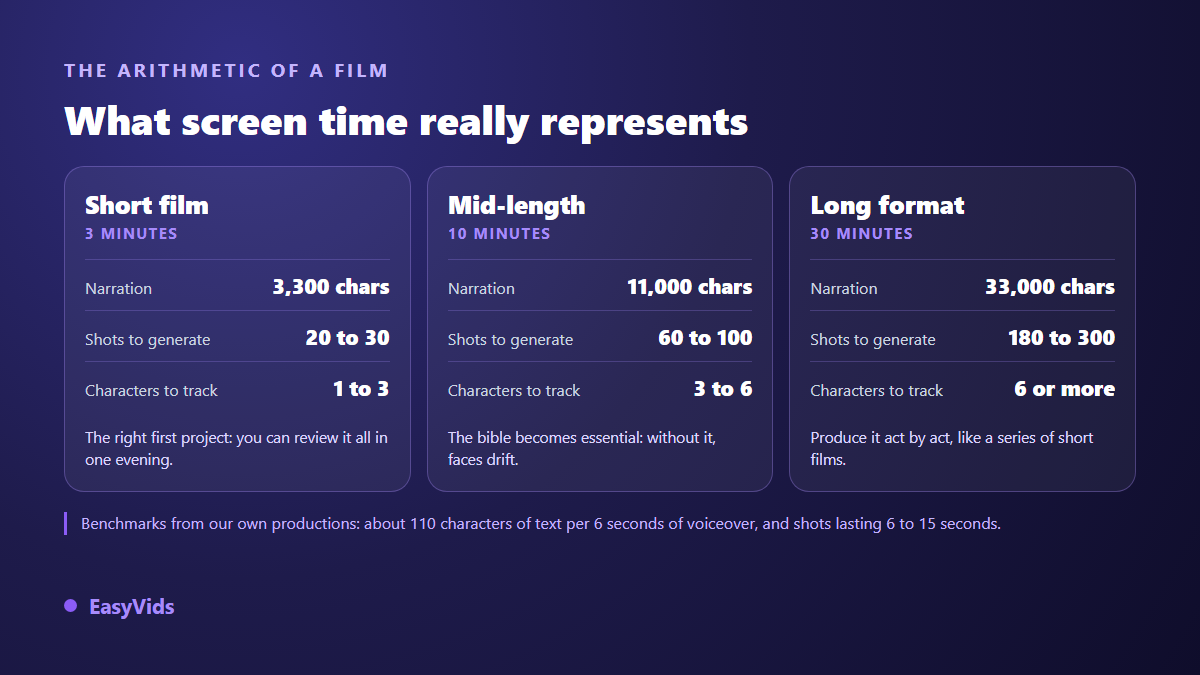
A first three minute film is produced in one evening. Ten minutes demands real organisation. Thirty minutes is handled act by act, like a run of short films sharing one bible and one visual direction. A project spread over several episodes follows the same logic, described in our guide to building a series with recurring characters.
The mistakes that make an AI film look like one
A film generated without method has a signature, and viewers spot it before the first act ends. It comes down to a handful of flaws, all avoidable once you know them.
- A style that shifts from shot to shot: lock a visual direction at the start and leave it alone.
- Faces that drift, because no reference is reused between shots.
- Shots that linger on a near static image after the narration has finished.
- A camera that moves everywhere: constant motion tires as much as a dead frame.
- On screen text nobody can read on a phone. Large, contrasted, short, or nothing.
- No captions, when a large share of the audience watches with the sound off.
What AI will not do for you
It will not find your subject. It has no idea what moves you or why this story deserves telling. A film made from a hollow brief gives a hollow result with very pretty pictures. Script, rhythm and the choice of what to show remain your job, and that is exactly where two films built with the same tool part ways. It does not replace a critical eye either: watch the whole thing before publishing, once without sound, once without looking at the picture. Each pass reveals different flaws.
Frequently asked questions
Can I make a movie with AI without editing skills?
Yes. Automatic editing syncs every shot to the length of its voice over and produces a watchable file with no technical skill at all. Editing becomes useful to shape rhythm, craft an opening or play with silence, not to get a first complete film.
How long does a complete AI film take?
For three minutes, count one evening including writing and reviews. Shots are generated in parallel, so compute is rarely the limiting factor. Most of the time goes into reviewing and deciding, exactly as on a conventional shoot.
Can an AI movie be monetised on YouTube?
Yes, provided you add value of your own. According to the YouTube Help Center, the partner programme requires original and authentic content: what gets penalised is repetitive output with no contribution, not the use of AI itself. YouTube has also required, since 2024, that realistic synthetic content be disclosed at upload when viewers could mistake it for real footage. A clearly fictional film, written and edited with care, sits within the rules.
Can I keep the same actors from start to finish?
Yes, as long as you go through reference images. Repeating the same description in every prompt is not enough, the face changes. A reference generated once and cited by every shot holds across hundreds of shots, including when the character changes setting, costume or apparent age.
Do I need a powerful computer?
No. The compute happens on remote servers, your device only displays a page. A phone is enough to write, launch a production and follow its progress. A larger screen stays more comfortable for fine editing and for reviewing shots.
A film made with AI is not judged by the engine behind it but by the discipline of whoever directs it: a story that holds, a steady breakdown, stable references, a carefully handled voice. The technique follows. To start a first project and watch the whole chain run, create your account and begin with a short three minute format.