The venue is booked, the date is locked, and now you have to tell people. A save the date video does that job better than a printed card: it lands inside a conversation, it plays in under a minute, it gets forwarded to the cousins you forgot on the list, and the date ends up in your guests' phones instead of under a fridge magnet.
The trap is not technical. Plenty of couples produce a lovely film that nobody remembers the date from, because the numbers flash for a second and a half over a bright photo. An announcement is not a memory montage. It carries four pieces of information and asks for an answer. Here is the structure, the timing, the on screen text and the export format, with pacing rules borrowed from our guide to photo slideshows with music.
The short answer
A save the date video runs thirty to forty five seconds, plays vertically, and shows four things: both first names, the date in very large type, the city, and what to do next. Three or four of your own photos, lightly animated, are enough, plus one or two generated establishing shots for the venue, quiet music and an optional short voice over. It all comes together in one place inside the EasyVids studio, with no editing software to install.
What the video does that a card cannot
A card informs. A video sets a mood, then informs. The difference shows at the exact moment the guest files the information away: after a video, they open their calendar, because they have just seen a date written large across their screen and a closing shot asked them to hold it.
It also travels differently. A card goes through the post, a video goes into a message and forwards itself. It is the only announcement format that crosses an entire family without you knowing every address. Many couples send the video first and a formal card later, to the relatives who care about paper.
Three lengths, and one that suits almost everyone
Length is decided before the first shot, because it drives the number of images, the amount of text and the choice of music. Three formats keep coming back, with clearly different uses.
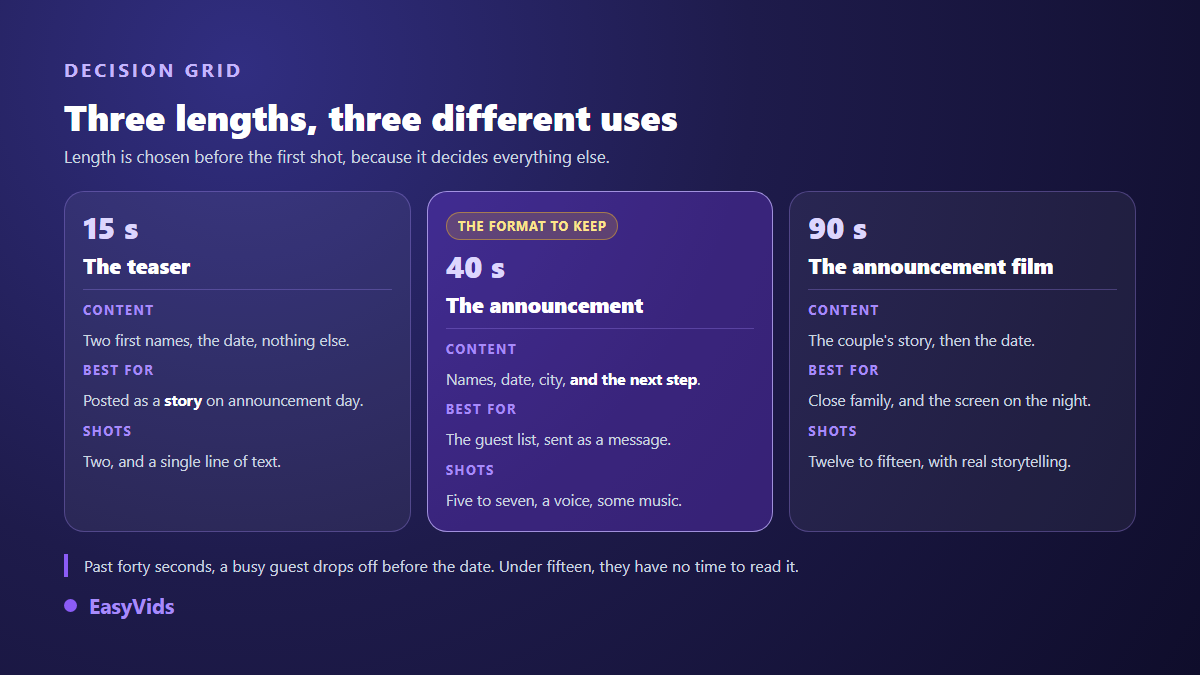
- The fifteen second teaser: two shots, your names, the date. It works for the day you make the news public.
- The forty second announcement: the format that fits the vast majority of weddings. Five to seven shots, the four facts, one clear ask at the end.
- The ninety second announcement film: real storytelling, for close family or for a screen at an engagement party. Keep it for people who will watch it through.
Past a minute, a busy guest drops off before reaching the date. Under fifteen seconds, they have no time to read it. When in doubt, build the forty second version, then cut a teaser out of it: the edit already exists. The long version only earns its place if you genuinely tell a story, how you met for instance, and our method for turning a written story into a film gives the structure to follow in that case.
The five beat structure
An announcement is built like the answer to a question the guest has not asked yet. Hook them, remind them who you are, give the date, place the venue, ask for an action. The order matters more than what sits inside each shot.
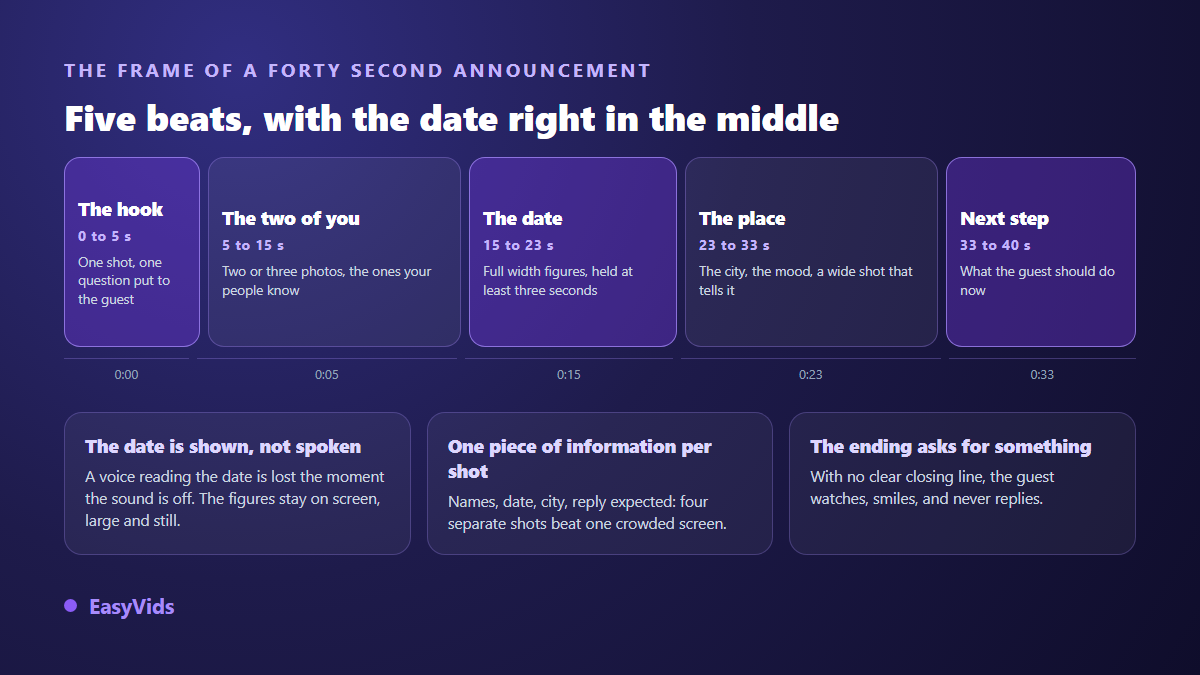
The most common mistake is exactly that placement. Put the date at the very end and only the viewers who stayed to the last frame will see it, which is never everyone. Put it in the middle and it benefits from full attention, leaving the ending free to ask for the reply.
Write that closing line before anything else. « Hold the date, full invitation to follow » does not mean the same thing as « Let us know before the end of the month ». The first one prepares, the second one commits. Pick according to where you are, and keep the line on screen a full three seconds.
Your photos, or generated shots?
Both, in this balance: your photos carry the emotion, generated shots carry the setting. A guest recognises your faces in half a second, and no model replaces that. Nobody, on the other hand, expects a real photograph of the estate hosting the reception. A generated wide shot in the right light does the job and saves you from waiting for a site visit.
Your photos do not have to stay still either. A slow camera move across a fixed image changes how a shot reads, and that motion is generated from the photo itself. The moves that work, and the ones that warp faces, are covered in our guide to animating a photo with AI.
One practical note on the tool: single shot generation accepts up to five reference images uploaded from your device, and you choose vertical, square or horizontal along with clip length depending on the model. You never start from a blank page. You start from your own pictures.
On screen text is where the announcement is won
A save the date is read inside a feed, on a screen held at arm's length, very often with the sound off. The text is not decoration laid over the images. It is the content, and everything else is packaging.
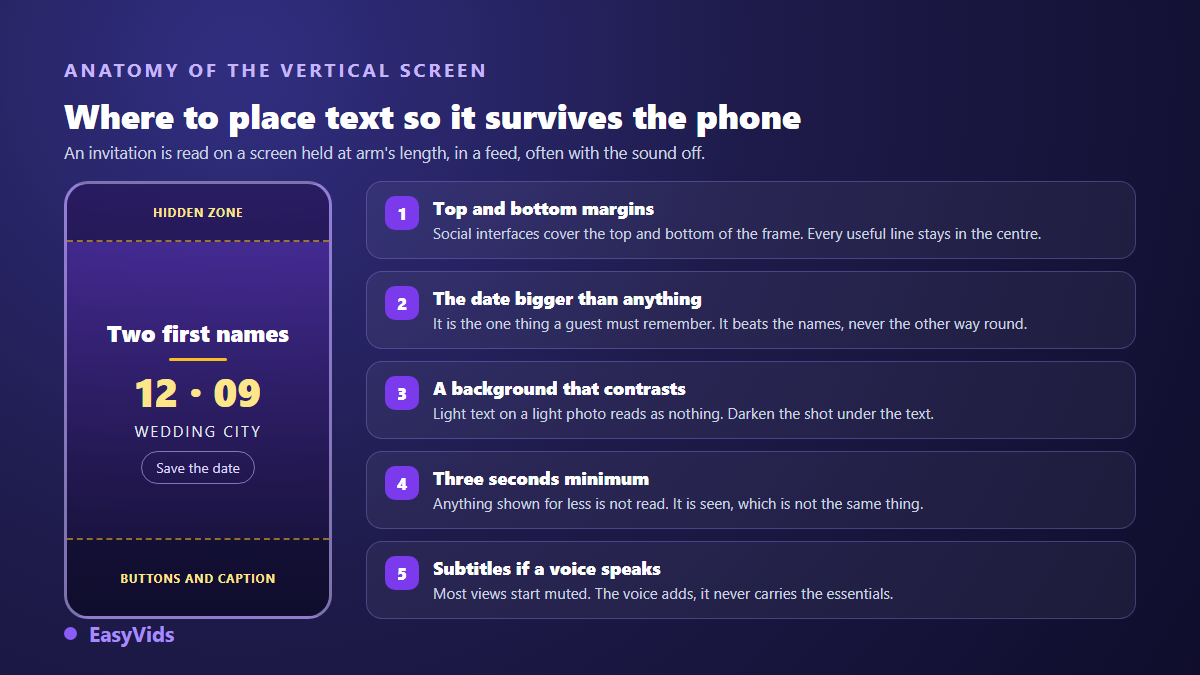
Four rules are enough. The date appears larger than your names, because it is the one thing a guest must retain. Every piece of information holds for at least three seconds. The shot darkens under the text whenever the photo is bright. And if a voice speaks, captions carry it too, otherwise half your guests hear nothing at all.
The online editor keeps these controls in separate tabs: the media you import, sounds, text, stickers, transitions and captions. You drop a text block, stretch it to the length you want, and check its legibility directly in the export format you selected.
Music sets the tone before the first image
Music reaches the viewer before the picture does: three notes are enough for a guest to know whether the announcement is solemn or joyful. Keep it well under the voice, around a fifth of its volume, and let it fall away on the final second so the date sits alone on screen.
Two routes exist. A discreet instrumental that competes with nothing. Or a song written for you, with both first names in the chorus: the music studio offers a wedding occasion, writes the lyrics from your story and lets you request an instrumental version. A commercial track on a public account can trigger an automatic claim even for family use, while a song generated for your video avoids that risk entirely.
Export format and how you send it
Vertical is the sensible default: it is the shape of messages, stories and feeds, so it is the shape of the screen where the video will actually be watched. Produce a horizontal version only if it has to run on a television or a projector during an event. Cropping a vertical film into a horizontal one always cuts part of the text, so export two versions from the same project instead. Platform by platform reference points sit in our video format sheet.
One word on sending. According to the WhatsApp help centre, a video sent inside a conversation is recompressed by the app, while sending it as a document keeps the original file. For your parents and your witnesses, sending it as a document is worth the extra tap. For everyone else the compressed version is fine, provided the on screen text was already large enough.
When to send it
Custom puts a save the date six to eight months before the wedding, and earlier still when guests have to book flights or request time off. That window is not a rule, it simply matches the moment when calendars still fill up easily. If your date falls in peak wedding season, move it forward.
Plan the follow up as well. An announcement usually calls for a second, shorter video a few weeks before the ceremony, repeating the schedule and the directions. The project already exists, so only the text changes. The same mechanics serve the other dates in your year, as our personalised birthday video method shows.
The mistakes that cost you replies
They repeat from one couple to the next, and each one takes minutes to fix once you spot it.
- A date held for less than three seconds, or set in a thin typeface that vanishes on a small screen.
- Text pinned to the bottom of the frame, exactly where the app interface covers it.
- Music louder than the voice, which makes guests turn the sound down instead of up.
- Ten photos crammed into twenty seconds: the eye keeps none of them.
- No ask at the end, so no reply. People enjoy the video and nothing happens.
- A horizontal file sent by message, which shows up as a postage stamp in the thread.
Building yours, step by step
The shortest path is six moves, in this order.
- Gather three to five sharp photos of the two of you, taken at different points in your story.
- Write the four facts on paper: names, date, city, the action you want. Nothing else goes in the video.
- Animate two or three photos with a slow move, and generate one or two establishing shots for the venue.
- Start the music or the lyrics with your names while the shots are being generated.
- Assemble in the editor: one fact per shot, text held three seconds, music under the voice.
- Export vertically, watch it on your own phone, and only then send it out.
That last move pays for itself. Reviewing the film on the screen where it will be watched reveals in ten seconds what a large monitor hides: text too small, a date that flies past, weak contrast. Plan details sit on the pricing page.
Frequently asked questions
How long should a save the date video be?
Thirty to forty five seconds for an announcement sent to the whole guest list. Fifteen seconds is enough for a public post, and ninety seconds only makes sense for close family or a seated audience watching a screen.
Do I need professional photographs?
No. Sharp phone photos taken in natural light beat a badly used studio session. What matters is focus, framing at face height and no motion blur. A photo that starts out dark stays dark after animation.
How do I send it to guests who are not on social media?
By message or by email, as an attachment when the file stays light, through a download link otherwise. A vertical forty second announcement produces a small file that travels easily in an ordinary conversation.
Can I make a version in a second language?
Yes, and it often helps when part of the family speaks another language. Duplicate the project, replace the on screen text, generate a second voice over in the language you need. The images stay exactly as they are.
What if the venue or the time changes after sending?
You reopen the project, fix the affected shot and export again. Only the touched shots are rebuilt, the rest of the edit stays put. That is the format's main advantage over a card already printed and posted.
A good announcement asks for no production budget and no editing skills. It asks for four clear facts, five well ordered shots and one review on a phone. Take an evening, gather your photos, and write the closing line first: everything else follows from it. To build yours, create your account and generate the opening shot straight away.