You only want to see what it looks like. One idea, a few seconds of video, an opinion of your own. So you look for an AI video generator with no sign up, you open the first result, and the promise holds for about three minutes. Right up to the download button, which asks for an email address.
The misunderstanding is nearly always the same. Generating without an account, yes, most services allow that. Walking away with a usable file, almost none. In between sit a watermark, a clipped duration, a downscaled resolution and usage rights nobody ever wrote down. This page covers what anonymous use really gives you, what it costs, and where it stops being worth it. If your real question is about money rather than email, what free plans actually allow covers the other half of the problem.
The short answer
An AI video generator with no sign up lets you try, not produce. What you usually get is a preview of a few seconds, watermarked, downscaled, and impossible to find again once the tab is closed. A clean file you can export and publish somewhere other than your own screen needs an identity, even if that identity is just an email address. So the useful question is not how to avoid the account, but what the smallest possible commitment is. The answer is short: a free account with no bank card.
Why almost no tool goes all the way without an account
The reason is technical before it is commercial. Generating video keeps graphics processors busy for tens of seconds, sometimes minutes for a single shot. That compute is billed by the second whether you like the result or not. An anonymous visitor can fire the same request fifty times with nobody able to stop them, and the bill runs the whole time. The account is not a toll gate, it is the only meter the service has. How a generator actually works makes that constraint concrete.
The workarounds are ones you have already met without naming them: quotas tied to your IP address, browser fingerprinting, a queue that stretches at peak hours, a deliberately limited preview. All of them cap what a stranger can consume. They also explain why the quality served anonymously is rarely the quality the tool can reach, which quietly skews every comparison you make.
Four different offers behind one promise
The words no sign up cover situations with almost nothing in common. Telling them apart at a glance saves you half an hour on a page that will never generate your idea.
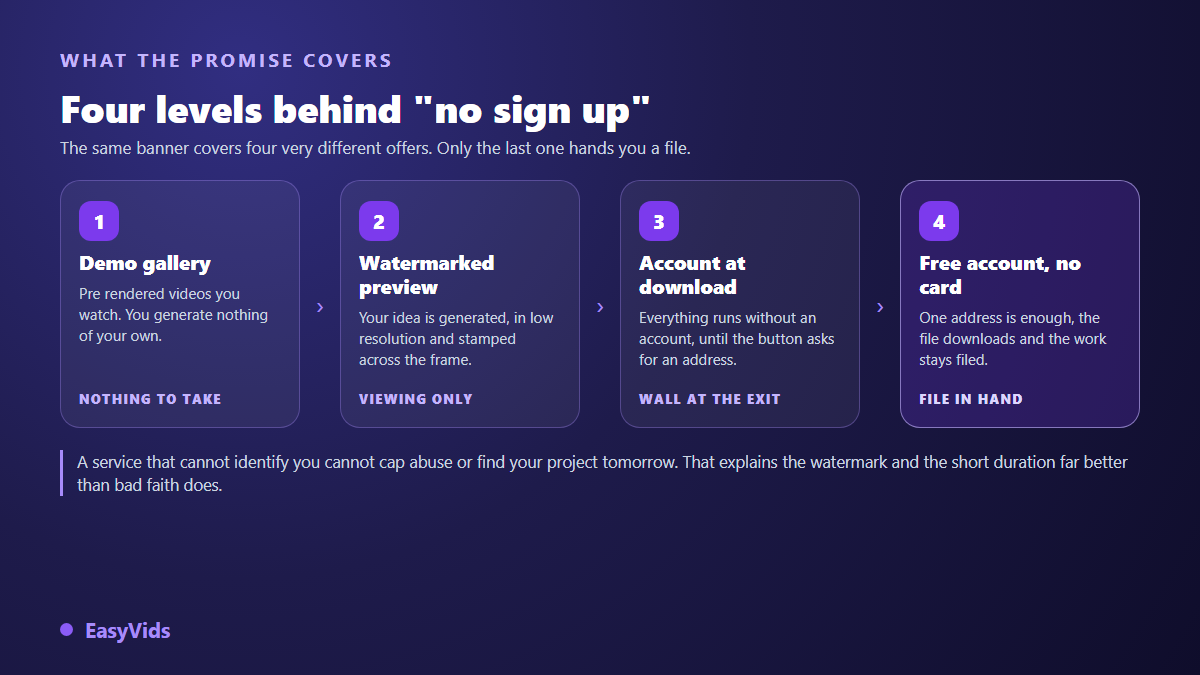
- The demo gallery: polished videos rendered in advance that you watch without producing anything. Good for judging a style, useless for testing yours.
- The watermarked preview: your text is genuinely generated, but the output comes back short, compressed and stamped across the frame.
- The account at download: the whole journey runs without identification, until the very last click. The most common case, and the most irritating.
- The free account with no bank card: a few seconds to register, then a file you can actually export. This is what most people typing no sign up are really after.
The five limits you hit every time
Skipping the account means accepting five trade offs. None of them is arbitrary: each follows from the fact that the service has no idea who you are and can guarantee you nothing in return.
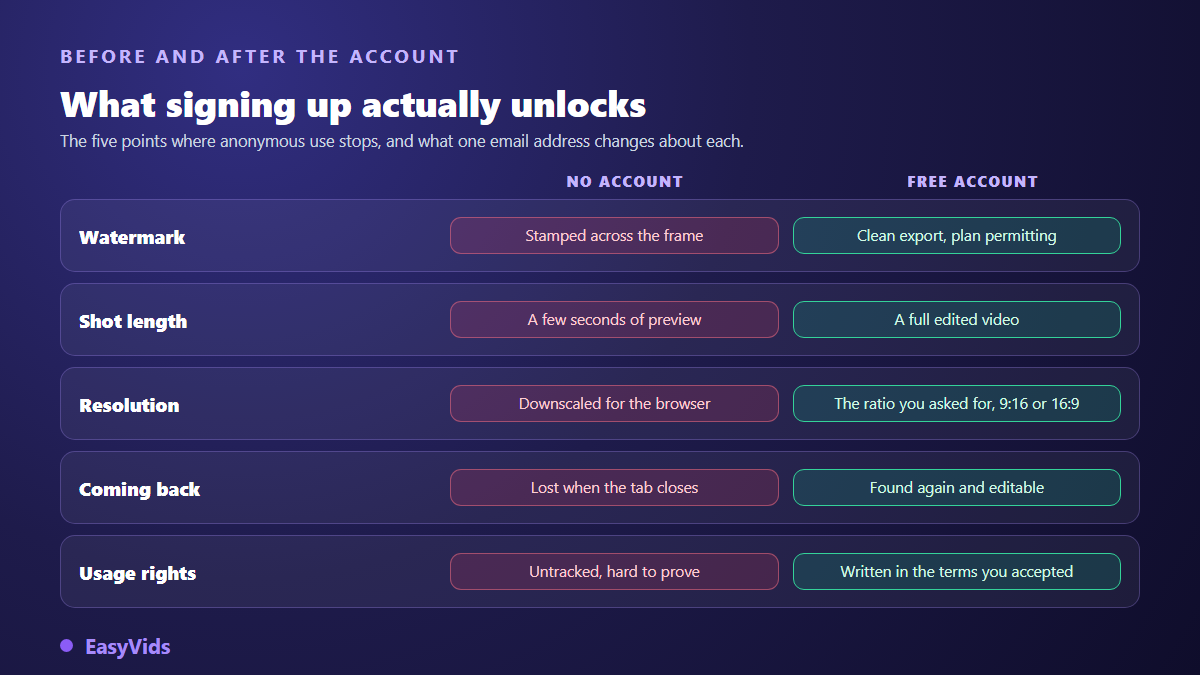
The most underrated is the fourth one, the missing history. A video generated without an account lives inside a tab. One refresh, one dropped connection, one phone that locks itself, and the render evaporates along with the temporary link holding it. On a fifteen second shot you shrug it off. On a three minute narration cut into twelve scenes, you lose the whole session and start again from the first sentence.
The watermark is where anonymity gets expensive
A watermark is not a cosmetic nuisance, it is a commercial signature. It tells your audience the name of a service that is not yours, and it runs from the first frame to the last. On a personal post, fine. On a product page, an ad, or a video delivered to a client, it disqualifies the work before anyone has watched it.
The removal tricks promised all over the web damage the image more than they clean it. A local blur, a tight crop, a patch laid on top: the shot loses whatever made it interesting, and the mark stays visible wherever it moves position. The only clean route is generating from an account that allows a mark free export, which our guide to watermark free exports walks through.
What an account changes for your data
The caution is legitimate and deserves more than vague reassurance. Creating an account on a generation service means handing over an email address and, often, the history of your prompts. In exchange you gain rights that anonymity never grants. The General Data Protection Regulation, in force since 25 May 2018, gives you a right of access to the data held about you under its article 15, and a right to erasure under its article 17. Both are exercised against an identified account, never against an anonymous session nobody kept a record of.
A disposable address then looks like the perfect compromise. It carries one mechanical flaw: the confirmation message, the password reset and access to your renders all travel through that inbox. The day it expires your work becomes unreachable, and no support team can hand it back, since nothing proves the account was yours. A lasting secondary address does the same job without the trap.
Everything you can prepare with no account at all
Anonymity keeps a real use, as long as you place it at the right point of the work. The account only matters for generation and export. Everything upstream is free to do, and it happens to be the part that decides the final quality. A badly framed idea produces a poor video on any tool, free or premium.
- Write the idea in one sentence: the subject, the audience, the emotion you aim for. One line is enough and steers everything else.
- Set the length in minutes: roughly 150 words of voice over per minute of video. A 300 word text gives two minutes, no more.
- Cut it into scenes: 5 to 15 seconds per shot, meaning 15 to 40 words. This planning works perfectly on paper.
- Pick the aspect ratio before generating: 9:16 for vertical feeds, 16:9 for a standard channel. Cropping later always removes something that mattered.
- Gather your visual references: logo, colours, product photos, the face of a recurring character if your project has one.
Image generators follow the same logic as video, with comparable limits as soon as you refuse to identify yourself. The detail sits in our review of image generators with no sign up, and it is worth a look before you start testing, since the same preparation habits carry much of the result.
Testing a generator in fifteen minutes
An honest comparison needs a method, otherwise you are mostly judging a landing page. Take one idea, phrased in exactly the same way, and send it to three tools. If your starting point is a picture rather than a sentence, run the same test on a still image turned into a moving clip, where the prompt describes motion instead of scenery. Then watch four things in this order: visual consistency from scene to scene, how natural the voice sounds in your language, the pacing of the automatic edit, and finally what would be left of the video once the watermark is out of the equation.
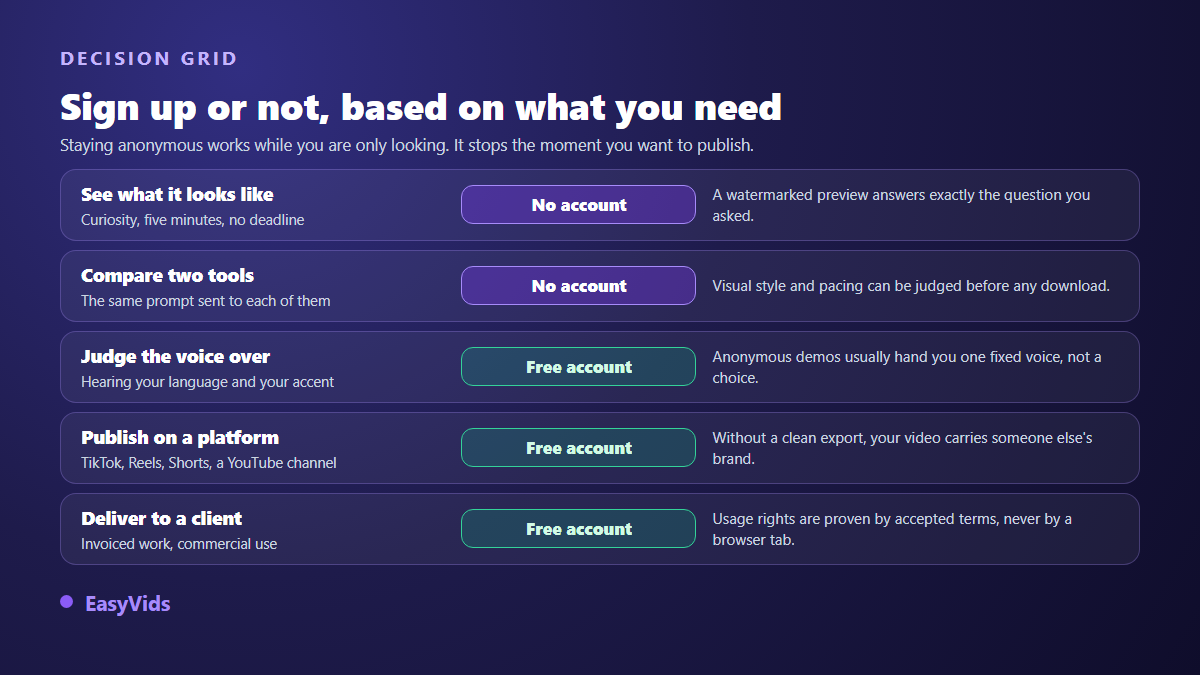
The protocol costs you a quarter of an hour and spares you the late discovery that a voice sounds wrong in your language. To save more time, our review of the main generators already ran that work across eleven tools, with the use cases each one handles best.
The free account with no card is the closest thing to what you want
Between frustrating anonymity and a committing subscription sits a middle position many readers look for without naming it. One email address, no bank card, credits granted on opening, and a complete studio available straight away. You test with your own ideas, you download the result, then you decide. That is how the EasyVids studio works, with the script, the visuals, the voice over, the music and the edit in one place.
Registering commits nothing financially, and nothing charges without your say so: the plans stay visible on the pricing page whenever you need them. To understand what the machine really does between your sentence and the final file, our complete AI video generator guide walks the six steps of the production chain.
Frequently asked questions
Is there a genuinely free AI video generator with no sign up?
Yes for generating, rarely for downloading. Several services expose an open input field and return a preview within a minute. The clean file almost always requires identification, because that is the only way the operator knows who is receiving compute time.
Can I remove the watermark from a video made without an account?
Not cleanly. Cropping, blurring and patches degrade the image without clearing the mark on every shot, especially when it moves position. The only satisfying route is regenerating the video from an account that allows a mark free export.
Can videos generated without an account be used commercially?
This is the blind spot of anonymous use. Usage rights live in the terms of service you accept when creating an account. An anonymous session leaves no trace of what you accepted or what was granted to you. For a video going to a client or into an ad, that vagueness is an avoidable risk.
Do free trials require a bank card?
Not always, and it makes a simple sorting rule. A trial that demands a card often turns into a subscription at the first renewal, sometimes without a reminder. A trial that only asks for an email address lets you walk away owing nothing, which is the format to favour while you are still exploring.
How do I find a video I generated without an account?
In most cases you will not: the render link is temporary and tied to the current session. The useful habit is downloading whatever you want to keep straight away, watermark included, before closing the tab or switching apps.
Looking for an AI video generator with no sign up is usually a search for something else: the certainty of not committing before seeing a result. An anonymous preview only half delivers that, since it never shows the real quality of an export. The short path is preparing your idea on your own side, then generating it once in a studio that returns a clean file. Opening a free account takes less time than reading this page, and asks for no bank card.