You searched for how to make motion graphics without After Effects, and you landed on a forty minute tutorial where someone stacks layers in an interface you have never opened. The implicit message never changes: learn the software, or pay someone who has. For the video you actually need, a one minute explainer, animated text over a voice over, a chart that moves, that is a dead end.
The work that makes an animated video pleasant to watch does not happen inside the software. It happens before, in how the script is cut and in three design decisions, and after, in how each shot is timed against the real length of the voice. The software executes, it decides nothing. Our motion design guide covers the discipline itself; this one walks the whole chain, from script to exported file, with tools that live in a browser.
The short answer
Follow five steps in this order: cut your script into shots, produce the voice over before the visuals, lock a visual direction in three decisions, animate every shot in three beats (an entrance, a still reading time, an exit), then export at a constant frame rate. A browser based video editor covers all of it. Compositing software only becomes necessary for particles, real 3D and motion tracking, which is a small minority of shots.
What compositing software actually does
After Effects is not a motion graphics tool, it is a compositing tool: it stacks image layers and combines them. That generality is its power and its learning cost. Particle systems, motion tracking, rotoscoping, a real 3D space with cameras and lights, an expression language, a plugin ecosystem. A broadcast title sequence leans on all of it.
Now look at your own need. A title that enters, a number that counts up, a logo that lands, a word that hits on a syllable. None of that requires particles or 3D. It requires four properties animated over time: position, scale, rotation and opacity. An editor with keyframes on those four covers the overwhelming majority of motion graphics published online every day.
The full chain, in five steps
Order matters more than tooling. Each step removes a guess from the next one, and a reversed step costs an evening of re-timing.
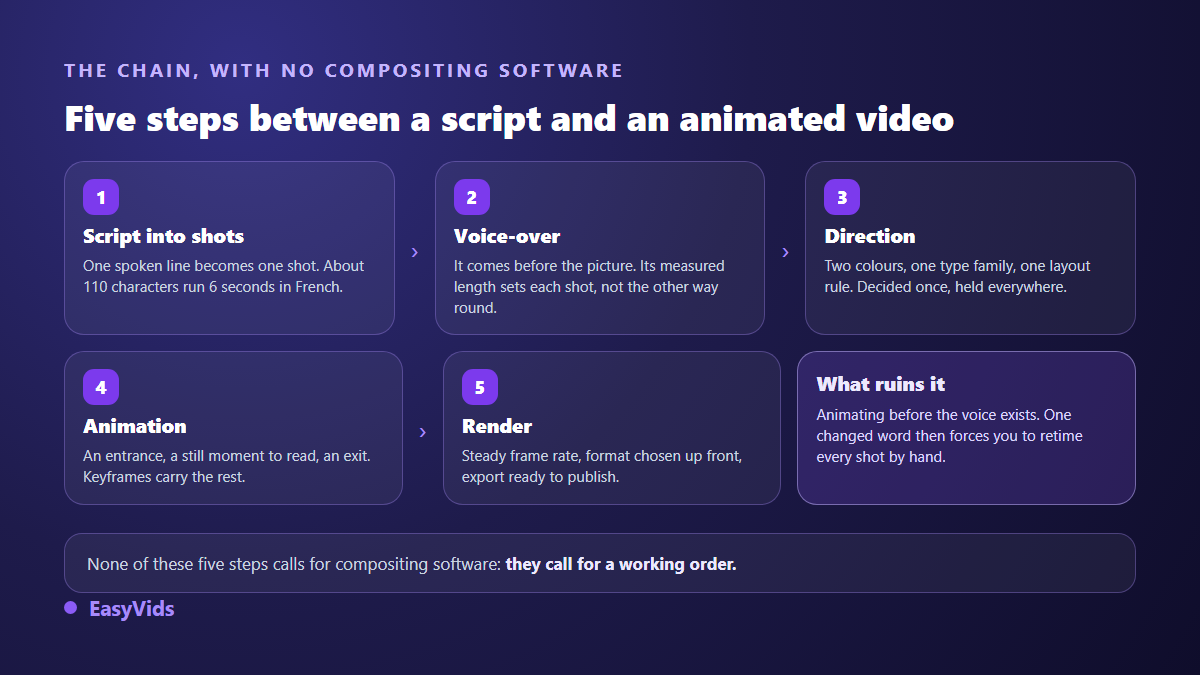
- Cut the script into shots: one spoken line becomes one shot, and one shot carries one idea.
- Produce the voice over: its measured length becomes the shot length, instead of being guessed.
- Lock the visual direction: two colours, one type family, one composition rule.
- Animate each shot: an entrance, a still reading time, an exit, in that order.
- Render and export: constant frame rate, aspect ratio chosen upfront, timing checked on the last shot.
Step 1: cut the script into shots
The simplest rule treats one line of your text as one shot. Across our own productions, roughly 110 characters of voice over run about six seconds. That ratio lets you estimate a film before a single audio file exists. Past eight seconds of speech, a shot stops being motion graphics: the animation finished long ago, the frame sits still, and the viewer is watching a slide. Split the sentence instead of speeding up the voice.
Step 2: the voice comes before the visuals
This is the inversion nearly every beginner makes. Animate first and every shot length is a guess; the voice then arrives two seconds longer or shorter and everything has to move. The other way round, the measured duration of the audio file becomes the shot duration, and nothing needs adjusting. The voice also carries half the perceived quality, which is why punctuation and delivery style deserve as much care as the animation itself.
Step 3: three design decisions, made once
Visual unity comes from repetition, not from drawing talent. Two colours plus one accent reserved for whatever must be seen. One type family, varied only in size and weight. One composition rule held across every shot. The constraint is liberating: it removes the question of what this shot should look like, every single time a new scene arrives. If you need illustrations rather than flat colour, generate them in one declared style with our AI image generator guide, then desaturate them heavily so the text stays in front.
Step 4: animate, and know when to stop
An animated shot has three beats, and only one allows movement. The entrance lasts about a quarter of a second. The still reading time takes everything else. The exit runs faster than the entrance. The rule that follows deserves a sticky note on your monitor: nobody reads text that is still moving. Ease in and ease out, rather than a constant speed that reads as a mechanical slide.
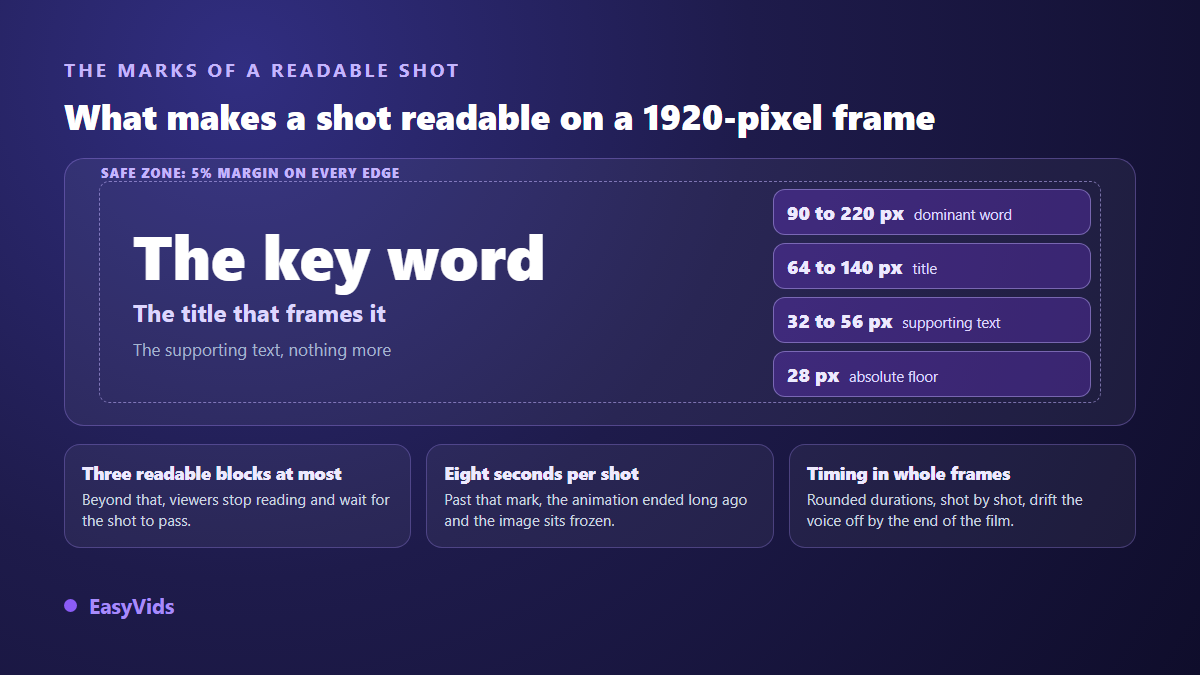
Sizes decide the rest. On a 1920 pixel wide frame, a dominant word sits between 90 and 220 pixels tall, a title between 64 and 140, secondary text between 32 and 56. Below 28 pixels, platform compression eats the letters. Keep anything readable at least 5 % away from every edge, where the app interface will otherwise cover it, and never show more than three readable blocks at once.
A serious editor ships ready made animations sorted by role: entrances, exits, looping accents such as pulse, sway or shake, and slow pan and zoom moves over a still image, each adjustable in intensity. When a gesture is missing, keyframes take over on position, scale, rotation and opacity. Our nine animated text effects go through the ones worth using.
Step 5: rendering, where mistakes become visible
Two technical details decide how clean the result feels. First, the frame rate: export at a constant rate, never variable, or the picture drifts away from the voice on some platforms. Our renders run at 30 frames per second. Second, the timing: rounding each shot separately makes the errors add up, and a long film ends visibly out of sync. Compute cumulative boundaries in whole frames rather than rounded seconds, and place cuts on frames rather than on tenths of a second.
Three routes, and how to pick one
Once the method is settled, only the tooling question remains. Three families answer it, and they do not serve the same projects.
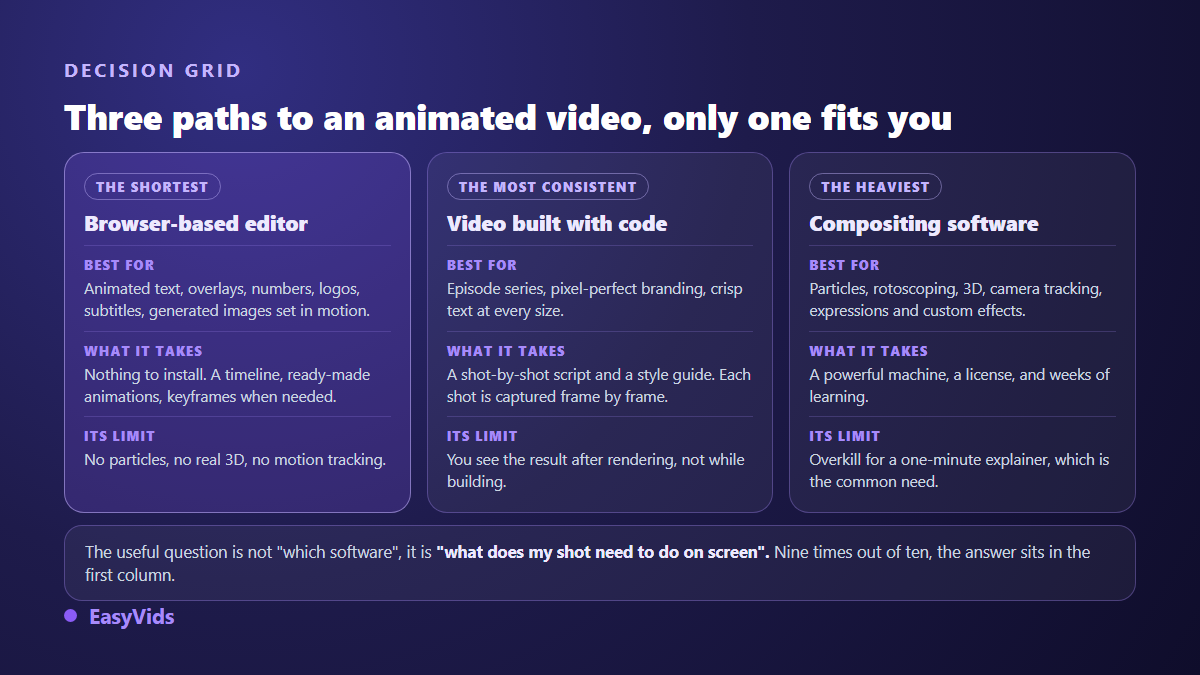
The shortest route is the editor that runs in your browser: elements on a timeline, an entrance and an exit, keyframes where needed, export. Nothing to install, nothing to update, and the project stays reachable from any machine. Our online video editing guide describes that environment in detail.
The second route builds the video from code: every shot is a page animated in HTML and CSS, photographed frame by frame, then encoded with the voice over. Text stays razor sharp at any size, brand rules are respected to the pixel, and each shot length follows the measured length of its voice. That is the route we use for our own motion design films. The trade off is real: you discover the result at the end of the calculation, not during the build.
The third route is compositing software, and it keeps its place when a shot demands it. Start from what the image has to do, not from the tool everyone quotes. Budget follows the same logic, since a one minute explainer has no reason to cost what a title sequence costs; our pricing page lists the plans, free trial included.
What compositing keeps for itself
Pretending everything is replaceable would be dishonest. Five families of work stay out of reach of a browser editor: particle systems, frame by frame rotoscoping, true 3D with cameras and lights, motion tracking on filmed footage, and expression driven effects. If your project rests on those, learn the software or hire a specialist. If it is an explainer, a short ad, a channel package or an animated infographic, you will simply never reach for them.
The mistakes that give an amateur video away
The same flaws repeat from one amateur production to the next, and they all come from the order of work rather than from the tool.
- Animating before the voice exists, so every text edit forces a full re-timing pass.
- Movement that runs for the whole shot: viewers wait for it to end instead of reading.
- A different typeface on every shot, or four colours competing for attention.
- Text under 28 pixels tall, unreadable as soon as the platform recompresses the file.
- Fifteen second shots on a static image, called motion graphics out of politeness.
- A different transition between every shot, when one repeated transition structures a film far better.
Frequently asked questions
Can you make professional motion graphics without After Effects?
Yes, for the vast majority of formats published online. Explainers, short ads, animated text, channel packaging and infographics all rest on four animated properties and a held visual direction. What separates professional from amateur is pacing and readability, not the brand of software.
What is the best free alternative to After Effects?
Framing the question around price usually leads to open source software as demanding as the tool you wanted to avoid. For a creator in a hurry, the useful alternative is a browser editor with a free trial and real keyframes: you ship your first video the same day instead of spending a month learning.
Do I need a powerful computer to animate in a browser?
No. Editing and preview run on your machine, while image generation, voices and scene writing run on our servers. An ordinary laptop is enough. A wide screen helps far more than a fast processor, because most of the work is seeing the whole timeline at once.
How long does a one minute animated video take?
One minute is roughly ten shots. Most of the time goes into writing and cutting, a few minutes into the voices, then one to two hours of animation the first time. Later videos go much faster, since the visual direction is already decided and only the content of each shot changes.
Can an AI made animated video respect my brand guidelines?
Yes, provided you declare them before the scenes are written rather than after. Your colours, typeface and logo are set upfront and applied to every shot. Without a brand kit, an art direction is inferred from your images: consistent, but not yours.
Making motion graphics without After Effects is not a compromise, it is another entry point: the same discipline approached through method rather than through an interface. A script cut into shots, a voice produced first, three design decisions held, shots that leave time to read. To animate your first shot today, creating an account opens the editor and the production studio, and the EasyVids toolset keeps writing, visuals, voice and editing in one place.