You generate ten images for one story and you get ten different people. The jaw changes, the hair gets shorter, the jacket shifts from blue to grey, and viewers drop off without knowing why. Consistent character AI video is not a finishing detail: it is the line between a pile of nice frames and a film somebody can actually follow.
The drift is not mysterious. It comes from one specific way of working, and it disappears when you change that habit. This guide explains the real mechanism, then the method our AI creation studio uses to hold a single character across fifty shots, the mistakes that break it, and the harder case of a series with several characters.
The short answer
A face stays the same when you stop describing it and start showing it. In practice: you produce one reference portrait, you give it a stable identifier, and that same image travels with every scene the character appears in, alongside an instruction to reproduce exactly this person. Text then serves only to repeat what a photo does not always pin down: hairstyle and outfit. That principle sits under our AI video generator, and it applies to a set of images as much as to a full film.
Why a face drifts between images
An image generator remembers nothing of what it produced a minute earlier. Every image is built from scratch, from the text alone. If that text says "a woman in her thirties, wavy brown hair, beige jacket", the model invents a woman who fits the sentence. Next time it invents another one, equally valid. Millions of faces satisfy the same description.
That is where the most common misunderstanding hides. Many creators assume that a longer description narrows the result. In practice each extra adjective opens a new margin of interpretation, and likeness stops improving past a handful of traits. A prompt, however long, describes a category of people. An image points at one person.
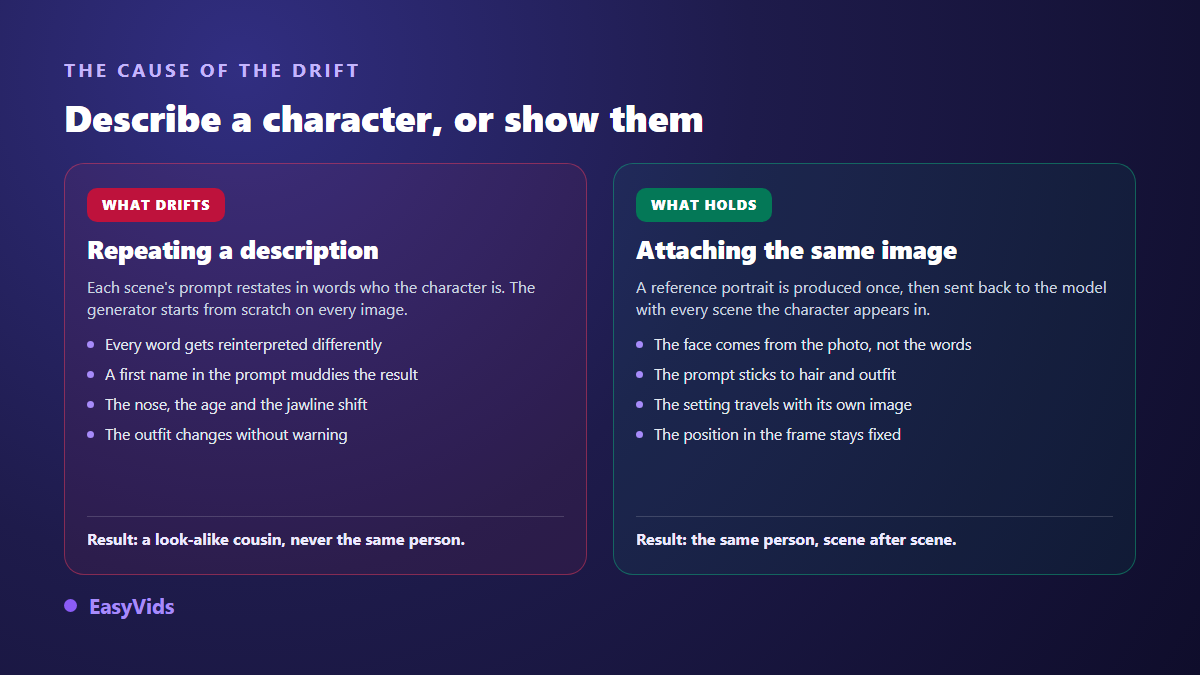
A second factor makes it worse: the scene itself. Changing light, angle and distance between two shots forces the model to rebuild the face under fresh conditions. The wider the gap between neighbouring images, the further the rebuild drifts. So a good method does not only lock a face. It also locks the place, each person's position in the frame, and the side the camera watches from. Lock the aspect ratio at the same moment, since the same character does not fill the frame the same way vertically and horizontally: our guide to video formats gives the one each platform expects.
The stable reference method
One sentence covers it: nothing essential is generated twice. Before the first scene, a set of references is built, and then it stops moving. Every recurring character gets a short stable identifier such as char_camille, and every location gets its own, such as set_workshop. These are not display names, they are addresses. A scene does not say "Camille in the workshop": it cites both identifiers, and the system knows which images to attach to the generation.
Then comes a preparation pass, what we call the project bible. It produces one portrait per character and one image per location, in neutral framing and clean light, with no staging. Those images are not made for the viewer: they work as identity papers. Once approved they are never redrawn. If you upload your own photo, it takes the place of the generated portrait and becomes the reference exactly as provided, untouched.
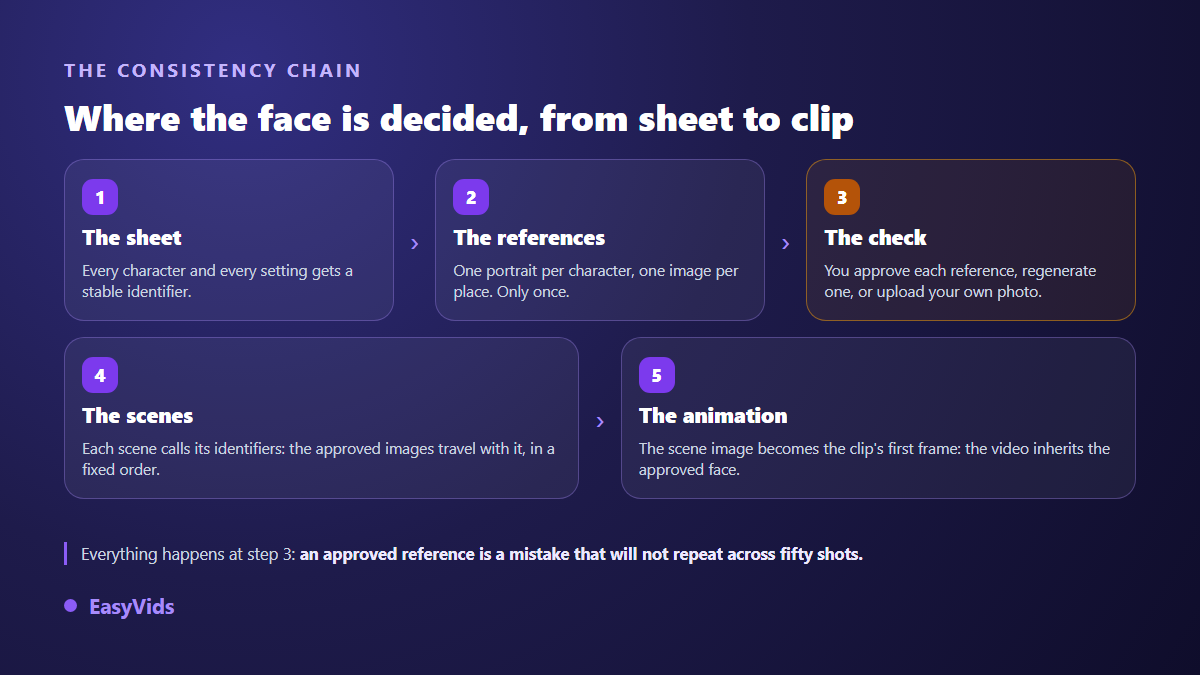
When a scene is rendered, the system reads the identifiers it cites and attaches the matching images to the request, in a fixed order, with a numbered instruction stating what each one shows: this one is a character to reproduce exactly, that one is the place to respect, this other one is an object to render faithfully. When something has to give, characters outrank sets, and one slot stays reserved for the location so the face and its surroundings travel together. Finally, the approved scene image becomes the first frame of the clip: the animation inherits a face that was already signed off instead of inventing a new one.
The invariant sheet
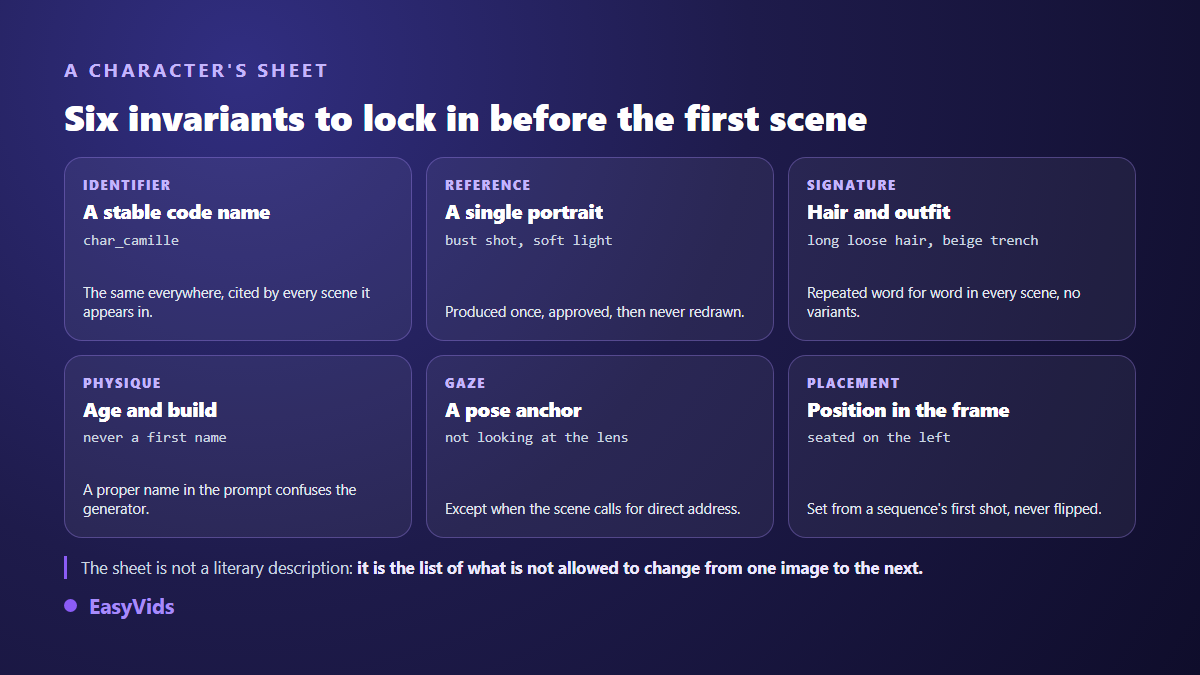
A reference image is not enough on its own, because it says nothing about what must hold steady when the scene changes. So write a short sheet per character before you produce anything. It is not a biography. It lists what is not allowed to move.
- A stable identifier, short and without spaces, cited in every scene the character appears in.
- One reference portrait: upper body, soft light, plain background, neutral expression, eyes visible.
- A two part signature, hairstyle and outfit, written as one sentence you will copy verbatim into every scene.
- Restrained physical traits: apparent age, build, complexion. Never a first name, which confuses the generator instead of helping it.
- A pose anchor, so the character does not stare into the lens in every shot unless the scene calls for it.
- A position in the frame for group sequences: left or right, fixed in the opening shot and never flipped afterwards.
- What is allowed to change: emotion, gesture, camera distance. Without that line you get fifty frozen, interchangeable shots.
The signature deserves a warning, because that is where most projects break. Since the reference image is attached to the generation, never re describe the face in detail inside the scene prompt. A description that contradicts the photo, even about hair length, puts the generator in competition with itself, and the text usually wins. The prompt must confirm the photo, never duplicate it.
The checkpoint nobody should skip
Between the references and the scenes sits a moment you will want to rush through: the one where you look at the portraits and sets before a single scene exists. There you can approve, fix a portrait description and rerun that item alone, or replace the image with your own. Replacing it with an uploaded photo triggers no generation at all: your file simply becomes the reference. A personal photo serves two very different purposes: anchoring a recurring character, or feeding an edit of pictures you already own carried by music, which we describe in our guide to photo slideshows set to music.
The trade off is easy to state. A reference approved reluctantly will show up in every shot that character appears in, and fixing fifty scenes always costs more than redoing one portrait. Our plans are listed on the pricing page. The rule of method never changes: do not approve a reference you are not happy with.
The mistakes that break consistency
- Re describing the face in every scene while a reference is attached: the text takes over and deforms the photo.
- Letting the signature drift with no story reason: the same person cannot wear their hair up in one shot and down in the next.
- Writing a first name into the generation prompt. The model does not know your character and reads the name as a hint about origin or looks.
- Starting from a weak photo: blurry, cropped, backlit or buried under a smoothing filter. A reference cannot pass on what it does not show.
- Picking a model that does not read reference images. Not all of them do, and those that do accept different numbers.
- Overloading a scene with references: past a few attached images the portrait gets pushed out by secondary elements.
- Flipping two characters' positions between consecutive shots, which breaks the cut even when both faces are perfect.
- Letting text creep into the generated image: warped letters, invented signage and approximate logos give the whole thing away instantly.
One more mistake is subtler: restarting everything whenever a shot disappoints. A serious production is fixed shot by shot. You spot the failed scene, regenerate that one, and leave approved work alone. It is what an editor does with a bad take.
A series with several characters
Two characters in one frame multiply the risks. The generator can blend them, swap their clothes, or give one the other's face. The fix is structural rather than editorial: each character keeps their own identifier, reference and signature, and the scene instruction states explicitly which reference image belongs to whom, in the exact order the images are sent.
Then there are crowded scenes. When a scene would need more than three elements respected, say two characters, a location and an object, you do not stack them. You first build a group image showing them together, and the scenes involved cite that image as a single reference. It is the logic of one character applied to a set: instead of re describing the group in every shot, you show it once.
- One identifier per character, never a shared one for "the two friends".
- Contrasting signatures: two characters with similar hair and clothes will eventually merge.
- A group image for scenes with three elements or more, reused across the sequence.
- Fixed positions set in the opening shot of a sequence, then repeated verbatim in the following ones.
- A run of short shots in one location rather than one long take: the cuts are far easier to control.
Keeping the same character across videos
Consistency rarely matters for a single video. A channel, an ad range or an educational series needs the same face for months. The mechanism is identical, with one twist: your reference files become the asset. Keep the approved portrait, the set images and the invariant sheet in one folder, and start the next project from those files instead of generating new ones. Our step by step guide to a published YouTube video shows how that small library gets built from the first upload.
When the character speaks
A speaking character adds a constraint: the voice has to be as stable as the face. Two approaches exist. In the first, the line is handed to the video model, which renders the shot with its audio: lip movement is part of the generated image, and the sentence has to fit the clip length, roughly fifteen to twenty five words. In the second, narration is recorded separately and laid over the shots, which frees up timing and editing. Either way the lines are written before production starts, and drafting several episodes ahead spares you from improvising at generation time: our method for writing a week of scripts in one sitting applies as it stands to a recurring character.
Either way, voice consistency is handled like face consistency: pick a voice once, write it into the character sheet, reuse it exactly. We covered the settings that make narration believable in our natural AI voice over guide. A visually flawless character whose voice changes between episodes is still an inconsistent character.
When the character resembles a real person
A consistent character ends up behaving like an identity: a recognisable face, a voice, a way of moving. That creates two duties. The first concerns the starting point. If your reference is a real person's photo, you need written, dated consent covering image, voice, target platforms and a duration. A photo found online, a customer, a colleague who signed nothing: the answer is no, and no tool checks that for you. Never build a character resembling a public figure, however loosely. The second duty concerns publishing: major platforms now expect realistic AI generated content to be labelled at upload, as YouTube's help page on synthetic content explains. Our common usage answers live in the FAQ.
Frequently asked questions
How many photos do I need for a consistent character?
One, provided it is sharp, evenly lit and framed at least to the shoulders. This is not training: you are not building a model of your face, you are handing over a visual target the generator tries to respect shot after shot. A second view sometimes helps for an object, rarely for a face.
Can I change a character's outfit without breaking consistency?
Yes, if the change is treated as a story event rather than an accident. Announce it in the scene that introduces it, update the signature in the sheet, then keep the new wording identical for every following scene. What breaks consistency is not the change, it is the undeclared change.
Why does my character still change with a reference image?
Three causes cover nearly every case. The scene prompt re describes the face and contradicts the photo. The chosen model does not read reference images. Or the scene attaches too many images at once and the portrait gets pushed out. Check those three before blaming the photo.
Generated character or real photo?
A real photo gives the most stable likeness, since the reference was not invented. A fully generated character avoids any image rights question and scales more freely. It depends on what you publish: your own face for personal presence, a generated character for a brand, a fiction series, or content you would rather not front yourself.
Does consistency work for sets and products too?
Yes, through the same mechanism. A recurring location gets its identifier and its image, a supplied product is used as is and never redrawn, with extra views when its shape and scale need to hold from any angle. A drifting set hurts as much as a drifting face.
Character consistency is not a checkbox: it is a production discipline, decided before the first image. Write the sheet, build the references once, actually spend time at the checkpoint, then let the scenes lean on them. Everything else goes back to being direction. Create an account and set your first reference today.