Your best selling dish was shot on a phone, mid service, under the warm yellow light of the dining room. On the delivery app it sits right next to a competitor who hired a photographer. AI food photography closes that gap in minutes: you describe the dish, the angle and the light, and you get a clean, well framed image in the exact ratio you need.
The hard part is knowing what to write. A vague prompt returns a generic plate that looks like stock imagery. A prompt that names the direction of the light, the surface and the lens returns something that looks studio made. The eleven formulas below are ready to copy, with one bracket to replace. If image generation is new to you, our complete guide to AI image generators covers the basics this article assumes.
The short answer
A working food prompt describes five things in this order: the dish and what it is served in, the camera angle, the light and its direction, the surface and props, then the lens rendering. You set the aspect ratio in the tool, generate several variants, and keep the best one. Thirty well chosen words beat a hundred: past that point, instructions start contradicting each other and part of the prompt gets ignored.
Why a photo taken in the dining room never looks appetising
Three causes, every time. Light first: a room lit in warm yellow, mixed with daylight from a window, produces an orange cast your eye corrects on the spot and the sensor records as it is. Angle second: a plate shot standing up, at adult height, flattens the food in the literal sense. Background third: a stained cloth, a half empty glass or a receipt is enough to push an image into amateur territory.
A generated image fixes all three at once, because you decide the light, the angle and the set before the scene exists. What it does not fix is the recipe, and it never replaces reality: what you show has to be what you serve, or a disappointed customer will say so in a review. That rule sits above everything else in this article.
The anatomy of a food photography prompt
A good prompt is not an inspired sentence, it is a stack of blocks. Each one answers a question the model would otherwise answer for you, and it will answer with the most average option in its training data: flat frontal light, white plate, wooden table. Naming each block is how you take those decisions back.
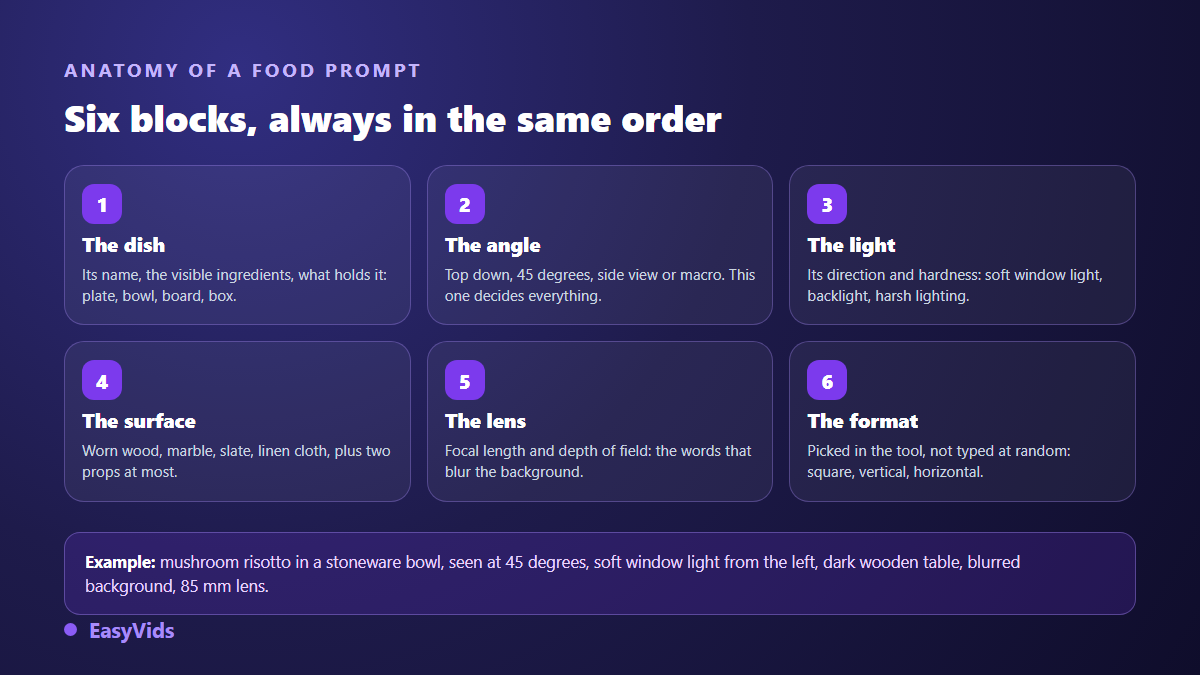
- The dish: its name, its visible ingredients, its vessel. A stoneware bowl tells a different story than a gold rimmed plate.
- The angle: top down, 45 degrees, side view or macro. This is the single setting that changes the most.
- The light: direction and hardness. Soft diffused daylight from the left is a different picture from hard single light from the top right.
- The surface and props: worn wood, marble, slate, linen, plus two props at most.
- The lens: focal length and depth of field, the two words that bring the background blur.
- The aspect ratio: chosen in the tool rather than in the sentence, and decided before you generate.
Four framings that cover almost an entire menu
Start with these. A full bistro menu, starters included, can be shot with these four angles alone. Replace the bracket with a short description rather than a menu name: slow braised beef cheek with mashed potato works better than our house special.
Prompt 1. Top down, for round plates and bowls. Top down flat lay photograph of [your dish] on a matte ceramic plate, centred composition, soft diffused daylight coming from the left, pale linen tablecloth, scattered fresh herbs and a folded napkin, shallow depth of field, natural colours, 50mm lens, sharp focus, appetising food photography. The most forgiving framing there is, and it fills a square nicely.
Prompt 2. The 45 degree angle, the menu shot. Food photograph of [your dish] shot at a 45 degree angle, plated on a wide rimmed white porcelain plate, warm side light with a soft shadow to the right, dark wooden table, blurred restaurant background with warm bokeh, 85mm lens, shallow depth of field, professional restaurant menu photography. This is how a guest sees their plate when they sit down, which is why it drives orders.
Prompt 3. Macro, to sell a texture. Extreme close up macro photograph of [your dish], filling the frame, visible texture and crumbs, glistening sauce catching the light, soft window light from behind, dark neutral background, 100mm macro lens, very shallow depth of field, ultra sharp details. Keep it for whatever happens on the surface: a molten centre, a crust, a gratin.
Prompt 4. Side view, for anything with height. Side view eye level photograph of [your dish], all layers clearly visible and stacked, a thin drizzle running down the side, plain warm grey background, soft key light from the upper left with a gentle fill, matte slate surface, 85mm lens, studio food photography, crisp edges. Burgers, pancakes, layer cakes and jars only exist at this angle.
Three prompts for delivery apps, atmosphere and drinks
Prompt 5. The delivery app thumbnail. Studio product photograph of [your dish] served in its takeaway container, centred on a plain light grey seamless background, even soft box lighting with no harsh shadows, no props, square composition with generous empty margins, high key catalogue style, very sharp. Ordering thumbnails display small and cropped, so a neutral background with wide margins survives automatic cropping.
Prompt 6. Bistro atmosphere, for the home page and social feeds. Rustic food photograph of [your dish] served on a worn wooden board, warm low key light from a window on the right, linen cloth, vintage cutlery, a glass of water out of focus in the background, deep shadows, moody bistro atmosphere, 35mm lens, subtle film grain. This one sells the venue as much as the plate, which makes it a strong cover image.
Prompt 7. Drinks, where condensation does the work. Photograph of [your drink] in a tall clear glass, condensation drops on the glass, ice cubes and a citrus slice, backlit against a bright window, light haze, pale marble counter, cool colour grading, 85mm lens, refreshing summer drink advertising. Backlight is the secret of drink photography: it lights the liquid instead of flattening it.
Four prompts for social media and advertising
Prompt 8. Vertical story, with steam. Vertical photograph of [your dish] steaming hot, thin visible steam rising against a dark background, dramatic side light, the hands of a chef holding the plate at the bottom edge, top half of the frame kept empty for text, 9:16 composition, cinematic food photography. Reserving the top half for copy saves you from cropping later.
Prompt 9. Dark and moody, for a dish with character. Dark and moody photograph of [your dish] on a black slate plate, single hard light from the top right, deep black background, dark stone surface, dusted spices scattered around, strong contrast, rich shadows, fine art food photography, 100mm lens. It stands out in a feed full of white, as long as you do not apply it to the whole menu.
Prompt 10. The shared table, for group offers. Overhead photograph of a shared table with [your dish] in the centre and three smaller side dishes around it, two pairs of hands reaching in, warm afternoon daylight, terracotta plates, textured beige tablecloth, natural lifestyle food photography, slight motion blur in the hands. Hands in frame bring the life most generated images lack.
Prompt 11. Advertising shot with room for text. Advertising photograph of [your dish] placed in the lower right third of the frame, large clean empty area in the upper left for a headline, plain deep green background, soft directional light, subtle drop shadow, minimal props, commercial food photography, 16:9 composition. Asking for empty space in the prompt stops you pasting a headline over a sauce.
Starting from a photo of your actual dish
Text alone invents the food. For a restaurant, the real value often lies elsewhere: keeping your recipe, your plating and your crockery, and replacing only the light and the set. That is what reference images are for. You upload a phone snapshot, describe the scene you want around it, and the model builds on your shot instead of imagining its own. The full method is covered in our tutorial on turning a phone photo into a shop ready visual.
Two things to know first. Not every model reads reference images, and the ones that do not simply discard what you upload, which is why EasyVids blocks the generation instead of charging you for nothing. And as soon as a reference is attached, a generation returns a single image rather than several variants. So frame your source photo carefully: whole dish, no flash reflection, shot from an angle close to the one you want.
Aspect ratio is decided before you generate
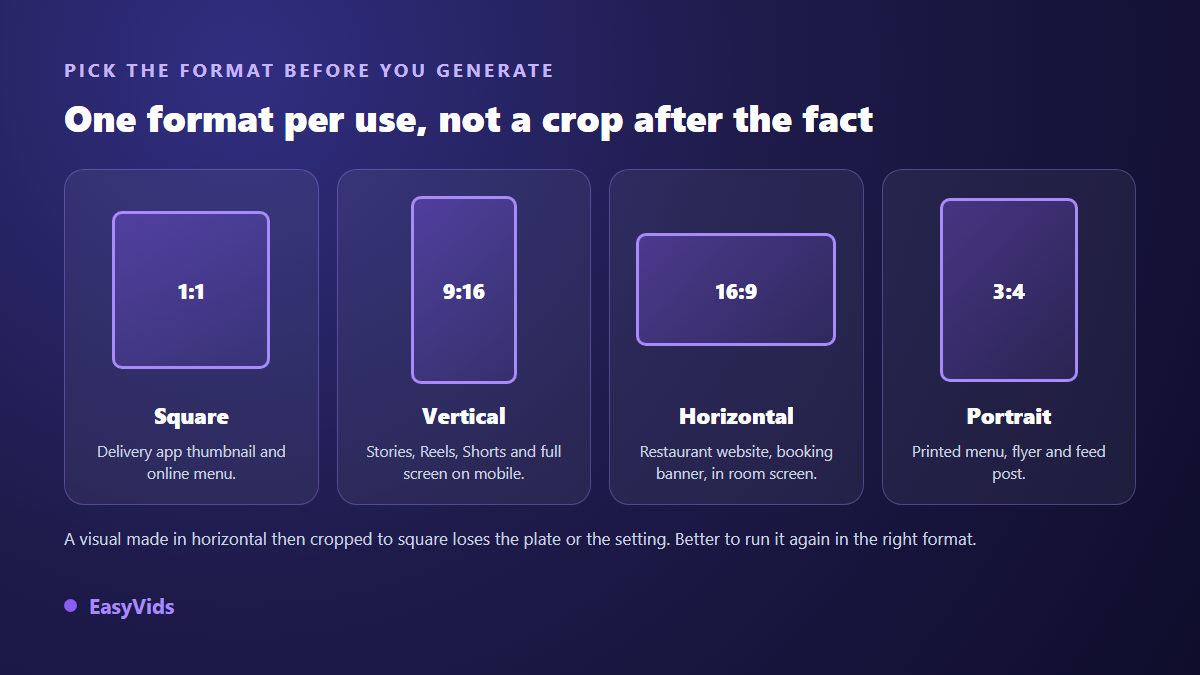
This is the most expensive mistake in time. An image generated in landscape and then cropped to a square loses an edge of the plate or the whole set that made it work. The image models in EasyVids offer square, vertical, landscape and, depending on the model, the classic 4:3 and 3:4 ratios: pick the one your destination needs before you launch, even if that means generating the same dish twice.
Then generate several variants of the same prompt rather than one. Some models return up to six images at once, and across our own generations the third or fourth is picked far more often than the first. The reason lies in the seed each generation starts from, which our walkthrough of how a sentence turns into an image explains in plain terms. A failed image costs a handful of credits, a failed photo shoot costs a day: our plans are listed on the pricing page, and free credits come with every new account.
The details that give a generated image away
Readers spot synthetic imagery in a second, often without being able to say why. In food photography the giveaways are always the same, and three of them are fixed directly in the prompt.
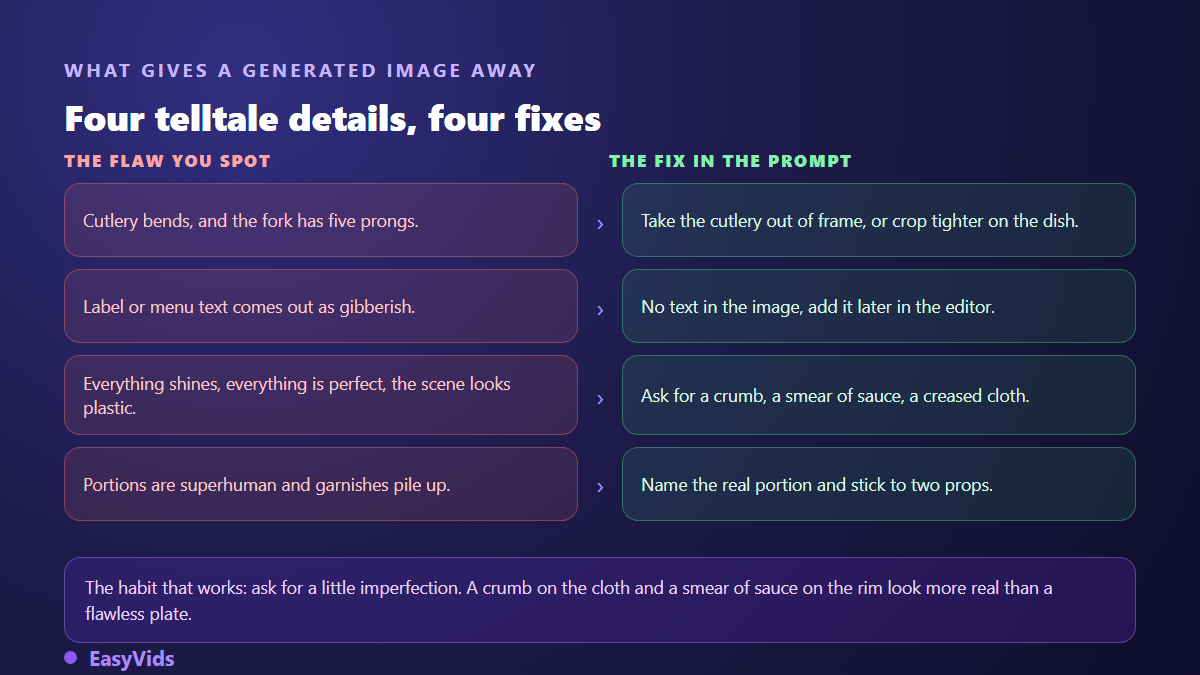
- Cutlery and hands remain the weak point: move them out of frame or crop tighter on the dish.
- Text on a label or a chalkboard usually comes out garbled: ask for none, and add it over the image afterwards.
- Absolute perfection is a tell: ask for a crumb, a smear of sauce on the rim, a slightly creased cloth.
- Superhuman portions and stacked garnishes break trust: name the real portion, keep props to two objects.
- A style that shifts from dish to dish ruins a menu: keep the same light and surface across a whole series.
What you can publish without misleading anyone
One rule matters above the rest: the image has to match what the customer receives. The photo content guidelines published by Google in its Business Profile help centre require images to be a true representation of the business and what it offers, and a photo far removed from the plate served invites both reports and bad reviews. The same help centre states that profiles with photos receive more direction requests and more clicks to their website.
On social platforms the question is labelling rather than legality. TikTok community guidelines on synthetic media have required creators to disclose realistic AI generated content since 2023, and Meta applies comparable labelling across its platforms. A food image clearly presented as an illustration raises no issue; the same image passed off as tonight's service does. When in doubt, one short line in the caption is enough.
Frequently asked questions
How many images should I generate to get a usable one?
Plan on three to six variants per dish with the same prompt, then one or two retries changing a single word, usually the one describing the light. Changing several parameters at once leaves you unable to tell which one helped.
Can I get the exact same look across a whole menu?
Yes, by keeping the same light sentence, the same surface and the same lens for every dish, and varying only the description of the food. That is what makes a set look shot on the same day by the same person.
Can a generated image be detected?
Partly. Google DeepMind states that images produced by its models carry an invisible watermark called SynthID, detectable with its own tools, and file metadata can also carry provenance information. Assume the use of AI will be visible rather than betting on it going unnoticed.
Are these images good enough for a printed menu?
Yes, provided you generate at a high resolution and in a portrait or square ratio close to the final slot. Judge a print visual at full size before sending it out: what looks sharp on a phone can fall apart on a card held at arm's length.
Food photography was never about equipment, it was about decisions: where to put the light, how high to stand, what to leave out of frame. Writing a prompt is making those same decisions with words. Start with one dish, the one you sell the most, and run the four framings from the first list. Creating an account is enough to run your first series, and the EasyVids studio keeps image generation, animation and editing in one place.