Your script is finished. You paste it into a generator, hit the button, and get back a string of images that barely belong to the same video. The character's face shifts, the room changes between two sentences, two identical shots follow each other. Learning how to storyboard a video is the step you skipped.
Good news: no drawing skill and no dedicated software involved. In practice a storyboard is a list. Each line becomes a shot, and each shot carries three things: what you hear, what you see, how long it lasts. This is the method we apply to our own productions, from raw text to approved images. If your script is not written yet, start with our guide to writing a video script that holds attention, then come back and cut it up.
The method in one minute
Break your script into short lines, one idea per line, around 110 characters each. Number those lines: they are your shots. Next to each one, write in a single sentence what the image must show, with a framing, a location and a light. List the characters and places that recur, so you can call them back identically. Then read the image column on its own: if two neighbouring shots look alike, change the framing of one. That is a usable storyboard, and you are ready to generate.
Why this step matters more, not less, with AI images
An image model sees one instruction at a time. It has no idea what you generated five minutes ago, and no idea what comes next. Every shot is therefore decided in isolation, and the whole thing drifts as soon as a project runs past a handful of images. A storyboard is the memory the model does not have.
There is a blunter reason too. Fixing a shot while it is still a line of text takes seconds and consumes nothing. Fixing the same mistake afterwards costs a fresh generation, sometimes a chain of them so the neighbouring shots still match. A storyboard is not time spent before producing, it is time taken back from corrections.
The starting rule: one line, one shot
A script reads as a flow. A video is watched as shots. So the first move is turning a block of text into a list: a new line at every idea, and no more thinking in paragraphs. The result is not pleasant to read. It is meant to be executed.
Then comes length. Across our productions, roughly 110 characters of voice over run about six seconds, which is the default target of the automatic split in our studio and suits most narration. Past 220 characters, around fifteen seconds on a single image, attention drops away, and our workshop flags those lines so you cut them in two. Under five words, a line does not deserve a shot of its own and is better merged with its neighbour.
- Cut at sentence endings first: a full stop is a natural shot boundary.
- If a sentence is still too long, cut again at commas, colons and semicolons.
- Never cut inside a word or a phrase that would lose its meaning.
- Merge lines under five words into the shorter of their two neighbours.
- Keep titles and on screen cards as separate shots, never merged.
- Read it out loud: if you run out of breath on a line, that line is too long.
The character count has a word equivalent, which helps when a duration is imposed on you. Our note on how many words fit into one minute of video gives the benchmarks by speaking pace, so you stop writing three minutes of narration for a one minute video.
The six pieces of information every shot carries
Once the lines exist, each one gets completed. The classic mistake is writing only the image description, then discovering at the edit that the voice never lands where it should. A complete shot holds six fields and reads back in a few seconds.
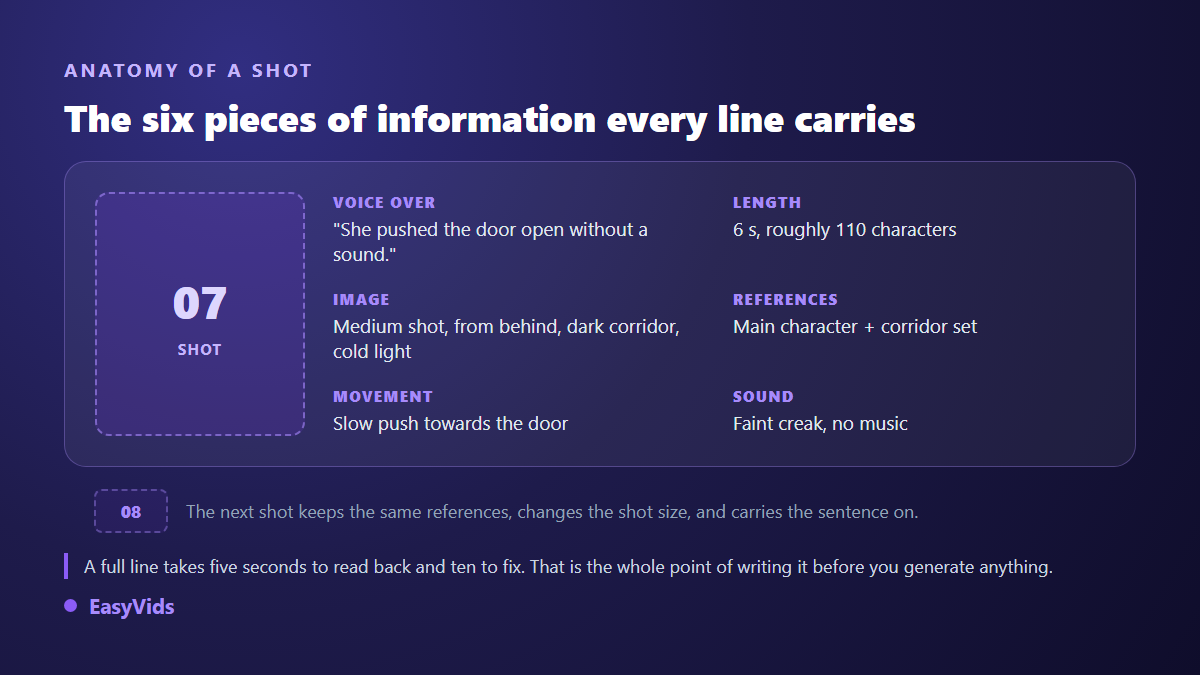
- The shot number, so you and your reviewers discuss the same shot.
- The voice over, copied word for word from the script: it sets the real duration.
- The target length, in seconds or characters, to spot overlong shots before generating.
- The image description: subject, action, framing, light.
- The references reused: which character, which set, which product appears here.
- The movement and sound: what moves in frame, and what plays behind the voice.
A spreadsheet is plenty. Six columns, one row per shot, and you have a document you can reread, hand to someone else and correct without generating anything. American animation studios of the 1930s popularised the idea by pinning a film's shots to a corkboard, judging the flow before spending months drawing it. The constraint changed shape, not logic.
Writing an image description without losing an afternoon
A shot description is not literature. It describes what a camera would see, and nothing else. Four building blocks are enough: the subject, what it does, how it is framed, and what light falls on it. "An older woman, seen from behind, pushing a half open door, medium shot, dark corridor, cold light from the far end" is a good description. "A mysterious atmosphere full of promise" is not: the model has nothing to work with.
Abstract words are the first enemy of generation. Replace an intention with a visible fact every time: sadness becomes a lowered gaze, urgency becomes running down a corridor, luxury becomes marble and raking light. That translation habit is the same one you need for video prompts, and our five block method for writing an AI video prompt sets out the order to put those elements in.
Vary your shot sizes, the move that creates rhythm
A video can be perfectly written and still be dull, simply because every shot is framed the same way. Cinema draws its rhythm from framing as much as from cutting: wide to place the scene, closer to tell it, tight to move the viewer, and a cutaway to let the whole thing breathe.
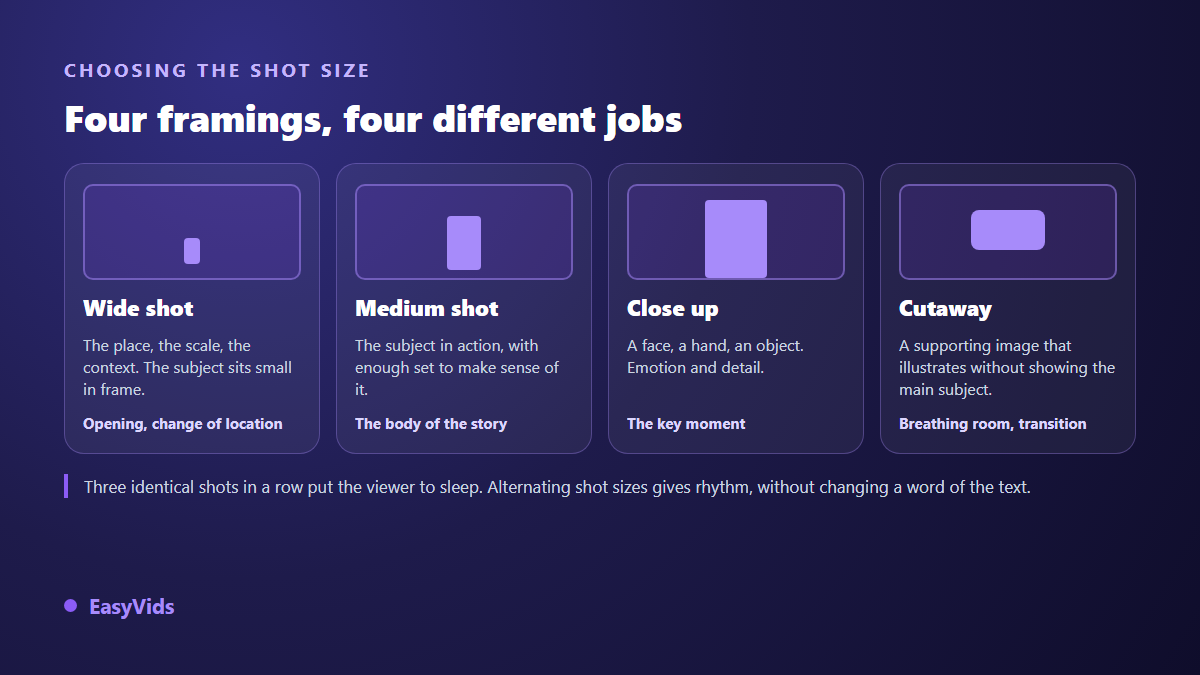
A simple pass fixes most of it. Once the storyboard is written, run down the framing column and look for repetition. Three medium shots in a row? Make the second one a close up. An explanation that drags? Slide a cutaway between two ideas. You have not touched the text, and the video already breathes differently.
The visual bible that holds consistency together
A storyboard describes the sequence of shots. What it still lacks is everything that must stay identical from first to last. That is the job of a visual bible: one sheet for the world, fixing era, style and colour palette, then one sheet per character, per set and per recurring object. Each sheet gets a short identifier, and every shot calls back the identifiers it reuses.
Without that, a character described afresh in every prompt slowly changes face, clothing and sometimes age. The fix is reused reference images rather than repeated descriptions, as our guide to keeping the same character across every scene explains.
In the EasyVids Director, that bible is built before the breakdown: the production plan comes out with its world sheet, its characters, its sets and its reference combinations, and each scene then lists the identifiers it draws on. So you can see, before a single image exists, which character appears in which shot.
Decide the aspect ratio at storyboard stage, not at export
Framing depends on aspect ratio, and aspect ratio is chosen before you generate. A wide shot designed for 16:9 loses half its set once cropped to 9:16. A close up designed vertically leaves two empty bands in landscape. Writing a storyboard without settling the format is like packing a move without knowing the size of the van.
Write the format at the top of your document, then describe accordingly: vertical compositions favour centred subjects and closer framing, horizontal ones carry wide sets and off centre characters. Our rundown of video formats by platform lists what each network expects, and our studio applies the chosen ratio to every image and clip in the same project.
Three ways to build a storyboard, depending on your time
The form matters far less than the existence of the document. Three approaches coexist, and they combine well.
- The spreadsheet. Six columns, one row per shot, free and enough for most projects. This is what we recommend to start with.
- The sketch. Pencil rectangles with stick figures. Drawing well is beside the point: you are checking composition and reading direction.
- The generated board. One image per shot, produced in a batch, approved before anything moves. It is the fastest way to judge a full sequence.
That third route exists as such in our studio: the Director offers an images only mode that stops at one image per scene, with no video at all. You get a consistent board, faster and cheaper than a full production, that you review before launching the animation. Shots that miss are regenerated one at a time, leaving the rest untouched.
The mistakes that show up on screen
Most generated videos that feel wrong repeat the same flaws, all of them decided at storyboard stage, and therefore all avoidable there.
- Twenty second shots on a still image: viewers finished looking after six.
- The same framing from start to finish, which flattens the whole narration.
- A set that changes for no reason between two sentences of one scene.
- Abstract descriptions that leave the model inventing, differently every time.
- On screen text planned nowhere, then dropped onto already busy images at the edit.
- No sound direction at all, when silence and atmosphere are decided shot by shot too.
A targeted reread solves nearly all of it. Go once down the durations, once down the framings, once down the references. Three quick passes beat one general reading where you stop seeing anything.
From storyboard to finished video
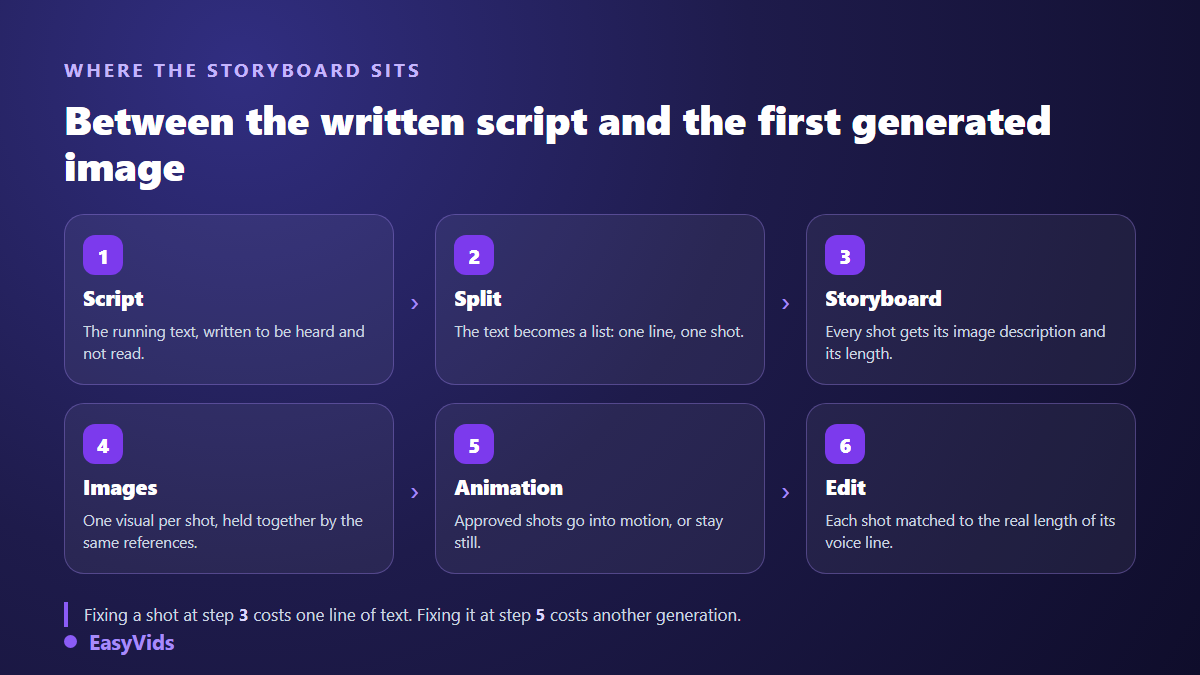
Once the document is ready, production turns mechanical. Each line goes off to generation with its description and its references, images come back in order, and the edit automatically syncs every shot to the real length of its voice. That is the sequence described in our complete guide to AI video generators, where the storyboard is step three.
On a long project this document becomes the frame of the whole film: it lets you pick the work back up three days later without having forgotten everything, and lets someone else read the story before you spend hours generating it. Our method for building a short film scene by scene starts exactly there.
One practical habit to close on: keep every shot description editable to the end. In our production workshop the instruction text of each scene stays visible and editable, and one button relaunches that scene alone, image, video or voice separately. A storyboard is never a contract, it is a working document.
Frequently asked questions
Do I need to draw to make a storyboard?
No. Drawing is only one possible form, and the least useful one when the images will be generated. A descriptive sentence per shot does exactly the same job: describing what will be seen before making it. Plenty of professional storyboards live in a spreadsheet.
How many shots does a one minute video need?
Around ten shots for a minute of narration if you aim for roughly six seconds each. A punchy social video often runs fifteen to twenty, a calm explainer closer to eight. The right number is whatever stops any single image from sitting alone on screen for more than about fifteen seconds.
Is a storyboard worth it for a thirty second vertical video?
Yes, and that is where it pays off fastest. In a short format every second counts: knowing in advance that shot three shows the product in close up and shot five carries the call to action saves the five successive versions nobody ever keeps.
Can I let AI write the storyboard for me?
Yes for the first draft, no for the final one. A model splits a script correctly and proposes perfectly usable image descriptions. What it does not know is your intent and your audience. Always reread the framing column and the reference column: that is where inconsistencies hide.
What should I do when a generated image misses the planned shot?
Rewrite the description before relaunching. Nine times out of ten the gap comes from an abstract word or a missing element in the instruction, not from the model. Add the framing, specify the light, name the reference to reuse, then regenerate that shot only. Switching tools before fixing the line only costs time.
A good storyboard does not make generation smarter. It makes your decisions visible before they cost anything. Open a spreadsheet, cut your next script into six second lines, fill the six columns, and watch the video exist on paper before it exists on screen. To move straight into production, creating an account opens the full studio, and the EasyVids studio keeps the breakdown, the images, the voice and the edit in one place.