You have the text. A note typed on your phone, a paragraph from an article, three lines written between two meetings. The trouble starts right after: turning that text into a TikTok means having something to show, and you have no set, no camera and no wish to appear on screen.
An AI TikTok video generator removes that step entirely. On this platform the raw material was never the footage, it is the idea and the pace. An account built on generated shots works perfectly well, as long as three constraints are respected: the vertical frame, the first three seconds, and readability with the sound off. This guide walks the whole chain, from a written sentence to a file ready to upload, with the settings we apply to our own generations. If your need goes wider than one platform, our general guide to turning text into video covers the broader case.
The short answer
Four decisions turn a written idea into a TikTok. Reduce the text to a shooting sentence, short and visual, instead of pasting it into a generator as it stands. Produce the shots in 9:16 from the start, never in landscape to be cropped later. Put the hook before the first shot, inside the first three seconds. Burn in captions, because sound is never guaranteed. The rest is consistency: this format is judged on a run of videos, not on a single one.
What the vertical frame really demands
According to the TikTok help centre, a video plays full screen in portrait, and the recommended upload resolution is 1080 by 1920 pixels, a 9:16 ratio. A landscape video still plays, but it sits as a band in the middle of the screen: viewers see black where they expect an image, and the comparison with the previous video works against you instantly.
The vertical frame is not free space either. The handle, the caption, the sound title and the button column sit on top of your picture. The safe zone guidance TikTok publishes for its advertising formats says it plainly: the bottom of the frame and its right hand side belong to the interface. Anything important placed there ends up covered. Ratios and durations platform by platform are gathered in our video format reference.
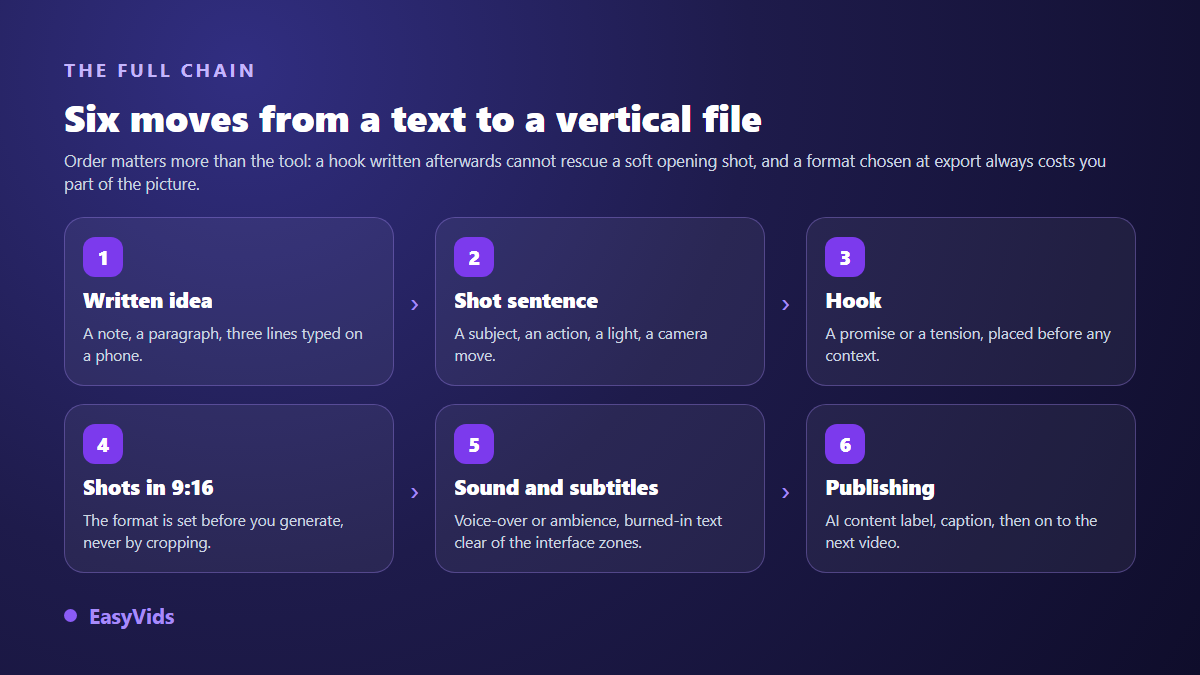
Each step takes minutes. The order matters more than the tool: a hook written afterwards never rescues a soft opening shot, and an aspect ratio chosen at export always costs part of the image.
Step 1: reduce the text to a shooting sentence
A video model does not read an article, it reads a shot description. Pasting three paragraphs into a generation field produces a confused image, with the engine trying to depict ten ideas at once. The useful move is to pull one single scene out of your text, the one that carries the idea, and describe it the way a cinematographer would: a subject, an action, a light, a camera move.
An example makes it concrete. The sentence remote work changed our relationship with the office cannot be filmed. But an empty open plan office at dawn, a steaming cup beside a keyboard, low raking light through the windows, slow push in films very well. Your original text does not disappear: it becomes the voice over or the on screen copy, while the description only serves to build the picture.
Step 2: write the three seconds that decide everything
The feed is scrolled with a thumb, and the decision to stay is made before the first sentence ends. So the hook is not the opening line of your text: it is a promise, a tension or a contradiction, placed before any context. Writing meant to be read starts by framing the subject. A vertical video starts by giving a reason not to leave.
That hook is visual as much as verbal. The first shot needs motion, contrast or a face. A still sky, however beautiful, holds nobody. Five openings that work with generated shots:
- The uncomfortable question, on screen while the image sets the scene.
- Result first, explanation second: show the end state, then walk back.
- The announced count, three mistakes, which promises a structure and an ending.
- The deliberate contradiction: a common claim, then a shot that denies it.
- The gesture in progress: a hand starting something, and the eye waits.
Step 3: generate vertical shots, one prompt at a time
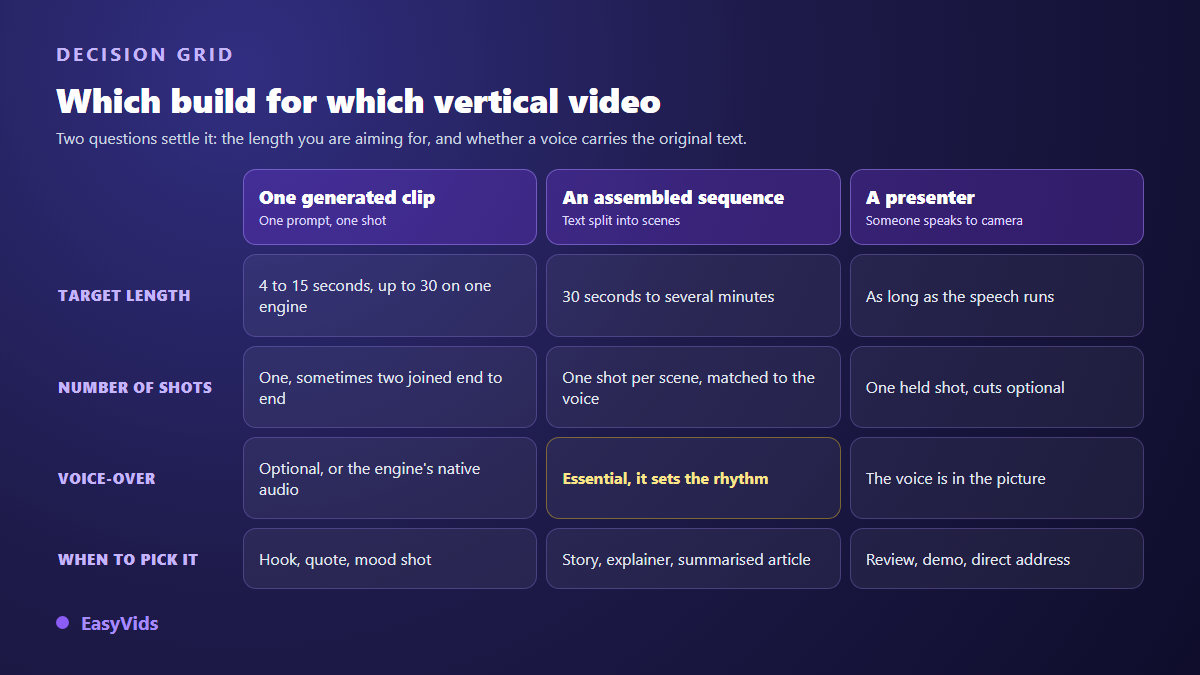
One shot generation means describing a single shot and getting a clip back, without building a full project. It is the most direct move for this format, because a short video often runs on two to five shots only. You pick the engine, the resolution, the duration and the framing. 9:16 is offered by almost every video engine available, and it is set before generation, not after. Depending on the engine a clip runs 4 to 15 seconds, with one going up to 30. The EasyVids studio gathers those engines in one place, with the same controls across all of them.
Two details save real time. The first is prompt assistance: you type a theme in plain language, the tool writes a full prompt, and you stay free to edit it before launching. The second is automatic recovery after a refusal. When an engine filter rejects a description, the AI reads the error message, rewrites the prompt while keeping your intent, then relaunches; a description you edited by hand is always used exactly as written. You can also attach up to five reference images to lock a location, a product or a face.
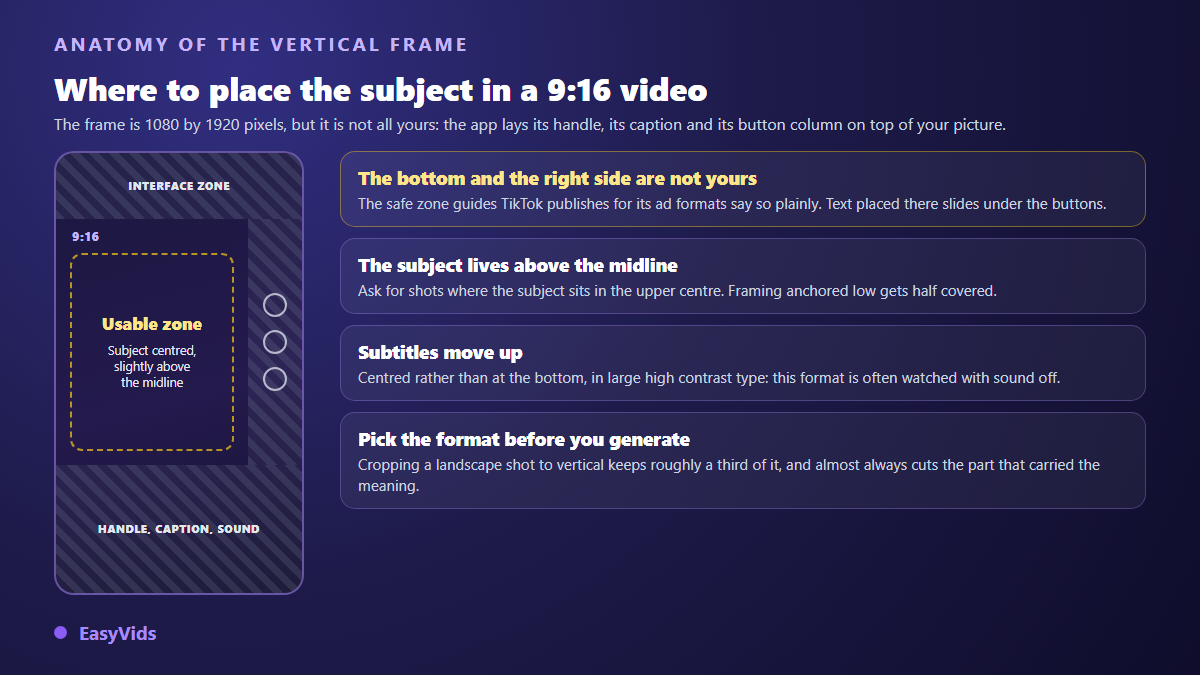
That constraint feeds straight back into your prompts: ask for shots whose subject sits in the centre of the frame, slightly above the middle. A composition built on the lower part of the image will be half hidden the moment it is published.
Step 4: going past fifteen seconds
A single generated clip rarely runs beyond fifteen seconds. For a thirty second or one minute video, several shots are assembled over one voice over. The text is split into scenes, each scene gets its visual, and the edit locks every shot to the real length of its voice. Our automatic splitting targets around 110 characters per scene, roughly six seconds of narration, which is the yardstick we use to estimate the final duration before generating anything at all.
Sound: voice, music, and sometimes silence
A vertical video with no audio feels unfinished, even with good captions. Three options exist: a synthetic voice over carrying the original text and giving the account a recognisable identity, the native audio some video engines produce alongside the image, or music alone for purely visual formats. Keep music well under the voice, around a fifth of its level, and check where the track comes from: a claim on the audio can cap the reach of a video that was otherwise working.
Captions are not optional
A share of the audience watches with the sound off, on a commute or in a waiting room. A video made from text is especially exposed, since its whole value sits in words. Burnt in captions answer that, provided they are sized for a phone screen and kept out of the areas the interface occupies.
Labelling AI generated video
TikTok community guidelines ask creators to make clear when realistic looking content was created or significantly edited by artificial intelligence, and a dedicated label is offered at publishing time. TikTok also announced in 2024 that it relies on C2PA Content Credentials to apply that label automatically to content coming from other services. The marking is provided by the platform itself, and applying it yourself remains the safest route.
The legal frame is tightening too. The European Union artificial intelligence regulation, Regulation (EU) 2024/1689, states in Article 50 that synthetic content must be marked in a machine readable format and that manipulated images or videos must be disclosed as such; those transparency obligations have applied since 2 August 2026. Openly fictional work raises no issue. A video imitating a real event or a real person raises many.
Publishing as a series
One video proves nothing. This format rewards consistency, and the only sustainable way to publish often is to work in batches: one writing session, one generation session, one editing session, rather than rebuilding everything video after video.
- Day 1: ten written ideas, one sentence each, pulled from your notes or articles.
- Day 2: the hooks, written in one sitting, because they come out better in a row.
- Day 3: shot generation, several running in parallel while you review.
- Day 4: editing and captions, with one identical template for the whole run.
- Day 5: scheduling, and a look at the retention curves of the previous videos.
Frequently asked questions
Do I have to disclose that a TikTok was generated by AI?
Yes, as soon as it shows realistic looking scenes or people. TikTok community guidelines require that disclosure and a dedicated label is available when you publish. Clearly stylised animation is less concerned, but the label costs nothing and keeps you safe.
How long should a video made from text run?
Fifteen to forty five seconds for a first format: enough to state an idea and close it. One caveat if direct monetisation matters to you: according to the TikTok help centre, its creator rewards programme only counts videos longer than one minute, so your text has to carry past that mark.
Can I get 9:16 by cropping a landscape video?
Technically yes, visually rarely. A landscape frame places the subject at the centre of a wide image; cropping to vertical keeps roughly a third of it and removes what gave the shot its meaning. Choosing the ratio before generation takes one click.
Can I keep the same location or face from one video to the next?
Yes, by attaching reference images to each generation rather than rewriting the same description. A repeated description drifts: the face changes, the location moves. A reused visual reference holds the likeness across a whole series.
Going from a text to a vertical video is not a hardware problem, it is a translation problem: a written idea becomes a shooting sentence, then a shot, then a series. The technology follows without friction. To try it on your first text, creating an account opens the full studio, vertical settings included.