Someone asked you to make the video. For Friday's service, or for the family gathering afterwards. You have never edited anything, you have three days, and nobody quite dares tell you what they expect. A memorial video almost never fails on the technical side. It fails on tone, on length, and on two or three decisions made in a hurry.
This guide follows the real order of the work: frame the request, gather the images, find the order, write the little text you need, choose the music, prepare the screening. The editing itself comes second to last and takes under an hour. If your project leans closer to a joyful retrospective than to a tribute, our guide to photo slideshows with music covers the same work in a lighter register.
The short answer
A memorial video that lands runs three to five minutes and holds forty to sixty photos. It opens on one strong image, moves through four or five blocks of six to twelve pictures, and keeps one last image for the end. Each photo stays four to six seconds on screen, carried by a very slow movement rather than an effect. The music is instrumental, slow, and chosen before the edit. Text is limited to a few three word cards. And you never generate an image or a voice the person never actually had.
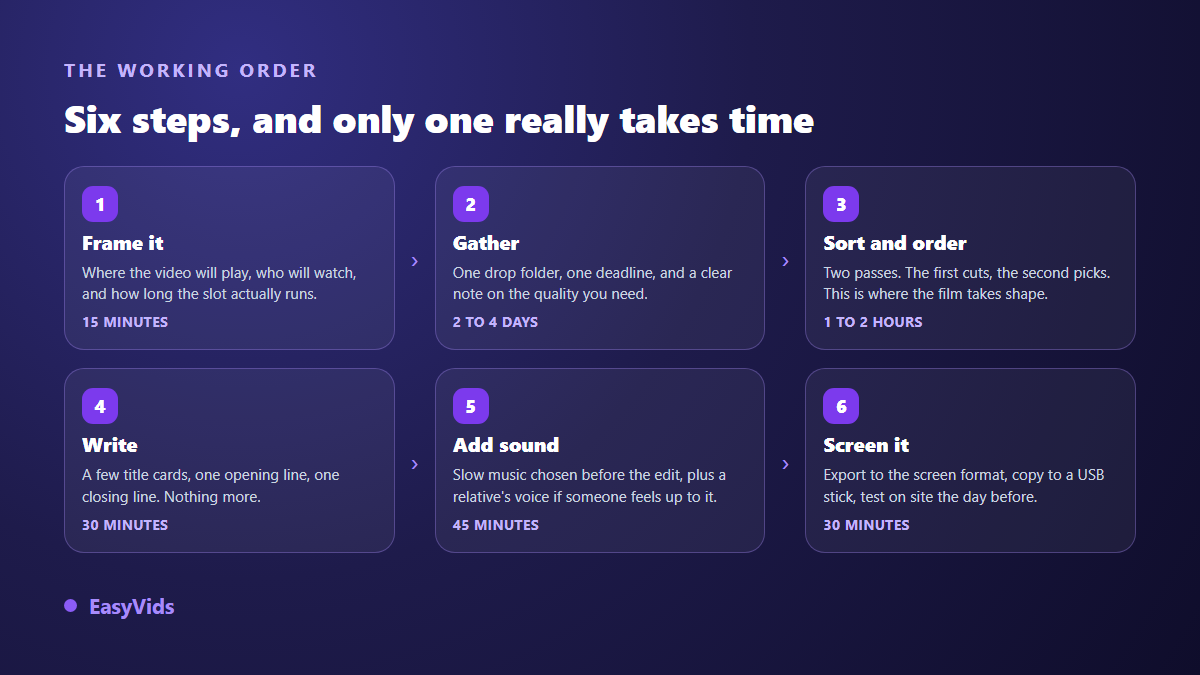
Frame the request before you touch a single photo
Three questions save an hour of editing. Where will the film be seen: a hall screen, a living room television, or the phones of relatives far away? In front of how many people? And above all, what slot does it fill in the day? Funeral directors usually announce a precise one. An eight minute edit dropped into a four minute slot puts everyone in an awkward position, you included.
The second question is harder: who decides. Name one person who settles disagreements, usually the partner or the eldest sibling. Six way debates over photo selection never end, and the edit runs aground the night before. Use that same conversation to ask what the family does not want to see: hospital images, a painful period, someone whose presence would create a problem. It is the only conversation you genuinely cannot skip.
How long should a memorial video be
Three to five minutes for a service, six to eight at most for a private screening after the meal, where people can talk over it. Attention in a grieving room is short: people cry, turn away, look for a tissue. A longer film does not make a bigger tribute, it tires a room that is already worn out.
The length is simple arithmetic. Multiply the number of photos by the average display time: fifty images at five seconds gives a little over four minutes, closing card included. Run that calculation before you select, because it hands you your target count straight away. That is faster than assembling two hundred images and then cutting into the bone.
Gather the photos without exhausting the family
This is the real bottleneck, and it is human rather than technical. The images sit with ten different people, in phones, in paper albums, in old message threads. Everyone promises to send them and nothing arrives. What works comes down to three things: one place to drop files, a very near deadline, and a message that states exactly what you want.
- One drop point, never three: a shared folder, or a group thread used for this and nothing else.
- A short deadline with a time of day. "Before Wednesday evening" collects more than "whenever you can".
- A quota per person: three to five photos each, not their whole album. The limit helps them choose.
- A quality instruction: the original file, never a screenshot or an image forwarded through a chat, which loses definition at every hop.
- One line of context: the approximate year, the place, the first names. You will need it for the order and for the cards.
- One open question: a photo that makes you smile when you think of them. It often returns the best image in the film.
A word on quality, because the promise circulates widely: an editing tool does not repair a photograph. EasyVids does not restore old prints and does not upscale low resolution images. An album page shot at an angle under a flash stays exactly that. If certain images really matter, scan them flat, under indirect light, before you start. That quarter of an hour beats any setting applied afterwards.
Order by blocks, not only by dates
Strict chronology is the first instinct, and it usually falls flat. A life does not reduce to a timeline, and sorting by year turns the film into a filing exercise. Edits that move people work in thematic blocks, each holding six to twelve photos that share a place, a period or the same group of people.
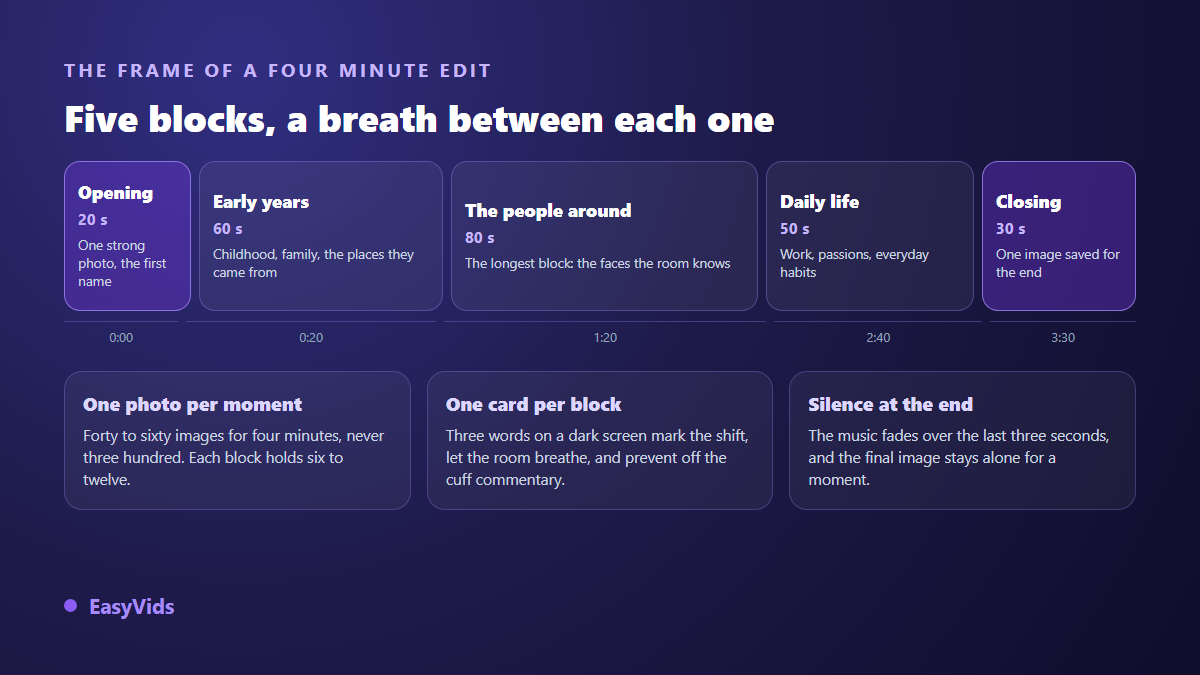
One structure works almost every time: a very short opening, a block on the early years, a long block on the people around them, a block on their work and habits, then a closing. The middle block matters most, because that is where everyone sitting in the room finds themselves somewhere. Give it a third of the film.
Two images count double. The first decides how the film reads: pick one that lands in a second, face sharp, eyes toward the camera. The last is what people carry out of the room. Set it aside during selection, use it nowhere else, and hold it a beat longer than the others, in the silence after the music.
The little text you need to write
A title card beats live commentary over a microphone. Three words on a dark background between two blocks, a year, a place, a first name, and the room follows without effort. Count one card per block, never one per photo. Long text does not get read on a screen seen from the back of a hall, and even less on a phone.
Two traps recur. The first is borrowed solemnity: grand phrases lifted from elsewhere ring false next to a kitchen photograph. A plain fact moves people more than a declaration. The second is the generic quotation on the opening card. If a line genuinely belonged to them, something they repeated, a sentence from a letter, it will be far truer. Otherwise a date and a name are enough.
Voice: a relative at the microphone, or generated narration
A memorial video works perfectly well without narration. Photos, music and cards form a complete piece. But as soon as a story runs alongside the images, the film changes nature: you can then hold certain photos far longer, since the sentence sets the length of the shot rather than the other way round.
If a relative feels able to do it, have them record on a phone, in a furnished room with no echo, the handset held about twenty centimetres away and slightly to one side. Ask them to read standing, two or three times, and keep the steadiest take. A voice that wavers is fine. A voice nobody can hear is not. Then drop the audio file into the edit like any other media.
If nobody wants to read, generated narration does the job without any staging. The studio takes a plain instruction for reading style, along the lines of read in a calm, gentle voice with no emphasis, and applies it to the whole text. That setting matters more than the choice of voice itself, and the rest of what separates a natural read from a mechanical one sits in our advice for genuinely natural AI voice over. One honest reservation: on a tribute, a hesitant human voice moves a room more than a flawless narration.
As soon as a voice narrates, add captions. A noisy room, a poor speaker or silent viewing on a phone swallow half the words. The editor builds the transcript from the project audio, inside your browser and across nine languages, then drops it in as a text track you can correct. Plan for that proofread: first names and surnames are always mangled by automatic transcription, and our guide to automatic captions covers the readability settings.
Music: slow, quiet, and free of nasty surprises
Music sets the tone before the first photo. Three seconds are enough. For a tribute, aim for something instrumental and slow: solo piano, strings, acoustic guitar, or a very plain pad. Avoid tracks with lyrics. Words compete with what the room is already feeling, and they impose their own story on images that carry one.
Choose the track before you edit. It fixes total length, tempo and often the order of your blocks. Then land your block changes on the moments where the music shifts, an instrument entering or a pause. Two settings matter more than the track itself: keep the music well under any voice, around a fifth of its level, and fade it down across the last three seconds. Nothing exposes a rushed edit like music cut off mid bar.
Then there is licensing, which stops more projects at the sharing stage than any technical issue. A commercial song passes at a private screening, but it is identified automatically on upload: according to YouTube's help centre on Content ID, recordings supplied by rights holders are matched as the file goes up, which can lead to a block or to advertising appearing on your film. That is precisely what you do not want that day. An original track removes the problem, and the studio offers a tribute preset among its ready made occasions, with a slow tempo and an instrumental version. On what you may publish with a generated track, our guide to AI music and copyright sets out the position.
The edit itself, an hour at most
Assembly happens in an editor that runs in the browser, with nothing to install. One detail matters here: the photos and recordings you drop in stay stored in your browser, on your own machine. For family pictures and a relative's voice, knowing that nothing leaves the device changes how you approach the whole project.
- Set the project aspect ratio first, before you drop anything in: horizontal for a screening, vertical for sending through messaging apps.
- Drag your photos in. Each element arrives with a default duration of five seconds that you stretch with the mouse.
- Lay the blocks out in the order you settled on, then place your title cards at the joins.
- Apply slow motion to the stills at the gentlest intensity, and vary the direction from one image to the next.
- Put the music on its own audio track, with a short fade in and a three second fade out.
- Add the voice and captions if the film is narrated, then reread every first name.
- Watch the whole edit once, changing nothing. It is the only review that counts.
On transitions, stick to one for the entire film. The editor carries eighteen families across three intensities, which leaves plenty of room to get lost. A half second crossfade fits almost every case. Wipes and travelling zooms pull the eye onto the effect rather than the face, which is the opposite of what you want. Same restraint on movement applied to stills: a slow drift is enough, and seven ways to animate a photo shows which ones stay invisible and which ones announce themselves.
What AI should not do to the face of someone who has died
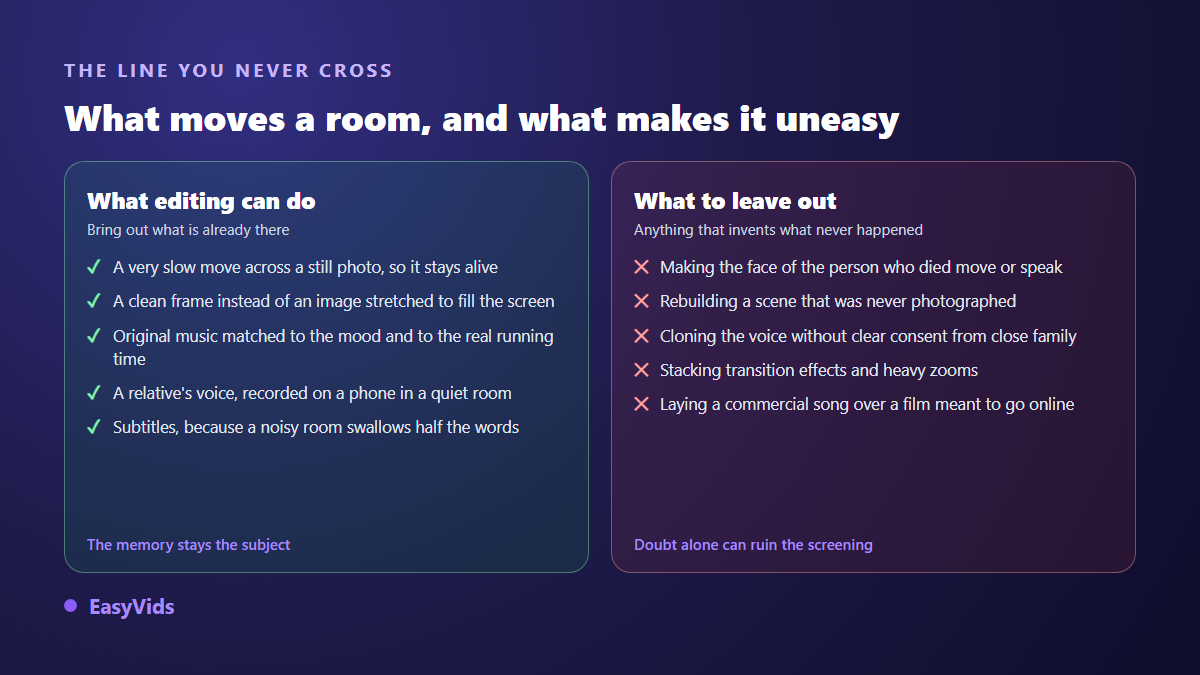
The temptation is real, and the tools make it easy: make a portrait blink, make a stern face smile, make someone say a sentence they never said. Our position is plain, and it doubles as advice: do not. A room recognises instantly a movement that does not belong to a person it knew, and the unease spreads through the rest of the film. The strength of a tribute is that it shows things that happened.
There is a legal frame too, and it is recent. The European artificial intelligence regulation, Regulation (EU) 2024/1689, sets out a transparency duty in Article 50: content generated or manipulated by AI that realistically depicts an existing person must be disclosed as such, and those obligations have applied since 2 August 2026. Rights attached to the image and voice of a deceased person then vary by country, and in practice they are settled with the immediate family. If the idea keeps coming back in conversation, the only workable rule is explicit agreement from that inner circle, and a film that makes no secret of it.
Preparing the screening, then sharing the film
Aspect ratio is decided at the start, not at export. An edit built horizontally and cropped to vertical loses an edge, and that edge nearly always holds someone. For a hall screen or a television, stay horizontal. For a film meant to travel through messaging apps, build vertically from the outset, which means favouring vertical photos during selection. A 4:3 frame is also available, and it suits old prints particularly well, since they sit in it without black bars or stretching. The full reasoning is in our guide to video formats.
- Export the day before, never on the morning itself. A failed export at the last hour cannot be rescued.
- Copy the file to two places, a stick and a laptop, and bring both.
- Test on site, on the real equipment, with sound. A hall speaker sounds nothing like headphones.
- Never rely on an internet connection on the day: play the file from the disk.
- Keep a lighter second version for messaging apps, which recompress or reject heavy files.
- Check the light in the room: a dark edit disappears on a projector in daylight.
One technical note that avoids an unpleasant surprise: the export is built inside the browser, on your machine. On an iPhone or an iPad it does not work, because the required components are missing from the system browser. You can gather, select and write from a phone, but keep assembly and export for a computer with a recent browser. Plan that session somewhere quiet, with the machine plugged in.
After the screening the request always arrives: someone wants the film for a relative abroad. Two routes exist. The file itself, sent through a messaging app or dropped in a shared space, stays simplest for a small circle. Uploading suits a larger group who are not comfortable with files: according to YouTube's help centre, an unlisted video does not appear in search results or recommendations, but stays accessible to anyone holding the link. That compromise fits most families.
Finally, keep the project, not only the exported film. Anniversaries come round, photos resurface, and an existing edit reopens in minutes where starting again costs an evening. Store the original photos, the music, the card text and the final file in one place. It is the sort of folder people open ten years later.
Frequently asked questions
How long should a memorial video be?
Three to five minutes for a service, six to eight at most for a private screening afterwards. Beyond that, attention in a grieving room drops away. If you have a lot of material, make two short films, one for the service and one for the family, rather than a single edit nobody finishes.
How many photos do I need?
Forty to sixty for a film of about four minutes, at four to six seconds each. Ask for three to five photos per person rather than a whole album: the limit improves the selection and spares you an endless sort the night before.
Can I make a photo of the person speak or smile?
Technically yes, and we advise firmly against it. A room spots a movement that does not belong to someone it knew, and the unease spreads to the rest of the film. European artificial intelligence rules also require manipulated content depicting a real person to be disclosed. If the idea is kept regardless, it calls for explicit agreement from the immediate family.
What music works for a tribute?
Something instrumental and slow: piano, strings or acoustic guitar. Leave out tracks with lyrics, which impose their own story. For anything published online, an original track avoids automatic matching of commercial recordings and the block that can follow.
Can I prepare a memorial video on a phone?
Gathering photos, selecting them and writing the cards all work from a phone. Assembly and export need a computer with a recent browser, since the file is built on your own machine. Prepare on the phone, edit on the computer.
A memorial edit needs no equipment and no editing background. It needs a clearly framed request, a tight selection, a considered order and a tone held from the first frame to the last. Give an hour to the selection and an hour to the assembly, and let the final image breathe. To prepare yours, creating an account opens the online editor, the music and the voice in one place, with no bank card required.