Thirty reels scroll past in two minutes, and yours is still not edited. Between the idea and the post sit the script, the visuals, the voice, the edit, the captions. An AI Instagram reel generator does not delete those steps. It changes who performs them: you decide, the machine produces, and a vertical file comes out in minutes instead of an evening.
You still need to know which tool does what. A video model that renders eight seconds of motion is not a reel, and a well written paragraph is not one either. This guide follows the whole chain, from the aspect ratio chosen before the first generation to the file you upload, including the framing margins the app never shows you. If these tools are new to you, our guide to AI video generators covers the fundamentals shared by every format.
The short answer
Work in this order. Lock the 9:16 frame before generating anything. Write a script built on a single idea, with the hook inside the first three seconds. Let the tool split that text into six to ten second scenes, generate one visual per scene, add the voice over and a discreet music bed. Burn the captions into the band between 55 % and 75 % of the frame height, then export at 1080 x 1920. For a thirty second reel, budget around fifteen minutes including review. Only the posting stays manual: the file is uploaded from the app like any other video.
The vertical frame is a starting decision, not an export setting
A reel lives in 9:16, that is 1080 x 1920 pixels, in MP4. Treating that as a last minute setting is the classic mistake. Cropping a landscape video down to vertical removes two thirds of the width, and with it the subject whenever it was not perfectly centred. Going the other way adds bars: less destructive, rarely attractive. If you publish elsewhere too, our reference sheet on video formats gathers the ratios and resolutions per platform.
In the EasyVids studio the ratio is picked at the first step and then travels through the whole chain, for a single shot as much as for a full narrative project, and it applies to stills as well as generated clips. The final render keeps that frame: at 1080p quality, a vertical project comes out at 1080 x 1920 with no silent re-crop along the way.
What the interface covers, and your editor does not show
A reel fills the screen, but it never has the screen to itself. The account name, the caption, the audio title, the button column and the navigation bar all sit on top of your image. Meta publishes safe zones for vertical placements in its advertising format guide, and asks creators to keep the top and the bottom clear of text and logos for exactly this reason. The same logic applies to an ordinary post.
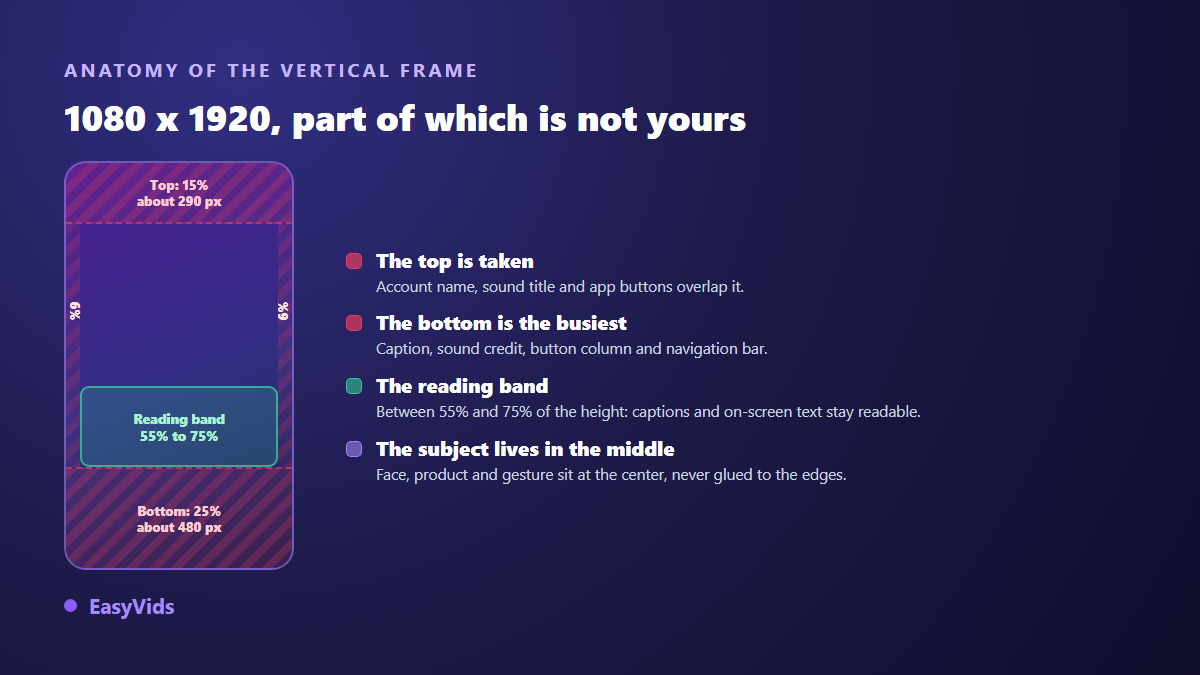
- Top: around 15 % of the height, close to 290 pixels. Nothing important goes up there.
- Bottom: at least 25 % of the height, about 480 pixels. By far the busiest area.
- Sides: 6 % of the width, roughly 65 pixels, so text never touches the edge.
- The reading band, between 55 % and 75 % of the height, is where captions stay visible.
- The main subject sits in the middle, never in the lower quarter of the frame.
Three routes to a reel, depending on what you already have
The right tool follows your starting point, not the tool of the month. Three situations come back constantly, and a fourth appears when the video already exists but has no on screen text.
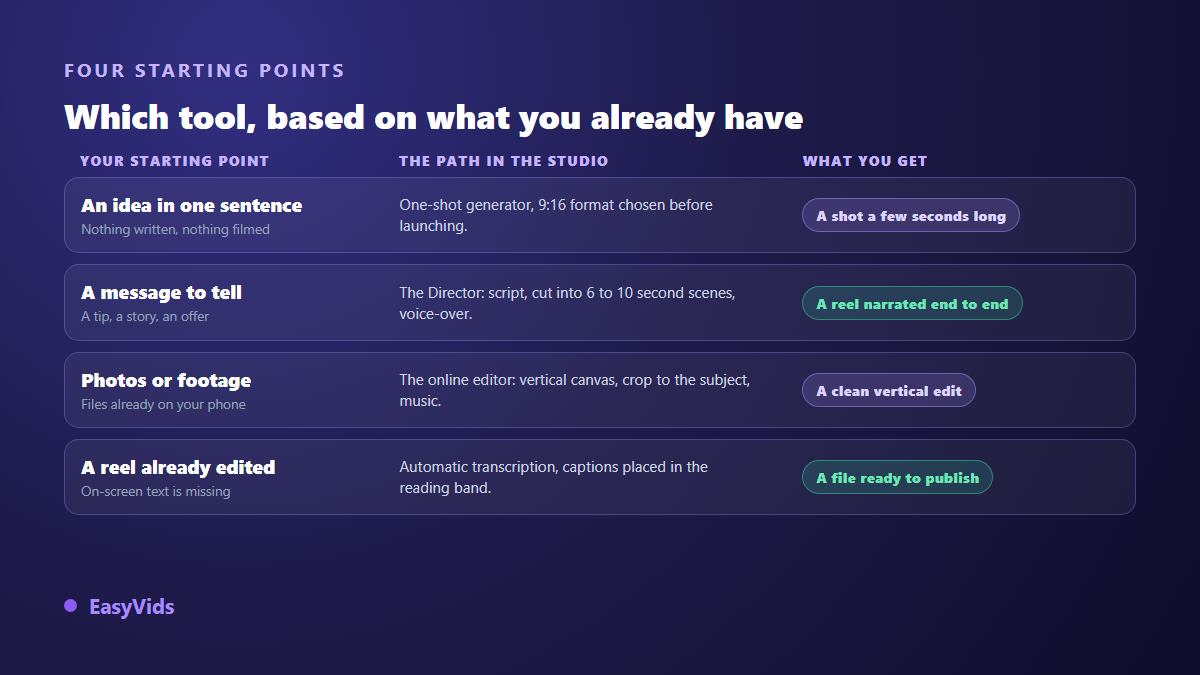
Route one starts from a one sentence idea: a one shot generator returns a single clip of a few seconds in 9:16 from a prompt. That is enough for a mood, a quick demonstration, a visual hook. Route two starts from a message worth telling: the tool writes the script, splits it into scenes, generates a visual per scene, records the voice over and assembles everything. Route three starts from files you already own, photos or footage, and the online editor takes over with a vertical canvas and a crop chosen around the subject. The reasoning barely changes for the neighbouring format, as our method for making YouTube Shorts with AI shows, except that length and cover art follow different rules.
The production chain, step by step
A generated vertical video is never the product of one click, whatever the interface suggests. Six steps follow one another, and each one shapes the next. Knowing that order tells you where to step in when a result disappoints you.
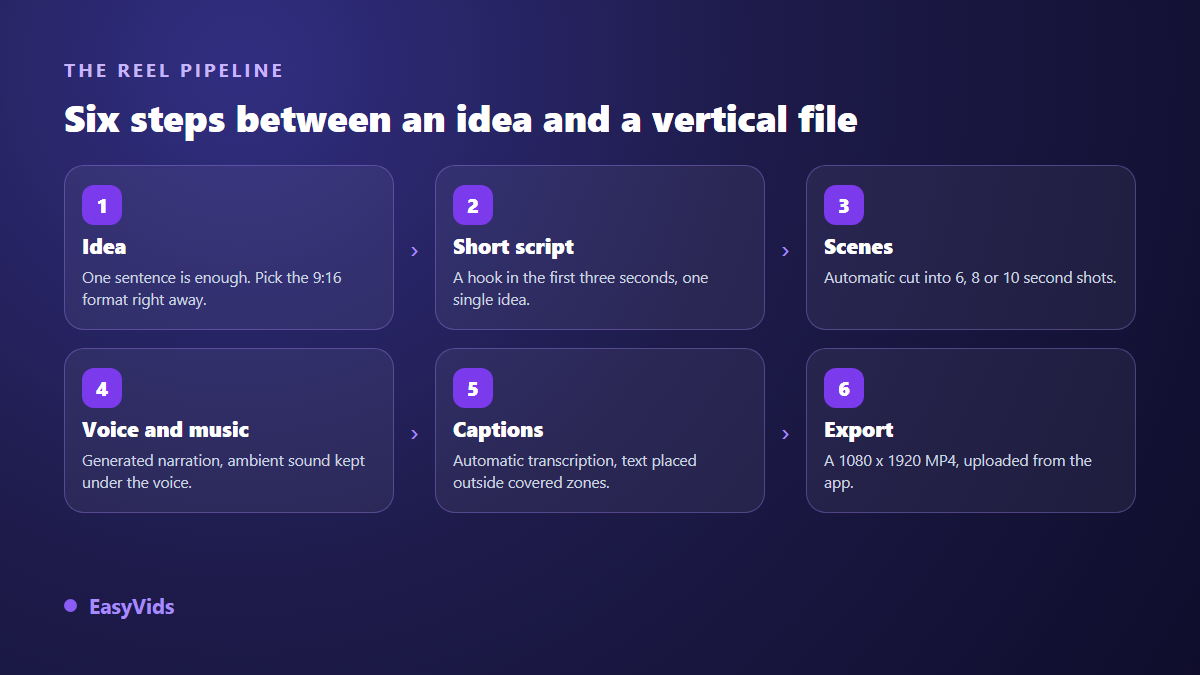
One question separates a toy from a working tool: can you redo a single step without relaunching everything? Regenerating scene three because its visual missed the mark, swapping one sentence, changing the voice. That detail is what keeps the pace sustainable when you post several times a week.
Writing a reel script: one idea, three seconds to hook
A reel does not tolerate an introduction. The first sentence carries the promise, the tension or the number, and everything after it delivers on that promise. Write in the second person, in short sentences, with action verbs. One idea per video: two ideas in thirty seconds give you two mediocre videos instead of one good one.
A calibration rule saves a lot of back and forth. A voice over runs at roughly fifteen characters per second. Thirty seconds therefore means about 450 characters, a little over seventy words. The automatic splitter in the studio works on exactly that basis, with a target of six, eight or ten seconds per scene: beyond it, the scene is flagged as too long and gets cut in two rather than read faster.
Voice, music, and what they must let through
Strong visuals carried by a flat voice lose the viewer after ten seconds. The reverse is surprisingly true: a convincing voice forgives plenty of visual flaws. On a short format, focus on the attack, that first second where the viewer decides, and on punctuation. Synthesis engines read a comma the way an actor reads a breath. Keep the music clearly under the voice, around a fifth of its volume, and check where the track comes from: an unclear licence can trigger a claim and strip the audio from your reel.
Captions are not optional on this format
A large share of the audience watches with the sound off, on a commute or in a waiting room. With no on screen text, the message never lands. Automatic transcription does the heavy lifting, then three settings decide legibility: position, size, contrast. Aim for a font size between 5 % and 6 % of the frame height, a thick black outline, and the block placed inside the reading band. Our guide to reel captions gives the exact values and the placement traps.
The cover image almost everyone forgets
A reel shows up twice: in the feed, where it plays by itself, and on your grid, where it is only a frozen thumbnail. Instagram lets you choose that cover when you publish. Grabbing whatever frame comes first leaves an unreadable grid, and the grid is often the first screen a new visitor sees. A vertical cover with three or four very large words and hard contrast is prepared alongside the video: the studio thumbnail generator outputs it straight in 9:16.
How long should a reel be
Reels have accepted up to three minutes since January 2025, an extension announced by Adam Mosseri, the head of Instagram. That ceiling is not a target. On this format, watched duration matters more than allowed duration: a finished twenty five second video beats a two minute video abandoned halfway. Start short and stretch only when your retention data shows people staying to the end.
The mistakes that make a generated reel look generated
- A single shot held for fifteen seconds: cut, change the framing, reset the eye.
- Text placed at the bottom of the frame, right where the caption and buttons cover it.
- A different visual style in every scene, which reads as a pile of borrowed images.
- A voice that runs without breathing, because the text was written for the eye.
- A hook that announces what the video will say instead of saying it immediately.
- A 16:9 export cropped at upload time, which cuts the subject and blurs the text.
Publish, then repeat without losing the week
The real gain is not the first video, it is the tenth. Once the style is fixed, producing a variant means changing the script and rerunning the chain: same frame, same voice, same caption treatment. Test several hooks on one piece of content instead of hunting for the perfect idea before posting. A credit based system lets you keep a fast model for drafts and a finer one for the published cut, and the plans are listed on the pricing page.
Frequently asked questions
Can I make a full reel without filming or speaking?
Yes. Visuals are generated from the script and the voice is synthesised from the text, so neither a camera nor a microphone is required. Your face and your voice become personalisation options rather than prerequisites.
Does Instagram penalise AI generated reels?
Using AI is not against the rules. Meta has applied an AI info label to content detected as generated by artificial intelligence since 2024, and asks accounts to disclose realistic video created or altered with AI. What platforms act against is repetitive mass posting with no contribution of your own. An original script, a considered voice and a deliberate edit stay well within the rules.
What length works for a first reel?
Between fifteen and thirty seconds. That is long enough to develop one idea and short enough to be watched to the end, which remains the most useful signal. Extend later based on your retention data, not on the platform ceiling.
Can I do all of this from a phone?
Yes, as long as the tool runs in the browser: generation happens on servers and your device only displays the interface. Writing, generating, captioning and exporting all work from mobile. Fine editing stays more comfortable on a larger screen.
Do I need a separate export for Shorts and TikTok?
Not usually: 9:16 is shared by all three platforms, so one file travels everywhere. Two details still differ, the area covered by the interface and the expected cover art. Check as well that your export carries no burned in watermark, a point covered in our article on AI videos without watermarks.
A reel that works does not depend on the most impressive generation model, but on a chain held together: a vertical frame decided upfront, one idea per video, an immediate hook, legible captions, a deliberate cover. Everything after that is repetition, and repetition is exactly where AI buys you time. To produce your first complete reel, creating an account opens the studio, and EasyVids brings the script, the visuals, the voice, the captions and the export together in one place.