Your channel wants a video every week, and every video eats a weekend. Writing, sourcing footage, recording, editing, redoing the thumbnail because the first one earned no clicks. An AI YouTube video generator changes that arithmetic, on one condition: treat the job as a production chain rather than a magic button. The difference shows by your third upload.
You also need to aim at the right format. An eight minute video and a forty second Short are not built the same way: the first lives on structure, the second on its first second. This guide covers long form, the one the standard player shows in 16:9. If your channel targets vertical, our method for publishing Shorts in batches follows a different logic.
The short answer
You set a length, the AI writes a script calibrated for it, the text is split into scenes of a few seconds, each scene gets a visual and a fragment of voice over, then the edit locks every visual to the real duration of its voice. You end up with a video file, a thumbnail and a caption file, and you upload them yourself. The underlying mechanics are the ones covered in our complete AI video generator guide; what changes here are the constraints of long form and of the platform rules.
The full workflow at a glance
Eight steps follow one another, and each one feeds the next. Skipping the first is expensive: most failed AI videos are videos whose length nobody decided before writing.
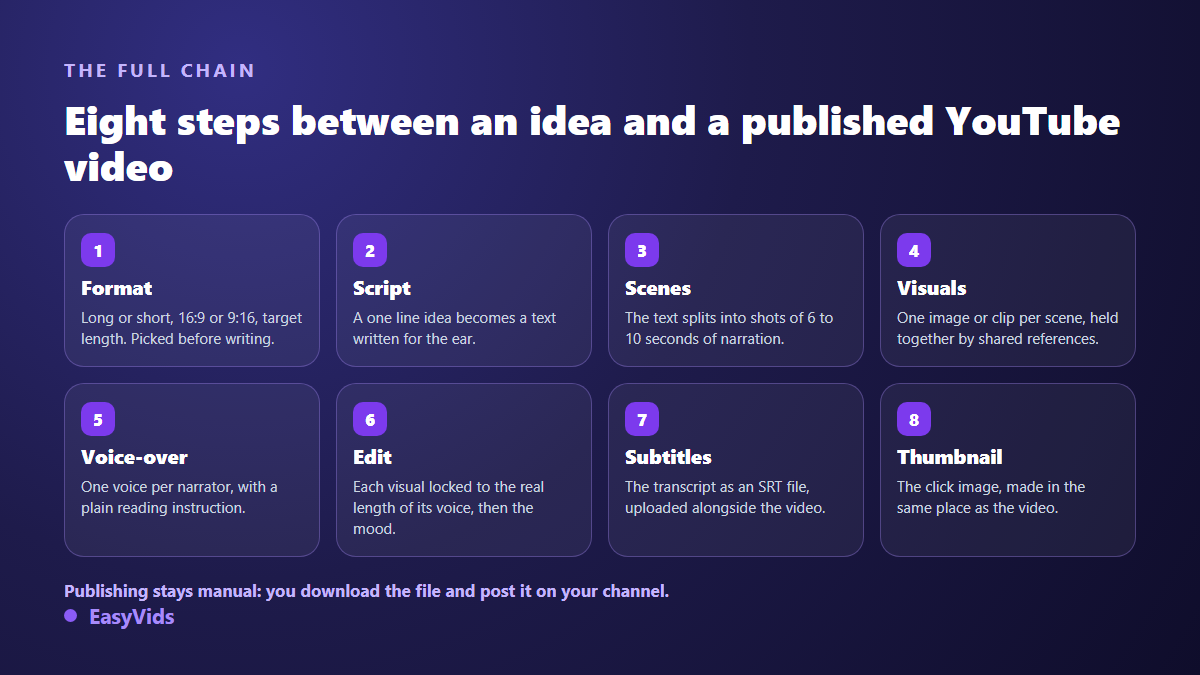
One thing matters above all: you must be able to step back in at any of these stages. Regenerate a single scene, swap one image, fix one line of narration, without rerunning the whole video. A tool that forces a full rebuild for a detail is where the hours vanish.
Step 1: lock the format and the length before writing
Aspect ratio is a starting decision, not an export setting. A video composed in 16:9 and then cropped to vertical always loses something that mattered: a face near the edge, on screen text, an object on the right. In our director view, the ratio chosen at the start travels with the project all the way to the generated images and clips.
Length comes next, and it is not an aesthetic preference. It sets the word count, therefore the scene count, therefore the workload. Eight minutes of narration is roughly 1,200 words; three minutes is roughly 450. If you are aiming much longer, other constraints appear, and our piece on longer AI videos covers what breaks when you stack too many scenes at once.
Step 2: write a script that holds attention
The most common mistake is arriving with a finished text written to be read with the eyes. A one sentence idea works better, because the model then writes directly for the ear: short sentences, a blunt hook, room to breathe. In the writing workspace you pick a tone, a language and a length in minutes or in words, and you can save personal instructions that apply to every later script.
A long video holds together through its frame, not through pretty sentences. The viewer needs to know early what they will get and why they should stay.
- The first fifteen seconds: name the subject, skip the greeting. The decision happens here.
- The promise: what the video covers, and what it does not. A broken expectation closes the tab.
- Five to seven parts: each announced in one sentence, then proven with a concrete example.
- A mid video reset: a question, a counterexample, a change of pace, right where attention dips.
- The close: one idea to keep, one simple action, and what to watch next. Never a flat summary.
Step 3: split the script into scenes
A narrative video is not text with pictures attached, it is a sequence of scenes. Each scene pairs a fragment of text, a visual and a slice of voice. Automatic splitting works to a target duration, around six to ten seconds of narration per shot, and flags segments that run clearly too long.
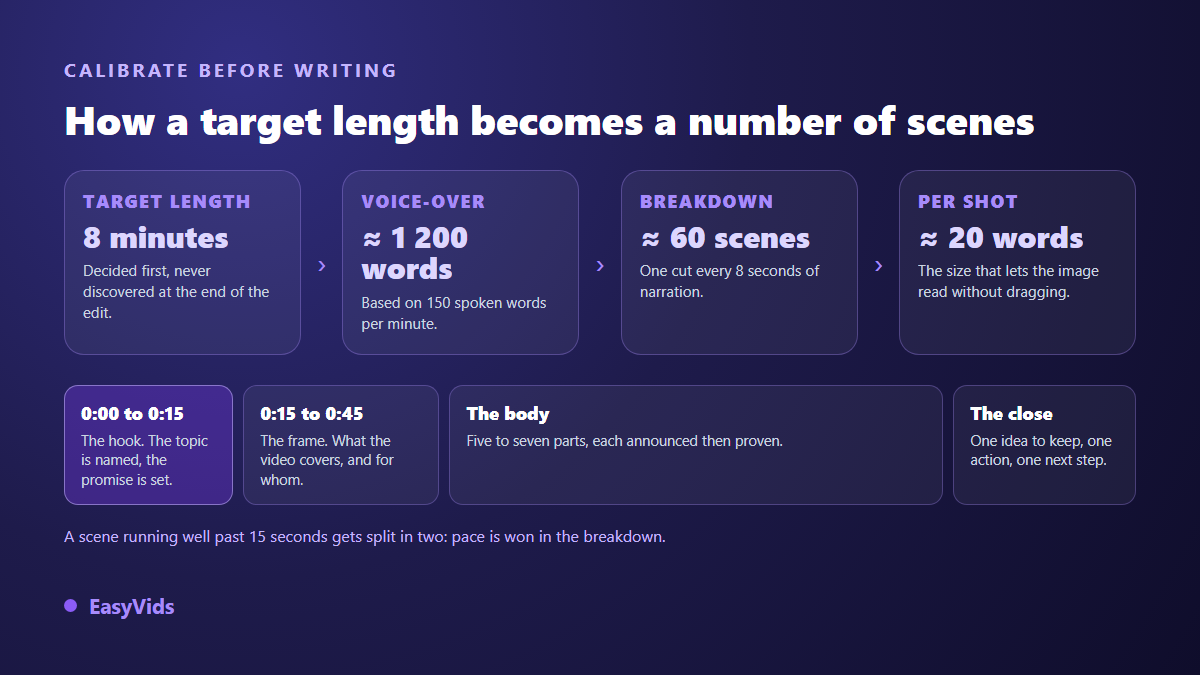
One rule saves most videos: a scene lasts five to fifteen seconds of voice, roughly fifteen to forty words. Below that, viewers cannot take in the image. Above it, they drift. When a scene overruns, split it in two rather than reading faster.
Step 4: visuals, and the real consistency trap
Across sixty scenes the risk is not one weak image, it is drift. The style shifts, the locations stop matching, the character ages ten years between two shots. The fix is to build the references first, portraits and locations, approve them, then generate scene images conditioned on those references. That is exactly what the mid production checkpoint is for: nothing runs at scale before you have looked at the base.
The choice between a still and a generated clip is made scene by scene. For an eight minute narration, most shots are perfectly served by crafted stills with a slow move added at edit time. Save generated clips for moments that carry an action. The mix costs less compute, renders faster, and often watches better than a run of four second clips glued together.
Step 5: the voice over carries half the result
Strong visuals with a mechanical voice give you a video people leave after ten seconds. The reverse is surprisingly true. On long form the stakes rise, because the viewer listens for minutes and hears every flat patch. Two levers do most of the work. Punctuation, first: synthesis engines read it the way an actor reads a score. Then the plain language delivery note available on some voice models: asking for a storyteller reading in a low voice changes more than switching voice altogether. Sticking to one voice, picked once, keeps one sonic identity across every video on the channel.
Step 6: editing, mood and sound
Automatic editing assembles the scenes, syncing each visual to the exact length of its voice. That is already publishable. Mood settings do the rest: a slow move on stills, fades and slides between scenes, a light push on clips, and a colour grade applied across the whole video if you want one.
One technical point is worth knowing before it surprises you: in the automatic edit, the native audio of generated clips is dropped and only the voice over is kept. That is the right call almost every time. When you do want to keep or mix that audio, open the project in the online editor, where every track becomes editable again. Background music sits well under the voice, around a fifth of its volume.
Step 7: captions, read by viewers and by the platform
YouTube produces automatic captions and they are decent on clear speech. They remain a fallback: they stumble on proper nouns, technical terms and numbers, which are precisely the words that carry your subject. Uploading your own file gives you control of the text, and that text is indexed.
The expected format is SRT, a plain text file pairing each line with a start and end timestamp. In the editor, a dedicated panel transcribes the project audio and hands you that file, which you proofread before uploading it alongside the video. If the format is new to you, our guide to the SRT file explains its structure.
Step 8: thumbnail, chapters and upload
The thumbnail decides the click, and it is produced in the same place as the video: describe the subject, add the text to display, and optionally supply a face photo as a reference. According to the YouTube help centre, the recommended size is 1280 by 720 pixels with a minimum width of 640 pixels. Weight and file type limits are listed in our note on YouTube thumbnail sizes.
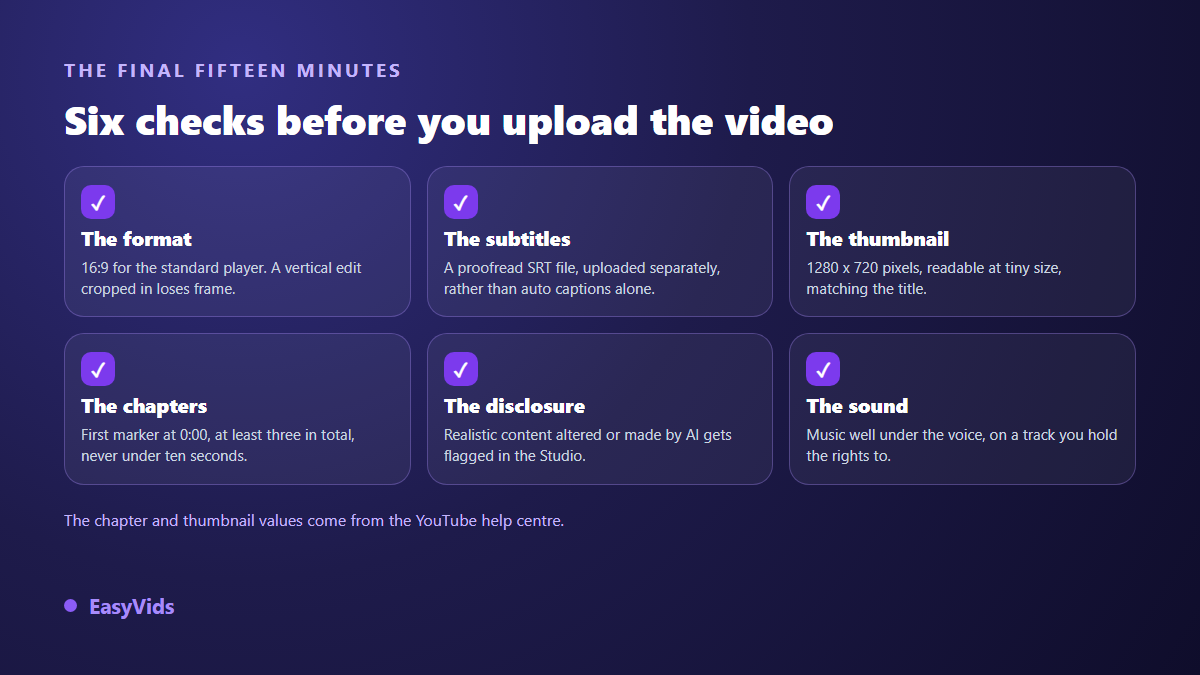
Chapters deserve attention on long form. Again according to the YouTube help centre, the first marker must start at 0:00, a video needs at least three, and each one must run at least ten seconds. They take a few lines in the description and turn an eight minute video into something people can navigate.
What the platform accepts from an AI made video
Using AI is neither banned nor a bar to monetisation. What YouTube penalises is the absence of contribution: in July 2025 the platform renamed its repetitious content rule as an inauthentic content rule, and its help centre asks for original and authentic content, which targets mass produced uploads with no editorial work. A carefully written, consistently illustrated, properly narrated story sits well inside the rules.
Two concrete obligations come with it. Since March 2024, YouTube asks creators to disclose realistic content created or altered with AI in Studio. And joining the partner programme requires, according to the YouTube help centre, 1,000 subscribers plus 4,000 valid public watch hours over twelve months, or 1,000 subscribers plus 10 million valid public Shorts views over ninety days. Edge cases are covered in our article on monetising an AI content channel.
How long an eight minute video actually takes
On our own productions the split is stable. Writing and reviewing the script costs about fifteen minutes of your time. Checking the scene plan, another ten. Visuals and voices are generated on our servers in parallel, and you do not need to keep the page open: the work continues and you find it done when you return. The automatic edit is a matter of minutes. What remains are your own retouches.
The real gain is not raw model speed, it is the removal of round trips between five services. Cost is steered scene by scene: a fast model for drafts, a more careful one for the shots that matter. Our plans and how credits work are set out on the pricing page, and a free trial lets you measure the real time on your own subject.
Frequent questions
Can the tool publish straight to YouTube?
No, deliberately. You download the video file, the thumbnail and the caption file, then upload them to your channel yourself. That last step keeps the title, description and chapters under your control, written for your audience rather than by a script.
Can an AI made video be monetised?
Yes, as long as it contributes something: an angle, a scenario, real narration. The inauthentic content rule updated by YouTube in July 2025 targets mass production without editorial work, not the tool used to make the images or the voice.
Do I need a powerful computer?
No. Everything runs in the browser and the compute happens on servers, so your device only displays the interface. A phone is enough to write, launch a production and follow it. Fine editing and caption proofreading stay easier on a large screen.
How many scenes for a ten minute video?
Around seventy five, based on six to ten seconds of narration per scene. It is not a technical ceiling, it is a comfort marker: beyond that, reviewing the plan becomes a long job in itself.
Do I have to disclose AI use?
Yes when the content is realistic enough to be mistaken for real footage; YouTube has asked for that disclosure in Studio since March 2024. Clearly stylised animation, illustration or motion graphics fall outside it. When in doubt, disclosing costs the video nothing.
The best way to start is a constraint: pick a length, hold it, and publish three videos before judging your channel. This workflow settles after two or three runs, and that is when the time saved becomes real. To try it on your own subject, creating an account opens the whole path, and the EasyVids studio keeps the script, the visuals, the voice, the edit and the thumbnail in one place.