You want to post consistently on YouTube, and you keep stalling at the same place: find the idea, write it, film it, edit it, start again tomorrow. An AI YouTube Shorts generator does not remove the work. It moves the work somewhere else. You stop filming and stop cutting by hand, you decide the topic, the tone and the pace, and production drops down one level, to where it can be launched in series.
Seven Shorts a week means one Short a day. That is not a talent problem, it is a production line problem: a repeatable writing method, a steady cut, and a system that keeps working while you do something else. The underlying rules are the ones described in our guide to AI video generators, tightened here around a short vertical format.
The short answer
Write all seven scripts in one go, aiming for roughly one minute of voice over each. Cut every script into six to ten second scenes. Create one project per Short, set the aspect ratio to 9:16, then start the automatic batch that produces the prompts, the images, the voice over and the video clips, scene after scene. The batch runs on our servers, so you can close the page. What is left for you is the edit, the captions and the publishing schedule.
What the vertical format decides for you
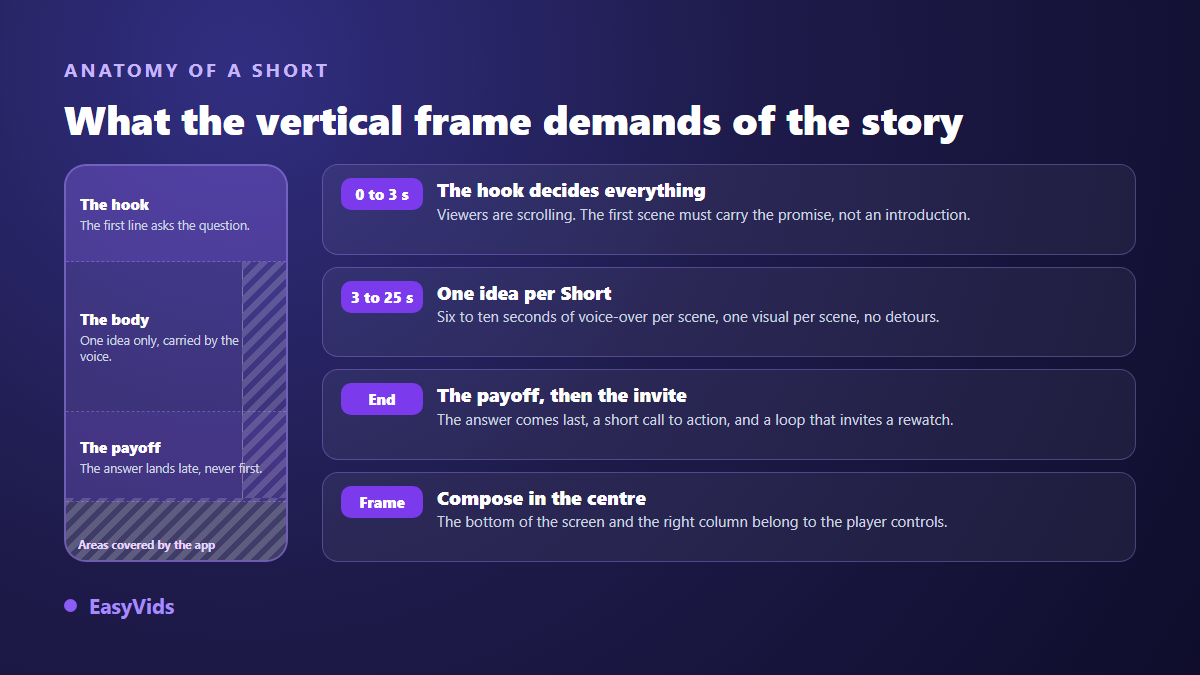
A Short is not simply a short video, it is a format with rules. According to YouTube's help centre, a Short can run up to three minutes since the October 2024 update, and a vertical or square video within that limit is recognised as a Short automatically, with no hashtag to add. The frame you target is 9:16, the shape of a phone held upright.
The practical consequence is easy to forget. In the player, the bottom of the screen and the right hand column carry the title, the description and the controls, so anything important placed there gets covered. Compose towards the centre, leave the margins breathing, and pick the aspect ratio when you create the project rather than at export. Cropping a 16:9 edit down to 9:16 at the last minute always removes something that mattered, as our rundown of sizes and ratios per platform explains.
Write seven scripts in one sitting
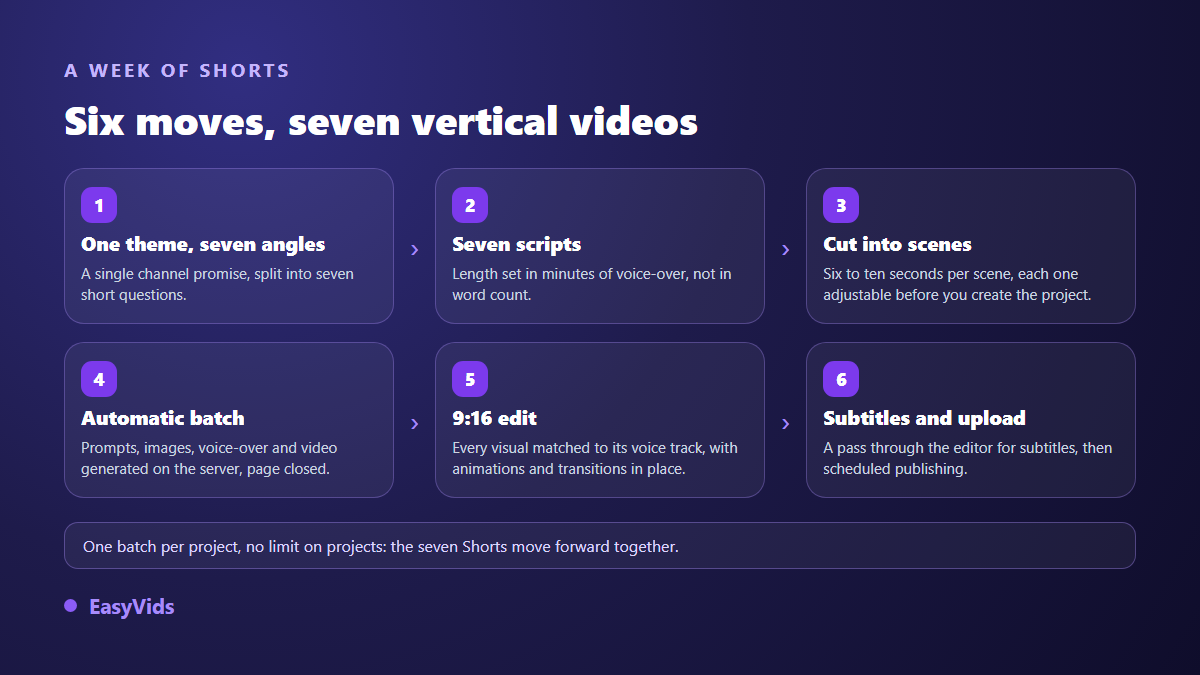
Consistency is won at the writing stage, not at the edit. Book one session a week, pick a single theme, break it into seven angles. A channel that answers seven neighbouring questions grows faster than a channel that jumps between topics, because the audience eventually knows what it comes for.
In the studio, the writing page starts from a one sentence idea and returns a text built to be spoken. Set the length in minutes of voice over rather than in words: it stops you writing something you will have to cut. Across our own productions, one minute of narration runs to roughly 150 words. You pick the tone, the language, and you can ask for a closing call to action. When topics run dry, our 27 ideas for videos you never have to film will fill several weeks.
Cut into six to ten second scenes
A script becomes a project through the splitting step. The text is cut into scenes, and each scene takes a visual, a fragment of voice over and, if you want one, a generated video clip. Presets offer six, eight or ten seconds per scene, and the exact size stays adjustable.
The rule of thumb we work with comes from our own productions: around 110 characters of text give about six seconds of voice over. A one minute Short therefore lands at eight to ten scenes. Before creating the project, reread the split: cut at the cursor, merge two scenes that are too short, insert one where the pace flattens. Five minutes there beat an hour of repair work later.
The batch that keeps running after you leave
This is the part that changes the cadence. In the workshop, you tick what the batch should produce: prompts, images, voice over, video clips. You then choose between missing items only, which never touches what already exists, and redo everything, which regenerates the whole selection. Finally you set how many scenes run side by side, up to ten, and you start it. Reread the motion prompt before you do, since it decides what the image actually does once animated: our prompt examples for animating an image give wordings that hold up on a short format.
The batch does not live in your browser. It lives on the server as a recorded job, and the page only starts it, follows it and stops it. Close the tab, shut the laptop, come back tomorrow: the workshop reattaches itself to the running batch and shows where it stands. If a server restarts overnight, a sweep picks the batch back up where it stopped, skipping the scenes already done so they are never charged twice.
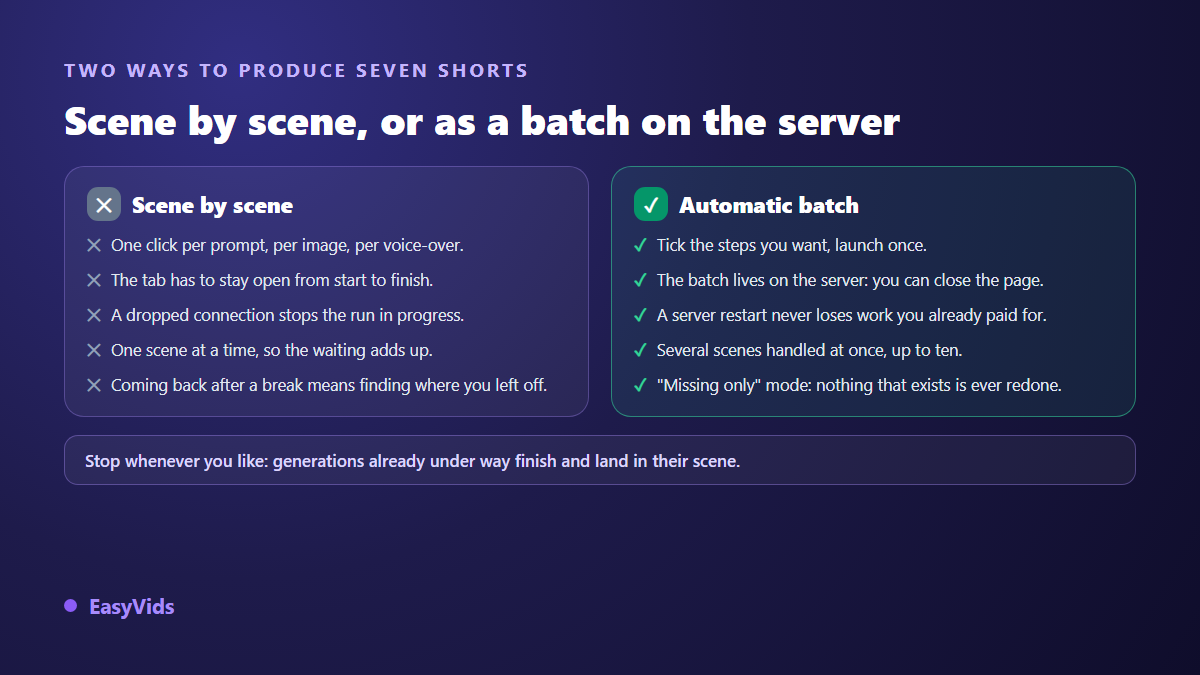
You can stop it at any point. A generation already sent to the provider runs to completion and joins its scene, because it has been paid for and there is no sense in throwing it away. The ones after it simply never start.
Seven projects at once, where the volume really comes from
A project accepts one batch at a time, since two competing batches could charge the same scene twice. Nothing limits the number of projects, though. Seven Shorts, seven projects, seven batches moving forward together while you get on with your day. That is where the week is won, not in the raw speed of a model. A single batch also takes up to five hundred scenes, which leaves plenty of headroom for a short format. That headroom matters most the day you leave short form behind, and our method for producing a longer AI video shows how to chain those scenes into a continuous story rather than a run of clips.
Editing vertical, and the captions that carry it
Automatic editing syncs every visual to the exact length of its voice over. You choose the ratio, 9:16 for a Short, and the output quality, up to 4K. You can switch on automatic motion: a slow drift across still images, transitions between shots, a light zoom on video clips, and a colour grade that keeps the series consistent. On a short format that motion matters twice as much, because a perfectly frozen image for eight seconds is noticed instantly.
Captions come next, in the online editor, which transcribes the voice over and lets you style the text. A large share of the audience watches with the sound off, and word by word animated captions have become the signature of the format: the method for recreating that style is a matter of a few settings, as long as the text stays clear of the bottom of the frame.
Mistakes that kill an AI Short
Short formats forgive far less than long ones. Three seconds of hesitation at the start and the viewer has already scrolled on. Here is what we see most often on short projects.
- The polite intro, the "hi everyone, today we are going to talk about" opening. Delete it and lead with the promise.
- A script written for the eye: long sentences, clauses inside clauses. Write for the ear, punctuate, breathe.
- A visual style that changes every scene. Lock one direction and hold it across the seven Shorts of the week.
- On screen text pinned to the bottom edge, where the player controls hide it.
- The answer given in the opening line, which removes every reason to stay.
- Seven Shorts identical to within a word, which read as filler and get treated as such.
Monetisation and disclosure
A channel built on generated Shorts can be monetised, on one condition: it has to add something of its own. According to YouTube's monetisation policies, revised in July 2025 under the heading of inauthentic content, what gets refused is not the use of AI but mass produced, repetitive material with no contribution. An angle, real writing, a considered voice, a deliberate edit: that is what separates a channel from a content farm.
Two transparency duties are worth knowing before you publish. According to YouTube's help centre, creators must disclose realistic content created or altered with AI in Studio, a requirement introduced in March 2024, after which the platform adds a label to the video. Separately, the European Union's artificial intelligence regulation adopted in 2024 provides, in article 50, that realistically manipulated audio or video be marked as such. A clearly stylised animation does not raise the same question as a photoreal human face; when in doubt, disclose.
On access to the YouTube Partner Programme, the published requirements ask for 1,000 subscribers plus either 4,000 valid public watch hours over twelve months or 10 million valid public Shorts views over ninety days. Short form is therefore the part that brings the audience in, and long form is what converts it.
Frequently asked questions
Can one person really publish seven Shorts a week?
Yes, provided you group the steps instead of handling each Short end to end. One writing session for all seven scripts, one splitting session, then seven batches started back to back: the slow work happens while you are away from the screen. Editing and review stay the only steps that need you present.
Do I need a powerful computer?
No. Everything runs in the browser and the compute happens on servers. A phone is enough to write, start a batch and follow its progress. Fine editing and caption placement are simply more comfortable on a larger screen.
What happens if I close the page mid generation?
Nothing bad. The batch is stored server side and carries on without the page. When you come back, the workshop finds the running batch on its own and shows the scenes completed, any incidents, and the stop button. A server restart does not lose work you have already paid for.
Are AI generated Shorts pushed less by YouTube?
YouTube does not judge the tool, it judges the content and how the audience reacts to it. A Short watched to the end and replayed gets pushed, however it was produced. What does cost you is mass production with no contribution, and a missing disclosure on realistic content.
Human voice or generated voice?
Both work. A well tuned generated voice, with careful punctuation and a reading style set, holds up perfectly on a short format. If you want your own timbre, voice cloning keeps one sonic signature across the whole series without re recording every week.
Consistency is a matter of organisation, not motivation: one theme, seven angles, a steady cut, batches that work without you. Pick this week's topic, write the seven scripts tonight, start the batches before you close the laptop. Creating an account opens the workshop and its automatic mode, and the EasyVids studio brings writing, generation and vertical editing together in one place.