You post a video on your company page and it shows up as a narrow strip in the middle of the feed. Or the upload fails with a message that explains nothing. Or your key line sits hidden behind the post header. LinkedIn video size is not complicated, but it comes down to a handful of exact values: an aspect ratio, a resolution, a duration, a file size. One wrong number is enough to waste a video that was otherwise good.
LinkedIn is the most explicit of the major platforms about what it accepts. The limits are published, numbered, and they move slowly. This page collects them as they appear in the LinkedIn help centre, then explains what to do with them when you compose the video, because clearing the technical check has never been the same thing as being watched. Values checked in August 2026. For the other networks, our reference sheet of sizes and durations platform by platform covers the same ground.
The short answer
Export MP4, H.264 video, AAC audio. For the feed, aim for 1080 x 1350 in 4:5, or 1080 x 1080 in 1:1 if you prefer a neutral frame you can reuse elsewhere. Keep 1920 x 1080 in 16:9 for anything watched on a desktop: a webinar replay, a screen demo, a filmed interview. Vertical 1080 x 1920 belongs to the video feed in the mobile app. On the limits, the LinkedIn help centre lists a file between 75 KB and 5 GB, a duration between 3 seconds and 10 minutes, a resolution between 256 x 144 and 4096 x 2304, and an aspect ratio between 1:2.4 and 2.4:1. One constraint outweighs all the others: playback starts with the sound off.
The technical envelope LinkedIn publishes
A platform does not accept a video, it accepts a file that fits inside an envelope of values. LinkedIn's envelope is wide, which is good news: almost every common export sits inside it without any special setting. The rare rejections nearly always come from the same place, a container that is no longer supported or a duration outside the bounds. The resolution line is the one people read too fast, and what 720p, 1080p and 4K actually measure explains why reaching for the biggest number only makes the file heavier without adding anything visible in a feed.
- Duration: 3 seconds to 10 minutes.
- File size: 75 KB to 5 GB.
- Resolution: 256 x 144 up to 4096 x 2304 pixels.
- Aspect ratio: 1:2.4 to 2.4:1, which covers landscape, square, portrait and full screen vertical.
- Frame rate: 10 to 60 frames per second.
- Bitrate: 192 kbps to 30 Mbps.
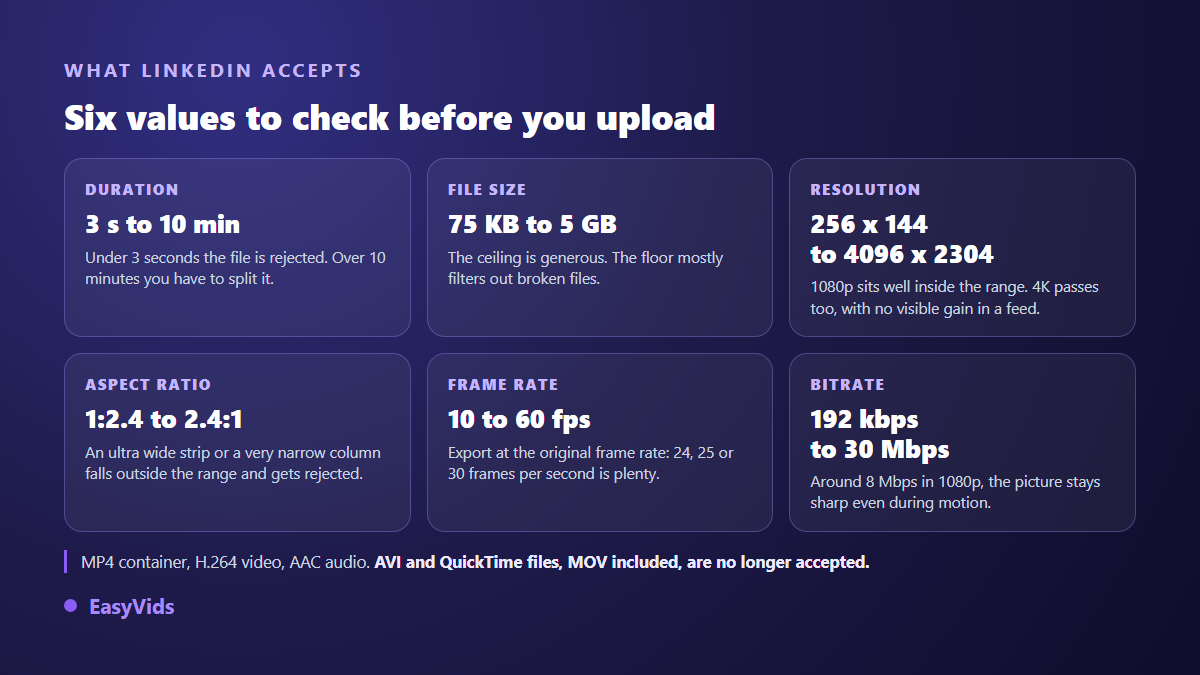
Two notes belong here. First the container: according to the LinkedIn help centre, AVI and QuickTime files, MOV included, are no longer accepted. That catches out anyone exporting from an editor still set to MOV by default. Second the context: sponsored campaigns follow their own specifications, published separately in LinkedIn's advertising documentation. If you are preparing a paid placement, that is the page to open, not the one covering organic posts.
Four frames, and the one that actually fills the feed
The accepted range is so wide that the real question is not whether a file passes, but how much room it takes. On a phone, a 16:9 video dropped into a vertical feed occupies a thin band in the middle of the screen, surrounded by text and interface. The same content in 4:5 covers nearly twice the area, and holds the eye longer while people scroll. With identical content, the frame changes your exposure before it changes anything about quality.
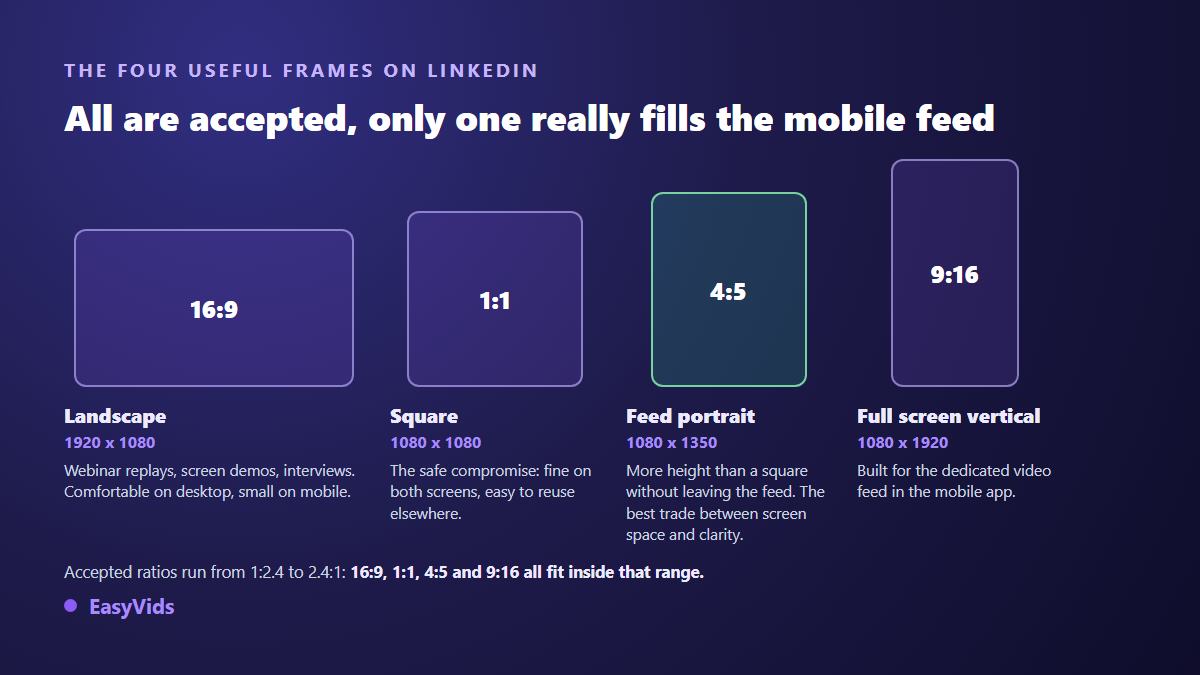
- 16:9 at 1920 x 1080: webinar replays, software demos, two person interviews. The only frame where a screen share stays readable.
- 1:1 at 1080 x 1080: the safe default. Fine on desktop and mobile, and reusable elsewhere without cropping.
- 4:5 at 1080 x 1350: the best trade off between feed real estate and comfortable reading. The frame to pick for anything built for mobile.
- 9:16 at 1080 x 1920: full screen vertical, made for the dedicated video feed LinkedIn rolled out in its mobile app from 2024.
One thing deserves to be said plainly: cropping afterwards rescues nothing. Taking a 16:9 down to 4:5 removes a large share of the width, and with it the subject itself if it was not perfectly centred, while on screen text drifts out of frame. The format is decided before the first shot, never at export. When an existing video really has to be adapted, rebuild it shot by shot and reposition what matters, a process covered in our guide to editing video in the browser.
Playback starts muted, and everything follows from that
According to the LinkedIn help centre, videos in the feed autoplay silently. Your reader sees moving images before hearing anything, and decides within a second or two whether to switch the sound on. A video whose message rests entirely on the voice over says nothing at all to most of the people who scroll past it.
The fix takes two steps. Burn the captions into the picture, so they survive downloads and reshares. Then attach an SRT file to the post, which LinkedIn supports, so the text stays clean and selectable. Both can be produced automatically from the audio track, as our guide to automatic captions explains. Add an on screen title in the first second: very often it is the only sentence anyone reads.
What people see before they decide to watch
The file is only part of the job. A video post also lives in three things around it, and they are almost always neglected: the very first frame, the first two lines of the caption, and the space the interface leaves free.
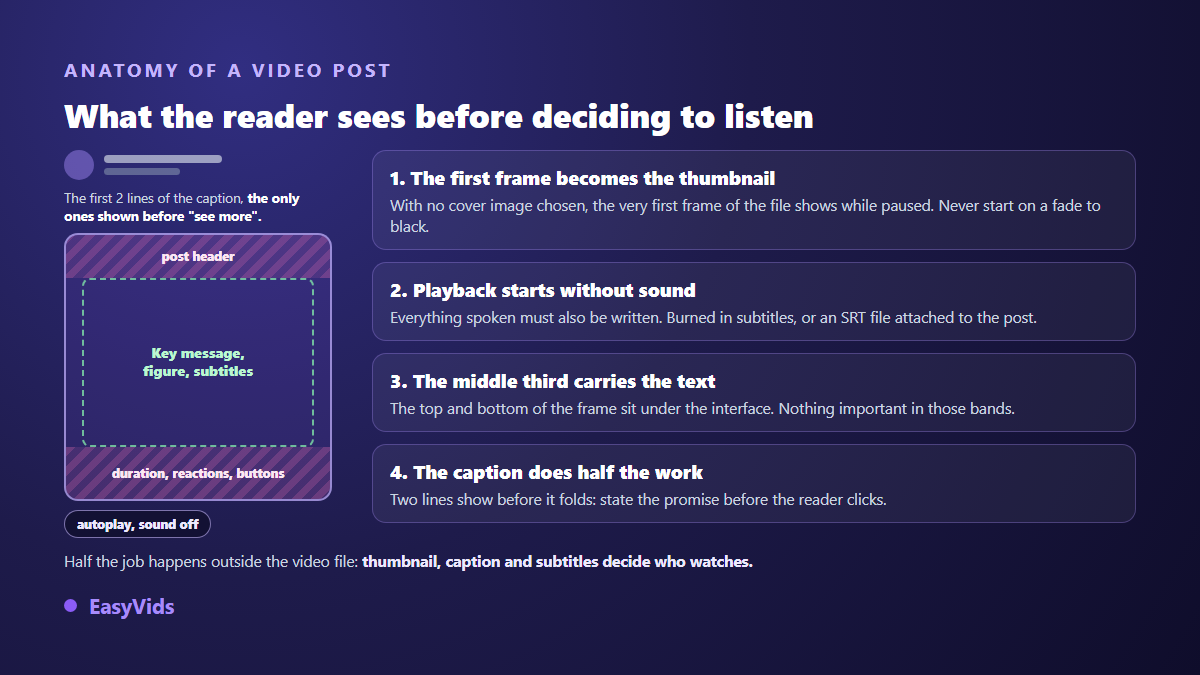
At rest, the first frame of the file acts as the thumbnail unless you choose a cover image when publishing. A fade from black, or an animated logo starting on an empty background, guarantees an empty thumbnail and a post nobody notices. Open on a full frame, with a face or a readable line. As for on screen text, keep it inside the middle third: the top carries the post header, the bottom carries reactions and buttons.
Duration: the hard limit and the length that holds attention
The documented ceiling is 10 minutes, but it says nothing about what works. LinkedIn has recommended keeping brand awareness videos short for several years now, around the thirty second mark. The reasoning is simple: a video met in a professional feed is rarely watched to the end, and a promise delivered in thirty seconds beats a three minute demo abandoned in the first one.
Two lengths work in practice. The short video, 30 to 60 seconds, for a single idea: an announcement, a result, one precise piece of advice. And the deliberately long format, 3 to 8 minutes, for a customer story, a technical explanation or a replay, provided the opening seconds state clearly what the viewer will learn. A useful yardstick when writing: across our own generations, one minute of voice over runs to roughly 150 words. A 45 second video therefore fits in about a hundred words, no more.
Export settings that work everywhere
- MP4 container, H.264 video, AAC audio: the common denominator accepted everywhere.
- 1080p resolution inside your chosen frame. 4K fits the accepted range but adds nothing visible in a feed, for a far heavier file.
- Native frame rate: 24, 25 or 30 frames per second. Converting introduces judder with no gain in quality.
- Bitrate around 8 Mbps at 1080p, comfortably inside the accepted range and enough to keep fast motion clean.
- Burned in captions, plus an SRT file attached to the post.
- No watermark on the picture: on a company page, a tool logo in the corner quietly damages the credibility of the post.
Producing LinkedIn video without a camera or a crew
On LinkedIn the hard part is rarely technical. It is producing often enough to exist in the feed. That is where an online studio earns its place: the format is chosen before generation, and it applies to every image and every clip in the production, which removes end of chain cropping altogether. In EasyVids, the Director offers 16:9, 9:16 and 1:1 on the first screen, and our complete guide to AI video generators walks the full chain from script to edit.
The online editor takes over for precise framing. Common project sizes are offered as presets, from 1920 x 1080 to 1080 x 1920 including square, and a free custom size lets you build the 1080 x 1350 in 4:5 that the feed displays so well. Transcription runs in the browser and produces the captions, exportable as SRT. Export delivers an MP4 with several quality levels and a frame rate of your choice, with no watermark burned into the picture, a subject covered in our guide to exporting AI video without a watermark. Plan details sit on the pricing page.
Frequently asked questions
What is the best video size for LinkedIn?
For anything built for mobile, 1080 x 1350 in 4:5. That frame takes more height than a square while staying an ordinary feed post. If your audience mostly watches on a desktop, or if the video shows a screen share, stay at 1920 x 1080.
Does LinkedIn support vertical 9:16 video?
Yes. The accepted range runs from 1:2.4 to 2.4:1, which comfortably includes 9:16. Full screen vertical makes most sense in the mobile video feed. In the classic feed, 4:5 stays easier to read, especially when the video carries on screen text.
How long can a LinkedIn video be?
Ten minutes for a post from a page, with a floor of 3 seconds, according to the LinkedIn help centre. Sponsored formats follow separate documentation. Beyond ten minutes, split the content into episodes, which usually works better than one long upload anyway.
Why is my video rejected at upload?
Three causes cover nearly every case: a container that is no longer accepted, MOV first among them, a duration outside the bounds, or an aspect ratio beyond 2.4:1. Re export as MP4, H.264, AAC, in one of the four common frames, and the block disappears.
Format does not make a video good, but the wrong one stops it from being seen. Decide the frame before writing the first line, compose in the middle third, write down what you say, export as MP4. The rest belongs to your subject. To produce your next video in the right frame from the start, creating an account opens the full studio, and the EasyVids studio brings generation, editing and captions together in one place.