You post your video, and the first word of your hook vanishes under the caption. Or the picture floats in the middle of the screen between two empty bands while every other clip fills the whole phone. TikTok video size comes down to three values, and those three values decide how much room your work takes under the viewer's thumb.
The problem is rarely the camera. It is a frame picked too late, once the video is already edited and cropping is the only option left. This page gathers the values to aim for, exactly where the app covers your image, and how to produce in the right shape from the first frame. Other platforms have their own numbers, collected in our video format sheet platform by platform.
The short answer
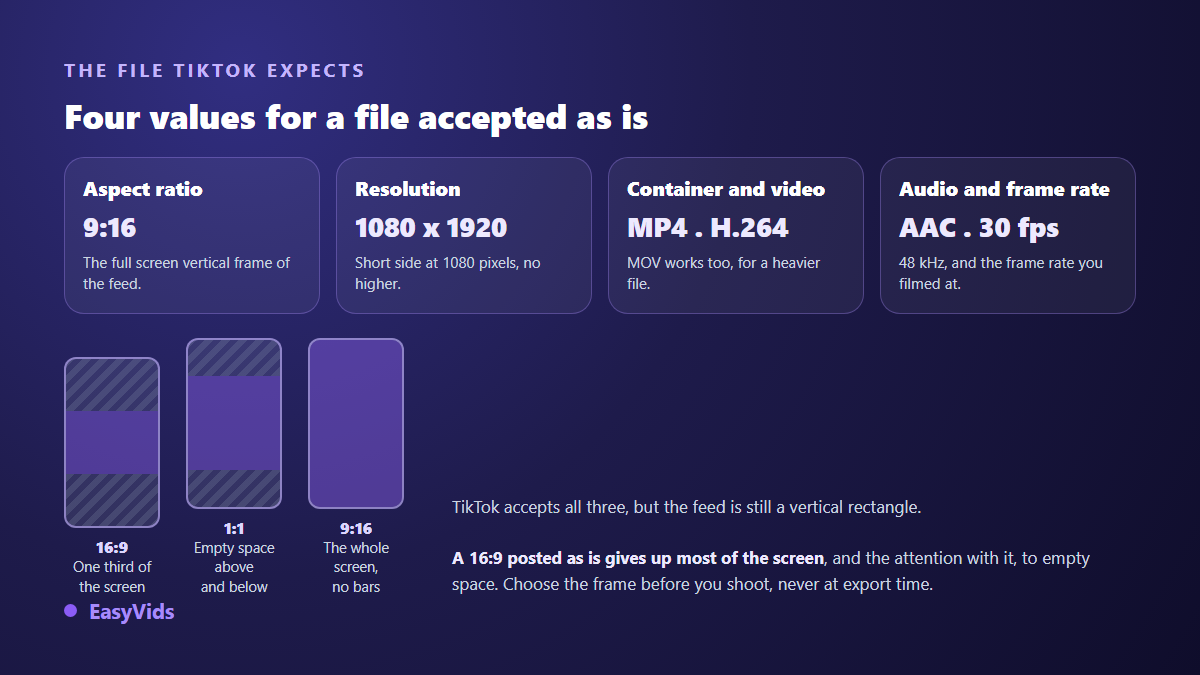
9:16, 1080 x 1920 pixels, an MP4 file encoded in H.264 with AAC audio. TikTok's own help centre recommends that ratio and that resolution, and it is the combination that travels through the app with no cropping and no empty bands. Three more settings matter almost as much: 30 frames per second, every important word inside the central rectangle of the screen, and a length under one minute for most subjects.
Aspect ratio, resolution and file size are three separate questions
The aspect ratio is the shape of the frame, the proportion between width and height. It is written 9:16 for a vertical rectangle, 16:9 for a landscape one, 1:1 for a square, and it says nothing about pixels. The resolution is that pixel count, written width by height: 1080 x 1920 for reference vertical video. The file size is what the video weighs, and it depends mostly on the bitrate chosen at export.
Keeping them apart avoids the most common mistake. A 1080 x 1920 clip and a 2160 x 3840 clip share exactly the same shape. The second holds four times more pixels and weighs far more, yet fills the same frame on the same phone. Choosing a format means answering two questions: what shape, decided before you produce, then how fine, decided at export.
Why 9:16 wins on TikTok
The app accepts other proportions, and a square or landscape clip will not be rejected. But the feed is a vertical rectangle that fills the entire phone screen. A 16:9 video therefore shows up as a central band surrounded by emptiness, taking barely a third of the available height. A square does slightly better without ever filling the screen. In a feed where viewers decide in one second whether they stay, that lost surface is expensive.
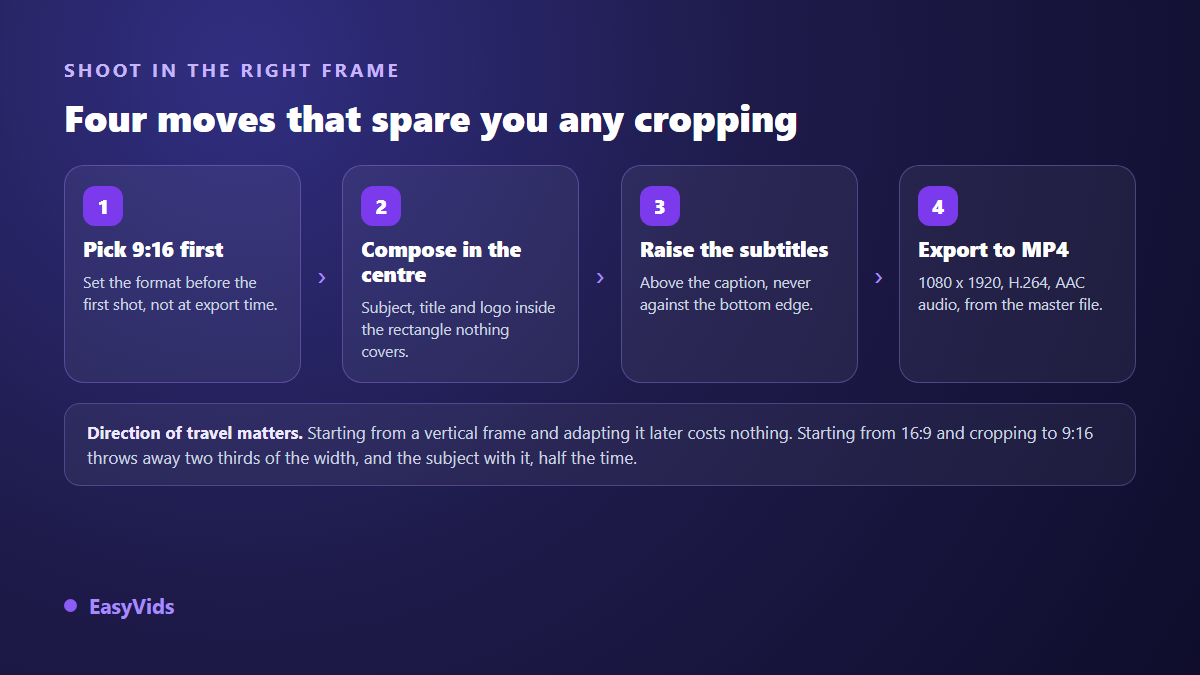
Direction of work matters too. Starting from a vertical frame and deriving a landscape version later destroys nothing, since the operation adds material on the sides. Starting from 16:9 and cropping to 9:16 removes two thirds of the width, and the subject with it whenever it was not dead centre. That is why the frame belongs at the start of the process, not in the export window. On an account that publishes in series, that decision gets frozen once inside the episode template, one of the four layers laid out in our method for building a complete video production system.
1080 x 1920, and why 4K buys you nothing here
The working resolution for vertical video is 1080 x 1920, meaning a short side of 1080 pixels. It stays sharp on every phone, encodes quickly and uploads without a wait. Going up to 2160 x 3840 gains nothing visible: the platform re encodes every file it receives for delivery, and that compression erases the extra detail long before a viewer notices it. 720 x 1280 remains an honest fallback on a poor connection.
One clarification saves a lot of disappointment: upscaling footage shot at 720p to 1080p adds no information at all. The extra pixels are guessed, never captured. If your source is modest, keep its native resolution and work on bitrate, lighting and the sharpness of your on screen text instead. Those three things, not the pixel count, are what makes a video look clean in a feed.
Container, codec and frame rate: the file that always passes
TikTok accepts several file types, MP4 and MOV first according to its help centre, and a wider list from desktop upload. Only one combination is worth remembering, because every other platform accepts it too and it avoids surprise conversions on arrival.
- MP4 container, with the index at the front of the file, the setting usually labelled Fast Start in editing software.
- H.264 video, High profile, 4:2:0 chroma subsampling. H.265 makes smaller files but is less consistently welcomed across devices.
- AAC audio, 48 kHz, stereo. A missing or silent track costs you half the effect and any association with a platform sound.
- Native frame rate: 24, 25, 30 or 60 frames per second. Converting 25 to 30 introduces visible judder on movement for no gain.
- Sensible bitrate: around 8 to 12 Mbps for vertical 1080p. With no published TikTok figure, YouTube's recommendation for 1080p, close to 8 Mbps, is a reliable reference point.
- One encode only: export from your master file, never from a copy already compressed by a messaging app.
On maximum file size, be wary of copied tables. The limit depends on the upload path: the mobile app and desktop upload accept neither the same file sizes nor the same lengths, and some accounts get extended ceilings. The only figure that concerns you appears on your own upload screen. Check it before preparing a file of several hundred megabytes.
Safe area: the usable surface is smaller than the screen
A 1080 x 1920 frame does not give you 1080 x 1920 usable pixels. The interface sits on top of your image: feed tabs and the search icon at the top, an action column down the right edge with the profile picture, likes, comments and share, then at the bottom the account name, a caption that unfolds over several lines, the sound title and the app navigation bar.
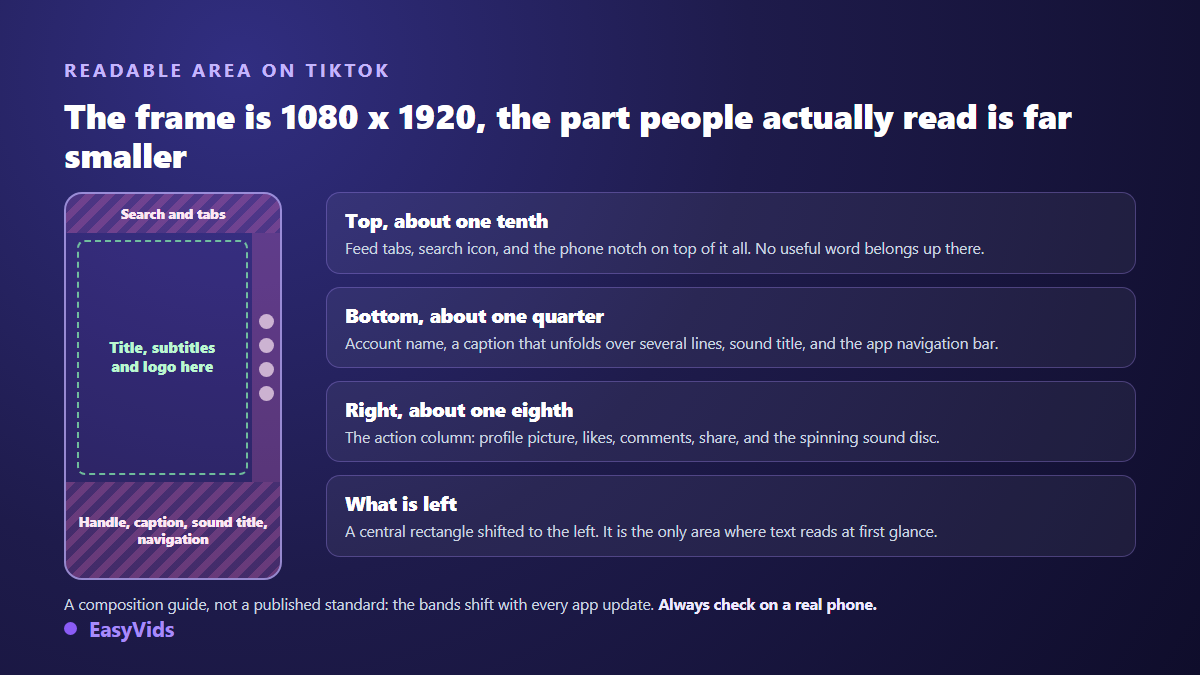
No public standard freezes those bands for the organic feed, and their height shifts with every app update. The guardrail we use in production comes down to three rough numbers: keep the top tenth, the bottom quarter and the right eighth clear. What remains, a central rectangle nudged to the left, is the only surface where a headline reads at first glance.
The real check happens on an actual phone before you publish. Our online editor also offers a TikTok guide that overlays the app interface on the preview: buttons and caption appear in their real positions while you place your text. Captions follow the same constraint, and deserve the same care as on neighbouring vertical formats, as our guide to captions in vertical video explains.
Length: the official ceiling and the duration that holds
The ceiling has moved a lot. TikTok announced three minute videos in July 2021, then ten minutes in early 2022, and has since tested longer uploads with a portion of accounts only. In other words, the allowed length is not the same for everyone, and it is not the interesting question. The interesting question is the length your subject deserves.
For a hook driven format, everything plays out between 15 and 60 seconds. A demo or a story can hold two to three minutes if it gives a reason to stay every fifteen seconds or so. The practical rule does not change: a short video watched to the end beats a long one abandoned a third of the way in. When in doubt, cut.
Cover image, on screen text and captions
The cover is picked from a frame of your video or replaced by an imported vertical image. Watch one trap: your profile grid shows that cover cropped, narrower in height than the video itself. A title sitting at the very top or the very bottom disappears there. Centre it, and keep it large enough to read in a thumbnail the size of a stamp.
On screen text follows the readable area rules: large, contrasted, short, never flush against an edge. Two or three lines of six words are plenty. Remember that many viewers watch with the sound off, on a commute or at a desk, so burned in captions often change more than any export setting.
Producing straight into TikTok format
The method that avoids cropping altogether is to lock the frame before production. On EasyVids the format is chosen when you launch generation, and each scene is composed for that frame: vertical is the starting point, not an end of chain crop. Available video models output 720p or 1080p, a few go higher, and the model you pick changes how many credits a generation costs, which the pricing page covers. The full chain from script to edit is laid out in our guide to AI video generators.
The online editor takes over for finishing. The canvas offers a 1080 x 1920 preset, captions are placed and moved by hand, and export produces an MP4 with several quality levels and a frame rate choice. If you start from a written idea rather than from footage, our method for turning text into a TikTok video walks the whole path, and the EasyVids studio keeps generation, editing and export in one place.
The format mistakes that come back most often
- Shooting 16:9 then cropping to 9:16, which pushes the subject out of frame half the time.
- Placing text at the very bottom, exactly where the caption and the sound title cover it.
- Reposting a clip downloaded from another app: it arrives already compressed, often marked, and gets compressed again.
- Upscaling 720p to 1080p or 4K in the belief that it adds sharpness.
- Forgetting the audio track, which cuts the video off from sound based discovery.
- Composing on a large screen without ever checking the result on a phone.
Frequently asked questions
What are the exact dimensions of a TikTok video?
1080 x 1920 pixels, a 9:16 aspect ratio. That is the resolution TikTok's help centre recommends, and the one that fills a phone screen with no empty bands. 720 x 1280 stays acceptable when your source is limited, while 2160 x 3840 adds nothing visible after the platform re encodes your file.
Can you post a 16:9 video on TikTok?
Yes, the app accepts it. It simply shows it as a central band surrounded by empty space, which costs you a large share of the available surface and attention. If a landscape file is all you have, place it inside a vertical frame with a designed background and a headline above rather than posting it as it is.
Why does my video look blurry after posting?
In most cases because it was compressed twice. A file already shrunk by a messaging app, or pulled from another platform, arrives degraded, and then the platform re encodes it again. Always export from the original file, keep a decent bitrate, and check that no data saving option in the app is throttling your uploads.
Should I export in 4K for TikTok?
No. Delivery happens on a phone and goes through systematic re encoding, which erases most of the gain. A 1080 x 1920 file with a decent bitrate looks sharper than a hastily compressed 4K one, for a much lighter file and a much faster upload.
How long should a TikTok video be?
Between 15 and 60 seconds for most content. Allowed ceilings run far higher and vary by account, but watched duration matters more than permitted duration. A dense subject can run two or three minutes as long as it renews attention regularly.
Format is not the creative part of the job, but it decides whether your creative work is seen the way you intended. Three habits are enough: lock 9:16 before you produce, compose inside the central rectangle, export MP4 at 1080 x 1920 from a clean master. To produce straight into the right frame, with no destructive crop and no rescue edit, creating an account opens the full studio and its vertical outputs.