You have a name, a business, and a site to launch next week. What you are missing is a logo. An AI logo generator hands you thirty of them in a few minutes, and one of them genuinely works. Then comes the question nobody asks before subscribing: will that file hold up on an invoice, on a shopfront sign, in a browser tab, and in front of the examiner who reviews your trademark application?
This guide answers it plainly. A generated logo does two or three things very well, and it fails at four others, always the same four. Knowing which ones stops you building an identity on a file you will have to redo in six months. The engine is the same as any AI image generator, with one extra demand: here the result has to stay identical to itself for years.
What an AI logo generator actually gives you
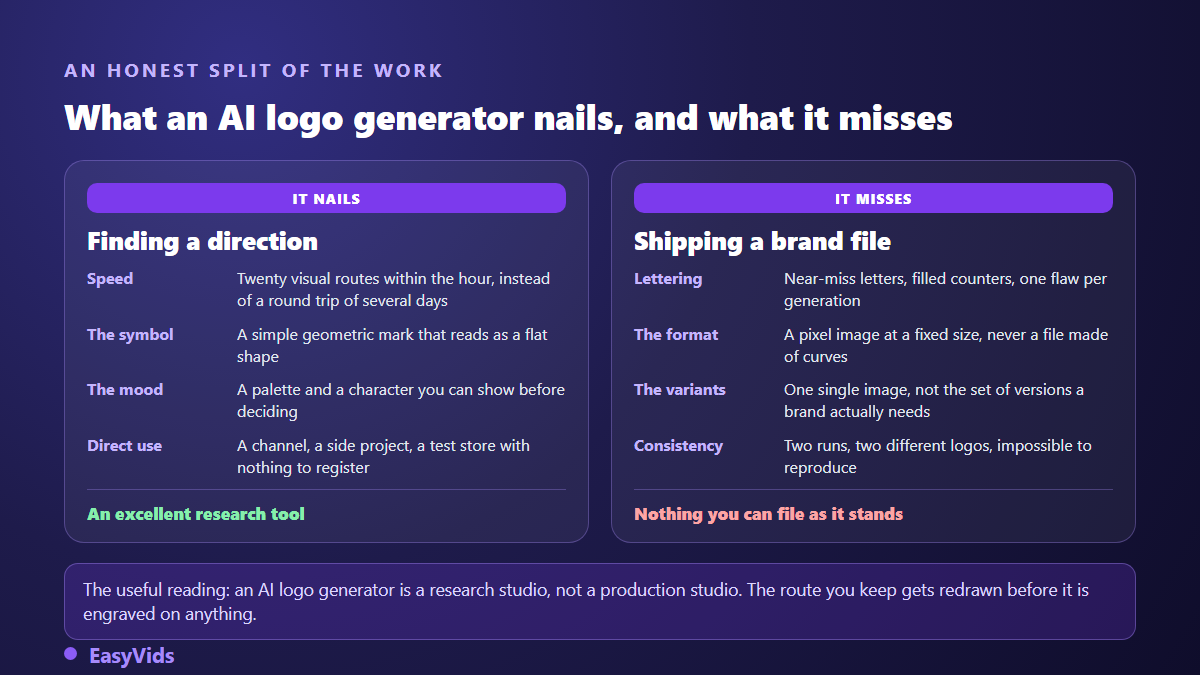
It gives you an image, not an identity. It finds a visual direction in minutes where the old route took several rounds of back and forth: a shape, a palette, a character. It fails on four precise points, and none of them depends on the model or the brand of tool: lettering it draws badly, a pixel format instead of curves, no set of variants, and no way to produce the same file twice. The working method follows from that. Generate the symbol alone, set the name yourself in a real typeface, then have the chosen route redrawn as vectors before any commitment. For a channel, a personal project or a test store, the generated image is fine as it stands.
What a generated logo genuinely does well
The first gain is exploration speed. Within an hour you see twenty different directions for your brand: a monogram, an abstract mark, a shape borrowed from your trade, a composition built on empty space. No design commission gives you that many routes at this stage, and routes are exactly what is missing at the start. What you lack early on is not a logo, it is a point of view.
The second gain is more concrete: in many cases the generated image is enough as it is. A video channel, a creator account, a community project, a store opened to test an idea have nothing to register and nothing to print on a sign. They need a mark that stays recognisable when small, on light and dark backgrounds alike. An image generator delivers that directly. The trouble starts the day that same file has to carry a business built to last.
Flaw one: the lettering gives it away immediately
Ask for a logo with your brand name written inside it, then look closely at the letters. A leg of an R cut short, an A whose apex closes up, an impossible gap between two characters, sometimes one letter too many. Across our generations this is the most consistent defect: image models draw shapes that look like letters, they do not typeset text. Our article on why text in AI images comes out unreadable explains the mechanism.
The fix is simple and permanent: never ask for the name inside the image. Generate the symbol alone, then set the name beside it in a typeface you choose and own. You gain three things at once: crisp letters at every size, text you can edit without regenerating anything, and a recognisable typeface you will reuse across your headings, documents and videos.
Flaw two: the file comes out in pixels, not curves
A professional logo lives in a vector file, a mathematical description of curves. It shrinks to favicon size and scales to the height of a wall without losing an edge. An image generator produces the opposite: a grid of pixels at one fixed size. Enlarge it and it blurs. A printer asking for curves will send your PNG straight back.
The temptation is automatic tracing, the tools that convert an image to vectors in one click. The result fools the eye from a distance and falls apart up close: dozens of pointless anchor points on what should be a perfect circle, edges that ripple, flat areas split into slightly different shades. A printer or an embroiderer spots it instantly. Auto tracing is fine for a mockup, it does not make a logo. The only clean way out is to redraw the chosen route in a vector editor from crisp geometric shapes, which is short work on a simple mark.
Flaw three: a logo is not one image, it is a set of files
This is the part most generators keep quiet about. The day your logo exists, several different versions are asked of you at once, and never the same one twice. The website wants a horizontal version on a light background. The social platform wants a square with no lettering. The partner printing a programme wants a single colour version. The developer wants a favicon that still reads at sixteen pixels across.
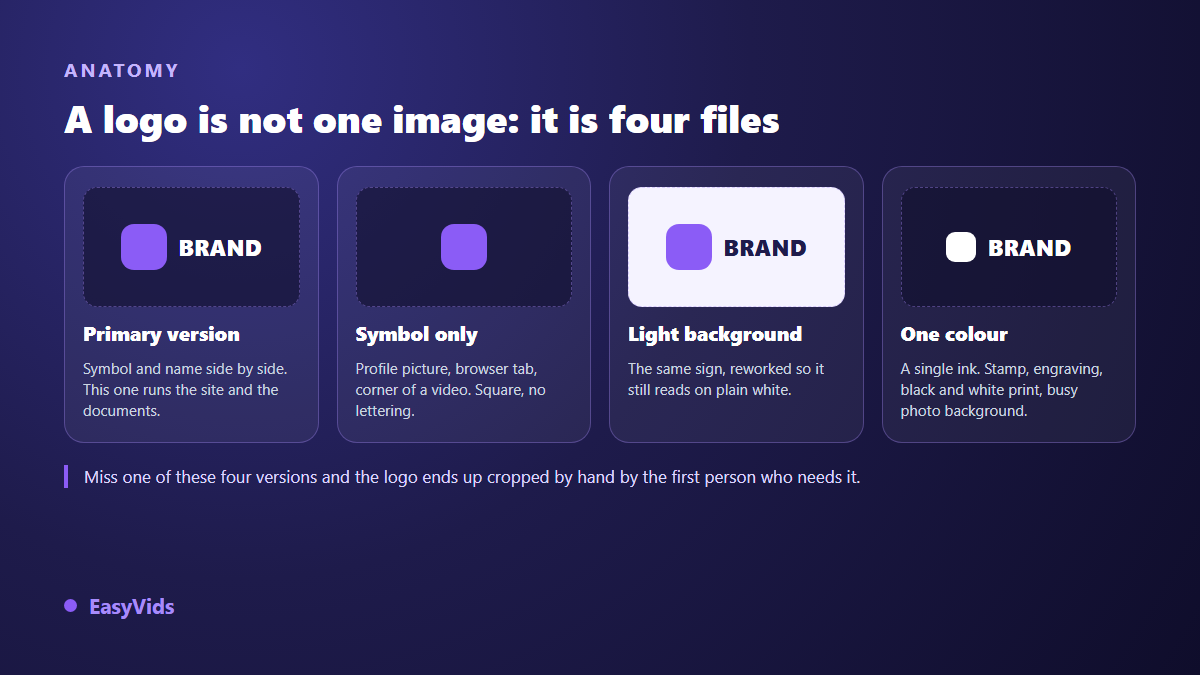
- Primary version: symbol and name side by side, for the site and your documents.
- Stacked version: symbol above the name, for square and vertical formats.
- Symbol only: no name, for the profile picture and the corner of a video.
- Single colour version: one solid ink, for stamps, engraving and embroidery.
- Dark background version: the same sign reworked to hold on black and on a photo.
- Favicon: the simplified mark, still readable at sixteen pixels across.
Add three written rules to that set, all fitting on one page: the clear space around the logo, its minimum print size, and the list of things nobody may do to it, stretch it, recolour it, drop it on a busy background. That folder is what holds a brand together over time, not the prettiest generation. No generator writes it for you.
Flaw four: two runs, two logos
Run the same request again tomorrow with the same wording and you get a different logo. Close, perhaps, but different. A brand rests on the exact opposite, one strictly identical sign everywhere, for years. That variability, a virtue when you illustrate an article, becomes a structural defect the moment identity is at stake. Two safeguards limit the damage: work from a reference image once a route is chosen, and freeze the result into a vector file you keep, as early as possible.
Trademarks: what AI changes, and what it does not
Two different rights meet here, and confusing them is expensive. The first is copyright, which covers the drawing. In its guidance titled "Copyright Registration Guidance: Works Containing Material Generated by Artificial Intelligence", published in the United States Federal Register on 16 March 2023, the US Copyright Office requires applicants to disclose AI generated material and recognises protection only for the human contribution. In part two of its report on copyright and artificial intelligence, devoted to copyrightability and published in January 2025, the same office states that an image obtained from prompts alone is not enough, for lack of human control over the expressive elements. Our guide on AI images and copyright covers the wider question.
The second right is trademark, and that is the one that actually protects a business. The World Intellectual Property Organization defines a trademark as a sign capable of distinguishing the goods or services of one enterprise from those of other enterprises. Examination therefore looks at the sign: is it distinctive, is it available? It does not look at the tool that drew it. Generating your logo closes no door by itself. What closes doors is a generic symbol, or one too close to a mark already registered.
Two useful landmarks before you speak to a professional. The Nice Classification, maintained by the World Intellectual Property Organization and updated regularly, sorts goods and services into forty five classes: a registration protects only the classes you claim, not your name in general. And the Madrid System, administered by the same organisation, lets you seek protection in several member countries from a single application. Beyond those two points the rules differ from country to country, and a clearance search belongs with a trademark attorney, never with a blog article or a generator.
The method that produces a usable logo
Put back in order, these constraints trace a short chain. It takes half a day, and it gives you a result you will still be able to use in five years, whatever tool has replaced today's by then.
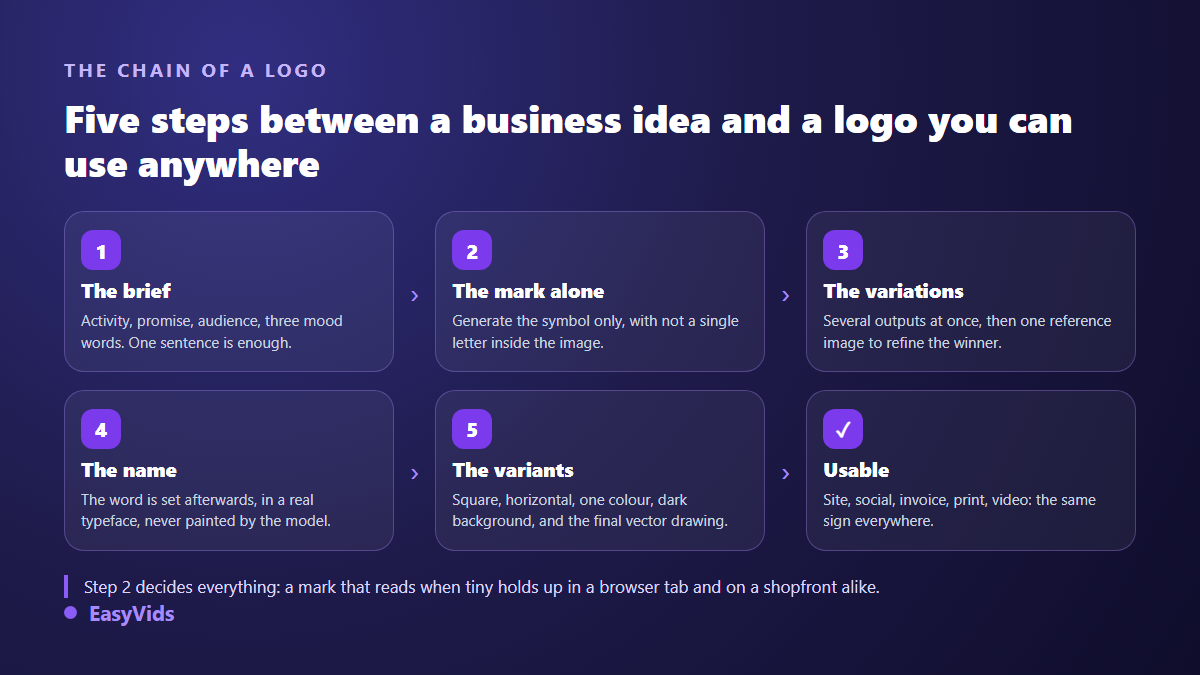
One note on the variation stage. Generate in batches rather than one image at a time: ten outputs at once give you something real to compare, whereas a single generation pushes you to accept the first acceptable thing. Only then take the best one as your reference and vary around it.
Writing a logo prompt: six ingredients, not one more
A logo prompt has nothing in common with an illustration prompt. You are not after a beautiful image, you are after a simple shape that survives being shrunk. Anything that adds detail works against you. If the exercise is new to you, our library of image prompt examples gives the general structure, tightened here to six elements.
- The type of mark: abstract pictogram, monogram, shape drawn from the trade, or a design built on empty space.
- The subject or metaphor: what the sign should evoke, in two words at most.
- The style: geometric, flat, line based, minimal. These are the only styles that shrink well.
- The colour constraint: two colours maximum, no gradient.
- The background: plain and light, so cutting it out afterwards stays clean.
- The explicit ban: no text, no letters, no drop shadow, no three dimensional effect.
Three tests before you commit
- The black on white test: flatten the image to one colour. If the shape vanishes or turns into a blob, the logo rests on its colour, not on its drawing.
- The sixteen pixel test: shrink the mark to the size of a browser tab. If it is no longer identifiable, simplify it.
- The neighbourhood test: place your logo next to three signs from your sector. If it blends in, it distinguishes nothing, which is exactly what a trademark examination will hold against it.
After the logo, everything else your brand shows
A logo on its own is not a visible identity. What your audience sees first are your images: your site banner, your social covers, your product visuals, your thumbnails. That is where image generation genuinely earns its place, because none of those pieces needs to be vector or reproducible to the pixel. The EasyVids studio brings image generation, the editor and video together in one place, and the available plans are set out on the pricing page.
Two follow ups nearly always come next. Placing your logo on a realistic object, garment, screen or packaging, for product pages and ads: that is the subject of our guide to AI generated mockups. And setting it in motion for video intros and posts, which our logo animation method covers step by step. In both cases the rule from the start still holds: the logo file stays untouched, and no model is ever allowed to redraw it.
Frequently asked questions
Can I use an AI generated logo commercially?
In practice yes, for everyday use: website, social accounts, products, communication. Terms of use differ from one tool to the next, and that is the first document to read before choosing. The real limit is not commercial, it is legal and technical: copyright protection for an image produced from prompts alone is uncertain, and a pixel file will not serve professional printing.
Can an AI generated logo be registered as a trademark?
Examination looks at the sign, not at the tool that drew it: the World Intellectual Property Organization defines a trademark as a sign capable of distinguishing the goods or services of one enterprise from those of others. Two practical obstacles remain. The sign has to be distinctive enough, which rules out the generic symbols generators produce by the thousand. And you need a clean file. Since conditions and procedures differ from country to country, prepare this step with a trademark attorney.
Why is my brand name misspelled in the image?
Because an image model draws shapes that resemble letters, it does not typeset text. The defect shows up in counters, spacing and neighbouring characters. Trying thirty more times is not the answer: generate the symbol with no lettering at all, then add the name yourself in a real typeface.
How do I get a vector file from a generated logo?
Automatic tracing gives an approximate result, fine for a mockup, disappointing on a print run or an embroidery. For lasting use, the shape is redrawn in a vector editor from circles, rectangles and clean curves. That is quick on a simple mark, and one more reason to generate a geometric shape rather than a detailed illustration.
Do I still need a designer if I already have a generated logo?
Not to design, often to finish. You arrive with a validated direction, which removes the longest and least predictable part of an identity project. What remains is the vector redraw, the set of variants and the page of usage rules. That is short, precise work, and easy to commission when you know exactly what you are asking for.
The right way to use an AI logo generator fits in one sentence: use it to search, not to deliver. Generate the symbol with no lettering, set the name yourself, test it in black on white and at tab size, then freeze the result into a clean file before putting it anywhere. To produce your first routes and the rest of your brand visuals in the same session, creating an account opens the full studio, no bank card required.