You publish a video, you click the automatic captions button, then you read them back. A first name has turned into an ordinary word, an acronym has become a string of syllables, a sentence breaks in the wrong place. The subtitle generator did most of the work, and you still spend twenty minutes fixing it. That gap, between text that is almost right and text you can publish, is what really separates one tool from another.
Accuracy has become a sales line rather than a measurement. A published score never tells you which voice, which topic or which background noise produced it, and an average says nothing about your own footage. So this article does not rank tools on an improvised test. It takes apart what actually produces accuracy, layer by layer, then hands you a five minute protocol to decide on your own files. For the general mechanics of captioning, our guide to automatic subtitles is the piece to read first.
The short answer
Accuracy is not decided by speech recognition alone. It is decided across four stacked layers: the words recognised, the way they are written (capitals, punctuation, proper nouns, acronyms, numbers), how the text is broken into lines, and how it is timed against the voice. A tool can nail the first layer and fail the other three, and that is the most common outcome. The only verdict that matters is your own: one hard clip, run through two or three tools, and the number of edits counted by hand.
A caption that holds up is four layers deep
Layer one is recognition: turning sound into a string of words. It is the layer everyone talks about, and on a clear voice in a quiet room it is now the least troublesome. Layer two is writing. The engine has to capitalise a name, render an acronym in capitals, choose digits over words, pick the right homophone and place punctuation that makes the sentence readable. That layer belongs as much to written language as to hearing, and it produces most of the corrections you end up making.
Layer three is segmentation: splitting the text into short blocks, two lines at most, cut where the sentence breathes. Layer four is timing: bringing each block in on the first syllable and taking it out before the next shot. Neither layer touches meaning, both decide reading comfort, and both are what a viewer feels first without being able to name them.
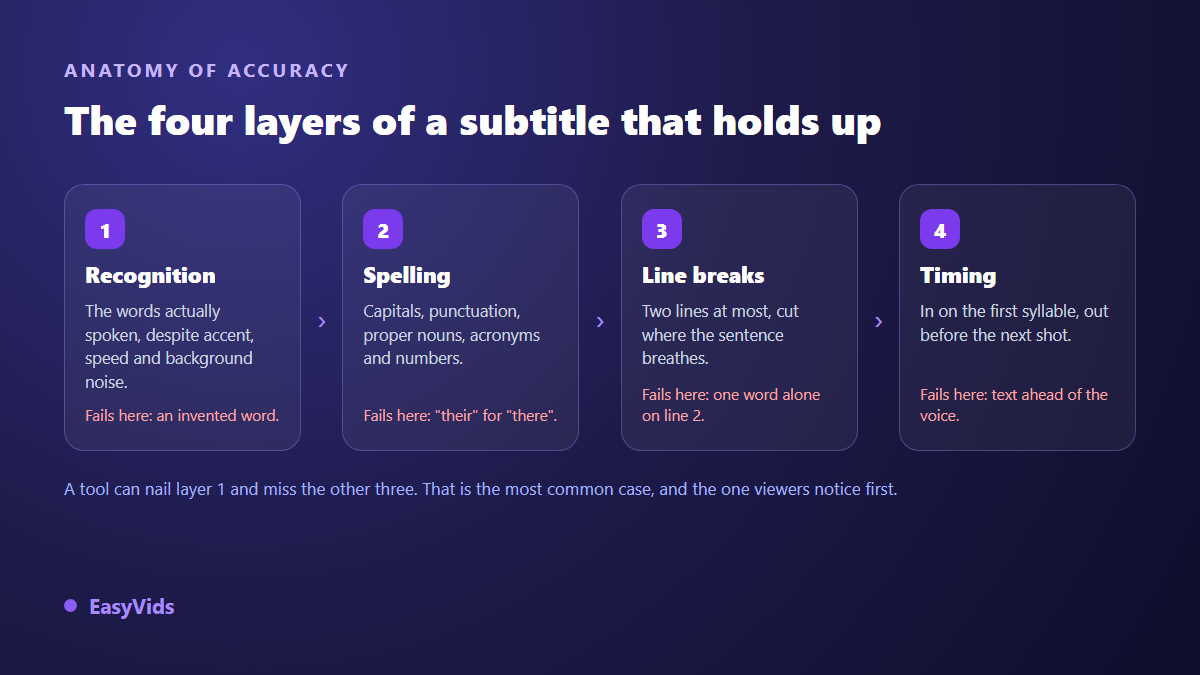
This is why two tools that hear the same words produce such different screens. One returns a six line block with no punctuation, technically correct and unreadable. The other returns short punctuated blocks, timed to the voice, with two words to fix. The second saves you time even when raw recognition is identical.
The traps a subtitle generator has to clear
Some difficulties have nothing to do with microphone quality. They belong to language itself, and they get worse the moment your video leaves everyday vocabulary. Knowing them lets you build a test clip that contains all of them, instead of trying a tool on an easy sentence that proves nothing.
- Homophones. Words the ear cannot separate. Only the meaning of the sentence decides, which asks the engine to understand and not merely to hear.
- Run together speech. Fast speakers glue words into a single sound, and the boundary has to be rebuilt rather than heard.
- Proper nouns. An unusual first name, a brand, a place name collapses into ordinary words. This is the most visible failure for your audience, because it usually lands on your product or your guest.
- Acronyms. Some are spelled out, some are said as one word. An engine that does not know yours writes phonetic syllables instead of capitals.
- Numbers and units. What you say in words usually belongs in digits, with the right spacing and the right time format. Those typographic rules cannot be heard, they have to be applied.
- Accented and non English terms. A name with diacritics can survive on screen and break on export when the file encoding is not preserved.
- Punctuation. Without commas and full stops a caption stays correct and becomes exhausting. A missing question mark changes how a whole line reads.
- Jargon. Technical vocabulary and product names come out as whatever the engine already knows, not as what you said.
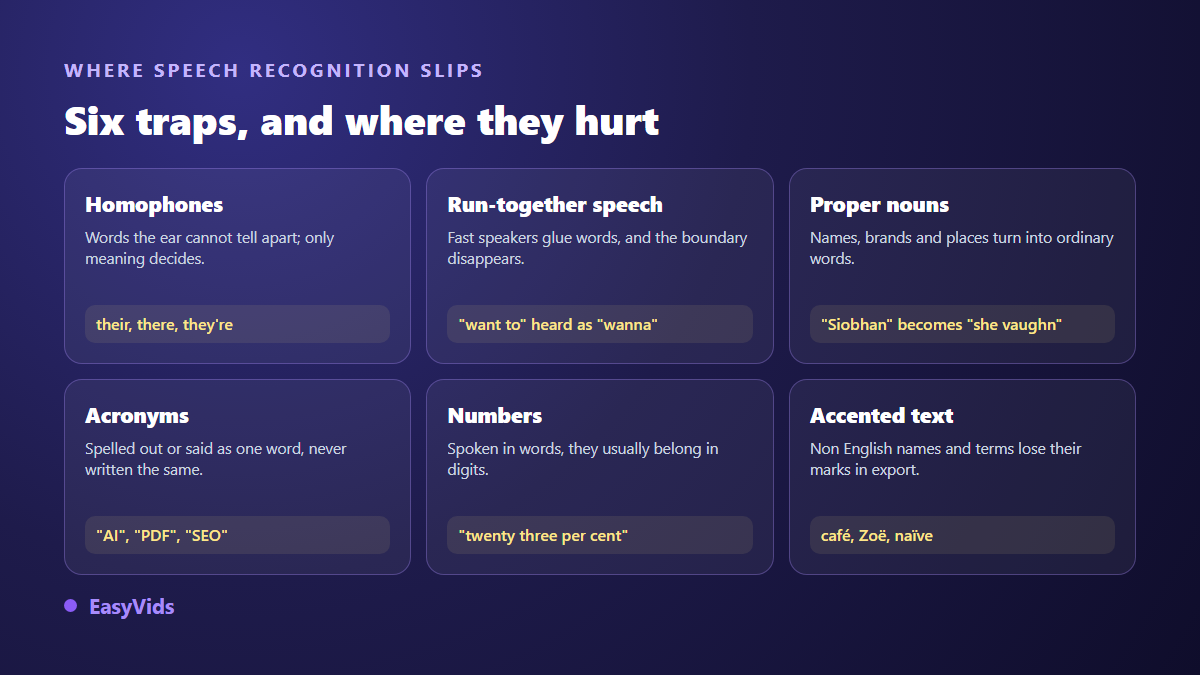
Across our own captioning work, the corrections that come back most often are almost never rare words. They are proper nouns, acronyms and numbers, which is to say everything the engine cannot guess until you tell it. That is good news, because all three can be handled in advance with a glossary.
Line breaks, the accuracy nobody measures
A caption can be correct word for word and still be bad. Five lines at once, a break between an article and its noun, one orphan word alone on the second line: reading turns into work. Professional rules have existed for decades. The timed text style guide Netflix publishes for its vendors caps captions at two lines and 42 characters per line, with a reading speed of 17 characters per second for adult programming.
Those numbers hold up for social video too, where text shares the screen with an interface. A serious generator shows you these settings and lets you change them: characters per line, number of lines, minimum duration on screen. A tool that exposes none of it will make you recut the text by hand, which cancels part of the time you saved. If you want to understand the file behind all this, our piece on the SRT file explains how it is built and how to fix it manually.
Timing, per word or per block
Two schools coexist. Classic captions hold a block of text for two to four seconds. Word by word animated captions light each word as it is spoken, which requires timestamps per word rather than per sentence. The second approach is far more demanding: a drift of two tenths of a second is invisible on a block and glaring when a word lights up before it is said.
So before choosing a tool for that style, check that it really produces per word timing rather than spreading a block proportionally. If you inherit captions that land at the wrong moment, the method for resyncing offset subtitles saves you from redoing the whole file.
The families of tools, and what each one gives you
Rather than a fixed ranking that ages in three months, it helps to think in categories. Each has its own logic and a structural limit that has nothing to do with the brand.
- Captions from the publishing platform. Generated by whoever hosts the video. Free and immediate, barely adjustable, and the text stays on the platform. According to the YouTube help centre, automatic captions can be edited from the channel's own editor.
- Dedicated transcription tools. Their business is text, not picture. Strong on long interviews, with speaker labels and several export formats, but you still have to carry the file back into your edit.
- Online video editors. Captioning is one function among many. The gain is staying in one place: transcribe, correct, style and export the finished video without switching tools.
- Speech models you run yourself. Free, with no file leaving your machine, but they ask for decent hardware and some technical comfort. Total control, no ergonomics.
- AI creation studios. When the video is built from a script, there is nothing to guess: the spoken text is already known, and accuracy becomes a timing problem instead of a recognition problem.
That last family is worth a pause, because it changes the nature of the problem. On EasyVids, a video generated from a script carries its own text: the captions have no words to recover, they reuse the exact sentence handed to the voice. Recognition cannot mangle a proper noun, because recognition never runs. For camera footage you go back through the four layers above, whatever tool you pick.
The five minute test you can run yourself
No generic ranking replaces a trial on your voice, your topic and your vocabulary. Here is a repeatable protocol that fits in five minutes and gives you a solid answer, valid for you, on the day you run it.
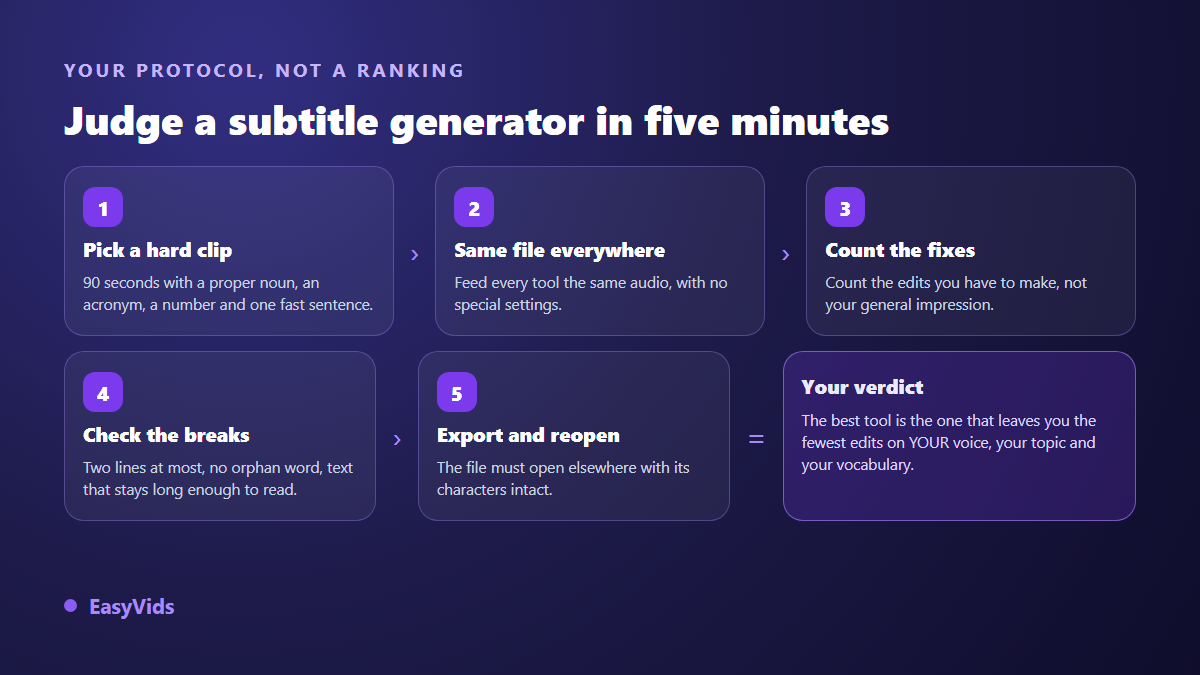
- Build a hard clip. Ninety seconds of your real voice, with a proper noun, an acronym, a number with a unit, one fast sentence and if possible a little background noise.
- Feed the same file everywhere. No special settings, no glossary, so the conditions match.
- Count edits, not impressions. Open the result and count how many fixes stand between you and publishing. That is the only measure that converts into real time.
- Look at the formatting. Two lines at most, no orphan word, blocks that stay long enough to read, punctuation present.
- Export, then reopen elsewhere. The file must open in another tool with its characters and timings intact. A tool that will not give your file back is locking you in.
Run this again roughly every six months. Recognition engines change often, and a ranking published a year ago describes nothing today. Your reference clip stays comparable over time, which makes it a far better instrument than any comparison article.
The glossary is the highest paying setting
Nearly every serious tool accepts a list of preferred words: names, brands, the jargon of your field, your guests. It is the setting that buys the most accuracy for the least effort, because it targets the exact family of errors that shows up most. Five minutes of preparation often beats changing tools.
The same logic applies beyond captions. Whenever you pull text out of a video for an article, a description or chapter markers, that word list improves the result. If that is your main need, the method to turn a video into text follows the same path with different formatting demands.
What caps accuracy before the tool does
A generator cannot recognise what it cannot hear. Background music at the level of the voice, two people talking over each other, a microphone placed too far away, audio compressed to death: every engine drops in those conditions, and the gap between them stops mattering. Fixing the recording pays more than switching tools.
Remember what captions are for. Success criterion 1.2.2 of the WCAG 2.2 accessibility guidelines, published by the W3C, requires captions for prerecorded audio at level A, the most basic one. Rough captions tick the box and miss the point: for a deaf or hard of hearing viewer, a mangled name or a wrong homophone is not a detail, it is lost information.
Frequently asked questions
Which subtitle generator is the most accurate?
No tool holds that title in the abstract, and an honest answer depends on your voice, your vocabulary and your recording quality. The gaps between good engines have narrowed a lot on recognition and moved to writing, punctuation and segmentation. The five minute protocol above gives you an answer that is true for your videos, which no general ranking can do.
Are automatic captions good enough without proofreading?
Not for publication. Even with an excellent engine there is almost always a proper noun, an acronym or a number to fix. Plan a quick pass, guided by reading the text out loud: the errors that remain hit your ears before they hit your eyes.
Burned in captions or a separate file?
A separate file can be corrected, translated and switched off, which makes it the better default wherever the platform supports it. Burned in captions are necessary where no file is accepted, or when the styling is part of your visual identity. Many creators keep both: the file for archiving and translation, the burned in version for social posts.
How long does it take to caption a ten minute video?
Automatic transcription usually takes less time than watching the video. Proofreading is the human part: budget roughly a third of the running time the first time, and less afterwards, once your glossary is in place and you know your tool's recurring mistakes.
Does a subtitle generator translate the video too?
Many tools offer translation from the transcript, but these are two separate operations. Translation quality depends first on the source text: a transcription error propagates and becomes invisible in the target language. Always fix the original before translating anything.
Keep the hierarchy in mind: fix your audio, prepare your glossary, then judge tools on how many corrections they leave you, never on an advertised score. And if your videos start from a script rather than a shoot, the problem disappears at the root, because the spoken text is already written and doubles as the caption. That is how the EasyVids studio works, and you can try it on a first video in minutes: create your account and run your own test clip through it.