You have a story. A bedtime tale you improvise, a short story in a drawer, a chapter of a novel in progress, a family memory nobody ever filmed. Turning it into a film used to require drawing skills, a camera crew or an animation budget. Story to video AI removes that barrier. What it does not remove is the directing work between the page and the screen, and that is where most attempts stall.
The obstacle is almost never image quality. It comes down to two things. Prose written to be read does not narrate the way it reads. And a character generated scene after scene changes face at every shot. Both are solved with method, not with a better model. This guide follows the whole path, from a text file to a finished edit. If your raw material is any text rather than a built narrative, our guide to turning text into video covers the general case. And when the family memory already exists as photos and short clips, the other route applies, the one that builds a keepsake film out of your own pictures.
The short answer
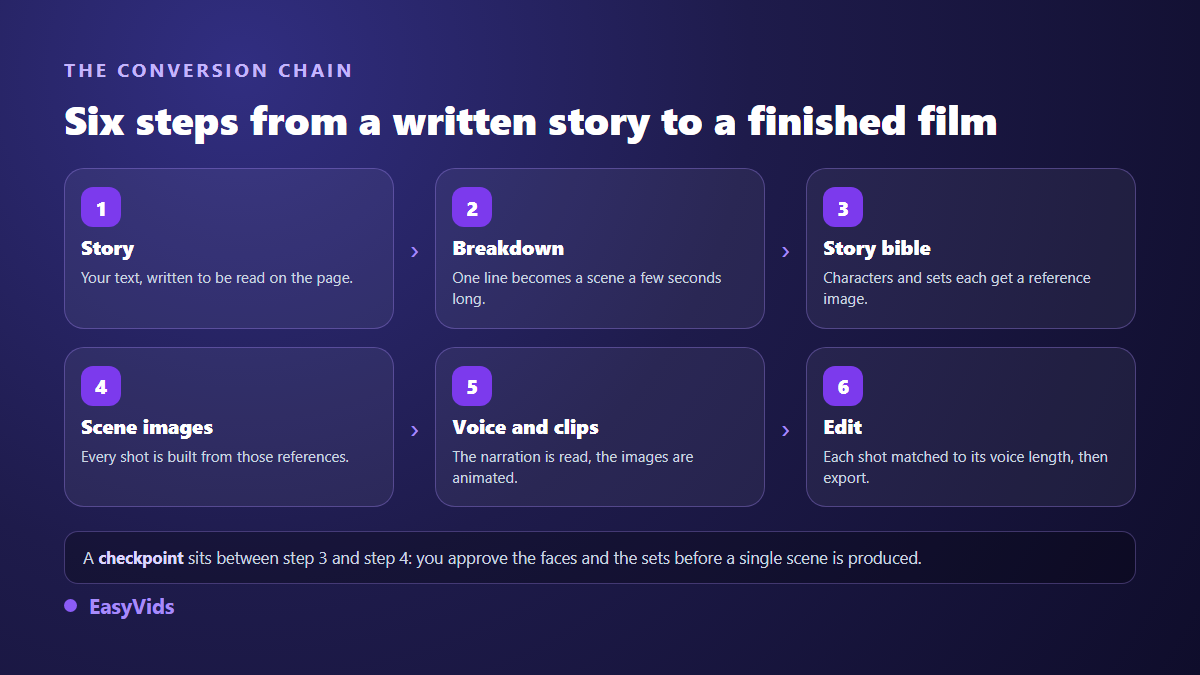
To turn a story into video, split the narrative into short segments (one line, one scene, six to ten seconds of narration), have a visual reference sheet built for every character and every recurring location, then generate each shot from those same references. The voice over then sets the exact length of each shot, and the edit assembles everything. Order is what matters: without stable references fixed before the first scene, your heroine wears a different face by the third shot.
A written story is not a film yet
A literary text carries things no image can show: what a character thinks, what they do not know, what the narrator knows before they do. It also allows long sentences, asides, clauses stacked on clauses. On the page, all of that can be reread. In the ear, the same sentence is lost by the third comma.
Conversion therefore means three separations. What remains of the narrative becomes the voice over. What becomes visible becomes a shot. What is neither, the narrator's asides, the callbacks, the enjoyable digressions, goes. Ten pages of prose almost never yield ten pages of narration: they yield a shorter, sharper text where every sentence calls for an image.
Prepare the text: what to cut, what to keep
This pass takes about twenty minutes and decides half the result. It happens in a plain text editor, before you open any generation tool.
- Dialogue tags ("she said", "the old man replied"): the voice reads them out loud and it sounds like dictation. Keep the line, drop the tag.
- Sentences with more than two clauses: cut them in two. A full stop beats a comma in a text meant to be heard.
- Long interior monologue: turn it into one sentence the narrator owns, or into a visible action.
- Half a paragraph of scenery: that belongs in the visual prompt, not in the narration.
- First names repeated every other sentence: repetition is far more audible than it is visible.
- Acronyms and abbreviations: write them the way they are pronounced, a synthetic voice reads what it sees.
Keep one rule in mind through this pass: every sentence you keep has to fit inside a shot. If you cannot picture the image that goes with it, the sentence is speaking to a reader, not to a viewer. It leaves, or it gets rewritten.
Split the story into scenes
The split sets the rhythm of the film. One line becomes a segment, a segment becomes a scene, a scene becomes a shot with its own voice. In the EasyVids Director, you paste the prepared story and one button cuts the text to a target length per scene, in characters or in seconds.
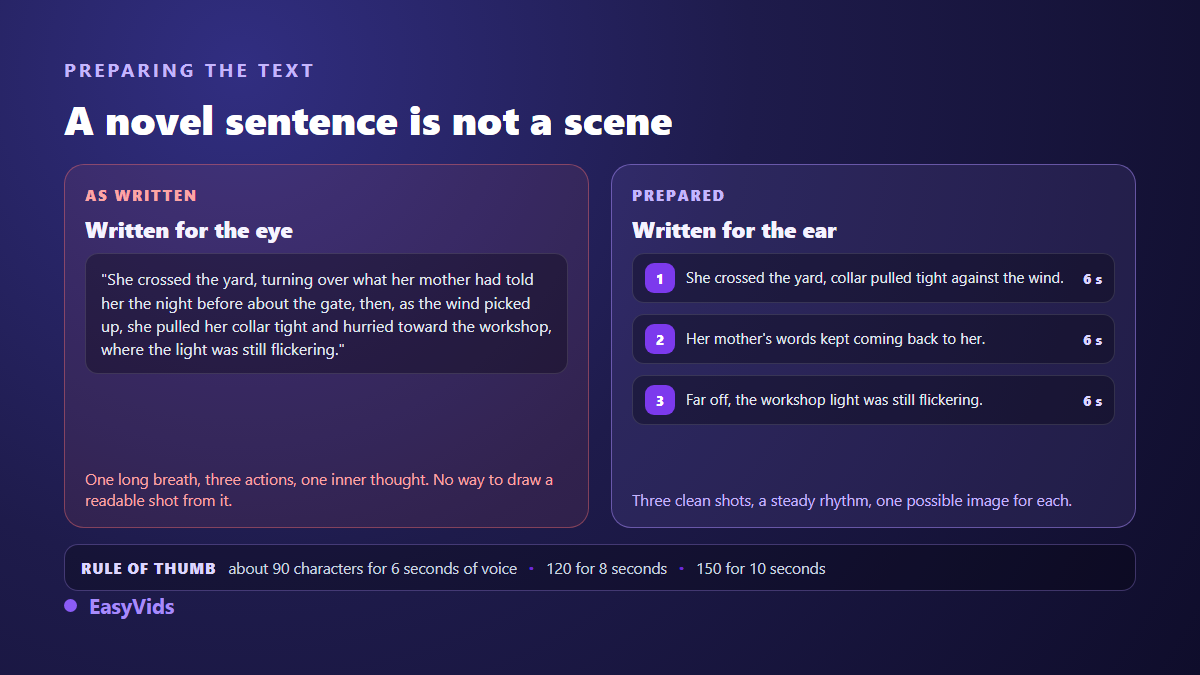
Our French benchmarks, which hold closely for English too: around 90 characters for six seconds of voice over, 120 for eight seconds, 150 for ten. Those figures are shown scene by scene while you prepare, and a warning flags segments running past fifteen seconds. A three minute story usually lands between twenty five and thirty five scenes.
Two manual adjustments are worth your time afterwards. Turning points deserve a scene of their own, however short, because the viewer needs an image that marks the shift. Conversely, two sentences describing the same instant in the same place can stay together, otherwise you get two near identical shots. On an ambitious project this split becomes the frame of the whole film, and our method for building a short film scene by scene goes further on narrative construction.
The bible: what keeps the same character in every scene
Before a single image is produced, the Director reads the whole story and derives a bible from it: the visual world, the cast, the recurring locations, and the main phases of the plot. Every character and every location gets a short stable identifier, then one reference image is generated for it, once.
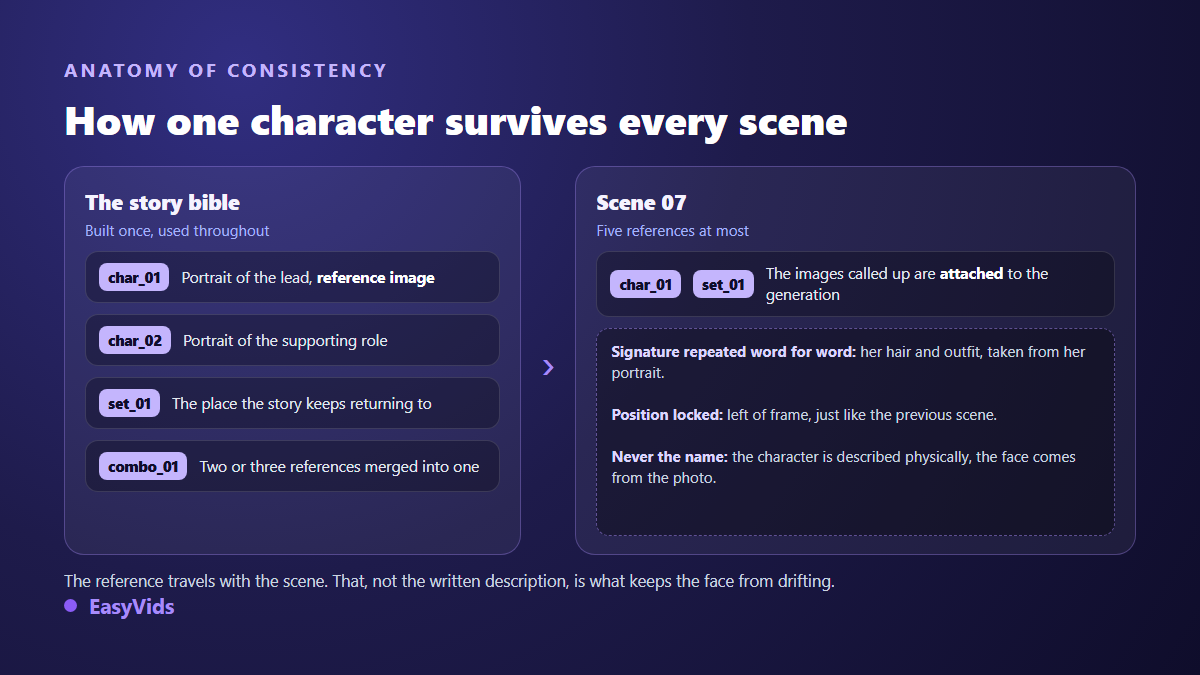
Each scene then cites the identifiers it needs, five at most. When the shot is generated, the matching reference images travel with the request: the face comes from the photo, not from a description. When a scene would need too many references, two or three of them are merged into one combined image that counts as a single reference.
The detail that changes everything sits in the prompts. The character's name never appears, because a proper noun sends the model somewhere else. Instead, their physical signature is repeated word for word from scene to scene: hair, outfit, colours. The full mechanism is covered in our guide to keeping a consistent character across videos.
The checkpoint before the first scene
Between the bible and scene production, generation pauses and shows you your characters and locations one by one. This is the only moment when fixing costs almost nothing: a heroine who looks too old, a location that does not match the village in your story, a supporting role dressed wrong. You regenerate the offending item, or replace the reference with your own photo, then approve.
Skipping that step to save five minutes is the most expensive mistake on the path. A rough bible propagates into the thirty scenes that follow, and the fix amounts to starting over. Across our productions, the projects that finish without a major redo are almost always the ones whose bible was corrected before approval.
Dialogue: performed on screen or read by the narrator
Stories contain lines, and you have two ways to handle them. Either the narrator reads them, audiobook style: the safest and fastest choice, and the right one for most tales. Or the characters speak them on screen, and each one can receive its own voice through the voice casting panel of the production.
The second option comes with a concrete constraint. A performed line has to fit inside a six to eight second clip, roughly fifteen words. A longer exchange is split across consecutive scenes, same place, same positions. That is exactly what cinema does with shot reverse shot, and it simply has to be planned at the splitting stage.
Continuity, what holds the film together shot to shot
Face consistency is not enough. Two consecutive scenes in the same place also have to keep the characters on the same side of the frame. If the heroine sits on the left in shot seven and on the right in shot eight, the match breaks, and viewers feel it even when they cannot name what bothers them. That is the 180 degree rule every editor knows, and it applies unchanged to a generated film.
In practice, each character's position is fixed in the first scene of a sequence and repeated word for word in the following ones, until the story calls for a move. Lighting follows the same logic: a night scene that turns back into broad daylight for no reason ruins continuity as surely as a changing face. When a character drifts anyway, our fixes for a face that changes between scenes give the procedure.
From storyboard to finished film
Two outputs are possible. Images only mode produces a consistent storyboard, one image per scene, faster and cheaper: with the voice over on top it is already an illustrated film, and it suits a tale perfectly. Video mode then animates each image into a short clip, driven by the motion prompt written for that scene. That prompt decides everything at this stage, and our prompt examples for animating an image show how to get the intended gesture rather than generic movement.
Either way, the editing workshop assembles the film with every shot locked to the real length of its narration. You decide what happens when a clip is too short or too long: loop it, slow it down without ever speeding it up, or clamp it to the voice. Automatic animations, a gentle drift on stills and transitions between scenes, switch on with one click. Aspect ratio, though, is decided before generating and never after: a film composed in landscape then cropped to vertical loses half its frame, as our reference on video formats per platform explains.
Mistakes that give away a badly converted story
- Pasting raw prose: the voice over recites dialogue tags and endless scenery.
- Skipping bible approval, then discovering the problem thirty scenes later.
- Redescribing the character in every prompt, with different words each time: the leading cause of a drifting face.
- Switching visual worlds halfway through because one style looks nicer on a single scene.
- Leaving shots longer than fifteen seconds on a still image: viewers leave before the sentence ends.
- Forgetting captions, when a large share of the audience watches with the sound off.
- Publishing an adaptation of a text you did not write without permission.
Frequently asked questions
Can a whole novel be turned into video?
Not in one piece, and it would not serve the book. A novel splits into chapters, and each chapter becomes an episode of a few minutes with its own run of scenes. The bible stays the same from episode to episode, which is what keeps the hero of chapter one recognisable in chapter twelve.
Does the story need rewriting before conversion?
Rewriting, no. Lightening, yes. Remove dialogue tags, cut long sentences, move visual description out of the narration. The substance does not move, only its spoken form. Expect around twenty minutes of editing for a text worth three minutes of voice over.
How many scenes for a five minute story?
Between forty and fifty, aiming at six to ten seconds of narration each. It is not an absolute rule: a contemplative passage carries longer shots, an action beat calls for shorter ones. The per scene duration gauge shown during preparation stops you discovering the imbalance at the edit.
Can I adapt a story I did not write?
Not without permission while it remains protected. The Berne Convention, which nearly every country has joined, protects a literary work from the moment it is created, with no registration formality. Traditional tales and public domain texts can be adapted freely, but the term of protection varies by country: check the one that applies to you before publishing.
Do I have to disclose that the film was AI generated?
Yes, in several situations. The European Union's artificial intelligence regulation requires, in its article 50, that AI generated or manipulated content be marked as such, and those transparency obligations have applied since 2 August 2026. Separately, the YouTube help centre asks creators to declare at upload any video that realistically depicts synthetic people or events. A visibly drawn tale raises fewer questions than a photorealistic reconstruction.
A story you have already written is the best raw material there is: the hard part, invention, is behind you. What remains is preparing it for the ear, cutting it into shots, and giving a stable face to whoever walks through it. Creating an account opens the Director: start with the first pages of your story, look at the bible it derives, then decide whether to commit the whole film.