The date is set, the venue is booked, and the least rewarding part is still ahead: telling everyone and getting an answer back. A written message drowns in a group chat. A photo of a paper card gets one second of attention. A video invitation does three jobs at once: it carries the information, it sets the tone of the evening, and it forwards itself from one phone to the next.
The trap is not the look of the edit, it is legibility. An overloaded animated invite becomes useless: the date flashes by in two seconds, the address sits small on a bright background, and nobody knows whether to reply or to whom. This guide works backwards. Pick the channel first, write the five facts second, decorate last. The building blocks are the same ones behind a personalised birthday video: one animated shot, on screen text, a track, an export.
The short answer
A good video invitation runs fifteen to thirty seconds, reads with the sound off, and holds four beats: a hook, the event, the practical details, the reply you expect. Generate an opening shot from a sentence or from one of your own photos, add the text in the editor, drop in an instrumental track, then export in the format of the channel you will send it through. Allow an hour the first time, twenty minutes after that.
An invitation is not an animated announcement
The difference lies in what you ask of the viewer. An announcement informs; an invitation asks for an action: come, and say so before a deadline. Every shot that does not help someone understand where, when and how to reply is a shot to cut. That is also what separates an invite from a memory montage, which follows the opposite rules and belongs with a photo slideshow set to music.
Second difference, often missed: an invitation travels. It gets forwarded to a partner, a cousin, a colleague who never saw your original message. So it has to stand alone. No fact can live only in the caption, because the caption does not follow the file when someone forwards it.
The five facts that must survive a distracted viewing
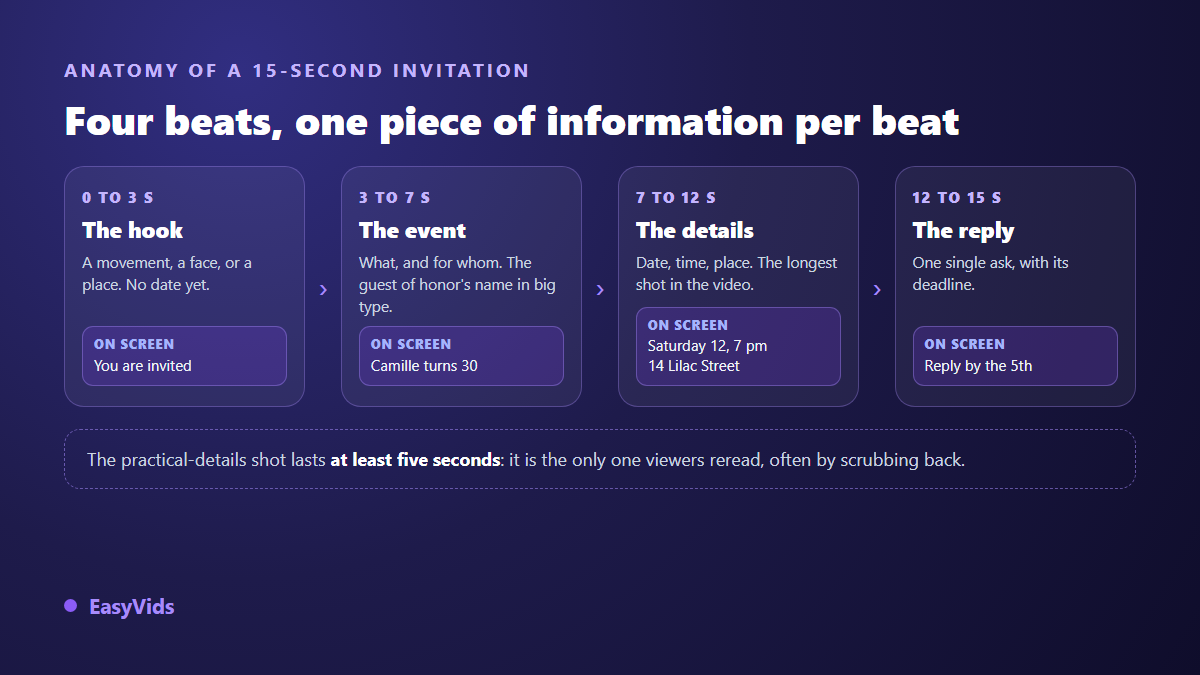
Your guest watches once, often while walking, usually with the sound off. Five facts have to stick, spread across the four beats of the edit, one idea per shot. Two pieces of information shown at the same time cancel each other out.
- Who is inviting, and in what capacity: the hosts' names, or the organisation.
- What it is: birthday, wedding, opening, farewell party. One word does it.
- When: day of the week, date, start time. The weekday alone prevents half the misunderstandings.
- Where: the full address, not just the venue name. A room name is not always findable on a map.
- What you expect: reply by a given date, to a given number. Without that line, you will be guessing headcount.
Two optional mentions earn their place when they apply: the dress code, and whether the invitation covers one person or two. They spare you the last minute clarification messages.
Step 1: pick the channel before you pick the images
The channel dictates the aspect ratio, the length and the size of the text. An invite meant for a status plays full screen and vertical, muted, for fifteen seconds. The same invite shown on a screen in a lobby is read from a distance, in landscape, on a loop. Deciding this first spares you from cropping a finished edit, which always eats a useful edge. Sizes and ratios per platform are gathered in our video format reference.
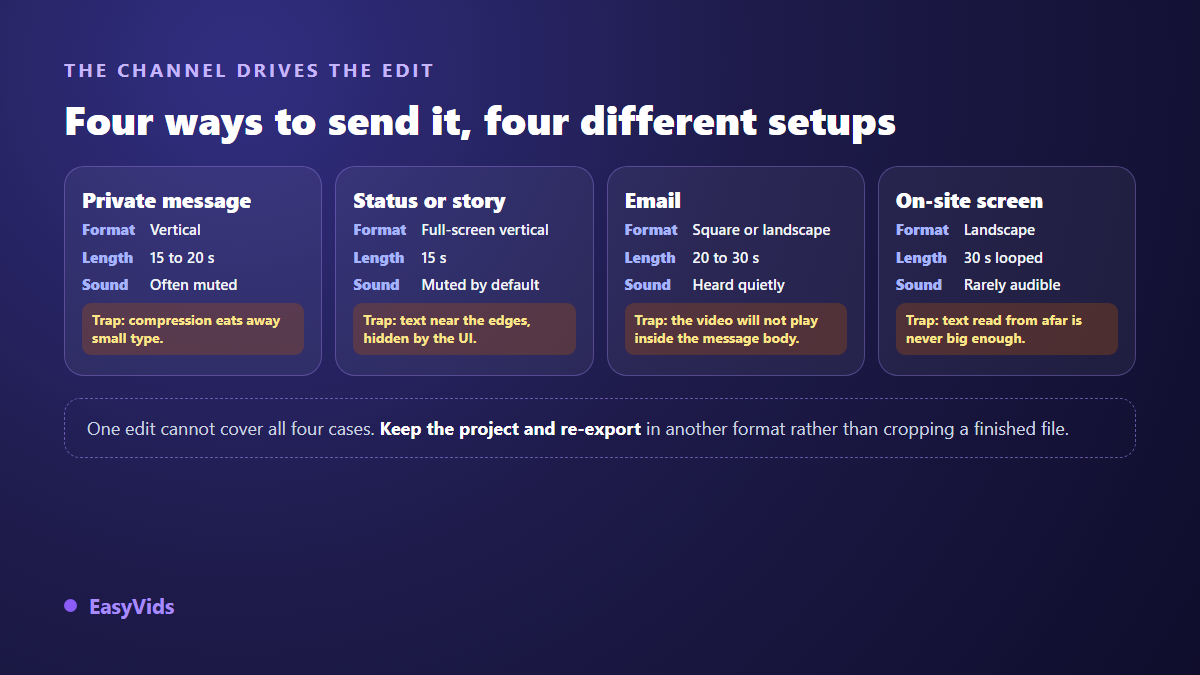
If you need several channels, keep the project open and export again in another ratio rather than trimming the finished file. Moving three text blocks takes two minutes; rescuing a wrecked framing takes thirty.
Step 2: the opening shot, generated or taken from your photos
The first three seconds decide whether the rest gets watched. Two routes work. The first generates a shot from a description: in the video generator you describe the movement, the light and the mood, choose vertical, square or landscape, set the length and resolution, and get a clip ready for the timeline. A table lighting up, balloons rising, a beach at sunset. The image announces the kind of party, it does not tell a story.
The second route usually carries more feeling: start from your own pictures. The generator accepts up to four reference images and sets a real photo in motion, the couple or the venue itself. Our guide to seven ways to animate a photo covers the moves that hold and the ones that distort faces. One caution applies to both routes: never rely on the model to write the date or the address inside the image. Generated text stays unreliable. Facts go on as overlays during the edit, where they are sharp and editable.
Step 3: on screen text, the part most people get wrong
An invitation is read first and heard second. Most feeds start videos muted, and many guests will open yours on a commute or in a waiting room. Six rules are enough to make the text land.
- One fact per shot, never two lines competing for attention.
- Heavy, large type: on a phone held at arm's length, thin lettering disappears.
- Strong contrast, light text on a dark area or the reverse, with a slight scrim behind the text when the image is busy.
- A safe margin on all four edges: status interfaces cover the top and bottom of the screen.
- At least five seconds on the date and address shot, two or three on the others.
- No abbreviations in the address, and the weekday in front of the date.
One test settles it. Show the video once to someone who knows nothing about the event, then ask for the address and the date. If they hesitate, the shot is too fast or the text too small.
Step 4: music sets the tone before the first image
Music fixes the mood faster than any visual. A fast tempo says party, a slow piano says ceremony, brass says family celebration. The music studio composes a track on demand from an occasion, a genre, a mood and a tempo, and offers an instrumental only option, which is the right call here: sung lyrics fight with your on screen text. For a birthday, a song naming the guest of honour can become the gift itself, and the personalised birthday song method applies as it stands.
Two editing choices matter more than the track itself. Cut your shots on the strong beats: the edit instantly looks more considered, at no extra cost. And keep the music well under any voice, around a fifth of its volume, or the mix buries the one sentence you wanted heard.
Step 5: voice over, one sentence at most
A voice changes what the object is: an animated card becomes a person inviting you. One sentence is enough, either the opening or the closing line. The studio offers a wide range of natural voices and a free form delivery instruction such as read it like someone smiling. Record yourself in a room without echo if you prefer your real voice, which gives the invite a personal signature. One rule stands: the video must still make sense muted. The voice is a bonus, never the carrier of the facts.
Step 6: the edit, the export and the message around it
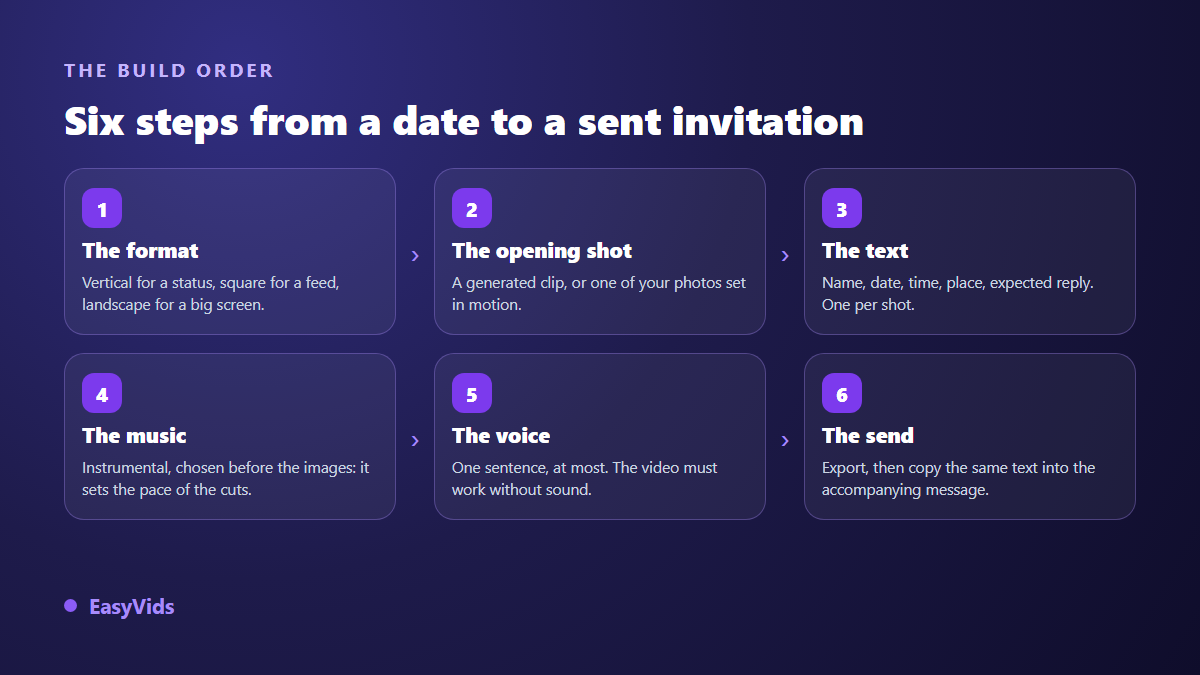
Assembly happens in the browser, with nothing to install. Drop in the opening clip, any photos, the music, then add the text shot by shot on the timeline. Transitions, text animations and a sound library sit in the same place, and a short musical accent on the moment the date appears pulls the eye at the right time. If you have never used a timeline, our guide to online video editing covers the basic moves.
Then comes sending, where many invitations lose their edge. Repeat the date, the address and the reply number in plain text in the message around the video. An address shown inside an image cannot be copied, cannot open in a maps app, and cannot be found again three weeks later by search. The video creates the desire, the text makes action possible. One quality note: chat apps recompress videos sent in a conversation, while a file attached as a document arrives intact where the app allows it.
Three events, three tones
A birthday invite can afford humour and pace: the name very large, an animated shot from a funny photo, a track that makes people move, a short running time. For a child's party, add the end time. Parents look for it before anything else.
For a corporate evening, an opening or a retirement send off, tighten everything. Square or landscape, sober type, no effect overload, and an explicit line about what is planned: drinks, speeches, a presentation. Guests at a work event decide on the programme, not on the mood. A retirement also calls for a second film, the one played on the day in front of colleagues, and our method for a retirement memory montage explains how to prepare it without mobilising the whole team.
A wedding needs two separate objects. The date announcement goes out far ahead, lasts a few seconds and sometimes carries only the names, the date and a city. The full invitation lands much later, longer, with the exact venue, the running order of the day and the reply details. Merging them gives you a video that informs badly and arrives at the wrong moment.
Getting replies, not just views
An invitation that collects emoji but no answers has failed. Three settings change that. Ask for a single action, phrased as an instruction. Give it a deadline, shown on screen and repeated in the message. Name the person to reply to, with a number: a reply addressed to someone arrives, a reply addressed to a group evaporates.
Plan a follow up about a week after the deadline for the people who stayed silent. A ten second vertical cut that simply repeats the date and the place does the job, and it takes minutes because the project already exists: export a shorter version.
Rights and permissions, two minutes well spent
As long as the invitation stays in a private circle, by message or email, the question barely arises. It does arise the moment you post it on a public account. On music, a well known commercial track triggers an automatic claim: according to the YouTube help centre, Content ID compares every upload against reference files supplied by rights holders. A track composed for you avoids the subject, and what you may publish with AI generated music is covered separately.
On images, treat it like any group photo. In France, article 9 of the Civil Code grounds each person's right over their own image, and publishing a picture where someone is recognisable requires their agreement; most countries apply a comparable principle. Ask before you post, and be stricter with photos of children, where both parents' agreement is the rule.
Frequently asked questions
How long should a video invitation be?
Fifteen seconds for a status or a story, twenty to thirty for a message or an email, thirty on a loop for a screen at the venue. Beyond that the ending goes unwatched, and the ending is where your call to reply sits.
Do I need editing skills to make a video invitation?
No. Dropping a clip, writing three text blocks and adding a track on a timeline takes one sitting to learn. Automatic assembly already produces a shareable file; the editor only serves to fine tune durations and text placement.
Can I make a video invitation on a phone?
Yes for the opening shot, the music and the voice, which all run from a mobile browser since the computing happens on servers. Precise text placement stays more comfortable on a large screen, if only to check the safe margins.
How do I send a video invitation without losing quality?
Export in the exact ratio of the target channel, then send the file as an attachment rather than inside the chat stream where the app allows it: automatic compression hurts small lettering first. Always test the result on your own phone before the wider send.
How far ahead should it go out?
Convention puts a wedding date announcement several months ahead and the full invitation a few weeks before the day. For a private party or a company evening, two to three weeks give people time to plan without the date slipping their mind.
A good video invitation needs no equipment and no editing talent. It needs three decisions: the channel you will send it through, the five facts you put on screen, and the single action you ask for. The rest is one evening of work. Plans are listed on the pricing page, and creating an account opens the generator, the music studio and the editor in one place, inside the EasyVids studio.