You go looking for the best AI image generator and you land on a ranking. Eleven tools, scores out of ten, a winner at the top. Three months later half of those tools run on a different engine, two have merged, and the winner still cannot spell three words on a shop sign. The ranking aged. Your need did not.
This page works the other way around. No podium, no invented score: the criteria that really separate a good generator from a weak one, the families of tools hiding behind the brand names, and a five test method you run yourself in fifteen minutes. If you want the mechanics first, our complete guide to AI image generation covers how these engines build a picture. This page is about choosing.
The short answer
The best AI image generator is the one that succeeds on your use case, not the one that wins a general comparison. Seven criteria decide it: prompt accuracy, hands and faces, readable text inside the image, keeping one character consistent across images, delivering the format you asked for, editing by instruction, and commercial usage rights. Run the same five tests on two or three candidates, line the results up side by side, and the decision takes one sitting.
Why there is no podium on this page
A ranking of image tools lasts a few months. Engines are updated without notice, one version fixes hands and breaks typography, another changes how aspect ratios are produced. A test published in January describes a tool that no longer exists in June, under the same name and behind the same home page.
There is a more awkward point. Many different interfaces call the same engine behind the scenes, under licence. Two services that look nothing alike on their sales pages can return the same picture for the same prompt. What separates them is not raw model quality but everything around it: format control, editing, character consistency, terms of use. Those are criteria, not scores.
The seven criteria that decide
These seven points show up in every disappointed review. They take minutes to test, they do not depend on a trend, and they stay valid when the names change.
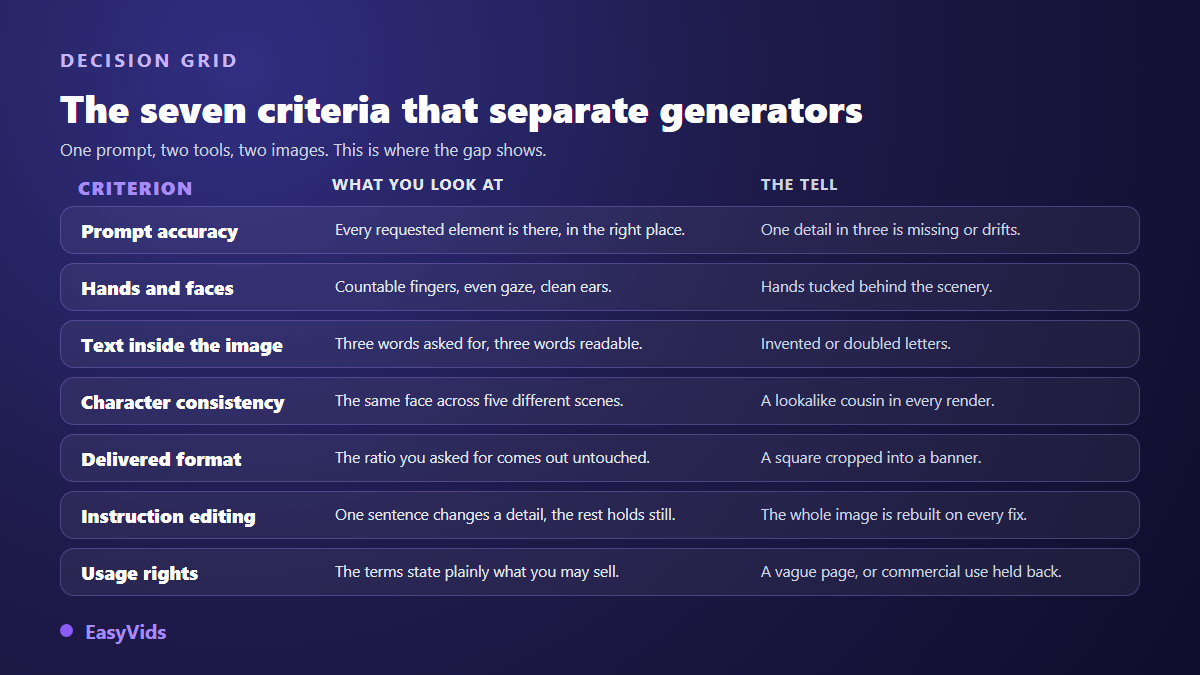
- Prompt accuracy. Every requested element appears, in the right place, with nothing invented on top.
- Hands and faces. Countable fingers, even gaze, clean ears: the detail that gives a sloppy render away.
- Text inside the image. Three words requested, three words readable and correctly spelled.
- Character consistency. The same face across five different scenes, not five people who merely look alike.
- Delivered format. The ratio you asked for comes out untouched, with breathing room around the subject.
- Editing by instruction. One sentence changes one detail and leaves the rest alone, instead of rebuilding everything.
- Usage rights. The terms state plainly what you may publish and sell, free plans included.
No tool wins all seven. So rank them by what you actually produce. For a thumbnail, readable text beats everything else. For a store, accuracy and format come first. For an illustrated book or a series of posts, character consistency becomes criterion number one.
Prompt accuracy: the criterion that drives the rest
Accuracy is the tool putting into the image what you asked for, and nothing else. Write a prompt that forces three precise, checkable elements: a woman in a yellow jacket, seated on the left of the frame, a red cup on the table. Then count. Three out of three, two, one. Repeat four times and the score settles fast. Part of the failure comes from the prompt rather than the engine, so rewrite yours in a shape that works, using our copy and paste image prompt examples, then run the test again.
Hands, faces and anatomy
An image can look great at a glance and fall apart on inspection. Hands remain the historic weak spot: extra fingers, melted knuckles, a reversed wrist. Faces fail more quietly, with a slight asymmetry of eyes or ears that feels wrong without being nameable. The test is one shot: a close portrait, hands open and visible, eyes toward the lens. Be suspicious of renders where hands hide behind an object, since that is often the engine dodging its own weakness, as explained in our piece on why AI gets hands wrong.
Text inside the image
Ask for a shop sign carrying three specific words. Within seconds you know where the tool stands. Some return clean, correctly spelled type, others produce invented, doubled or melted letters. This single criterion decides several jobs on its own: thumbnails, posters, promo visuals, covers. A misspelled word in a published image costs more than approximate lighting. If your work relies on burned in text, keep the option of laying type over the image in an editor, as described in our guide to text in an AI image.
The same character across images
This is what separates a toy from a working tool, and rankings serve it badly because it never shows on a single image. Generate five scenes with the same person: at home, in the street, at the office, in profile, full length. If you get five cousins who vaguely resemble each other, the tool will not carry a series. Three mechanisms exist today: a very detailed written description, a reference image supplied on every generation, and a character saved once then called by name. Only the third holds over a long series, as covered in our guide to keeping the same character.
The format you ask for is the format you get
A small detail that costs hours. You ask for a vertical story frame and receive a cropped square, or a vertical whose subject is cut off at the chin. Two different faults hide there: the engine does not natively produce that ratio, or it does but frames badly, pushing the subject against the edges. Check the list of ratios actually produced rather than the automatic crop applied afterwards, and check the room left around the subject. A cover or thumbnail image needs air at the top and sides, or the text you add later will have nowhere to sit.
Editing by instruction instead of regenerating
You have an image that is almost right. One object to remove, one colour to change, a background to lighten. A good tool takes the instruction in plain language and touches only what you aimed at. A weak one launches a full regeneration and you lose the image you wanted to keep. Test it: keep a good render, ask for one object to change colour, then compare the two versions. If the face moved or the scenery reorganised itself, that is not editing. This weighs heavily in real work, because serious production spends more time fixing than creating.
Usage rights, the question people ask too late
Two separate questions get mixed up constantly. First, may you use the image commercially? That answer sits in the terms of use of the service, it varies from tool to tool, and some free plans hold commercial use back. Read that page before you produce, not after.
Second, is the image protected? The United States Copyright Office report on copyright and artificial intelligence, in its part on copyrightability published in January 2025, holds that material produced by a machine without sufficient human authorship is not protectable, while the creative contribution made by a person still is. Rules differ by country, and permitted commercial use does not mean a protected image. The detail, resale included, sits in our guide to AI images and copyright. Look too at what the tool writes into the file: the C2PA standard defines a content provenance metadata format that several publishers now attach to their images.
Five families of tools
Behind the label image generator, five families do different jobs. Picking the right family saves more time than picking the right name inside one.
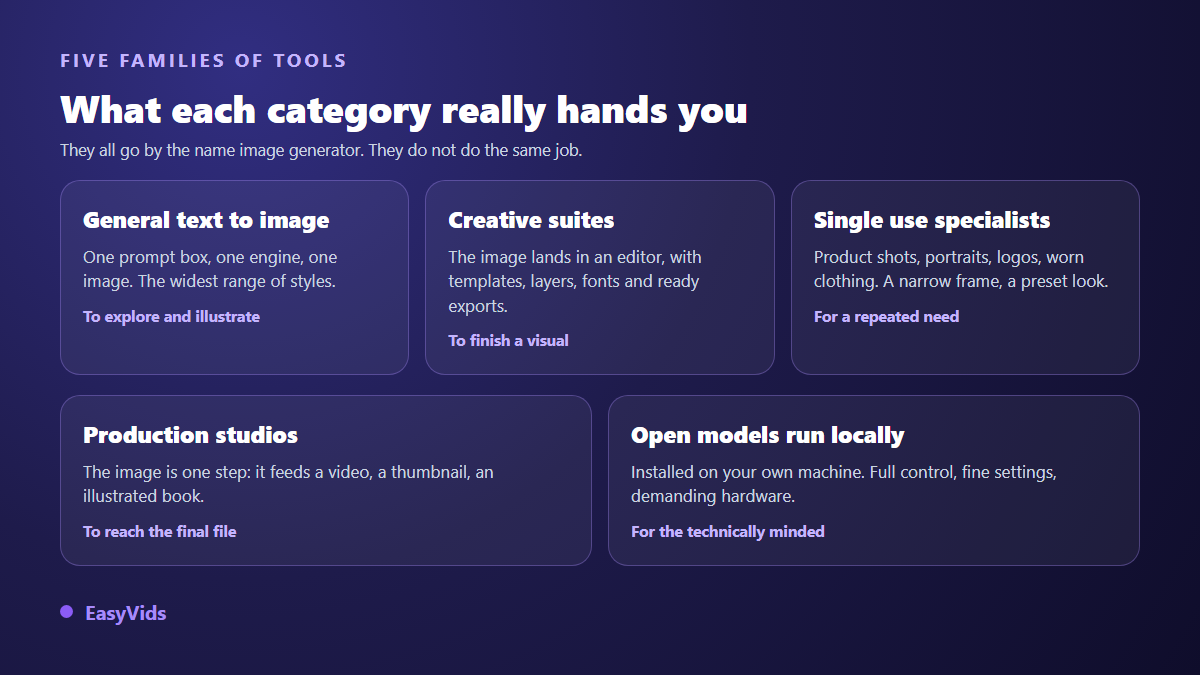
General text to image tools offer the widest range of styles and serve exploration. Creative suites deliver the image inside an editor, with layers, fonts and export templates, which matters when the visual has to be finished rather than merely generated. Single use specialists, for product shots, portraits, logos or worn clothing, impose a narrow frame and return a preset, reliable look.
Two less obvious families remain. Production studios treat the image as one step: it feeds a video, a thumbnail, an illustrated book, and you leave with the finished file instead of a picture to place somewhere. Open models run on your own machine give the finest control, with no service imposed usage cap, at the cost of a graphics card and an afternoon of setup.
How to judge for yourself in five tests
Here is the method. It takes fifteen minutes per tool, it produces comparable images, and it avoids the classic mistake of writing a different prompt on every service you try. Copy the same wording everywhere, in the same order.
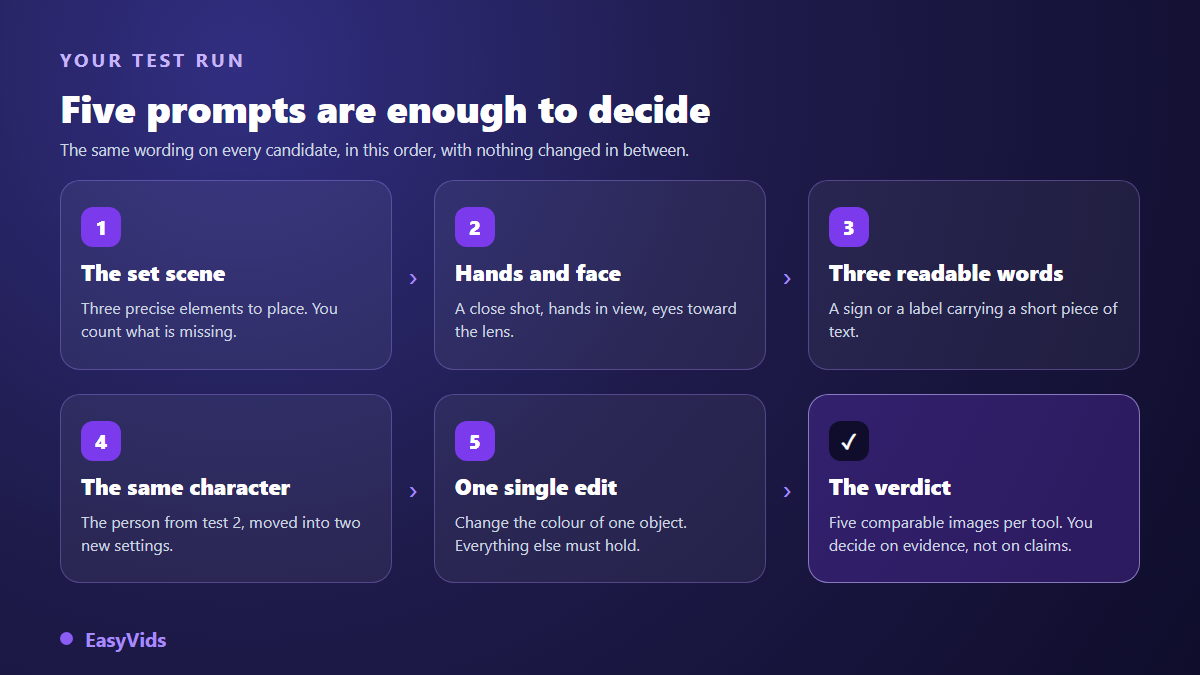
- Test 1, the set scene. A prompt with three precise elements to place. You count the ones that are missing.
- Test 2, hands and face. A close portrait, hands open and visible, eyes toward the lens.
- Test 3, three readable words. A sign or label carrying a short piece of text that you choose.
- Test 4, the same character. The person from test 2, moved into two new settings, description unchanged.
- Test 5, one single edit. Take a good render and ask for one object to change colour, nothing else.
Adapt test 1 to your trade rather than copying a generic example: a product on a neutral background if you sell, a worn garment if you run a clothing shop, as in our virtual model guide, an author portrait if you publish. A tool that fails on your real case will not make up for it with a nice landscape.
False criteria that push you the wrong way
A few arguments show up everywhere and almost never help. They are not lies, they simply have no effect on the result you will get tomorrow morning.
- The number of models or styles advertised: you will use two or three.
- The example gallery: it shows the hits, never the discarded attempts.
- Generation speed: four bad images in an instant cost more than one good one that takes its time.
- Brand fame: it tells you who markets best, not who renders best on your case.
- Scores from a dated comparison: measured on other prompts, on an engine version that has already changed.
Cost does matter, but judge it on real usage: one image that lands on the first attempt is cheaper than four you throw away, whatever the headline rate. That is why our conditions live on the pricing page, which stays current, rather than inside an article that would quietly age.
When the image is only one step
Many people looking for an image generator do not want an image. They want a thumbnail that gets clicks, a video, an illustrated book, a product page. In that case the best tool is not the one with the prettiest standalone render, it is the one that chains: the generated image becomes a shot in the video or a page in the book, without five downloads and an editing app in between. That is the idea behind the EasyVids studio, where image, voice, video and book share one project.
Frequently asked questions
What is the best AI image generator in 2026?
No tool wins on all seven criteria, and any name given today would be outdated within months. Turn the question around: which criterion matters most to you, readable text, character consistency, exact format, usage rights? The five test method above answers it in fifteen minutes, on your own images.
Is a free AI image generator enough?
For discovery, yes. Free tiers run the five comparison tests perfectly well. The limits come later: queues, reduced resolution, watermarks, and above all commercial use that is sometimes excluded by the terms. Check that last point before publishing anything for a business.
Why does the same prompt give such different images across tools?
Because each service adds its own layer in front of the engine: an automatic rewrite of your text, a house style applied by default, safety filters, a forced ratio. Two services can call the same model and return unrelated images. That is why a quick test beats a spec sheet.
Can you sell AI generated images?
It depends first on the tool terms, which allow or forbid commercial use, then on the platform you sell through, since several stock libraries have their own submission rules. Copyright protection is a separate question again. Read all three before putting an image up for sale.
How many tests before judging a tool?
Five targeted tests beat fifty random images. What matters is keeping the same prompts from one tool to the next and changing one thing at a time. Two or three candidates are enough: beyond that the comparison blurs and you end up choosing out of fatigue.
An image generator is judged on evidence, never on a score handed down by someone else. Take your two or three candidates, run the five tests, and put the images side by side: the decision becomes obvious, and it holds because it rests on your own use. If you want to start with a tool where the image feeds a video, a thumbnail or an illustrated book directly, create your account and run our tests on the studio first.