You have a photo you like and you want to see it move. You drop it into a generator, type a prompt, hit go. Six seconds later the face is not quite the same, the background has shifted, and the movement you had in mind is nowhere to be found. The model did not fail. It did exactly what your text asked for.
The misunderstanding fits in one sentence. As soon as a starting image is supplied, the generator stops building the scene and starts extending it through time. Everything the photo shows is already settled: the subject, the set, the light, the style. What is left to write is what begins, what ends, and what must not change. The 21 examples below are sorted by intent, and they assume you have already picked the kind of motion your picture can take, which is the subject of our seven ways to give a photo movement.
The short answer
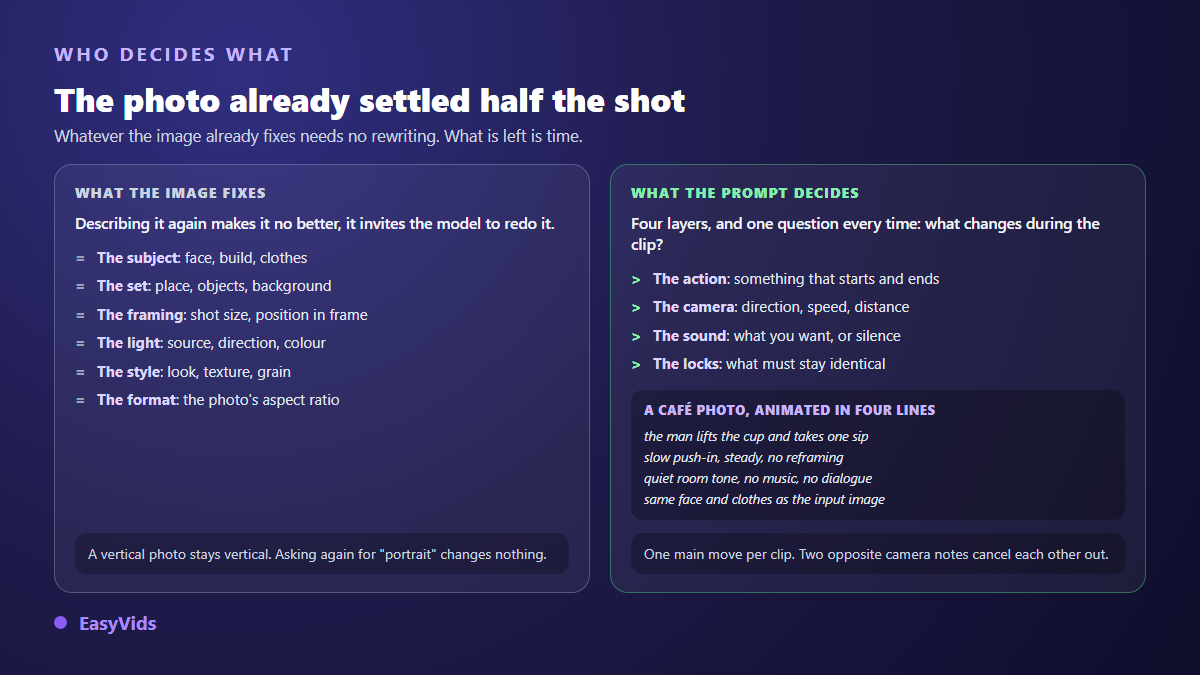
Good image to video prompts describe four things and nothing else: the subject's gesture, the camera move, the sound, and the locks that forbid the picture from transforming. They never restate the face, the set or the style, because the photo already carries them, and every word that repeats them invites the model to rebuild them its own way. One rule holds almost everywhere: one main movement per clip, written with a verb in progress. The EasyVids studio splits the two writings apart, with a video prompt field separate from the image prompt.
Why this is not an ordinary video prompt
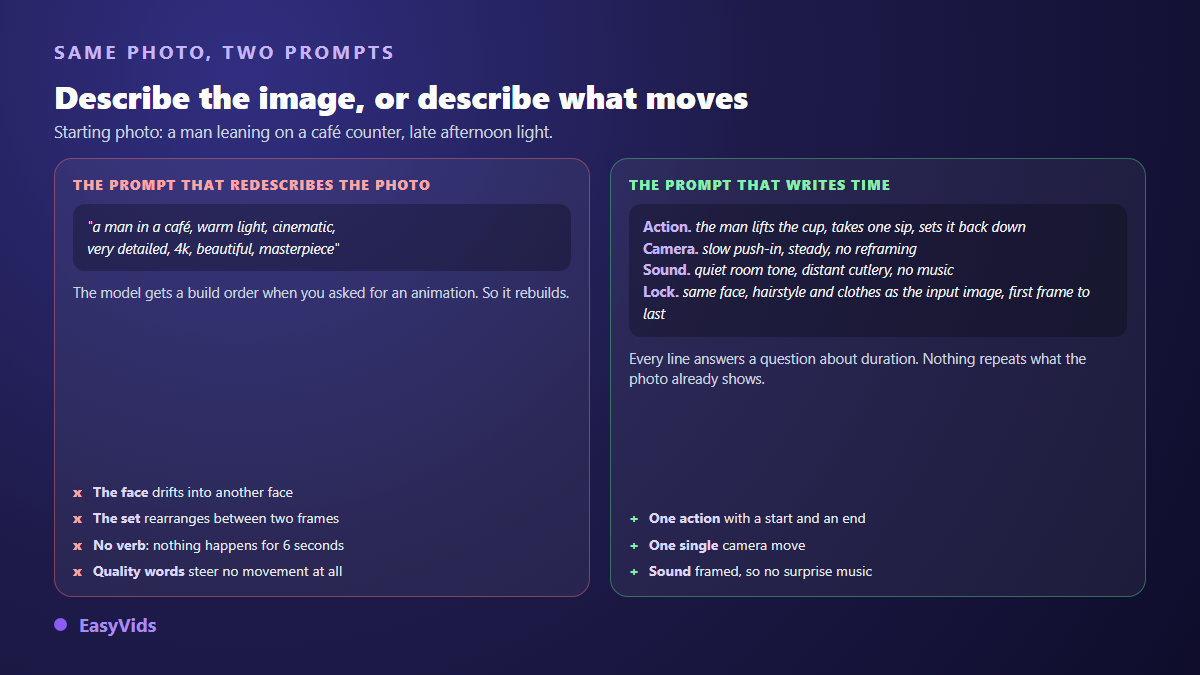
In text to video, your text carries everything: subject, framing, light, look. It has to be long and precise, which is the logic behind our twenty video prompt examples written without a starting image. In image to video, half of that work is already done, and redoing it works against you. A prompt that opens with « a man in a café, warm light, cinematic » hands the model a build order when you wanted an animation. So it rebuilds, and it rebuilds differently.
The practical consequence is counter intuitive: your prompt should get shorter. On a well framed photo, three well chosen lines beat fifteen lines of description every time. The rest of this article is about which lines to keep.
The four layers, in writing order
The order is not decorative. Video models weight the beginning of a prompt more heavily, and they truncate the end when the text exceeds the model's own limit, often a few thousand characters. Put the essentials first and the locks last: locks are short reminders, they survive the cut.
- The gesture. What the subject does, in the present progressive, with a beginning and an end inside the clip. « lifts the cup and takes one sip » is playable in six seconds. « works in the kitchen » means nothing to a model.
- The camera. One move only, with a direction and a speed. Two opposite instructions in the same prompt cancel each other and hand you a limp shot.
- The sound. Recent models generate audio too. Say nothing and you sometimes get background music, or an invented voice on a scene that asked for neither.
- The locks. One or two sentences naming what must stay identical. Everyone skips this layer, and it is the one that saves the most shots.
A word on language: our production prompts are written in English, even for videos delivered in another language. That is not a preference, it is the language these models were trained on, and the camera vocabulary is far better understood there.
Five camera prompts that work on almost any photo
Start here. A clean camera move is often enough to turn a photo into a shot, without asking the model to touch the subject, which means no risk of distortion.
- Slow push-in : slow push-in toward the subject, the camera moves forward a few centimetres, everything else stays still. The safest of them all: it adds tension and leaves no room for invention.
- Reveal pull-back : slow pull-back revealing the surroundings, the subject stays centred and in focus. Keep it for wide photos. On a tight portrait the model has to invent whatever enters the frame, and it invents badly.
- Steady pan : slow lateral pan from left to right, steady tripod movement, no zoom. State the direction, or you get a hesitant back and forth.
- Parallax : subtle parallax, the foreground drifts slightly faster than the background, the camera stays almost static. The documentary depth effect, and the most discreet of the list.
- Handheld : handheld camera with very subtle shake, natural breathing motion, no reframing. Breaks the postcard feel. Keep no reframing, otherwise the frame starts hunting for its subject.
Four prompts that move the subject without deforming it
The moment the subject moves, the risk goes up. Two principles keep it under control: a bounded action, and as little face movement as possible. A head that turns forces the model to invent angles no image ever showed it.
- Breathe and look : the person breathes gently, blinks once, then slowly turns their eyes toward the window, shoulders barely moving. The bare minimum for a portrait to stop being a photo.
- A gesture that ends : the person finishes pouring the coffee, sets the pot down, then stays still. A bounded action fits the clip. An open ended one loops, and the loop shows.
- Breeze on the hair : a light breeze moves a few strands of hair and the edge of the shirt, the face stays perfectly still. Peripheral motion adds a lot of life and never touches the features.
- A smile forming : a slight smile forms slowly across the whole shot, no other facial change. That closing clause is not optional: without it the features rearrange as the smile rises.
Four prompts for materials and natural elements
These are the movements models handle best, because the physics is predictable and no anatomy is at stake. On a landscape, a still life or an archive picture, they are often enough on their own.
- Water : the water surface ripples gently, small reflections shift, the shoreline stays fixed.
- Steam : steam rises slowly from the cup and dissipates near the top of the frame.
- Foliage : leaves and grass sway in a light wind, trunks and branches stay stable.
- Dust in the light : fine dust particles drift slowly through the light beam, everything else remains still.
Three atmosphere and lighting prompts
Letting the light evolve instead of the subject is a shooting trick that transfers as is. The shot tells you something while nothing has actually moved.
- Passing cloud : the light slowly shifts as a cloud passes, shadows lengthen across the wall, no camera movement.
- City at night : neon signs flicker faintly, distant traffic lights change, reflections move on the wet pavement.
- Flame : the candle flame flickers softly, warm light pulses on the nearby surfaces.
Three prompts for a product photo
Product shots are where drift costs the most: a label that changes its own text makes the clip unusable. Always name what must stay readable, and prefer moving the hand or the camera over moving the object.
- Short orbit : macro shot, the camera orbits slightly around the product, the label stays readable and unchanged.
- Hand enters : a hand enters the frame from the right, picks up the bottle and holds it steady, the label stays sharp and unchanged.
- Material in action : macro shot, the cream is spread slowly with a fingertip, texture visible, nothing else moves.
Two locks to paste at the end of every prompt
These two lines do not produce an effect, they prevent two. In our pipeline the first one is appended automatically as soon as a scene involves a character, precisely because animation is the moment a face drifts most, even when the starting image was perfect. It is the core issue behind a character whose face changes between scenes, and text is what fixes it.
- Identity lock : every person keeps exactly the same face, hairstyle and outfit as in the input image, from the first frame to the last, no morphing, no face change.
- Sound lock : no dialogue, no spoken words, characters do not talk, no background music, only natural ambient sound. Drop it, obviously, when you do want the person on screen to speak.
Aspect ratio is not always a menu setting
Here is a detail few guides mention, and it explains a lot of broken framings. In image to video, several models simply accept no aspect ratio parameter: they match the output to the proportions of the picture you supplied. Picking « vertical » in an interface then changes nothing at all. The reasoning reaches past the clip too: the first frame of a shot often ends up as the thumbnail, and at that size contrast and the direction of the gaze decide the click, which is the subject of our article on thumbnails that genuinely earn clicks.
Two habits follow. Crop the photo to the target ratio before uploading it, and write the format inside the prompt itself, for instance vertical 9:16 portrait format, tall vertical composition. That is what our server does: the format instruction is prepended to the text sent to the model, because it is sometimes the only channel left. Choosing the ratio upstream still pays best, as our guide to sizes and ratios per platform explains.
Read the defect before rewriting everything
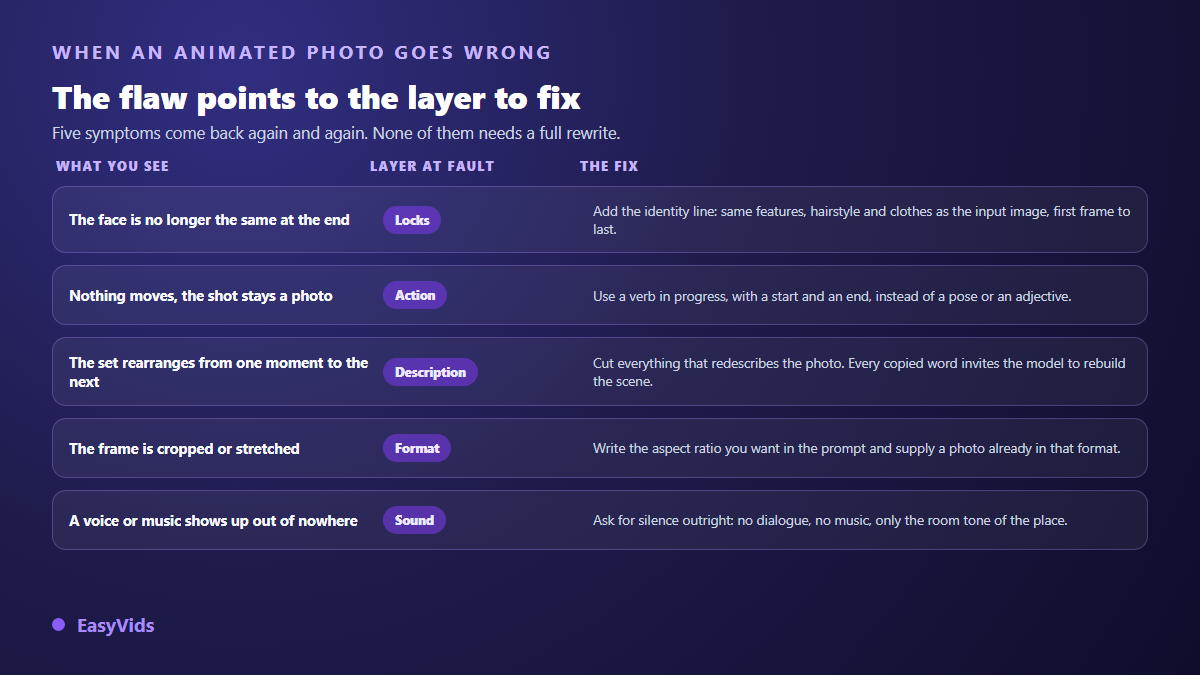
The most expensive habit is starting from scratch on every attempt. You lose the most useful information you had: what was working in the previous version. Change one layer at a time, relaunch, compare. Three runs handled that way teach you more than fifteen blind ones, and cost less.
Two cases deserve a separate word. If the generation is refused by safety filters, the problem is almost never your intent, it is a word: filters react to body vocabulary, to poorly described minors, to weapons, to brands and to real people. Rephrase by suggesting rather than showing. And if the shot comes out soft while the photo was sharp, check the output resolution you asked for before blaming the prompt.
Rights and disclosure: two checks before publishing
Animating a picture creates no rights over it. A photo found through a search engine still belongs to its author, and the face in it belongs to someone. On the publishing side, the European regulation on artificial intelligence provides, in its article 50, that AI generated or manipulated content be marked in a machine readable way, and that the public be told when a content misleadingly depicts a real person. The YouTube help centre, on its page about altered or synthetic content, asks creators to disclose at upload any realistic footage that could be mistaken for a real recording.
Where these prompts live in the studio
The Director workflow inside the EasyVids creation studio makes the chain explicit: every scene first gets its image, built from the project's references, then that image is animated with a video prompt of its own. Both fields sit side by side on screen, and the second one carries a short instruction: describe the movement, the camera, the dynamics of the scene. You can edit it scene by scene, relaunch a single video, or ask for an assisted rewrite when a prompt gets refused by the filters. Two honest limits: a generated clip runs from a few seconds to about fifteen depending on the model, so an animated photo is a shot rather than a sequence, and the gap between a fast model and a premium one stays visible on complex movement, which is why drafting with one and finishing with the other makes sense. The pricing page puts that arbitration in context.
Frequently asked questions
Should image to video prompts be written in English?
Preferably, though it is not mandatory. Video models understand other languages, but their camera and movement vocabulary is much richer in English, and short formulations are followed more faithfully. Our production prompts are written in English while the delivered videos are not, and it has no effect at all on the voice over or the on screen text.
How long should a prompt be when it starts from an image?
Two to four lines cover the vast majority of cases, noticeably less than a text to video prompt. Everything the photo already shows is wasted text, and worse, text that pushes the model to recompose the scene. Make it longer only to add a constraint, never to decorate.
Why does the face change even though I supplied a photo?
Because animation regenerates every frame, and nothing by default forbids the model from sliding the features from one frame to the next. The identity lock fixes most cases. Reducing how much the face moves and shortening the clip does the rest.
Can I supply two images, a start and an end?
Some models accept it and build the transition between the two pictures, which gives very fine control over the beginning and the end of the shot. The constraint is that both photos must be close in framing, light and style, otherwise the model invents an acrobatic journey between them. On models that take a single image, it serves as the first frame of the clip.
How many reference photos can I attach?
In our studio, up to five depending on the selected model, and the point is not to pile up random angles. One character reference, one set reference and one product reference beat five variants of the same face, which tend to blur the result instead.
Take a photo you like, write three lines that describe time only, add the identity lock, and watch. It is the fastest way to feel what this way of writing actually changes. To try it on your own pictures, creating an account opens the full studio, with a separate video prompt field on every scene.