You publish a carefully made video, and a large share of your audience scrolls past it without hearing a single word. Sound is off by default in almost every feed, and a silent video with no text on screen says nothing at all. Auto subtitles answer that problem directly: your audio is transcribed, split and synced to the picture in minutes, without you typing a line.
The trap is stopping there. Automatic transcription always gets something wrong, and almost always in the same places: proper nouns, acronyms, numbers. This guide walks the whole chain, from the audio track to the exported file, with the numeric readability rules broadcasters follow, the choice between burned in captions and a separate track, and the traps of translation.
The short answer
An auto subtitle tool listens to the audio track, writes what it hears, and attaches a precise timestamp to every word. Within minutes you get text already split into synced blocks, which you review, style, then export either as a separate file or burned into the picture. The review pass is the only step that truly belongs to you, and it rarely takes more than ten minutes on a five minute video. It is the best effort to reach ratio in the whole post production stage, and it happens without leaving the editor when you work inside a complete AI video studio.
Why captions decide how far a video travels
The first argument is not accessibility, it is reach. In a feed, a video starts muted. You have two or three seconds to prove, with no sound, that something is happening. A 2019 study by Verizon Media and Publicis Media pointed the same way: 80 percent of respondents said they were more likely to watch a video to the end when captions were available, and half of them muted videos in public.
Three quieter effects matter just as much. Captions support viewers who are not native speakers, and everyone watching on a train or in an open office. They make your speech readable by search engines: a subtitle track is text, therefore indexable material, while an audio track is not. And they rescue an average recording, a strong accent, a word swallowed at the end of a sentence.
How automatic transcription actually works
A speech recognition engine does not transcribe sentences, it recognises sounds. It cuts the audio into very short frames, predicts the most likely sequences, then rebuilds words with a language model. That second model explains why errors are usually plausible: the machine picks the word that fits the sentence, not necessarily the one you said.
Two outputs matter to you. The text, obviously. And word level timestamps, giving the start and end of every term. That second output is what allows clean block splitting, and word by word reveals in short vertical formats. A tool that returns raw text with no timing leaves you the longest job to do by hand.
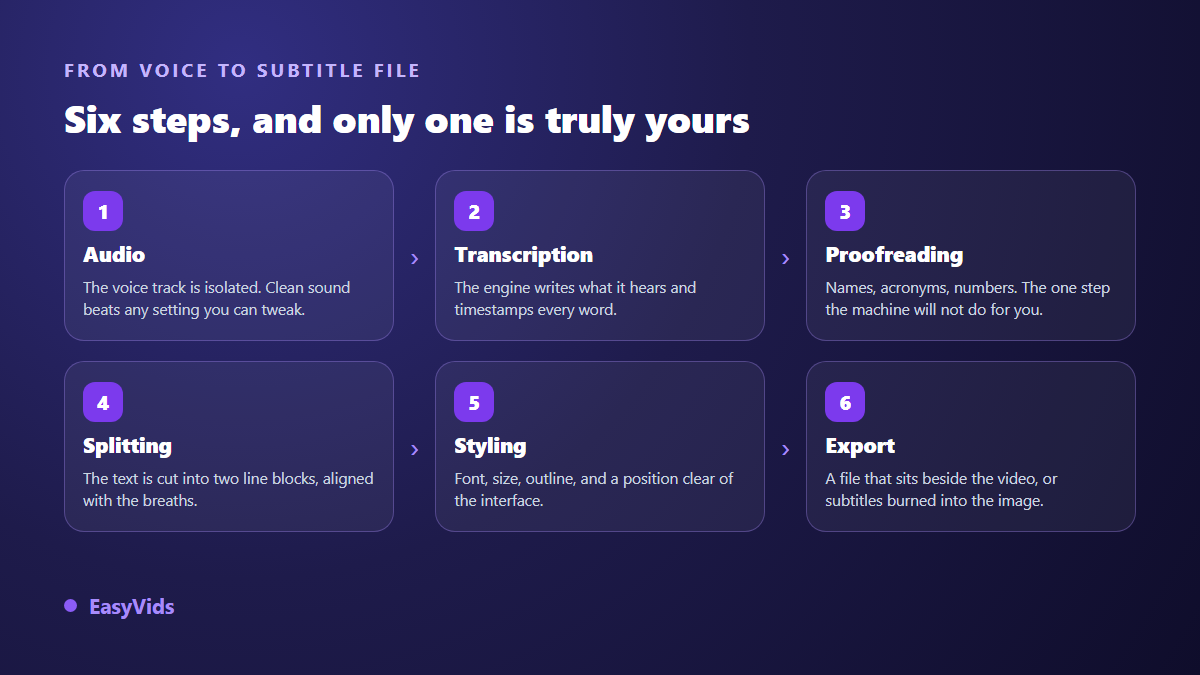
Keep the order in mind. Splitting into blocks comes after the text is corrected, never before: fixing a word inside an already split file usually forces you to retime the whole block.
What auto subtitles still get wrong
On a clean recording, current engines sit at a few percent of misrecognised words, and the rate climbs fast as conditions degrade. Those errors are not spread at random. They cluster in a short list of cases, always the same ones, and knowing them is what makes a review pass fast.
- Proper nouns: brands, cities, first names, software names. The engine swaps them for the closest common word.
- Acronyms and initialisms, often spelled out or broken into syllables.
- Industry jargon that sits outside the model's general vocabulary.
- Numbers, dates and units, whose written form varies with no stable rule.
- Regional accents, fast delivery, sentence endings swallowed on a dying breath.
- Overlapping voices, loud music, the background noise of a public place.
- Punctuation, which is guessed: badly placed, it changes the meaning of a whole sentence.
On our own transcriptions, most corrections land on the first two lines of that list. That is good news: those errors show up on a quick read, and a single find and replace fixes a name that appears twenty times.
The review pass you cannot skip
Reviewing does not mean re listening to the whole video. Three passes are enough. First read the text with your eyes only, no sound, hunting for words that make no sense in context: those are your errors, and they stand out. Then fix recurring proper nouns in one replace operation. Only then play back the two or three passages that still look doubtful.
Two habits pay off over time. Keep a short list of the terms you say often, brand and product names included, and always correct them the same way. And protect the source: a voice recorded without echo, or a well punctuated synthetic voice, transcribes almost flawlessly. We covered that work on the voice in our guide to natural sounding AI voice over.
Readability rules, in numbers
A subtitle is not text dropped on an image, it is a constrained object. The viewer has to read it without looking away from the picture, and without ever feeling behind. Broadcasters have worked on this for decades, and their published guidelines converge on the same figures.
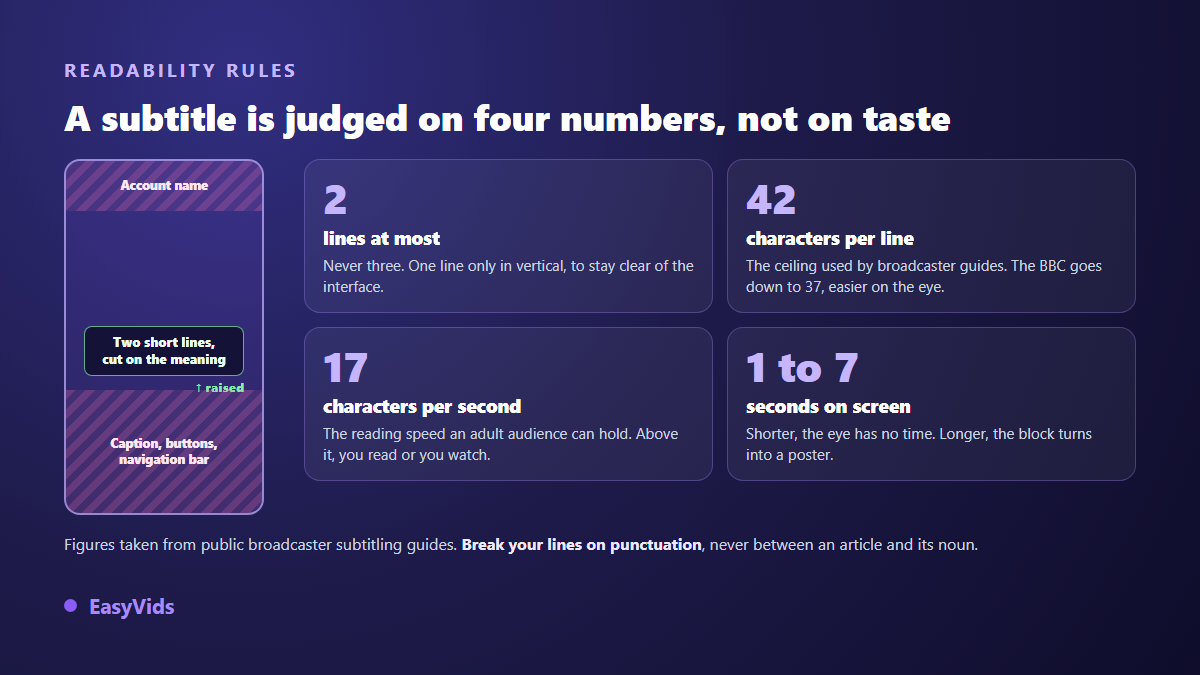
Two lines maximum, never three. A ceiling of 42 characters per line including spaces, with the BBC recommending 37 for comfort. A reading speed around 17 characters per second for an adult audience. And a display time between just under one second and seven seconds: below that the eye cannot settle, above it the block stops being a subtitle and becomes a poster.
Where you break the line matters as much as its length. Break after punctuation, or before a conjunction, never between an article and its noun, never inside a verb group. Let the blocks breathe too: a two frame gap, under a tenth of a second, removes the flicker when two subtitles follow each other.
Where to place subtitles in the frame
In vertical, the default position glued to the bottom of the frame is the worst available. Platform interfaces cover roughly 14 percent of the top of the screen and up to 35 percent of the bottom, plus about 6 percent on each side, before counting the icon column of some apps. Lift your subtitles above that zone, around the lower third, and check the result on a real phone before publishing.
In 16:9 the risk is different: the player controls appear on hover and hide the bottom line. Keep about 5 percent of the height clear under the text. And if you publish the same video horizontally then vertically, never crop already burned in subtitles. Regenerate them at the right ratio, or half the words will fall outside the frame.
Style follows the format, not the trend
On long form, restraint always wins. A sans serif face, white with a black outline or a slightly transparent dark bar, and a size that stays readable on a phone. The subtitle should be forgettable: it supports the voice, it does not perform.
On short vertical formats the subtitle is part of the edit. The established style is a word by word reveal, or groups of two to three words, with the current word highlighted. It holds attention, but it forces one constraint: a single line at a time, otherwise the text eats half the screen. We broke that style down setting by setting, from picking the highlighted word to the reveal cadence, in our guide to word by word animated subtitles. Two guardrails apply whatever the style. One typeface and one accent colour for the whole video, and real contrast against the picture, or your captions vanish the moment a bright shot arrives. That check belongs in the editor, alongside the rest of the edit described in our step by step YouTube video guide.
Subtitle file formats, and burned in versus separate track
A subtitle file is a plain text file: a list of blocks, each with a start time, an end time and one or two lines. You can open it in a text editor, fix it by hand, and upload it again. Four extensions cover almost every need.
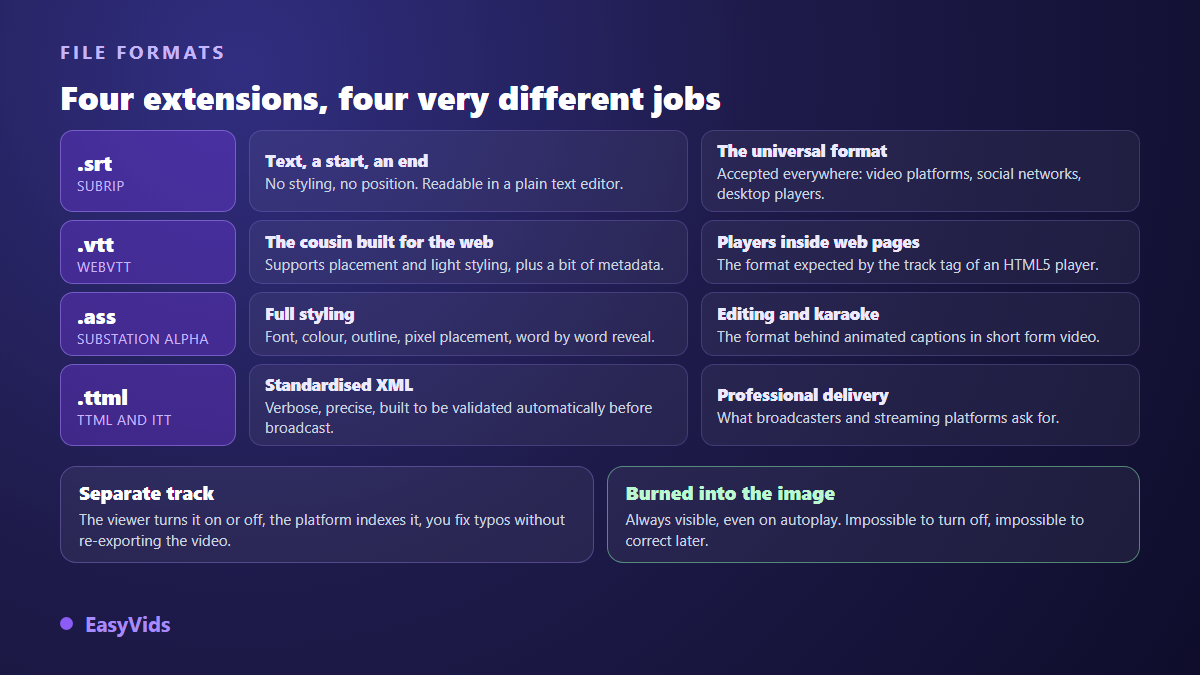
The real decision is a separate track or burned in text. A separate track can be fixed after publishing, translated, indexed, and switched on or off by the viewer. Burned in captions guarantee the text shows everywhere, including autoplay in a feed and on services that accept no uploaded file. In practice many creators do both: burned in for short form, uploaded file for long form. Burning them in means going back through the timeline, a step described in our guide to online video editing. Whichever you choose, keep the subtitle file. It is your transcript, your translation base, and the starting point of an article or a description. That same reviewed text also works as the script when you turn the video into an audio episode, a path covered in our guide to AI voices for podcasts.
Translating subtitles without breaking the timing
Translating subtitles multiplies a video's reach for very little effort, on one condition: translate from the reviewed text, never from the raw transcript. A transcription error, once translated, becomes an absurd sentence nobody can trace back, and it spreads across every language at once.
The second trap is timing. The same sentence does not occupy the same length in two languages: translators generally count 15 to 20 percent more text going from English to French, and the reverse in the other direction. Keep the original blocks and your reading speed immediately breaks the comfortable threshold. Recalculate the split on the translated text, splitting a sentence in two blocks where needed, and condensing where you must.
Three habits complete the method. Idioms are rendered by an equivalent, never word for word. Proper nouns, brands and units stay as they are or get converted explicitly. And for anything that carries your reputation, a review by a real speaker of the language stays mandatory: a sales video translated blind does more damage than a video with no subtitles at all.
Captions, subtitles and accessibility
The word subtitle actually covers two different objects. Standard subtitles transcribe speech. Captions for deaf and hard of hearing viewers go further: they identify who is speaking when several voices answer each other, and describe meaningful sounds in brackets. A slamming door, a laugh, an ominous score.
That distinction is not regulatory trivia. The international web accessibility guidelines place captions for prerecorded video at level A, the very first tier of requirements, the one a site should satisfy before anything else. If you publish on a company site, an online course or a public service, the question is not whether you caption, but how well.
Frequently asked questions
Are auto subtitles reliable without a review pass?
No, and that is not a matter of engine quality. Even an excellent transcript fails on proper nouns, acronyms and jargon, which are exactly the words that carry meaning in a professional video. Budget a quick review, roughly five to ten minutes for a five minute video.
Should I burn in subtitles or upload a file?
Upload a file for long form, because it can be corrected, translated and indexed. Burn them in for short vertical formats, where autoplay and animated styling are part of the platform's language. Nothing stops you doing both, and it is often the right call.
How many characters should a subtitle hold?
Two lines maximum, up to 42 characters per line including spaces, and closer to 37 if you want comfort margin. Each block stays on screen between about one second and seven seconds, at a reading speed near 17 characters per second.
Do subtitles improve a video's search performance?
Indirectly, yes. A subtitle track is text: it gives platforms readable material about what the video actually says, on top of the title and description. Its main effect is on watch time, which weighs far more in recommendations.
Can I subtitle a video in a language I do not speak?
Technically yes, transcription and translation both work. The risk sits elsewhere: you cannot judge the result. For informational content the trade off stays favourable. For commercial, contractual or medical content, have a speaker of the language read it before you publish.
Subtitling remains the highest return step in post production: a few minutes of work for a video that finally works on the audience watching with the sound off. Make it a habit to transcribe as soon as the edit is locked, fix your proper nouns, hold the two lines and the 42 characters, lift the text above the interface. The rest is styling. To transcribe, review and burn in your subtitles in the same place you edit, create your account and try it on a video you have already published.