A forty minute recording is sitting on your phone. A team meeting, a customer interview, a lecture you meant to revisit. You know the answer is in there, somewhere around minute twenty, and you are not going to play the whole thing again. An audio to text converter exists for that exact moment: it turns an hour of sound into a document you can scan in three minutes.
Machines write fast. They do not write accurately on the first pass. Speech recognition hears sounds, it does not understand meaning, and it fails in the same four places every time: proper nouns, acronyms, numbers, and any moment when two people speak at once. This guide starts from a sound file with no picture attached: a meeting, an interview, a lecture, a voice note, a podcast. If your source is a video, our guide to transcribing video to text takes the same job from the other end.
The short answer
To convert a recording into text, drop the audio file into an online speech recognition tool, set the spoken language, run the transcription, then proof it before you send it anywhere. Nothing to install, nothing to retype. In the EasyVids online studio, a sound file uploads like a video, and the text comes back in passages, each one attached to its exact moment in the recording. The step nobody gets to skip is proofing: it is what separates a rough draft from a document you can forward.
Why audio only is harder than video
Transcribing a video and transcribing a sound file do not demand the same attention. With video, the picture rescues you constantly: you see who is speaking, you read a name on a slide, a figure appears on screen, a swallowed word is obvious from context. With audio, that crutch is gone. The text becomes the only record of what was said, and it will be read by people who were not in the room.
There is a second, quieter difference. A sound recording is rarely made in order to be transcribed. A phone in the middle of a table, a laptop microphone a metre away, a recorder at the bottom of a bag: the capture is endured, not planned. A video is almost always shot with the intention of being watched. You start from harder material, which is why accuracy, not speed, has to stay your criterion.
Six steps from sound file to document
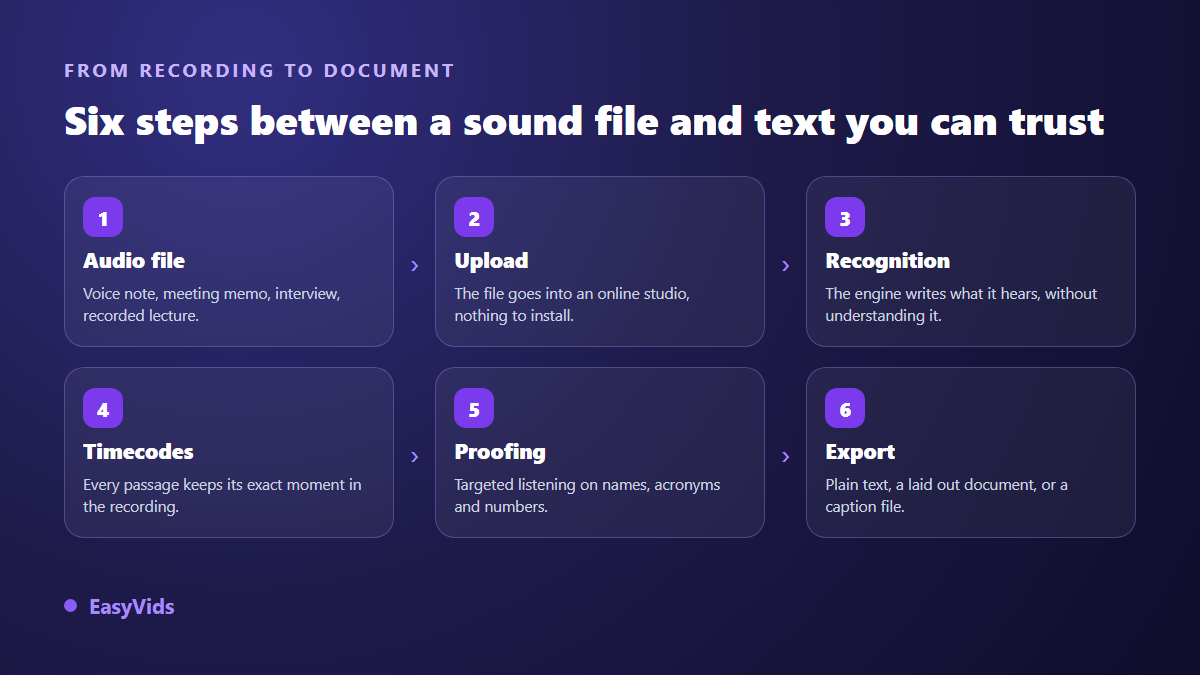
The chain is short and always the same, whatever tool you use. The file goes up, the audio is prepared, an engine writes what it hears, every passage gets a timecode, you proof it, you export in the format that matches the job. Knowing the sequence tells you where to act when the result disappoints: the problem almost always sits in step one, the recording itself, not in the engine.
One note for anyone starting from a video but wanting only the words. It is often easier to pull the audio out of the video before running the transcription, especially when the video file is too heavy to upload as it is. The engine only ever works on the sound track anyway.
File formats, and the one that really hurts
Common formats go through without trouble: MP3, M4A, WAV, OGG. Phone recorders mostly produce M4A, messaging voice notes usually Opus inside an OGG container, dictation recorders WAV. It hardly matters, because the first thing any speech engine does is bring everything back to its own working format, generally mono at a low sample rate. The human voice fits comfortably in that band, so a very heavy WAV buys you nothing over a clean MP3.
Two traps are worth knowing. First, a recording compressed to the bone, as very long voice notes often are, loses the high frequencies that separate an f from an s. No engine can restore what was thrown away at capture. Second, a stereo file where each speaker sits on a different channel: when it is folded down to mono, the two voices land on top of each other instead of staying apart. Given the choice, take clean mono over badly split stereo.
Accuracy is decided while you record
No software setting rescues a voice captured three metres away in a tiled room. The distance between mouth and microphone is the single biggest factor: it sets the balance between speech and everything else. Move the microphone back and room noise rises to the level of the voice, at which point errors arrive in clusters, across whole sentences, rather than one word at a time.
When you know in advance that a recording will be transcribed, six habits change the outcome, and none of them cost anything.
- Bring the microphone closer. A phone in front of the speaker beats a laptop microphone at the far end of the table.
- Open with a round of introductions. Everyone says their name and a sentence. You will know who is speaking later, and you will have heard each name pronounced.
- One person at a time. Overlapping voices are the one error no engine knows how to repair.
- Kill anything that hums. Air conditioning, fans, extractors, engines: steady noise masks consonants, and consonants carry the meaning.
- Avoid speakerphone. A voice that leaves a loudspeaker before entering a microphone arrives already damaged.
- Spell the hard words. A company name, a product reference, an internal acronym: say it letter by letter once, and the correct version exists somewhere in the file.
The four places recognition breaks
A speech engine does not look for the right word, it looks for the most probable sequence of sounds in the language it knows. That mechanism explains the first and costliest family of errors: proper nouns. A surname, a brand, an unusual place name is not part of what it learned, so it gets swapped for the nearest ordinary word, with total confidence. Nothing in the text flags the spot, which is exactly what makes the error dangerous: it reads perfectly well.
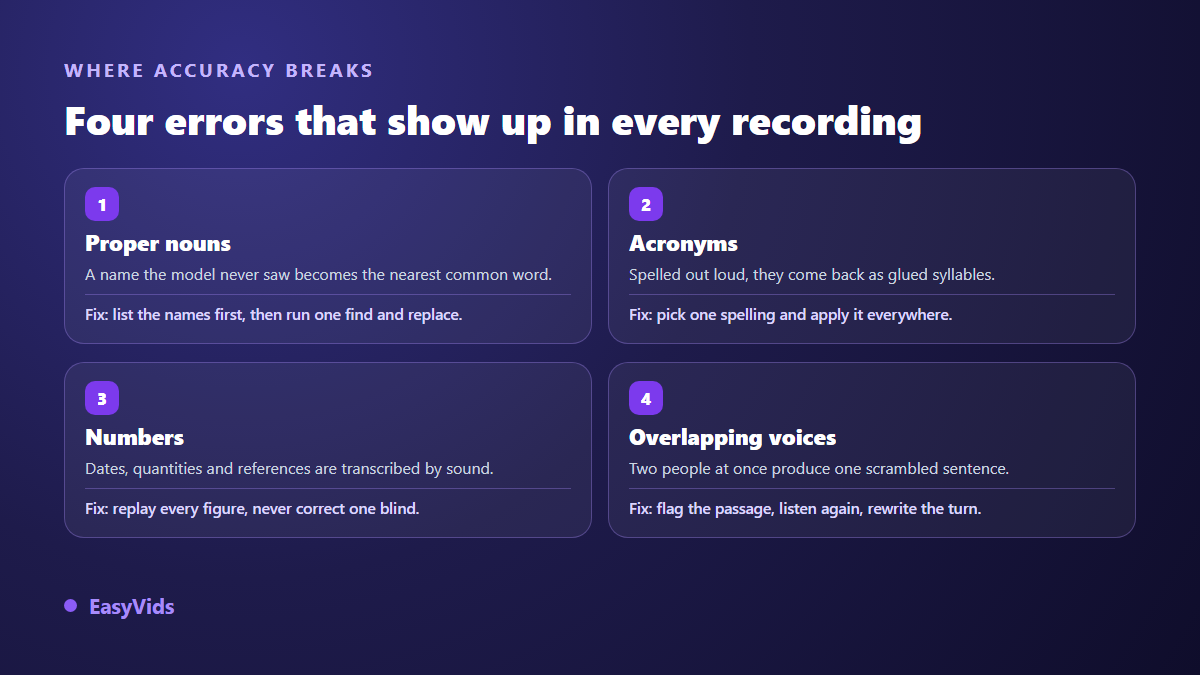
Acronyms come next. Spelled out loud, they come back as glued syllables or unexpected words. The cure is mechanical: choose one spelling and apply it everywhere with a single replacement. Numbers are a different problem, because they stay plausible. A date, a quantity, a reference is transcribed by sound, and the result reads fine while being wrong. It is the one category where silent reading is useless: you have to listen to the passage again.
The fourth family is overlapping voices. When two people speak at once, the engine does not return two sentences, it returns one built from pieces of both. No setting repairs that afterwards. While proofing, spot the sentences that mean nothing, jump back to their timecode, and rewrite the passage by hand. Add trade jargon to the list: specialised vocabulary degrades a transcript as much as a bad microphone does.
The word list: five minutes that save an hour
Before a transcription that matters, write down the words the engine cannot possibly know. Names of the people present, product names, in house acronyms, places, two or three technical terms. The list works twice. If the tool accepts a custom vocabulary or a context note, you hand it over and steer its guesses. If it does not, the list becomes your proofing plan, and you know precisely what to search for.
The fast method then fits in one sentence: do not correct while reading, correct while searching. Open the text, search for the wrong version of a name, replace every occurrence in one go. An engine is wrong consistently: it writes almost the same mistake for the same word every time, which makes a global replacement safe, provided you checked the first occurrence against the audio.
Several speakers: splitting the turns
Telling voices apart has a name, diarisation. The principle is to group passages that sound acoustically similar and stick a label on them: speaker 1, speaker 2. The system does not know who anyone is, only that this is not the same person. That is already the important part, because meeting notes without turns are unreadable: nobody can tell who committed to what.
The limits are predictable. Two similar voices sometimes end up merged under one label. Somebody who moves away from the microphone can be given a new identity halfway through. Very short interjections, the yeses and the rights, often attach to the wrong speaker. Once the text is proofed, replace the labels with real names, and the document becomes usable by someone who was never in the room. That is the whole point of the exercise.
Background noise: what can be saved
Three kinds of noise, three outcomes. Steady noise, air conditioning, an engine, room hiss, is handled reasonably well because it is constant and therefore identifiable. Short noises, a chair scraping, a door, cutlery, cost a word or two and are repaired while proofing. The third is the only truly fatal one: a conversation nearby. It is speech, and nothing tells the engine that it is not yours.
Noise reduction before transcription helps with the first two. Go gently: pushed too far, a denoiser eats consonants along with the hiss, and the transcript gets worse rather than better. Test the setting on one minute before processing a full hour, comparing both versions of the same passage.
Proofing: listen first, read second
Proofing a transcript takes two passes, and they are nothing alike. The first is targeted listening: you do not replay everything, you jump to the marked spots, the ones holding a number, a proper noun, an acronym, or a sentence that means nothing. This is where timecodes earn their keep, since every passage points back to its exact second in the recording, just as it does for automatic captions.
The second pass happens in silence, with the audio off, and it is the one that turns a draft into a document: repunctuate, break paragraphs at each change of subject, remove the filler words unless you are producing a full verbatim, replace speaker labels with real names, add a subheading for each major moment, and run one last search on every word of your list.
Output formats, and how to choose
One recognition pass always produces the same raw material: text plus timecodes. What you export depends on what you will do with it, and this is the choice most people get wrong, keeping the most complete format by default rather than the most useful one.
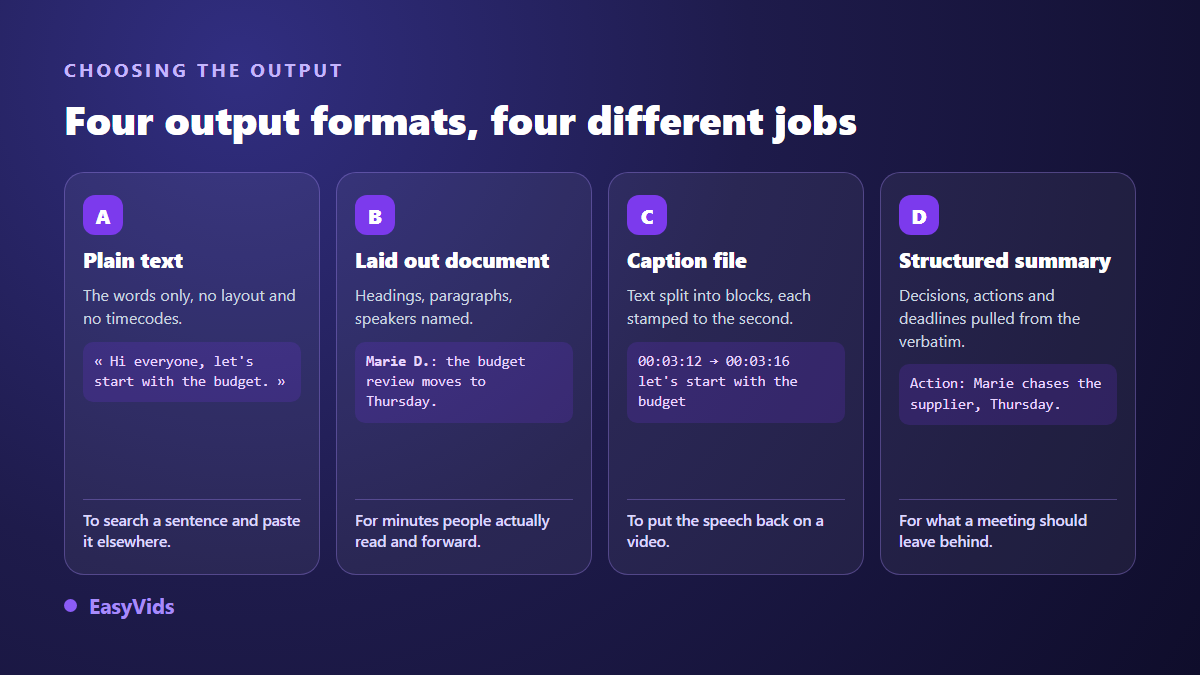
Plain text is for searching a sentence and pasting it elsewhere. A laid out document is for being read by others, with speakers named and sections titled. The timed file, SRT or VTT, becomes essential as soon as the speech has to appear on screen again, for instance if you edit the recording into a video: our guide to the SRT file explains how it is built and how to edit it. The structured summary keeps only decisions, actions and deadlines, and it is the only format anyone rereads a week after a meeting.
Verbatim or clean copy: two documents, not one
A full verbatim keeps everything, including hesitations, false starts and unfinished sentences. It is the version of record, and it earns its place in legal work, in qualitative research, or whenever you have to quote someone exactly. A cleaned copy removes what gets in the way of reading without touching the meaning: that is what you want for minutes, a newsletter or an article drawn from an interview. Keep the verbatim aside and work on the clean copy, and always check a published quote against the audio, word for word.
Recording other people: check the rules first
A meeting or interview recording contains the speech of people who are not you, and the law on that varies widely. In France, article 226-1 of the Code pénal punishes capturing, recording or transmitting words spoken privately or confidentially without the speaker's consent. Rules differ from one country to the next, and in the United States from one state to the next, so check what applies where you are recording. The safest habit is also the simplest: say out loud that you are recording, at the start, and leave the sentence in the file. On the file itself, remember that online transcription means sending the recording to a third party service; the General Data Protection Regulation, in force since May 2018, governs that use for personal data of people in the European Union, so look at what the tool states about how long it keeps your files.
Frequently asked questions
Can I convert audio to text for free?
For a trial, yes, and that is usually enough to decide. Serious tools let you transcribe a short recording with no commitment, so you can judge quality on your own sound, with your accents and your background noise, rather than on a curated demo. Beyond that, transcribing hours of audio becomes a paid service because every minute consumes compute. The current offers live on the pricing page, which is the only source worth trusting on that.
How accurate is it on a meeting recording?
No single percentage means much, because accuracy depends on your file first and the engine second. One voice, close to the microphone, in a quiet room, and the text comes back nearly clean, with proofing limited to names and numbers. Six people around a table, a door slamming and two of them talking over each other, and you will rewrite whole passages. Transcribe one test minute before committing the full hour.
How do I transcribe a voice note from a messaging app?
Export the file from the app first, the share or save function almost always offers it, then upload that file to the transcription tool. Never play the note on a phone speaker to record it again on another device: you add the acoustics of the room and lose part of what made the voice intelligible.
What if the recording mixes two languages?
Set the dominant language yourself instead of relying on automatic detection, then fix the passages in the other language by hand. An engine locked to one language transcribes foreign words phonetically, which looks odd but is easy to spot. If the two languages sit in long separate blocks, cut the audio into two files and transcribe each in its own language.
Can I get minutes instead of a verbatim?
Yes, in two stages, and the order matters. Transcribe, proof, summarise last. A summary computed on an unproofed transcript inherits its errors without flagging them, and hides them, since the original text disappears behind the summary. Once the verbatim is clean, pulling out decisions, actions and deadlines takes minutes.
Your next recording does not need to be played three times. Upload the file, let the machine write, and save your attention for the proofing pass, which is what separates a draft from a document worth sending. The simplest test is a short recording with a free account, judged on your own sound.