Your company needs a presentation video. You ask for a quote for an animated corporate video, and you discover that the invoice is not the real problem: the calendar is. A kick off meeting, a script to approve, a storyboard reviewed by four people, a first cut, two rounds of changes, and a video delivered a quarter later, by which time your offer has already moved on.
The work that makes such a video convincing does not happen inside the animation software. It happens in the structure of the message, in three design decisions, and in the timing against the voice over. Our guide to motion design sets out the principles of the craft; this article applies them to a company that has to introduce itself, with its own constraints: a brand kit to respect, figures to show, people to name, and a message that has to land with the sound off.
The short answer
An animated corporate video comes together in four moves. Write a 90 second script built from five blocks: the problem, the promise, the proof, the how, the call to action. Split that script one line per shot, never letting a single shot run past eight seconds of speech. Lock three design decisions for the whole film: two colours, one type family, one composition rule. Produce the voice over before the images, because its measured duration sets the length of every shot. An agency only becomes necessary if your film relies on real footage; as long as it lives in the graphic register of text, shapes, figures and logo, a tool that animates in the browser is enough.
What corporate actually covers
The label is broad, which is why quotes are impossible to compare. The same word covers the institutional film that tells the story of the company, the employer branding video aimed at candidates, the offer presentation for a professional audience, the annual report set in motion, and a leadership message to the teams. Those five objects share neither duration, nor tone, nor place of publication.
One thing does connect them. You are speaking to someone who does not know you yet and has no reason to grant you more than ten seconds. That constraint drives everything else. It rules out opening on the year the company was founded, it forces a promise before any proof, and it explains why motion design fits the genre so well: it shows an idea, a flow or a figure, which is exactly what a camera cannot film.
Why animation rather than a shoot
Filming has three enemies inside a company. The offices, rarely photogenic. The calendars, impossible to align for half a day. And the consent of the people on camera, which has to be collected in writing and becomes a real issue the day someone leaves. Footage also ages fast: it dates through clothing, through furniture, through a logo that changed in the meantime.
Animation removes those three frictions and solves a fourth one, brand fidelity. A graphically built shot respects your exact colour and your exact typeface, which no shoot can guarantee under office lighting. That is also what separates this approach from AI video generation: a model produces a believable scene from a description, but it writes on screen text poorly and knows nothing about your visual identity. For your company name displayed large, animated graphics remain the only reliable method.
The 90 second structure that holds attention
A company presentation nearly always fails in the same place: it starts with you. Founded in a given year, so many employees, recognised expertise. Your viewer is waiting to hear about their own situation. Reverse the order and the video changes nature. The same mechanics govern a spoken pitch to a jury or a partner, described in our 60 second video pitch structure.
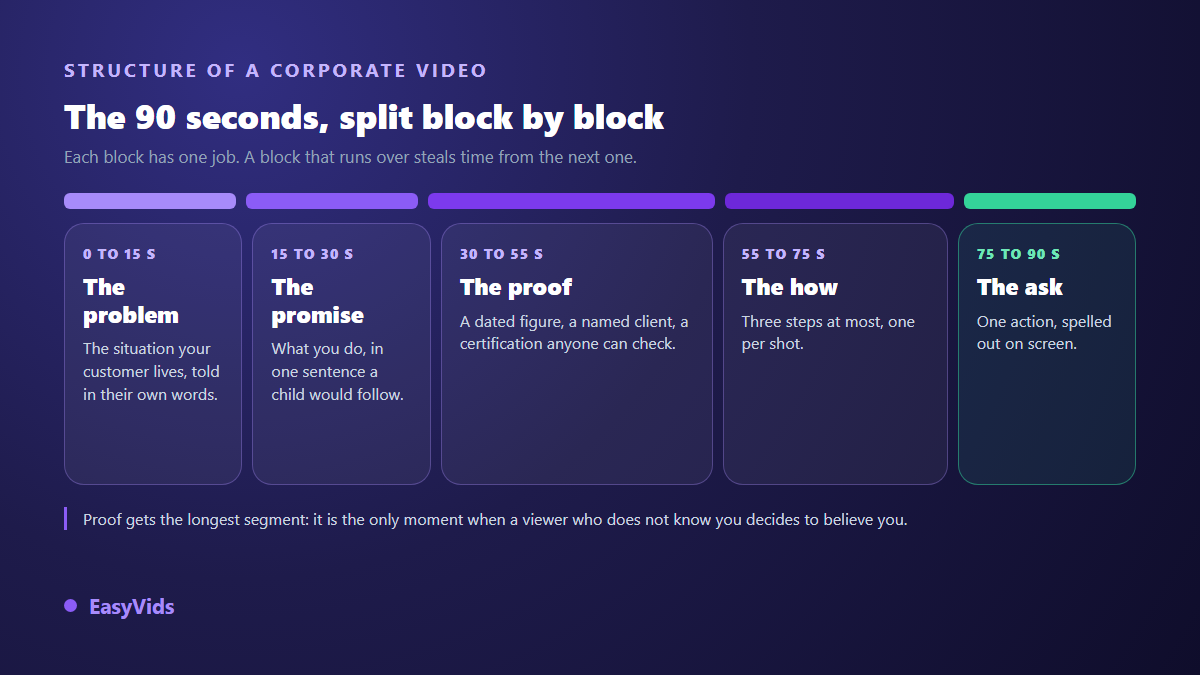
- The problem: the situation your customer lives with, phrased in their words, never in your industry jargon.
- The promise: what you do, in one sentence someone outside your sector can understand.
- The proof: one dated figure, one named client who agreed to it, one verifiable certification. One proof per shot.
- The how: three steps at most, one per shot, showing what working with you actually looks like.
- The call: a single action, spelled out on screen and spoken by the voice over at the same moment.
The same split works at 45 seconds by tightening each block, and at two minutes for an audience that already knows you. What is not negotiable is the order. A block that overruns steals time from the next one, and it is almost always proof that pays the price, even though it carries your credibility.
Writing the script: one line, one shot
The cut is decided while writing, not while editing. The simplest rule treats one line of your text as one shot, and one shot as one idea. Across our own productions, roughly 110 characters of voice over run about six seconds. That benchmark works before any audio exists: divide the characters in a line by that ratio and you get its duration, which is the length of the shot to animate. A 90 second script therefore means around fifteen shots, which makes the workload concrete straight away.
One ceiling deserves to be set at writing time. Past eight seconds of speech, a shot stops being motion design. The animation finished long ago, the image just sits there, and your viewer is watching a narrated slide. When a sentence goes beyond that, cut it in two rather than speeding up the read. Our engine applies that ceiling to its automatic splitting and only lifts it when the user splits the script by hand.
Three design decisions, made once
The visual unity of a professional film does not come from talent, it comes from constraints decided once. Two colours are enough: one dominant, one accent reserved for whatever must be noticed. One type family is enough, used in two weights. And a single composition rule, for instance text always anchored in the same place, spares you the placement question on every new shot.
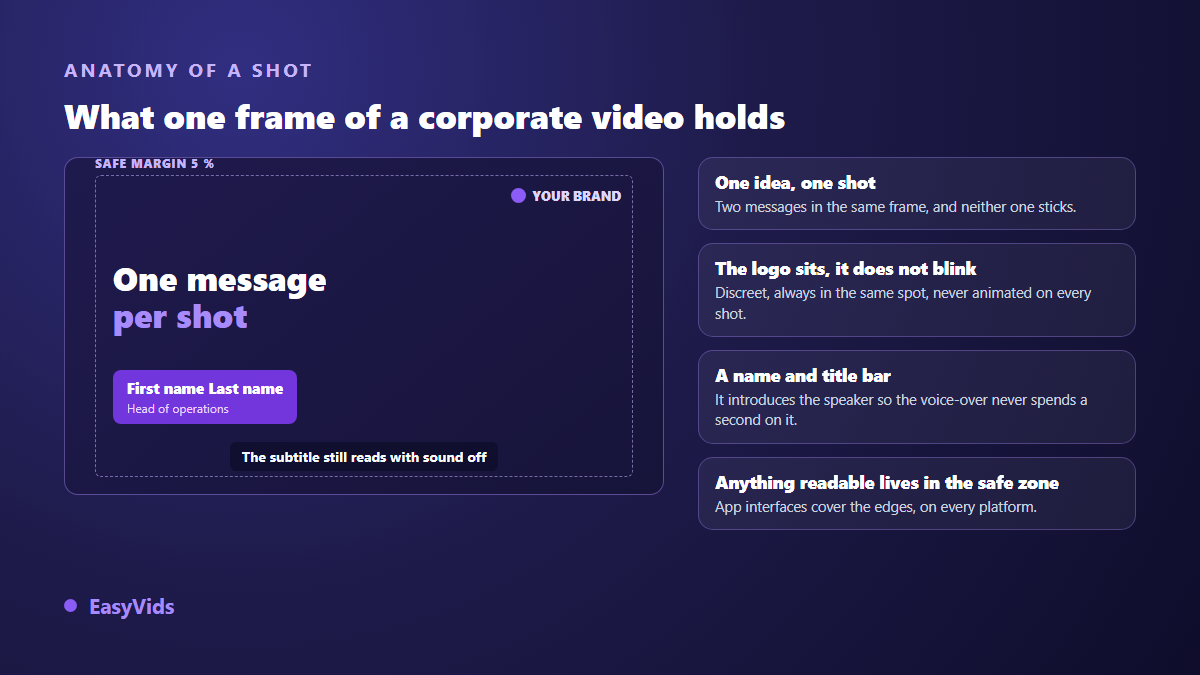
Three guardrails complete those decisions. The WCAG accessibility guidelines published by the W3C ask for a contrast ratio of at least 4.5 to 1 between body text and its background, and 3 to 1 for very large characters: below that, part of your audience simply does not read it. Keep everything meant to be read at least 5 % away from every edge, otherwise app interfaces will cover it. And never display more than three readable blocks of text at once.
Your figures, without the unreadable pie chart
The annual report reflex is to drop a full chart on screen. In video, nobody reads it. One figure per shot, displayed very large, counting up while the voice comments on it, carries far more. Date it and put its source on screen in small type underneath: that is what separates data from an advertising claim. The full method, including comparisons and trends, sits in our guide to animated infographics.
Naming people without losing three seconds
As soon as a speaker appears, the viewer asks one question: who is this, and on what authority. Answering with the voice over wastes three seconds of narration every time. A name strip settles it in writing while the voice carries on. Its duration and placement follow precise rules, gathered in our guide to the name and title strip. The same logic applies to client names used as proof, provided you have their written agreement before publishing.
Format follows the place of publication
The same video does not exist everywhere in the same way. On your home page the visitor has clicked: they accept 90 seconds and often turn the sound on. In a professional feed playback starts muted while people scroll, so on screen text carries the whole message; the sizes and durations specific to that network are gathered in our LinkedIn video format sheet. On a trade show screen nobody stays more than ten seconds, and the video must loop without a voice over.
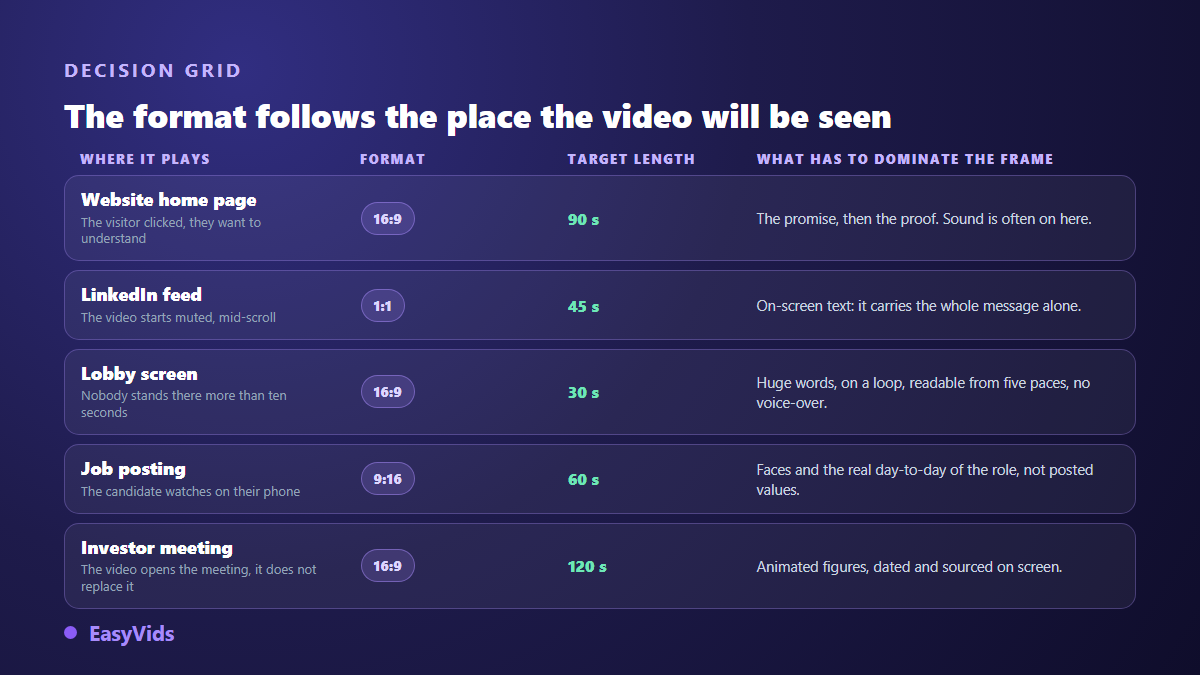
The habit that saves the most time is to write once, then produce two versions of the same film: the long landscape cut for your site, and a tighter square or vertical cut for social feeds. Both share the script, the brand kit and the voice over. Only the framing and the number of shots change.
Building it without an agency: what a code based engine does
That is the path we are building at EasyVids, and the principle fits in one sentence: the video is built by code, with no template recycled from one client to the next. You paste your script, one line becoming one shot. You add your images, logo, product photos or screenshots, which the AI works into the scenes it writes. You fill in your brand kit if your company has strict rules, colours, font and logo; otherwise an art direction is derived from your images. You pick the format, the voice and its reading style, then every shot is rendered frame by frame on our servers and assembled with the voice over. The build carries on even if you close the page, and you can stop it midway.
One point of honesty: this part is still being finished and is not open to every account yet. The studio itself is available from sign up for the rest of the chain, from writing to visuals, voice over, music and editing. For orders of magnitude and how credits work, our pricing page is the only up to date reference.
The mistakes that keep a corporate video from being watched
- Opening on the company history instead of the customer situation.
- Stacking adjectives nobody can prove: innovative, tailor made, customer focused, leading.
- Having the script approved by five departments, which produces text nobody owns.
- Skipping captions, when a large share of the audience watches with the sound off.
- Flashing the logo on every shot instead of placing it quietly, always in the same spot.
- Ending on a plain thank you, with no action asked of the viewer.
One last point that often gets overlooked: plan the update from the start. A shot based animated video is corrected shot by shot. If your offer changes in six months, only the two shots involved need rebuilding, provided the script and the brand kit were kept. Footage, by contrast, gets replaced whole.
Frequently asked questions
How long should an animated corporate video be?
Ninety seconds for a general presentation on your website, forty five seconds for a professional feed, thirty seconds looping for a trade show screen. Past two minutes, keep the format for an audience that already knows you, such as your teams or your partners. A longer running time is only justified when every shot adds something new.
Can a strict brand kit be respected without an agency?
Yes, provided the tool accepts your exact colour codes, your font and your logo, and applies them to every scene. That is precisely the strength of a graphically built video over one generated by a video model: the colour on screen is the one you entered, and the type stays crisp, with no distortion.
Do I need a voice over, or is on screen text enough?
Text alone works for muted playback, a trade show screen or a social feed, as long as each shot leaves time to read. A voice over becomes necessary as soon as the video has to explain a mechanism or carry emotion, because it frees the image from the weight of words. When in doubt, produce the voice: a muted captioned version follows from it easily.
How is this different from a video generated by an AI model?
A video model builds a believable scene from a description, with all its uncertainty on screen text and colours. Motion design draws graphic elements and animates them: the text is perfectly crisp, your brand kit is respected to the pixel, and the result is reproducible. The two approaches combine well, a generated shot for atmosphere and graphic shots for the information.
How do I update the video when the offer changes?
Keep the script split into lines, the list of colours and the font used. An update then means correcting the lines concerned, regenerating the voice for those shots and running the render again. That is why it pays to avoid anything in the script that dates quickly, such as a headcount or an annual award.
A company presentation video is not a style exercise, it is an answer to the question all your prospects ask. Start with a single 90 second film, written in five blocks, cut into about fifteen shots, held together by two colours and one typeface. Within a few weeks you will know whether it saves your sales team time, and what to fix. To write that first script and put it on screen today, creating an account opens the whole studio, and the EasyVids home page brings the full chain together in one place.