You got picked to make the video. The send off is in two weeks, twenty colleagues have promised a message, and the last thing you edited was a holiday photo album. A retirement slideshow almost never fails on the technical side. It fails on length, on tone, and on the one clip nobody dared to cut.
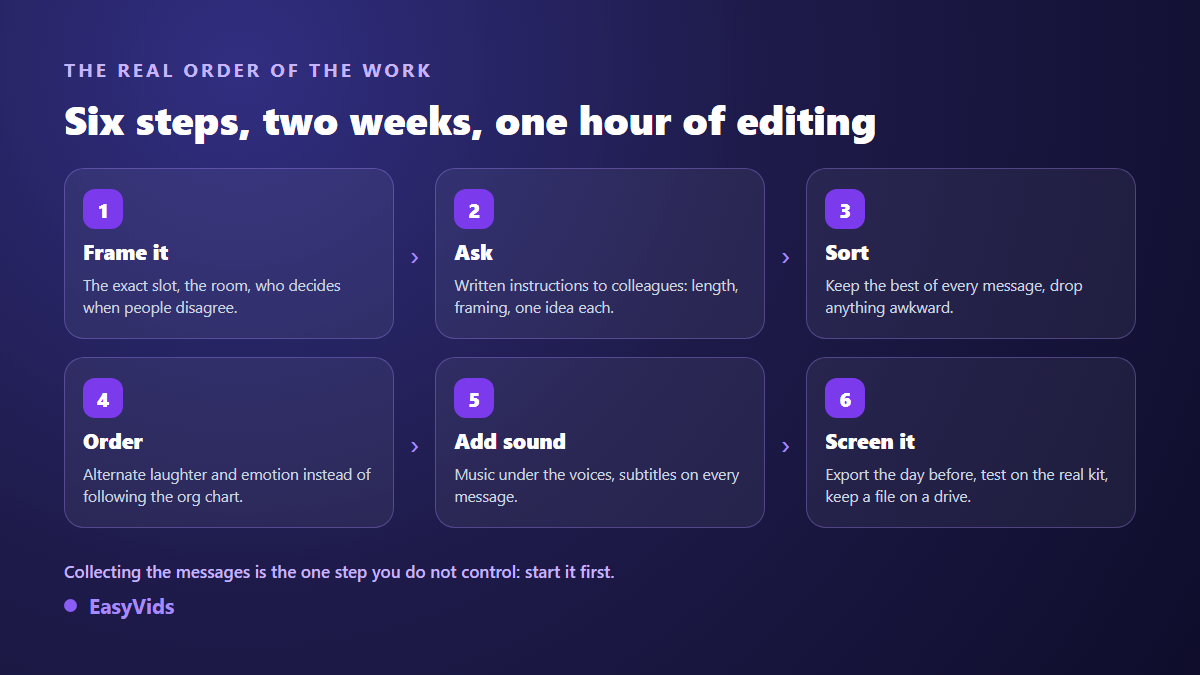
This guide follows the real order of the work: frame the request, write the brief you send to colleagues, sort what comes back, find the order, add sound, screen it. The editing itself comes second to last and takes under an hour. If your project rests mainly on archive photos rather than filmed messages, our guide to photo slideshows with music covers the same work from another angle.
The short answer
A retirement slideshow that lands runs three to five minutes. It holds twelve to fifteen colleague messages of about fifteen seconds each, broken up by short blocks of archive photos. It opens on someone who worked beside the person every day, never on the most senior name on the org chart. It laughs at situations, never at the person. And it comes together in two very uneven stages: ten days to gather the material, one hour to assemble it.
Frame the request before you message anyone
Three questions save you an evening of editing. When will the film play: during the speeches, or later once the drinks are going round? On what equipment: a meeting room projector, a canteen television, or a laptop screen on a table? And in front of whom: the team alone, or the team plus a partner and sometimes children who came for the occasion? That last answer changes everything, because it decides what you can allow yourself.
Then settle the question of authority. One person decides when opinions clash, usually the direct manager or whoever is organising the send off. Six way debates over an awkward clip never end, and the edit runs aground the night before. Use that same conversation to ask what nobody asks: is there a subject to avoid? A departure that was not entirely chosen, a recent dispute, a colleague the relationship ended badly with. That information spares you a heavy silence in the middle of the screening.
The brief you send colleagues decides everything
The quality of the final film is decided here, almost entirely. A vague request along the lines of send me a few words on camera brings back clips filmed from below, backlit, with the open plan office audible and someone talking for two minutes without knowing what to say. A short, precise written brief brings back usable takes first time. Write it once, send it to everyone at once.
- A stated length: fifteen to twenty seconds, no more. Say that you will edit, which reassures anyone who dislikes being filmed.
- One idea per person: a specific memory, or what they owe the person professionally. Not a full thank you speech.
- A fixed orientation: phone held horizontally, or vertically, but the same for everyone. It is the most forgotten instruction and the most painful to fix afterwards.
- The phone at eye level, propped against a stack of books rather than held at arm's length.
- Light in front of the face, never a window behind, or the speaker becomes a silhouette.
- A quiet room: an empty meeting room rather than an open floor or a corridor.
- The original file, dropped in a shared folder rather than forwarded through a chat app, which recompresses and degrades it.
- A deadline with a time of day. Before Thursday 6 pm collects three times more than whenever you can.
Think about the people missing from your distribution list. Former colleagues who moved to another company, the intern from ten years ago now managing a team elsewhere, the contractor the person worked with for years. Their messages almost always produce the best moment in the film, because they bring back an era the room had forgotten. A quick search through old project notes turns up three or four names.
How long should a retirement video be
Aim for three to five minutes. Past that, conversations restart at the back of the room and the film ends in front of people staring at their glass. Remember the real setting: a send off happens standing up, in a hum of noise, with people arriving late and others having to leave. It is not a cinema screening.
The arithmetic is simple and it saves you a nasty surprise. Twenty messages of forty seconds gives more than thirteen minutes, which is unmanageable. Twelve to fifteen clips of fifteen seconds, plus a minute of photos split across three short blocks, gives a film of a little over four minutes. Run that calculation before you edit, not after: it tells you straight away how many messages to keep.
Nobody needs a solo slot. Group people up: four colleagues from the same team film one take together, the remote office sends a group shot where each person says a word. You save screen time, and those collective shots break up the run of single faces staring into a lens.
The order that holds a standing room
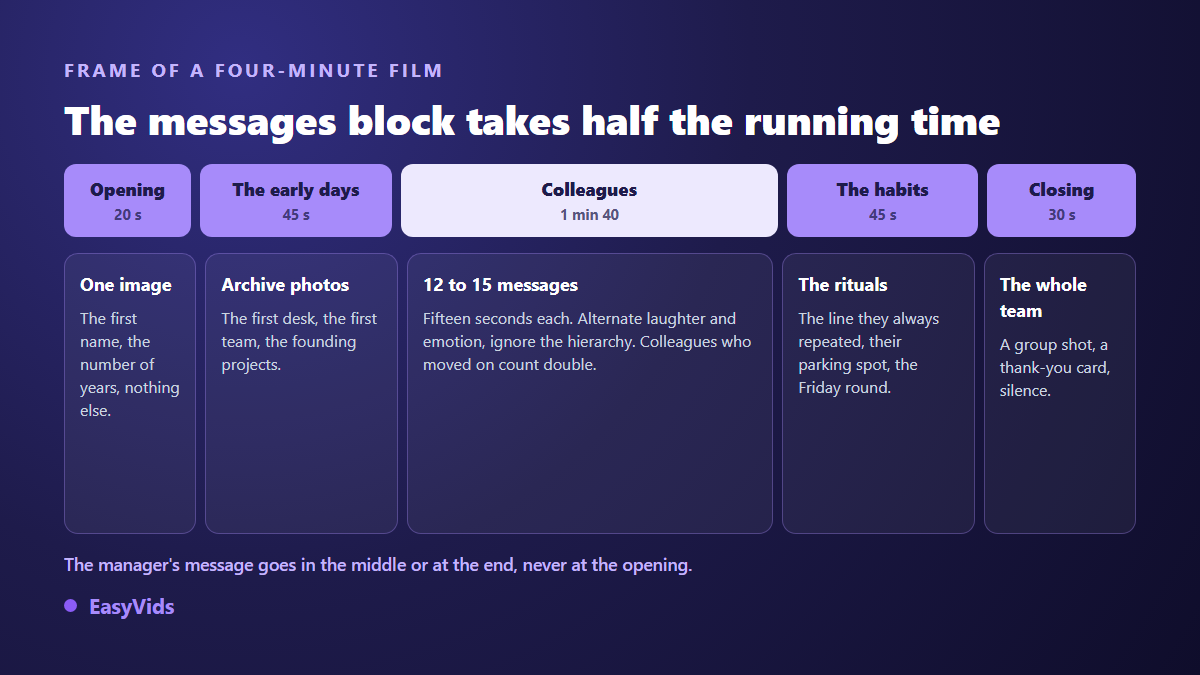
One structure works nearly every time. A very short opening, the first name and the number of years on one strong image. A block on the early days, built from the archive photos you managed to find. The long block of messages, taking half the running time. A block on the rituals, those details the whole team recognises in a second. Then a closing with everyone together.
Two ordering rules deserve to be followed to the letter. Do not open with the most senior person. A director's message up front gives the film the air of an official ceremony, and the room drifts away before the second minute. Put it in the middle, or just before the closing. Then alternate registers: do not stack the three funny messages together and follow them with five emotional ones. A laugh, a lump in the throat, a laugh. That back and forth is what holds a standing audience, and it is the same edit that carries a personalised birthday video, for exactly the same reasons.
Finally, hold one message back for the very end. The shortest, the most direct, the one that says thank you looking straight into the lens. That is the one the person will remember on the way home.
Tone: laugh at the situations, never at the person
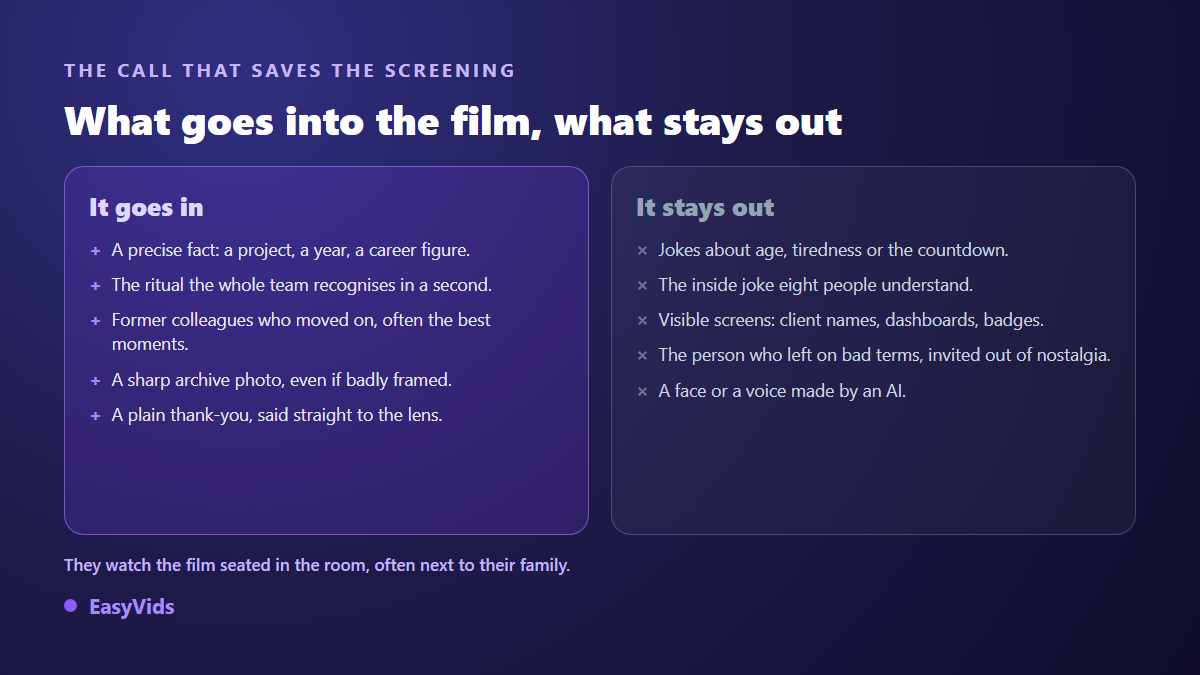
What sets this apart from any other memory edit is one thing: the person is sitting in the room, and everyone is watching them while it plays. They can neither look away nor pretend. Every pointed remark is lived through in real time, often next to their partner. The rule that protects everyone is simple: laugh at situations you went through together, never at the person themselves.
Three things fall flat every time. Jokes about age and tiredness, which sound like relief that they are leaving. The inside joke eight people understand while forty others wait. And the old photograph pulled out to mock a haircut or a waistline. A specific fact, on the other hand, always lands: a project you delivered together, a hard year, the exact number of people they trained. Ask the direct manager for a fact, not an adjective.
Check what the photos actually show before you drop them in. A lit screen in the background can mean a client name, a dashboard or an internal address projected large in front of a room that includes outside guests. Badges and documents lying on desks deserve the same attention.
Music, and the licensing question
Two uses, two treatments. Under spoken messages you want a discreet instrumental with no lyrics, well below the voices, around a fifth of their level. Lyrics under a testimonial lose you half the words. Over photo blocks you can lift the level and let the music carry alone: that is the moment the room breathes.
The music studio composes an original track from a plain language brief. For a send off, two ready made occasions fit: a thank you and tribute preset, and a preset built for a graduation or a promotion. A free text field also lets you describe the occasion yourself, with a first name and an anecdote. An instrumental only option gives you the version without vocals to sit under the messages, and composition takes a few minutes during which you can close the page.
Then comes the question that stops projects at the sharing stage. A commercial song is fine at a private screening on your own premises. It becomes a problem the moment the film goes online: according to YouTube's help centre on Content ID, recordings supplied by rights holders are matched automatically on upload, which can lead to a block or to advertising appearing on your film. An original track removes the problem, and our guide to AI music and copyright sets out what you may publish.
The edit itself, an hour at most
Assembly happens in an editor that runs in the browser, with nothing to install on a work machine, which spares you a request to the IT team. One detail matters here: the files you drop in stay stored in your browser, on your own device. For clips filmed by colleagues and internal photos, knowing that nothing leaves the machine changes how you approach the project. Set the project aspect ratio before you drop anything in, horizontal for a room screening, and the full reasoning sits in our guide to video formats.
- Drop all the messages in first, unordered: you will see immediately which ones are unusable.
- Trim every take to its core. A colleague opening with I don't really know what to say loses the room in three seconds.
- If orientations are mixed despite the brief, place vertical clips over a blurred background instead of stretching them: the setting lives in the project background.
- Each photo arrives with a default duration of five seconds, which you stretch or shorten with the mouse.
- Put text cards at the joins between blocks: one word, a year, a place. Never a full sentence.
- Lay the music on its own audio track, with a short fade in and a three second fade out.
- Even out the volume between messages, or the room jumps at every change of speaker.
- Watch the whole edit once, changing nothing. It is the only review that counts.
For the photo blocks, one feature saves a lot of time: magic montage drops animations and transitions across the whole track automatically, with a style family and an intensity of your choosing, and it avoids repeating the same effect twice in a row. Images get a slow Ken Burns move first. A single undo removes the lot if you dislike the result. On the filmed messages, though, stick to one transition: a short crossfade between two faces is enough, and wipes pull attention onto the effect rather than the person. The rest of the tool's settings are covered in our guide to online video editing.
Finally, add captions over the spoken messages. It is the best investment in the whole edit: a meeting room projector sounds poor, the room murmurs, and half the words disappear. The editor builds the transcript from the project audio, inside your browser, across nine languages, then drops it in as a text track you can correct. Always reread first names and surnames, which automatic transcription mangles without fail, and our guide to automatic captions covers the readability settings.
Image rights: settle it before, not after
An internal film gathers faces, and those faces belong to their owners. The General Data Protection Regulation, Regulation (EU) 2016/679, treats the image of an identifiable person as personal data. In France, article 9 of the Civil Code separately grounds everyone's right over their own image, and equivalent principles exist in most countries. In practice, a colleague who sends you a filmed message obviously accepts that it plays at the send off. An archive photo showing ten people, three of whom have left the company, is not the same reasoning.
The workable rule is the announced perimeter. State plainly where the film will be shown, and hold to it: an internal screening does not license a post on the company's social accounts. If the communications team later wants an extract, that gets asked again, and it can be refused. One last line, with heavier consequences: do not use AI to fabricate a face, a voice or a sentence the person never had. The European artificial intelligence regulation, Regulation (EU) 2024/1689, sets out a transparency duty in Article 50 for generated or manipulated content that realistically depicts an existing person, and those obligations have applied since 2 August 2026. Beyond the text, a room instantly spots a movement that does not belong to someone it has worked beside for twenty years.
The screening, where it all actually happens
The film can be excellent and the screening a disaster. That is the most common outcome, and it nearly always comes down to sound. Here is the checklist that prevents it.
- Export the day before, never on the morning itself. A failed export at the last hour cannot be rescued.
- Copy the file to two places, a stick and a laptop, and bring both.
- Test on site, on the real equipment, with the volume up. A meeting room speaker sounds nothing like headphones.
- Bring an external speaker if the room has none: it is the number one failure at send offs.
- Never rely on the corporate network on the day, or on access to an online service: play the file from the disk.
- Dim the lights or close the blinds: a dark edit disappears on a projector in daylight.
- Ask someone to quieten the room before you start, and to stay near the machine during playback.
One technical note that avoids an unpleasant surprise: the export is built inside the browser, on your machine. On an iPhone or an iPad it does not work, because the required components are missing from the system browser. You can gather, sort and write from a phone, but keep assembly and export for a computer with a recent browser, plugged in and somewhere quiet.
After the party: what you hand over
The request always arrives within minutes of the screening: the person wants the file, and often their children do too. Prepare two versions at export. The full file, handed over on a stick the same day, which is a gift in itself. And a lighter version for messaging apps, which recompress or reject heavy files. If relatives live far away, uploading stays the simplest route: according to YouTube's help centre, an unlisted video appears neither in search results nor in recommendations, but stays accessible to anyone holding the link.
Frequently asked questions
How long should a retirement slideshow be?
Three to five minutes. A send off happens standing up, in noise, with people coming and going. Past five minutes, conversations restart at the back of the room. If you have a lot of material, keep the unused messages for a second file handed to the person, rather than stretching the film you screen.
What exactly should I ask colleagues to send?
A message of fifteen to twenty seconds, one idea, filmed in a quiet room, phone at eye level, light in front of the face, everyone in the same orientation. Add a deadline with a precise time and a single place to drop the files. That written brief does more for the final film than any editing setting.
What music works for a retirement send off?
A discreet instrumental with no lyrics under the spoken messages, and something warmer and fuller over the photo blocks. Leave out tracks with lyrics during testimonials, they cost you the words. For anything published online, an original track avoids automatic matching of commercial recordings and the block that can follow.
Can I use photos taken at the office without asking?
Be careful. The image of an identifiable person is personal data under Regulation (EU) 2016/679, and image rights are protected in most countries. For an internal screening in front of the people concerned, the practice is accepted without heavy formalities. State the distribution perimeter clearly, and ask again if the film leaves the company. Also check that no readable screen or badge appears in the background.
Do I need a computer, or will a phone do?
Gathering, sorting and writing the cards all work from a phone. Assembly and export need a computer with a recent browser, since the file is built on your own machine and the operation is unavailable on iPhone and iPad. Prepare on the phone, edit on the computer.
A retirement slideshow needs no equipment and no editing background. It needs a clear brief sent early enough, a tight selection, an order that alternates registers, and a tone held to the last frame. Give an evening to the sorting and an hour to the assembly, and save the best message for the end. To prepare yours, creating an account opens the online editor, the music and the voice in one place, with no bank card required. The EasyVids studio brings those steps into a single interface.