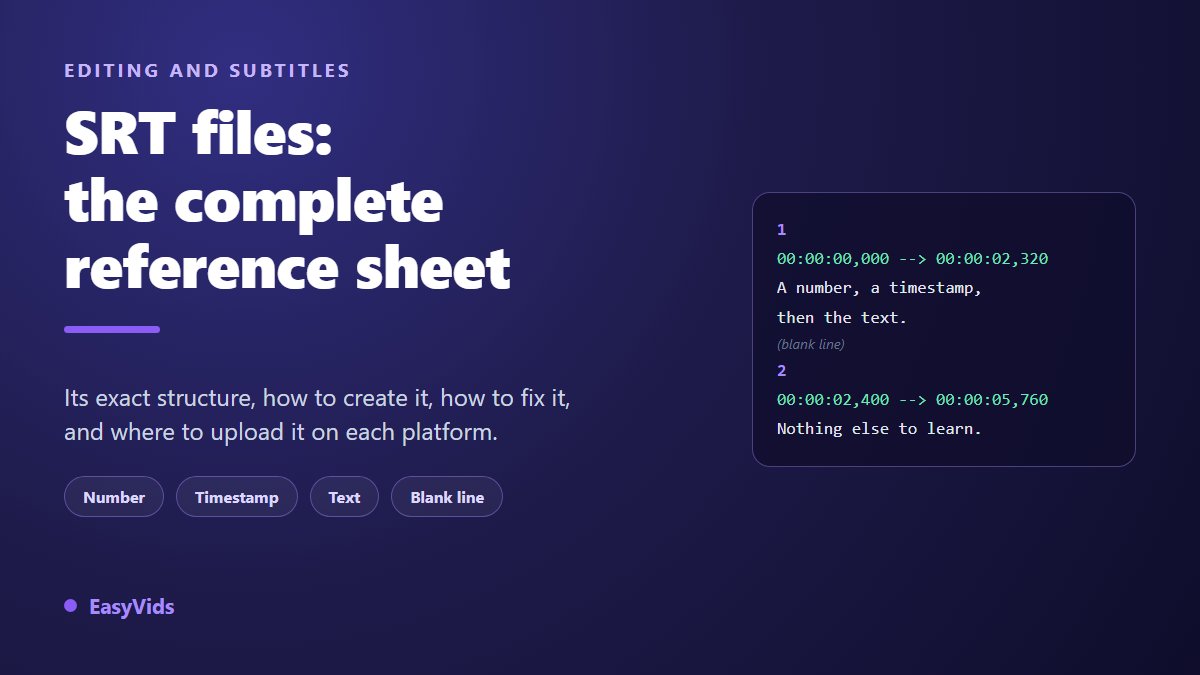
Your video is finished and the only thing missing is captions. You build an SRT file, you upload it, and nothing goes to plan: the platform rejects it, or it accepts the file and every line lands two seconds late with accented characters turned into symbols. It stings, because this is one of the simplest file formats still in use.
This page is a reference sheet rather than an overview. It covers the exact structure of an SRT file line by line, a complete example you can copy, the three ways to produce one, how to diagnose a timing shift, the encoding trap that ruins accented characters, and how to attach the file platform by platform.
The short answer
An SRT file is a plain text file with the .srt extension, made of repeated blocks. Each block holds a sequence number, a timecode line written hh:mm:ss,mmm followed by an arrow and a second timecode, one or two lines of text, and a blank line that closes the block. Nothing else: no font, no colour, no position. You open it in any text editor, fix it by hand, and save it as UTF-8. Almost every video platform accepts it, and it is the format the Subtitles panel of the EasyVids online studio imports.
What an SRT file actually contains
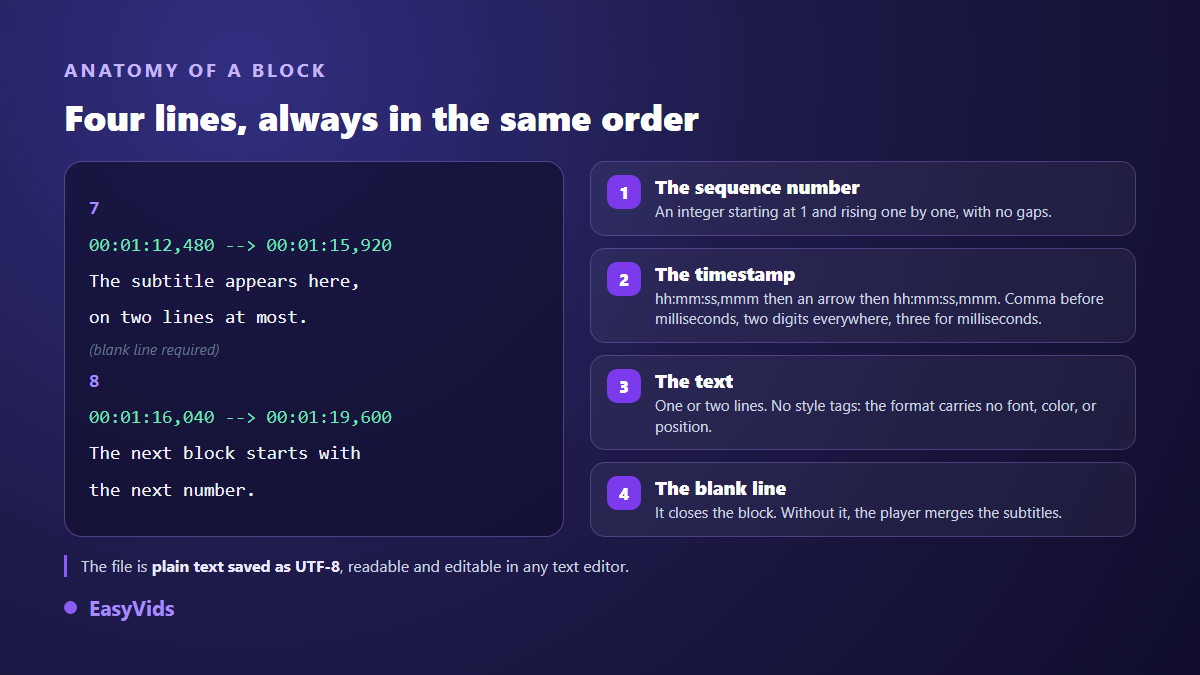
An SRT file holds one thing, repeated as many times as there are captions: a block. The format is never the hard part. Trouble always comes from a punctuation detail or a missing line break. Here is what a block contains, in an order that is not negotiable.
- The sequence number. A single integer on its own line, starting at 1 and rising one by one. It anchors the file and makes manual edits far easier.
- The start timecode. Written hh:mm:ss,mmm. Hours, minutes and seconds always take two digits, milliseconds always take three, and the decimal separator is a comma, never a full stop.
- The arrow. Two hyphens followed by a greater than sign, with a space on each side. It separates the start time from the end time.
- The end timecode. Same strict writing. It must come after the start, otherwise most players drop the block.
- The text. One line, two at most in normal practice. No formatting is guaranteed: the format carries no font, no colour and no on screen placement.
- The blank line. It closes the block. Without it, two neighbouring captions merge and the rest of the file falls apart.
Two practical consequences follow. First, an SRT file is repaired in Notepad: you need no specialist software to change a word or nudge a timecode. Second, everything to do with styling is decided elsewhere, in the player or in the edit. An SRT will never turn a word yellow or lift a line above a logo. Font, size and contrast are therefore settled at the editing stage, and our guide to choosing a subtitle font gives the values that stay readable on each platform.
A complete SRT example
Here are three real blocks, exactly as they appear inside the file. Copy them into a text editor, save the result under any name with the .srt extension, and you have a valid file ready to upload.
- 1
- 00:00:00,000 --> 00:00:02,320
- Welcome to this guide to subtitles.
- (blank line)
- 2
- 00:00:02,400 --> 00:00:05,760
- An SRT file holds three things:
- a number, a timecode, some text.
- (blank line)
- 3
- 00:00:05,880 --> 00:00:09,040
- The next block picks up the next number,
- and so on to the end of the video.
Three details deserve attention. The second block spans two lines of text, which is allowed and even advisable once a sentence exceeds the comfortable width of the frame. The blocks never overlap: each caption ends before the next one starts. And there is no stray space in front of the numbers and no tab character anywhere, two invisible faults that strict parsers reject.
SRT, VTT, ASS and SBV: which one to pick
You will meet other extensions when exporting captions, and the choice has real consequences. WebVTT is the web format: it opens with a WEBVTT line, uses a full stop for thousandths, and carries some styling and positioning. ASS comes from anime subtitling: fonts, outlines, pixel placement, and rejection by most publishing platforms. SBV is a minimal syntax with no number and no arrow, accepted mainly by YouTube. None of these formats produces the word by word animated captions you see on social feeds: that effect is built in the edit, and our guide to word by word animated captions explains how.
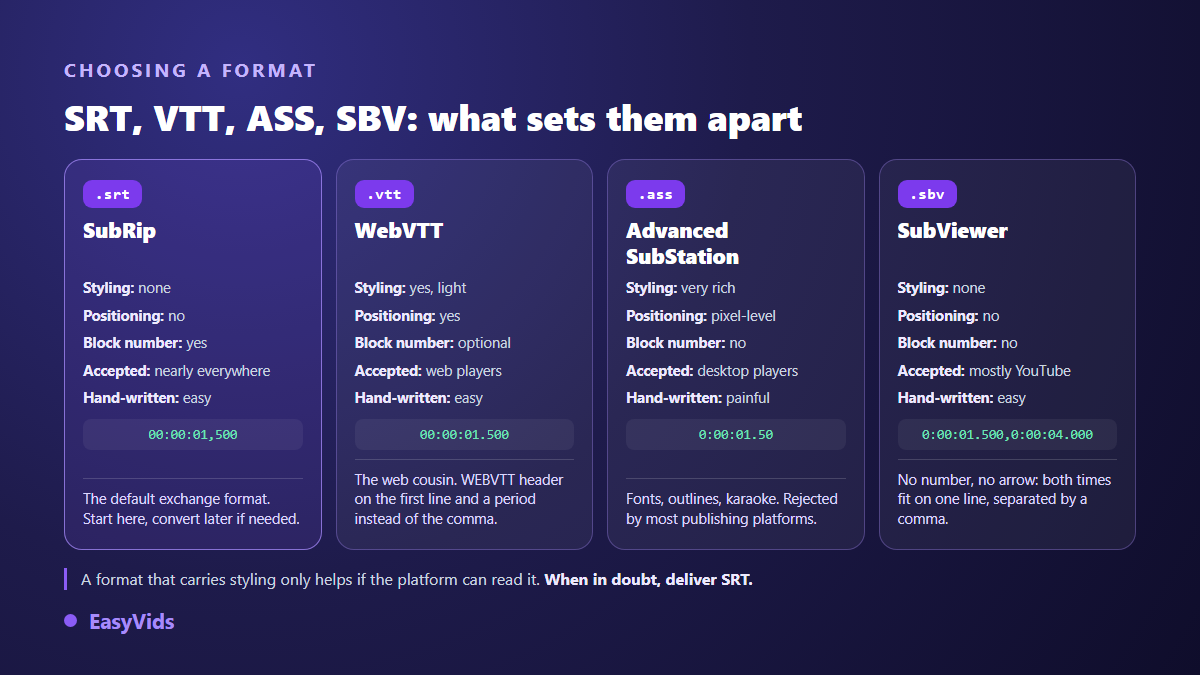
Keep SRT as your interchange format and convert only when the destination demands it. It travels between editing software, platforms and translators without losing anything, precisely because it carries almost nothing. If your videos come out of an automated chain, our AI video generator guide shows where captioning fits into that chain.
Three ways to create an SRT file
Depending on the length of your video and the precision you need, three routes lead to the same file. They do not cost the same time or the same attention.
- By hand in a text editor. You watch, you note the times, you type the blocks. Free and exact, and painful beyond a few minutes of footage. Keep this route for spot fixes.
- From your script, if you wrote one before shooting. You cut the text into short segments, then set the times while listening back. Fastest route on a narrated video, because the words are already clean.
- By automatic transcription. An engine listens to the audio and produces numbered, timed blocks directly. It is the quickest path, and it always needs a review pass: proper nouns, numbers and punctuation remain the three weak points of any transcription.
In all three cases the review is the real work. Automatic transcription saves you the typing, never the checking. If your video rests on narration, our guide to natural sounding AI voice over explains how to write copy that splits cleanly into short segments, which cuts the captioning work in half.
Writing captions people can actually read
A valid file is not yet good captioning. Viewers need time to read without taking their eyes off the picture, which is a balancing act. Professional style guides have converged on a handful of simple markers, and they hold just as well for a thirty second vertical clip. Some videos make captions essential rather than merely comfortable, starting with those built on a whispered narration, whose production is covered in our guide to AI generated ASMR voices.
- Two lines per block at most, never three.
- Short lines: broadcast style guides sit between thirty seven and forty two characters, and you should go lower on a vertical video where usable width is scarce.
- Display time in proportion to length: a four word block survives on just over a second, a full two line block wants three or four.
- Line breaks that respect the grammar: do not split an article from its noun, or a verb from its auxiliary.
- One idea per block, aligned with the speaker's breathing rather than a mechanical cut every seven words.
- No text left hanging after the sentence ends: an orphan caption pulls the eye and kills the rhythm.
Diagnosing a caption file that drifts
When captions land at the wrong moment, the first question is not how to fix them but what kind of drift you are looking at. Compare the first caption with the last one. If the gap is identical at both ends, the fault is simple. If it grows across the video, it is a different problem and no global offset will solve it.
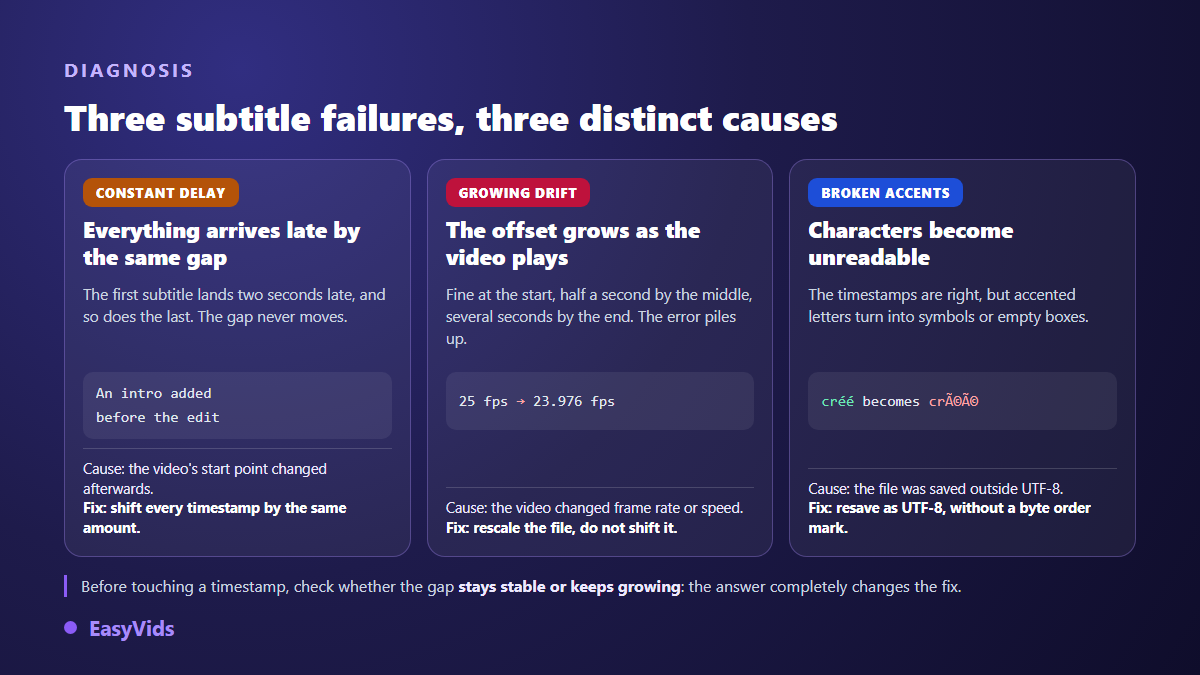
A constant delay almost always comes from a changed starting point: an intro added, a few seconds trimmed off the head, a long cut turned short. You then shift every timecode by the same amount and the job is done. Progressive drift betrays a difference in frame rate or speed between the video used to write the captions and the one you are publishing. That calls for rescaling the times, which means multiplying them by a factor, and most captioning tools do it in two clicks.
Encoding, the number one trap
This is the most common failure and the least understood. An SRT file never declares its own encoding, so the player has to guess. Save it in your system's default character set instead of UTF-8 and every accented letter turns into a string of symbols for whoever opens it elsewhere. The rule to remember is short: save as UTF-8, preferably without a byte order mark, since those few invisible leading bytes still upset strict parsers. Then check an accented word in a player other than the one you wrote the file in.
Attaching an SRT file on each platform
Platforms handle captions very differently, and the difference is not cosmetic. An attached file stays text: viewers switch it on or off, search engines read it, and translating it needs no new export. Burnt in text is part of the pixels: always visible, everywhere, but impossible to remove. When both routes are open, the attached file wins. When a platform accepts no caption file, or when you need full control of the look, burning the text in is the remaining route, and our method for burning in subtitles that hold on every platform covers the legibility settings it takes.
- YouTube. In YouTube Studio, open the Subtitles menu, pick the video, add the language, then choose to upload a file with timing. SRT is one of the basic formats accepted, and the file must be plain UTF-8 with no markup.
- Vimeo. Both SRT and WebVTT are accepted, with WebVTT recommended by the platform. Timecodes must follow the strict writing: two digits for hours, minutes and seconds, three for milliseconds.
- LinkedIn. Captions are attached from a desktop browser before the post goes out, and the required format is SRT, as the LinkedIn help page on closed captions sets out.
- Facebook. The file name follows a strict convention built from the language code and the country code, the language in lower case and the country in upper case, ending in .srt.
- Instagram and TikTok. Their help centres do not document any caption file upload. Both offer automatic captions in the app, and the reliable way to control the styling remains burning the text into the picture before you upload.
Inside the EasyVids editor, captions live in their own panel. You either import a file you already have, in SRT or ASS, or ask for a transcription of the audio on the current timeline, letting the language be detected or choosing it from a list. If the editor itself is new to you, our guide to editing video online walks through the tracks, the timeline and the export these captions land in. Every cue becomes an independent text element on its own track, centred at the bottom of the frame in bold white, wrapped to fit the usable width. Malformed blocks are skipped and counted, so the panel tells you how many entries were ignored. Server side transcription is charged by the length of the audio, and the pricing page is the only up to date source on that.
Frequently asked questions
How do I open an SRT file?
With any text editor: Notepad on Windows, TextEdit on Mac in plain text mode, or the code editor of your choice. Avoid word processors that save in a proprietary format. If the file comes back as anything other than plain text with the .srt extension, no player will read it.
What is the difference between an SRT file and burnt in subtitles?
An SRT file stays separate from the video: viewers toggle it, search engines read it, and translating it needs no re-export. Burnt in subtitles are painted into the pixels: they always show, in every app, including those that support no caption file at all, but they can never be removed or translated. They also force a fresh export, so a fresh encode: the right way to shrink a video file without losing quality keeps the text from coming out blurry on the other side.
Why do my accented characters show up as symbols?
The file is not saved as UTF-8. Reopen it, choose Save As, select UTF-8 without a byte order mark, then import it again. If the characters are already mangled inside your editor window, go back to the original file rather than repairing words one by one.
Can I use bold or colour inside an SRT file?
The format has no provision for it, and platforms that accept SRT generally ignore any markup you add by hand. If you need a specific look, burn the captions into the picture during the edit, or move to a format that carries styling once you have checked that your destination reads it.
How long should a caption stay on screen?
Long enough to read without effort, which depends on word count rather than a fixed duration. A very short block survives on just over a second, a full two line block wants three or four. The best test is watching the whole video once without ever pausing.
An SRT file asks for no expensive software and no rare skill: a number, two timecodes, some text, a blank line, and a UTF-8 save. The rest is discipline, and that discipline turns into comfort for an audience that largely watches on mute. Build your file, test it on one platform before publishing everywhere, and always keep the text version for translation. Creating an account opens the online editor so you can import an SRT, generate a transcription, or burn captions in before you publish.