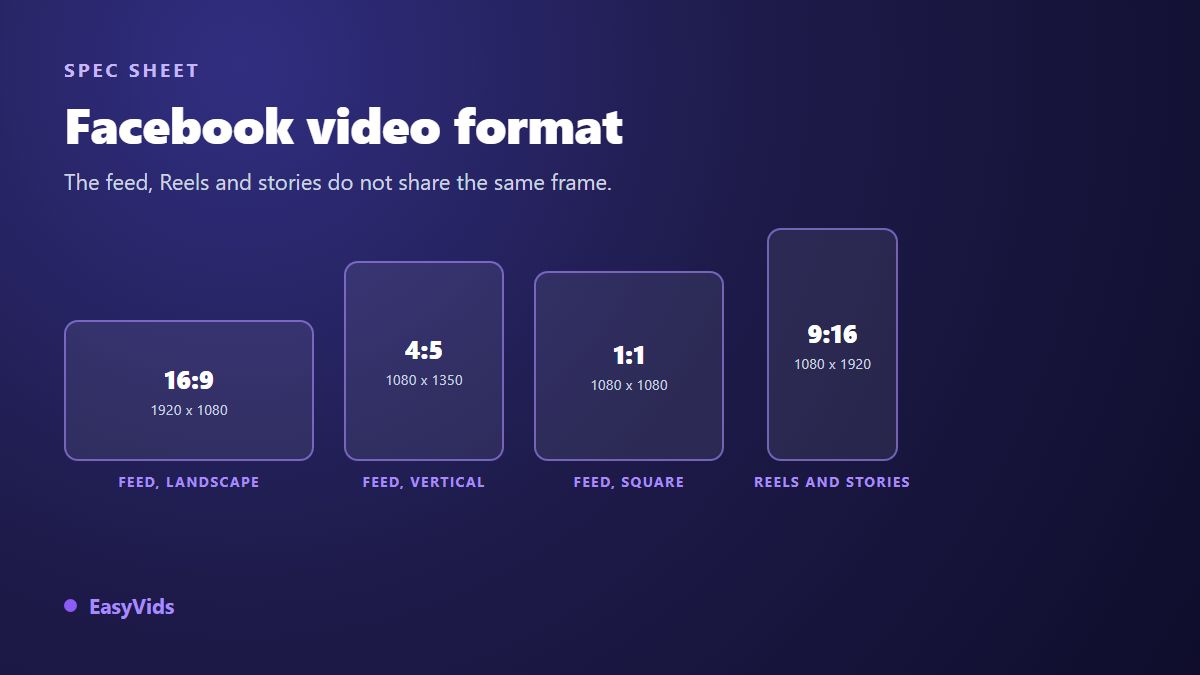
You post the same video to Facebook and it looks different everywhere. Black bars in one place, a headline sliced by a button in another, a soft mushy picture on a phone. The edit is rarely to blame. The Facebook video format is, because it is not the same in the feed, in Reels and in Stories, and it decides for you what stays visible.
This sheet gathers everything you set before export: aspect ratios, pixel dimensions, encoding, file size, duration, and the areas the interface covers up. It extends our cross platform video format sheet, which compares YouTube, TikTok and the rest. Here we stay on Facebook, and we go all the way to the practical move: which frame to pick before you produce, how to repurpose without rebuilding, what to check before you hit publish.
The short answer
For a feed post, target 4:5, that is 1080 x 1350 pixels: it is the vertical ratio Meta lists in its feed format specs, and it fills far more screen than 16:9. For a Reel or a Story, target 9:16, that is 1080 x 1920 pixels. Either way, export an MP4 with H.264 video and AAC audio, at 1080 pixels on the short side at minimum. Keep your subject and your on screen text near the centre: that is what lets you recrop later without losing anything.
Three surfaces, three frames
Facebook is no longer one scrolling page. A video can surface in the feed, in the Reels tab, inside a Story, in a group, or full width on a desktop. Every surface imposes its own geometry and its own way of stacking interface elements on top of your picture. Picking the frame before you produce spares you the rescue crop, the one that always cuts something that mattered.
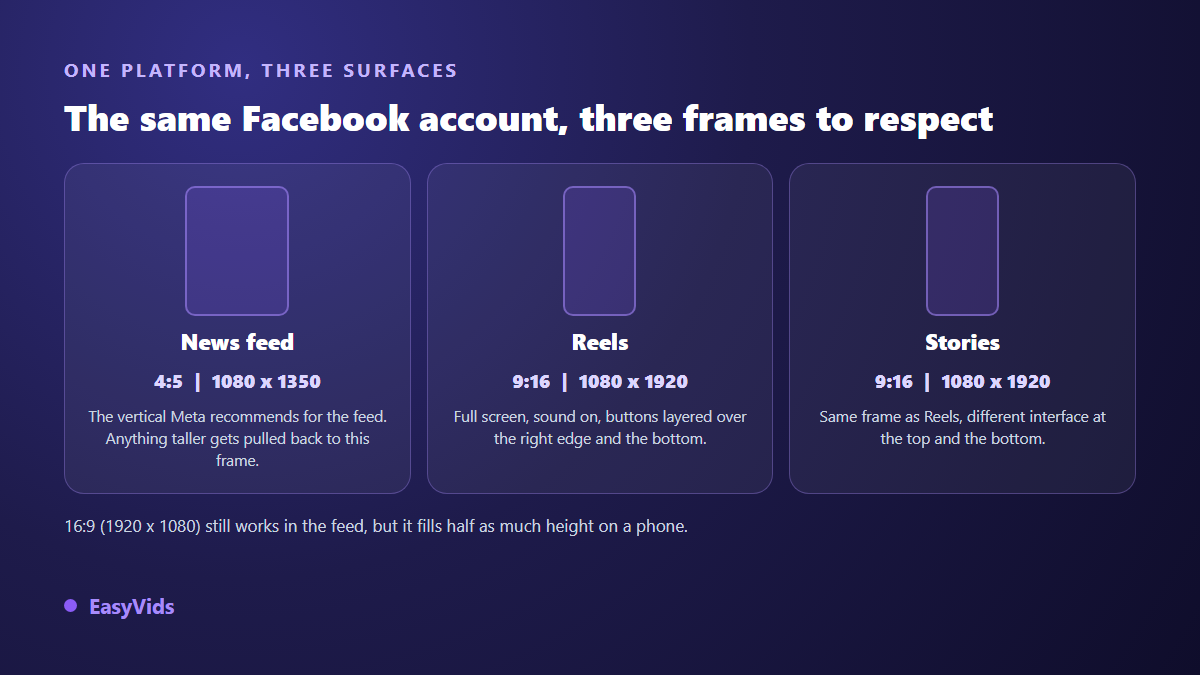
One sentence covers the whole logic: a vertical edit travels to every other frame, a landscape edit travels nowhere. Starting from 9:16 lets you trim down to 4:5 and to square with no effort. Starting from 16:9 leaves you adding bars or zooming into the picture, which costs you resolution exactly where you need it most.
The feed: why 4:5 wins
The feed accepts landscape, square and vertical. 16:9 is still fine for a longer video watched on a desktop. On a phone it occupies a narrow strip in the middle of the screen, and the thumb keeps moving. 4:5 fills almost the whole visible height without crossing the line beyond which the platform pulls the picture back to that ratio.
According to the format specifications Meta publishes for feed posts and feed ads, 4:5 is the recommended ratio, and a taller video is masked back to that frame on display. In other words, posting 9:16 to the feed does not buy you extra height: it costs you the top and the bottom of your composition. If your headline sat at the top of the frame, it is gone.
In practice: 1080 x 1350 pixels, subject centred, on screen text in the middle third. And assume the sound is off. A large share of the audience scrolls without listening, so the message has to travel through the picture. Burned in captions do that job, and our method for burning captions that survive every platform saves you trouble when the same video gets reposted elsewhere.
Facebook Reels: full screen, no compromise
A Reel plays at 9:16 full screen, so 1080 x 1920 pixels. Nothing to negotiate: any other ratio ends up with bars or with an automatic crop you do not control. The real difficulty is not the size, it is the overlay. The account name, the caption, the reaction and share buttons all sit on top of your picture, along the bottom and down the right edge.
On length, stay careful. Meta rolled Facebook Reels out with a 90 second limit, then moved that ceiling around depending on accounts and countries. Check what the app accepts on the day you publish rather than trusting a number read somewhere else. Cutting before the limit remains the better instinct: a video watched to the end beats a long one abandoned halfway.
Stories: the usable area is smaller than the screen
A Facebook Story uses the same 9:16 frame, but the interface eats the edges. Profile picture and account name at the top. Caption, send arrow and sometimes an action button at the bottom. In its creative guidance for Stories, Meta advises leaving roughly 14 % of the height clear at the top and at the bottom, around 250 pixels on each side of a 1920 pixel tall frame.
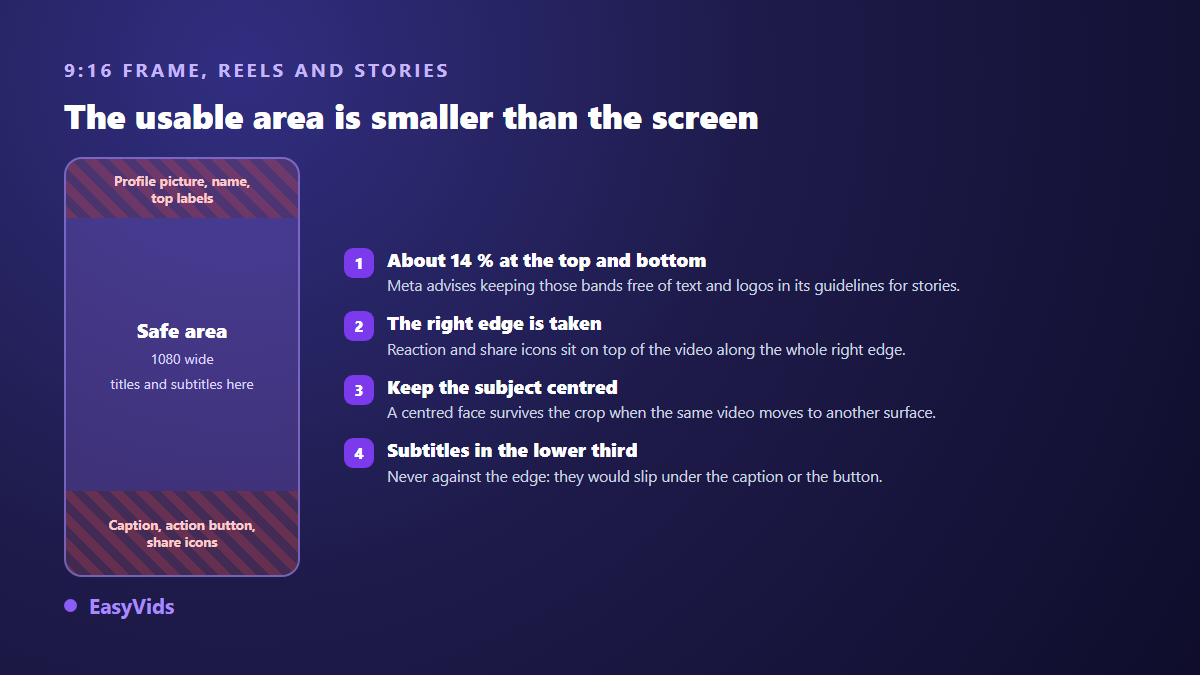
That margin is not dead space. Your picture keeps playing there, it simply has to stay clear of anything the viewer needs to read. The same principle applies to Reels, with a more generous reserve at the bottom, because a caption can run two or three lines depending on how much you wrote.
Pick the frame before you generate
When the video is produced by AI, the format decision comes even earlier. The frame chosen at the start drives the generated images, the animated shots and the final assembly. Cropping a 16:9 generated image into 9:16 after the fact throws away two thirds of what the model drew, and the subject rarely lands where you want it.
In EasyVids the format is picked when the project starts, in 16:9, 9:16 or 1:1, and it then travels all the way to export: reference images, animated shots and the final edit all come out at the same ratio, with 720, 1080 or 4K on the short side. For a Facebook post that means deciding on the very first question whether you are aiming at the feed or at Reels.
Encoding: the settings that keep pixels clean
Facebook re-encodes everything you upload. You do not control the final file, only the quality of the material you hand over. According to the video encoding guidelines Facebook publishes in its help centre, the ideal file comes down to a few simple traits.
- MP4 or MOV container, MP4 being the safest across devices.
- H.264 video, progressive scan, never interlaced.
- AAC stereo audio at a comfortable bitrate, never heavily compressed mono.
- 1080 pixels on the short side at minimum, and the highest resolution you actually have.
- A steady frame rate, 24, 25 or 30 frames per second depending on the source, with no mid file variation.
- A generous video bitrate: it decides sharpness after re-encoding far more than the resolution label does.
That last point deserves one more sentence. A 1080 export starved of bitrate looks worse than a properly encoded 720 file, because the platform compression stacks on top of yours. Dark flat areas, sky gradients and fast motion break first. If your picture falls apart in those places, raise the bitrate before touching the resolution.
File size and duration limits
For a video uploaded to a page or a profile, the Facebook help centre lists a maximum file size of 10 GB and a maximum length of 240 minutes. Those ceilings are wide. The real problem is almost never reaching them, it is pushing a heavy file over a mobile connection and watching the upload fail at 80 %.
A few minutes of 1080 footage stays comfortably under a gigabyte at a sensible bitrate. If your file goes far past that, duration is not the cause, your export setting is. Drop the bitrate a notch rather than the resolution: the eye forgives a slight loss of detail more easily than a 720 image stretched across a large screen.
Produce once, cut down for each surface
The fastest workflow is to edit once, vertically, with a composition that survives cropping, then export the files you actually need. 9:16 works as the master because it is the tightest frame: whatever fits inside it will fit everywhere else.
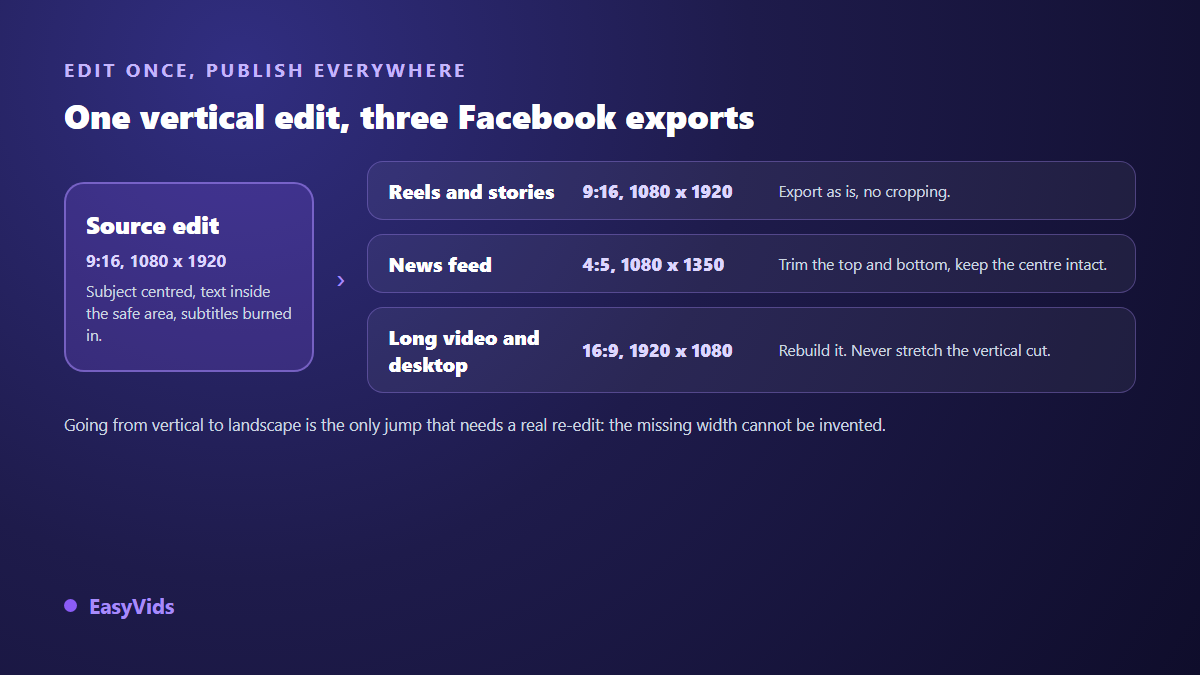
In practice this happens in an editor. You set the scene size, you reposition the elements, you export. Editing video straight in the browser is more than enough for this kind of job, with nothing to install. In the EasyVids editor the scene size is picked from the usual frames, 16:9, 9:16, 1:1, 4:3 and 3:4, or typed by hand in width and height, which is how you get the 1080 x 1350 the feed wants. Export offers MP4 or WebM, several quality levels and a choice of frame rate.
The format mistakes that cost the most views
- Posting 16:9 as a Reel: the video shows up tiny between two empty zones.
- Editing 9:16 for the feed: the top and bottom of your composition disappear.
- Placing a headline in the first two hundred pixels: the interface covers it.
- Sticking captions to the bottom edge: they slide under the caption text or the button.
- Cropping landscape to vertical with a plain zoom: faces walk out of frame.
- Exporting at 720 to save time: platform compression finishes the job the wrong way.
- Skipping captions: a silent video in a silent feed tells no story.
These numbers move, so date your sheet
Meta changes its surfaces without warning. Accepted ratios, Reels length and button placement have all shifted more than once. The values on this page match what Meta documentation states in 2026. Two habits keep you safe: keep a 9:16 master with breathing room around the subject, and post a test video on your own account before a campaign. What you see on your own phone beats any spec sheet copied from elsewhere.
Frequently asked questions
What is the best video format for Facebook?
4:5, meaning 1080 x 1350 pixels, for a feed post, and 9:16, meaning 1080 x 1920 pixels, for a Reel or a Story. If you could only produce one, produce the 9:16: it crops down to the others, while the reverse does not work.
Why does my video have black bars on Facebook?
Because its aspect ratio does not match the surface showing it. Facebook does not distort your picture: it fits it inside the available frame and fills the rest. Re-export at the ratio the target surface expects instead of letting the platform decide for you.
Should I upload in 4K to Facebook?
Rarely worth it. The platform re-encodes, and the vast majority of views happen on phones. A well encoded 1080 file with a generous bitrate looks better than an over compressed 4K one. Keep 4K for videos meant for a large screen, or for a master you archive.
How long can a Facebook video be?
The Facebook help centre lists a maximum length of 240 minutes for an uploaded video, which concerns almost nobody. Reels follow a far shorter limit that Meta has moved several times since launch. Check it in the app when you publish, and keep your edit comfortably below it.
Can I use the same video on Facebook and Instagram?
Yes. Meta's two vertical surfaces share the 9:16 frame at 1080 x 1920 pixels. The areas covered by the interface differ slightly between apps, so keep your text well centred. For the feed, a single 4:5 export serves both networks with no rework.
Format is not a technical detail you settle at the end. It is the first decision of the edit, because it drives framing, text placement and readability on a phone screen. Pick 9:16 as your master, keep what matters near the centre, export what each surface needs. To produce and repurpose your videos at the right frame with nothing to install, create an account and open the EasyVids creation studio, where generation, editing and export live in one place.