You post Shorts, you notice a thumbnail box in YouTube Studio, and you have no idea what to do with it. The YouTube Shorts thumbnail question keeps coming back because the answer changed recently, and because it depends on the device you publish from. Some creators see an upload button. Others only get to pick a frame from the video. Others see nothing at all, and assume they missed a setting.
The doubt makes sense: nobody ever sees your thumbnail while scrolling the Shorts feed. So why bother. Except the feed is not the only place your Short lives, and that is exactly where the answer sits. Here is what YouTube allows today, where the image is actually looked at, and how to set it depending on the device in your hand. If the topic is new to you, our complete guide to YouTube thumbnails covers the ground that applies to both formats.
The short answer
Yes, a Shorts thumbnail matters, just not where you think. It never shows in the Shorts feed, which plays the video full screen with no thumbnail at all. It shows everywhere else: your channel Shorts tab, search results, the home page, the subscriptions tab. There are two ways to set one. From the mobile app, you pick a frame taken from the Short itself. From YouTube Studio on a computer, you upload a real vertical file in 9:16, provided your account is verified and the feature has reached your channel.
Why YouTube refused Shorts thumbnails for so long
The absence of custom thumbnails on Shorts was a deliberate choice, not an oversight. Rene Ritchie, who handles creator liaison at YouTube, explained the reasoning publicly: the overwhelming majority of Shorts views start in the feed, and the feed displays no thumbnail. Building a tool around an image almost nobody would see looked pointless, and misleading for creators who would expect clicks from it.
That logic held while Shorts lived only in the feed. It gave way when YouTube acknowledged, in the July 2026 communications around the rollout, that thumbnails do matter on the home page and on the Home and Shorts tabs of a channel. The deciding argument came from sponsorships: a brand assessing a channel scrolls its grid, and a grid made of blurry freeze frames does not close deals.
Where your thumbnail is actually seen
Picture a Short as a video living in two separate worlds. In the first one, the vertical feed, everything rests on the opening second of picture and sound: your thumbnail does not exist. In the second one, made of pages and lists, your Short is a tile in a grid among other tiles, and the thumbnail speaks on your behalf.
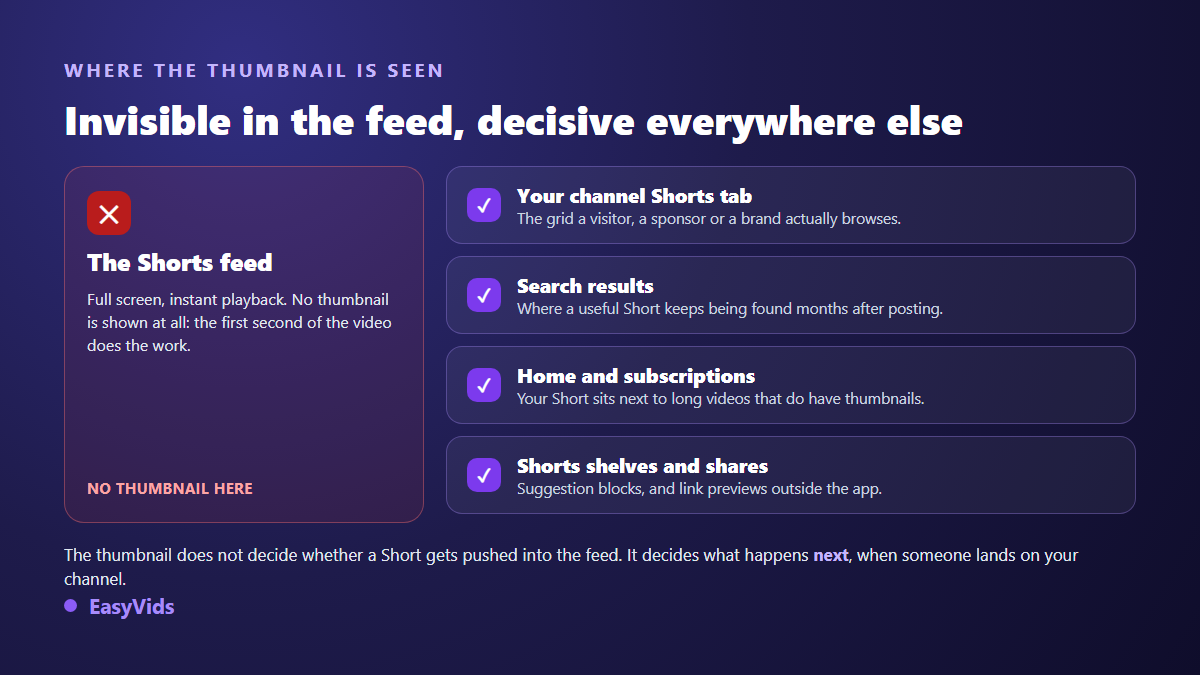
That second world carries more weight than it looks, because it concentrates two valuable audiences. The viewer who just watched one of your Shorts and opens your channel to see the rest. And the person searching for a precise answer weeks after you posted. Both decide on a still image, exactly as they would in front of a long video.
- Your channel Shorts tab: the vertical grid a newcomer scans in ten seconds.
- Search results, where a useful Short keeps being found long after release.
- Home and subscriptions, where your Short sits beside long videos that do have real thumbnails.
- Suggestion shelves, and link previews shared outside the app.
What YouTube allows today, path by path
The two paths do not produce the same result, which is where the confusion starts. On mobile, the YouTube Help pages about creating Shorts describe a frame picker: you scrub through your video, stop on the view you like, and you can add text and a filter on top. It works before and after publishing, and only from the app, never from Studio.
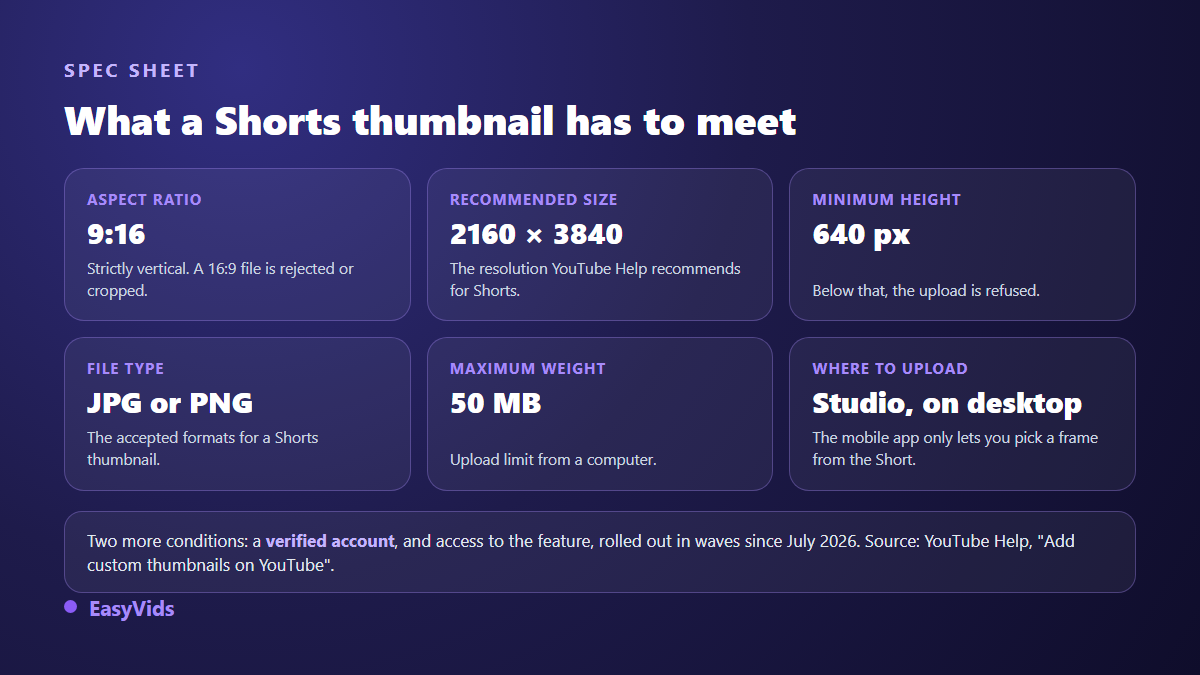
On a computer, it is a plain file upload. The help page titled "Add custom thumbnails on YouTube" states that custom Shorts thumbnails can only be added in YouTube Studio on a computer, and that your account must be verified. Access rolled out in waves from July 2026, starting with YouTube Partner Program channels, which is why one creator sees the button and the next one does not.
The exact size of a Shorts thumbnail
A Shorts thumbnail is prepared vertically, with no exception. The same YouTube Help page recommends 2160 by 3840 pixels, a 9:16 ratio, a minimum height of 640 pixels, a JPG or PNG file, and a maximum of 50 MB when uploading from a computer. A horizontal image dropped here is refused or cropped, and the crop will not ask your opinion.
If vertical framing is new to you, our piece on the 9:16 ratio and its exact dimensions explains how to plan for it at design time rather than at crop time. Long form numbers are different and often mixed up with these: the size of a standard YouTube thumbnail stays horizontal, and an image built for one never fits the other.
Picking a frame from your phone
This is the fastest path, and the only one available to a channel that has not received the upload feature yet. It does not create an image, it selects one from your video. That is often enough, provided your Short contains at least one sharp shot with the subject well framed.
- Open the YouTube app, then your Short from the channel page or the upload screen.
- Tap the suggested thumbnail, then the edit control next to it.
- Scrub frame by frame and stop on a sharp shot, free of motion blur.
- Add a short text and a filter if useful, then confirm.
- Check the result from your channel Shorts tab, not from the editing screen.
One habit pays off: plan that frame while filming. Hold still for half a second on a clean shot, face towards the lens, before moving on. You will always have a usable frame, and you will avoid the freeze where you blink.
Uploading a real thumbnail from a computer
The desktop path is the one that gives real control, because the image no longer has to exist inside the video. Open YouTube Studio, go to your channel content, select the Short, and drop your vertical file into the thumbnail area. It works on an already published Short as well as during an upload.
Two checks are worth the time before you confirm. Look at the thumbnail small, at the size it will take in a channel grid, not large in the editor: that is the size your audience gets. And be aware that YouTube's thumbnail comparison test, available on long videos, does not cover Shorts. You cannot settle two versions by measurement, which makes your composition rule matter even more.
Composing an image that survives a vertical grid
A Shorts thumbnail does not obey the same rules as a long form one. It is tall, narrow, and displayed small among a dozen neighbours. Anything built on detail disappears. What survives comes down to three things: a recognisable shape, hard contrast, and very few words.
Across the vertical visuals we produce, three words is the comfortable maximum once the image is reduced to grid tile size, and two words always read better than four. Keep that text in the upper half: the bottom of the tile carries interface elements, view counts among them, layered over your image. Our article on text on a YouTube thumbnail covers legibility in depth, and the principles hold in vertical too.
- One point of interest per image, framed generously and centred vertically.
- Three words maximum, bold, with an outline or a shadow so they hold on any background.
- Strong contrast between subject and background, or the tile melts into the grid.
- Nothing important in the lower band, where the interface overlaps.
- Series consistency: same font, same text position, same dominant colour across your Shorts.
Does every Short need a thumbnail
No, and trying is the surest way to stop posting. Cadence is the first strength of short form. A simple sorting rule saves your time without costing anything that matters.
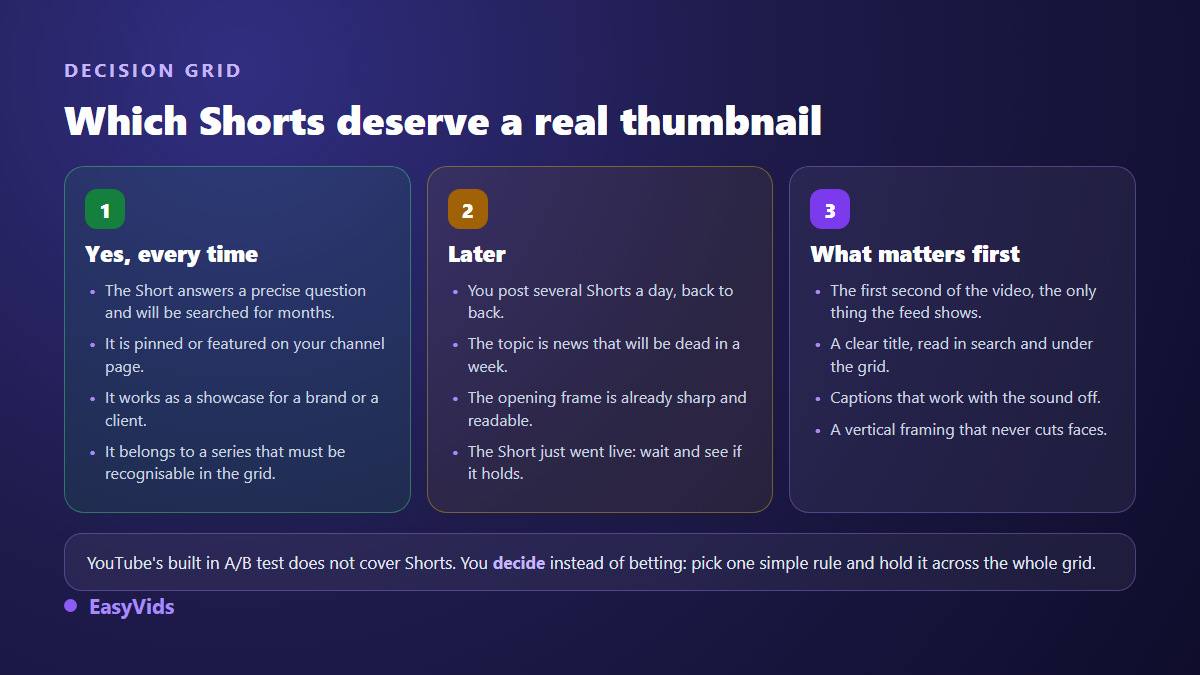
A Short that answers a precise question will be searched for months, so it earns a real image. A news Short posted in a batch gains nothing. A sound habit is to wait a week or two, see which Shorts keep pulling views, and only polish those. Since the native comparison test does not run on this format, that observation over time replaces the test: our walkthrough of A/B testing thumbnails explains what the feature measures on long videos, and what it does not.
What matters before the thumbnail on a Short
Since the feed shows no thumbnail, most of your audience is decided elsewhere. The opening second of the video plays the role a thumbnail plays on a long video: sharp, framed, and instantly clear about the subject. A blurry opening shot costs you far more than any weak tile.
Then come the title, read in search and under the grid tiles, and captions, essential for the share of your audience watching with the sound off. If you produce short form in series, our method for creating YouTube Shorts with AI shows how to hold a posting rhythm without dropping those three points.
Building the thumbnail without photo editing software
You do not need professional software to produce a clean vertical image. An image generator handles 9:16 perfectly: describe the scene, set the ratio, lay your text over it, export a PNG. The full step by step method sits in our guide to creating a YouTube thumbnail with AI.
The value of a studio that gathers image generation, writing and editing in one place shows up on series work. You lock a style once, reuse it across every Short, and your grid becomes recognisable at a glance. That is what the EasyVids studio is built for, with a free trial so you can judge the result on your own topics.
Frequently asked questions
Can I add a custom thumbnail to a Short from my phone?
Not as a file. From the mobile app you select a frame from the video and can add text and a filter to it. YouTube Help states that uploading a custom thumbnail for a Short happens only in YouTube Studio on a computer.
Why do I not see the thumbnail upload option on my Shorts?
Three likely causes. Your account is not verified yet, a condition stated in YouTube Help. You are on mobile while the feature is desktop only. Or the feature has not reached your channel: the rollout happened in waves from July 2026, starting with YouTube Partner Program channels.
Does a Shorts thumbnail affect view count?
Not in the feed, which shows none and carries most of the views. It affects what happens next: clicks from your channel page, from search and from home, so the second life of a Short and the impression your channel leaves on a visitor or a brand.
What size exactly should a Shorts thumbnail be?
A 9:16 ratio, a recommended 2160 by 3840 pixels, a minimum height of 640 pixels, a JPG or PNG file, and 50 MB maximum from a computer. Those values come from the YouTube Help page on custom thumbnails.
Can I test two thumbnails on the same Short?
No. YouTube's thumbnail comparison tool did not cover Shorts when the feature opened in July 2026. The only available measurement is observation: change the tile on an older, stable Short, then follow its views over several days.
Keep the rule simple: shape the opening second for the feed, shape the thumbnail for everything else. Pick a sharp frame from your phone at posting time, and save the custom vertical file for the Shorts that keep working for you weeks later. To produce those vertical images and your short form videos in the same place, create your account and try it on your next Short.