Your video is working. Views climb, comments come in, and one question keeps returning: is there a version in my language? Translating subtitles is by far the cheapest answer to it. No reshoot, no new voice over, no new edit. The same video file, one more text file, and an audience of a different size.
The catch is that it rarely goes to plan. Translated lines overflow the screen, cues overlap, whole sentences flash past before anyone can read them. The translation itself is not the culprit. A subtitle obeys two constraints at once, meaning and time, and only one of them survives a straight translation. This guide walks the full method, starting from clean source captions, which our guide to automatic subtitles covers in detail.
The short answer
Export your source captions as a timed text file, translate in blocks of ten to fifteen cues rather than line by line, then watch the video at normal speed and fix whatever overflows. Timestamps do not move, because the audio does not move. What moves is the length of the text. On a ten minute video, budget around twenty minutes per language, review included.
A translated subtitle answers to two masters
A literary translator looks for the right wording. A subtitler looks for the right wording that fits on two lines and reads in three seconds. That is a physical constraint, not a matter of taste. The timed text style guide Netflix publishes for its vendors caps lines at 42 characters for Latin script languages, with two lines maximum per cue. Those numbers are not a universal standard, but they give a solid order of magnitude: past that, the eye never gets back to the picture.
Then there is the expansion problem every translator knows. Text changes length when it changes language. A short English cue often becomes a longer sentence in French or Spanish, because those languages take five words where English takes three. The meaning survives, the room does not. That is why a faithful word for word translation almost always produces unreadable captions, and why the real work starts after the translation, not during it.
Five steps, in this order
The whole chain is five moves. None of them is technical, but the order matters: translating before your source captions are clean simply copies your mistakes into a second language, then into a third.
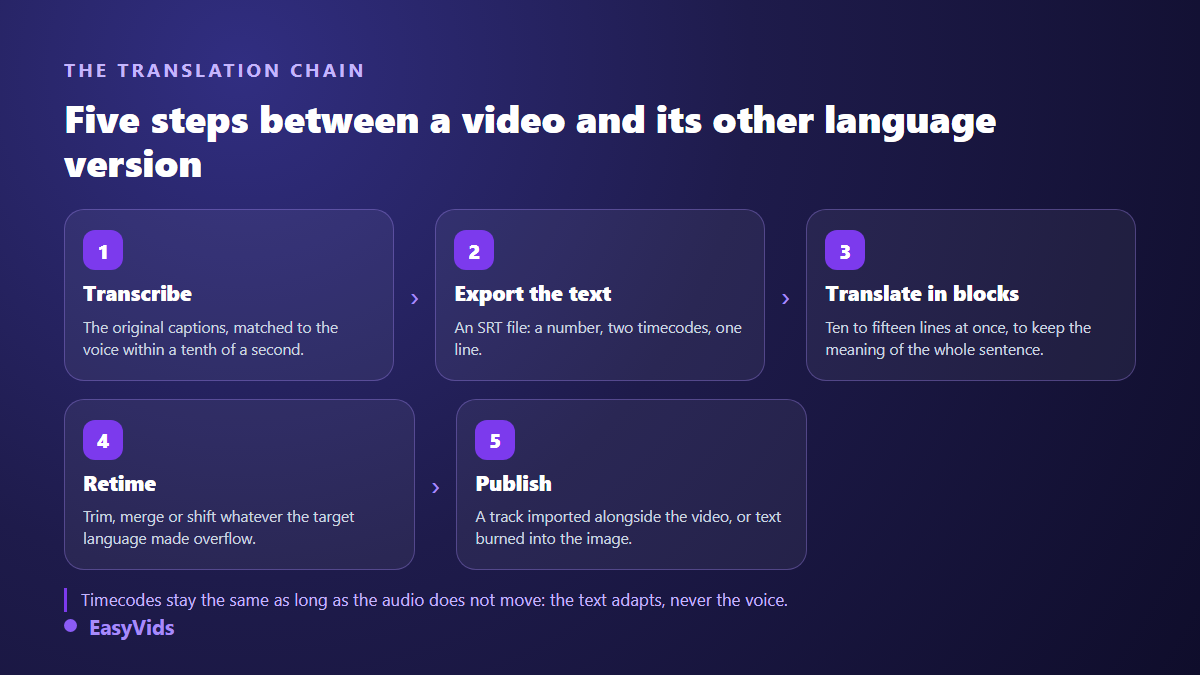
- Transcribe the video in its original language, then fix that transcript before anything else.
- Export the captions as a timed file, where every cue carries its own in and out points.
- Translate the text in blocks, leaving the timestamps untouched.
- Reflow: shorten, merge or shift the cues the target language made overflow.
- Publish, as a separate track or as burned in text depending on the platform.
Step 1: a source transcript worth translating
A mistake in the source transcript becomes a mistake in every language. A misheard brand name, a flipped number, a sentence cut in the wrong place: the translator, human or machine, does not fix it, it propagates it. Proofread the source cue by cue before you open anything else. Twenty minutes here save two hours by the time you reach your third language.
The format to aim for is SRT, inherited from the SubRip software. Its structure holds three things and nothing more: a sequence number, a timestamp line in hours, minutes, seconds and milliseconds, then the cue text. That plainness is exactly what makes it translatable, since the text can be read and replaced with no special tool. Our reference on the SRT file breaks down the structure and how to repair one by hand. WebVTT, specified by the W3C for web video players, follows the same logic with slightly different syntax.
Step 2: translate in blocks, never line by line
This is the most common mistake and the most expensive one. A caption file breaks sentences for display reasons, not by units of meaning: one sentence spreads over three cues, and the verb only lands on the third. Translated line by line, that sentence loses its syntax and sometimes its point. Translated in blocks of ten to fifteen cues, it keeps its logic, and you can redistribute words from one cue to the next.
In practice, copy the file in slices, timestamps included, and state explicitly that numbering and timestamps must be reproduced untouched. Put your line length limit, your register and your do not translate list in the same instruction. A length constraint given before the translation gets respected; asked for afterwards, it almost never is.
Step 3: reflow what the translation broke
Here comes the part nobody plans for. Some cues are now too long for their display time. Three moves fix them, and one move is off limits.
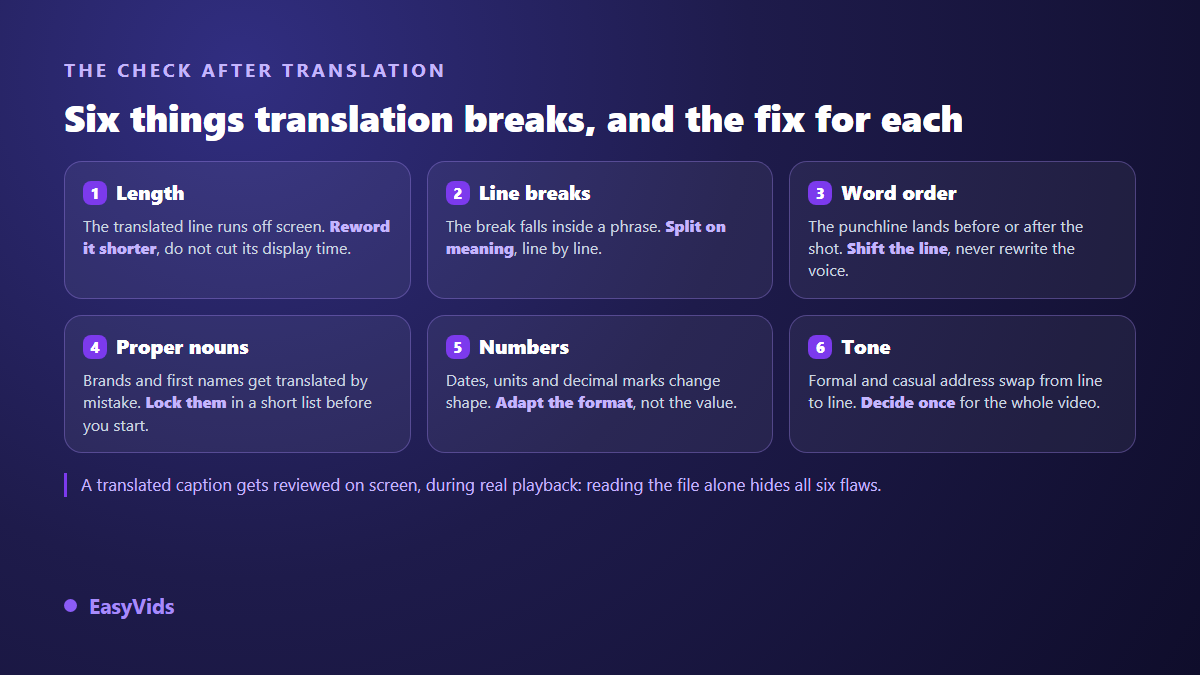
The forbidden move is stretching display time to fit a text that is too long: the next cue gets pushed back, and step by step the whole file drifts away from the voice. The three allowed moves are rewriting shorter, merging two neighbouring cues into one, and pushing a word into the following cue. If the drift has already set in, our method for resyncing out of step subtitles puts everything back without starting over.
Step 4: the on screen review, the only one that counts
A caption file read in a text editor always looks perfect. The flaws only appear at normal playback speed, on the device your audience actually uses. Watch the whole video in the translated language, with the sound off if you can, and note every point where you ran out of reading time. That note becomes your fix list, and it is always shorter than you feared.
- Each cue fits on two lines at most, never three.
- Text covers no face, no on screen graphic and no interface bar.
- Proper nouns, brands and identifiers stay identical across every language.
- Numbers change format without changing value: dates, units, decimal separator.
- The register stays consistent from the first cue to the last.
- No cue appears before the line is spoken, which would give away every punchline.
Step 5: separate track or burned in text
There are two ways to put a multilingual video online, with different constraints and different uses. According to the YouTube help centre, a single video accepts subtitles in several languages, and each viewer sees the one matching their settings: one video published, one file per language. YouTube also shut down its community contributions tool in September 2020, which used to let viewers submit translations themselves. Since then, supplying the files is the channel's job.
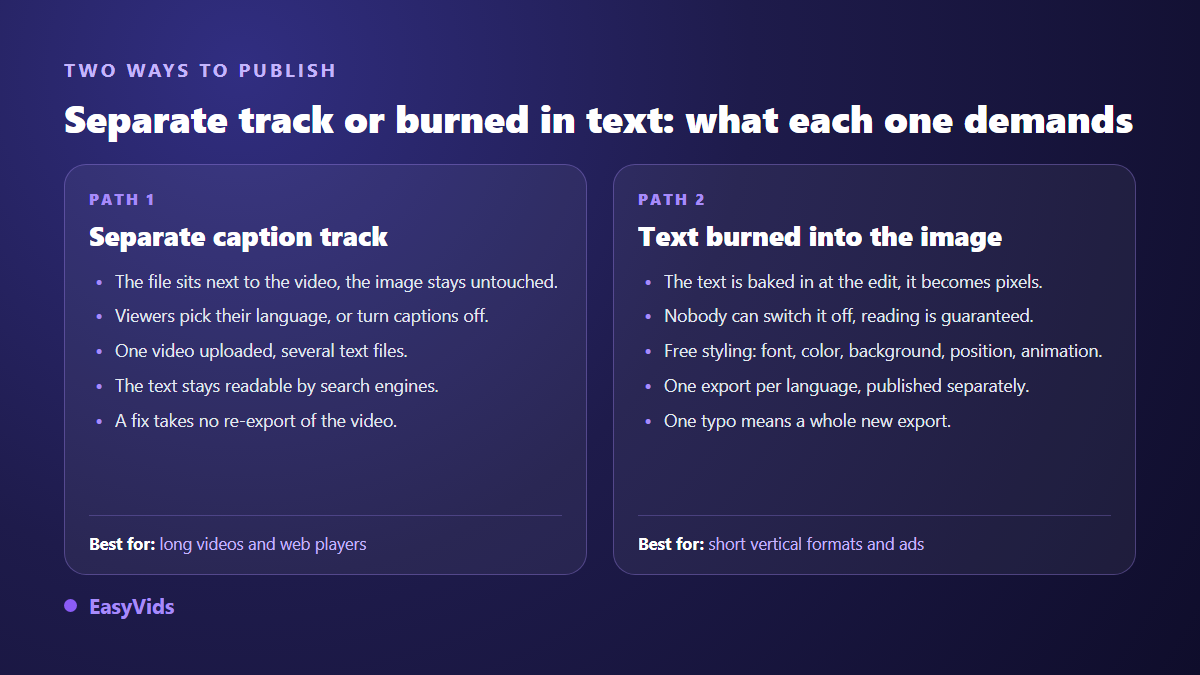
On short vertical formats the practice is the opposite: the text is burned into the picture at edit time, and you publish one video per language. Heavier to produce, but reading is guaranteed and the styling is entirely yours. Our guide to burning subtitles into a video covers the legibility settings that survive a small screen. One practical habit: name your files with the two letter language codes from the ISO 639-1 standard, so you never upload Spanish where Portuguese belonged.
Doing the work in an online editor
The EasyVids studio holds both ends of this chain in the browser. Its Subtitles panel does two things. Generate subtitles transcribes the audio of your edit and drops the result onto a text track, with the spoken language picked from a list of nine or left on automatic detection. Import a file accepts SRT and ASS files and turns every cue into an editable text element.
That second door is the one translation uses. Generate the source captions, translate them outside, then reimport the translated file: it lands on a new track, with its font, colour, background and position adjustable cue by cue. One track per language, the track visibility toggle to show only the one you need, one export per language. Worth knowing: the studio exports the video, not a caption file. For a separate track on YouTube, keep your translated file on your side and upload it to the platform yourself.
Translated subtitles or dubbing?
Subtitling is fast, economical and reversible. Dubbing, meaning replacing the voice over with one in the target language, takes more work but gives a completely different listening comfort. The two combine well: a voice in the viewer's language, and captions in that same language for everyone watching with the sound off. Our guide to AI voice over covers how to get a natural read rather than a flat one.
The decision rule is simple. If your video shows something, a demo, a product, a place, subtitles are enough and the eye stays on the picture. If it rests on one person talking for eight minutes, reading becomes tiring and dubbing wins. On the writing side, the EasyVids script workshop drafts directly in French, English, Spanish and Portuguese, which spares you translating a text built for another language.
Frequently asked questions
Can subtitles be translated automatically with no review?
Technically yes, and the result is often understandable. But machine translation knows nothing of your context, your proper nouns or the length constraint: it produces cues that overflow and misreadings on your field's vocabulary. Budget a review pass. It takes a few minutes per ten minutes of video, and it is what separates a useful translation from an embarrassing one.
Do timestamps need redoing after translation?
No, as long as the audio has not changed: the words are still spoken at the same moments, so the timings remain valid. You only touch durations to merge two cues or move a cut, never to squeeze an oversized line into its slot.
How many languages should I start with?
Two. Your original language and the one where your largest secondary audience sits, which your channel analytics already tell you. A third language earns its place once the first two are kept current on every new video, not before.
Do translated subtitles help a video rank?
A subtitle track is text attached to your video, so it is readable by search engines, unlike text baked into the picture. It is a useful signal, not a magic lever. It mostly works because it opens the video to viewers who would never have watched, and they are the ones who lift watch time.
Translating subtitles has the best effort to audience ratio in the whole of video production: the creative work is already done, all that remains is opening the door. Start with one language, hold it across your next ten videos, and look at where the new views come from before adding a second. To generate your source captions and reimport their translated version in the same editor, creating an account opens the full studio.