You built a YouTube intro, you are quite proud of it, and your retention curve still collapses inside the first fifteen seconds. The usual suspects are the topic, the thumbnail, the pacing. The real one is often the very first thing on screen. Before you open another YouTube intro maker, it is worth asking what that intro is actually for.
An intro is not good or bad on its own. It is well or badly timed, well or badly placed. This guide covers the three questions creators skip: how long it should run, where exactly it should land, and when the right call is to have no intro at all. Yours is one piece of your channel's animated branding, and it is the only piece that can actively cost you viewers.
The short answer
A YouTube intro that works runs three to eight seconds, lands after a hook and never before it, and carries three pieces of information at most: your logo, the channel name, a promise in a few words. On Shorts, on tutorials found through search and on the first video of a brand new channel, it has no place at all. The rest of this article is about telling those cases apart, then building yours without animation software.
The real problem is placement, not length
A viewer who presses play has committed nothing yet. They clicked a thumbnail and a title, and they are checking whether they were right. During those first seconds they are looking for one thing: does this video keep the promise that made me click. An animated title sequence, however polished, does not answer that. It postpones it.
That is where a useful intro parts ways with an expensive one. YouTube's help documentation on the audience retention report in YouTube Studio describes a curve read second by second from the start of the video, with the moments where viewers leave flagged automatically. Open that report on your last ten videos and look only at the stretch that matches your title sequence. If the slope is steeper there than anywhere else, you have your answer, without taking anyone's word for it.
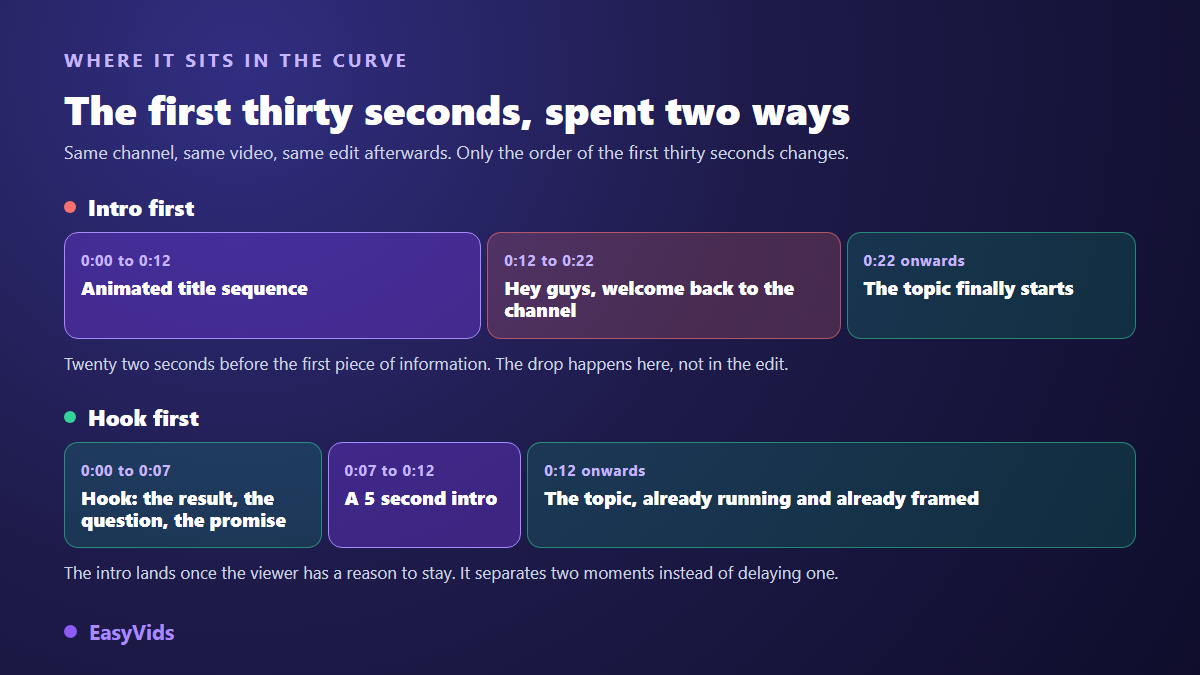
Order changes everything. An intro placed first asks the viewer to wait before deciding to stay. The same intro placed after seven or eight seconds of hook arrives once they have already decided: it delays nothing and marks the real start of the topic. Same file, two positions on the timeline, and moving it costs nothing to produce.
Three to eight seconds, and why not fifteen
Intro length is not a matter of taste, it is a matter of return on the time you spend. An intro does three jobs: it makes the channel recognisable, it separates the hook from the body, and it gives one beat of breathing room. Those three jobs take seconds. Anything beyond that repeats information the viewer already has.
The test needs no tools. Time your intro, then cut it in half and watch the short version. If you cannot name what was lost, the short version wins. Repeat until the cut hurts. Across the channel branding kits we build, that trimming almost always stops between three and eight seconds, which is also the range that survives the move to vertical formats.
When you should have no intro at all
This is the part tutorials skip, because it sells nothing. Yet plenty of channels would gain more by deleting their title sequence than by rebuilding it. The question is not whether your intro looks good. It is how the viewer arrived on this particular video.
- Shorts and vertical videos: playback loops and viewers swipe. One second of branding is one second of delay.
- Videos found through search: someone looking up how to fix a specific thing wants the answer, not your logo.
- The first video on a brand new channel: you cannot be recognised before you have been watched once. Save the signature for the end.
- Very short videos: under two minutes, an eight second title sequence eats a visible share of the runtime.
- Videos running as ads: Google Ads documentation on skippable in-stream ads states that viewers can skip after five seconds. Those five seconds are not for a title sequence.
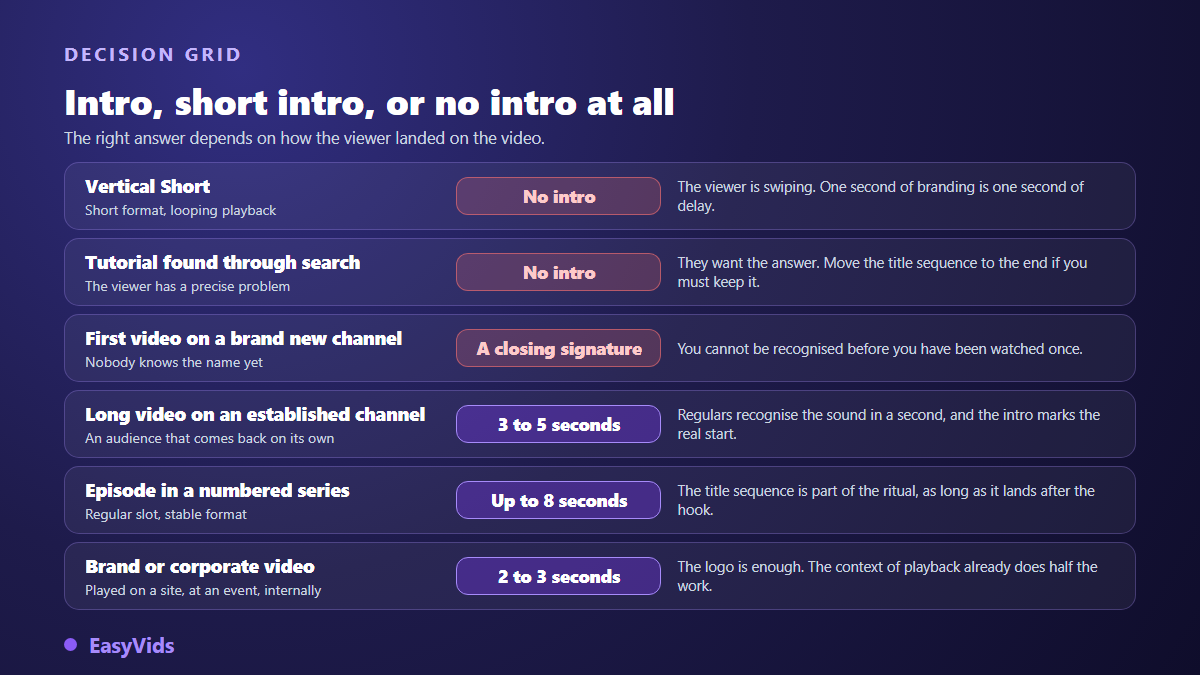
Nothing says a channel has to treat every upload the same way. Plenty of established creators keep a title sequence on long form and use none on short form. Decide the rule once, write it down, and read it again at edit time. That is faster than reopening the argument on every video.
The four parts of an intro under ten seconds
An effective intro is not a small film. It is four gestures in a row, each with a job. A part with no job leaves the edit. That single rule is what stops an intro from swelling from one version to the next until it becomes a short film nobody asked for.
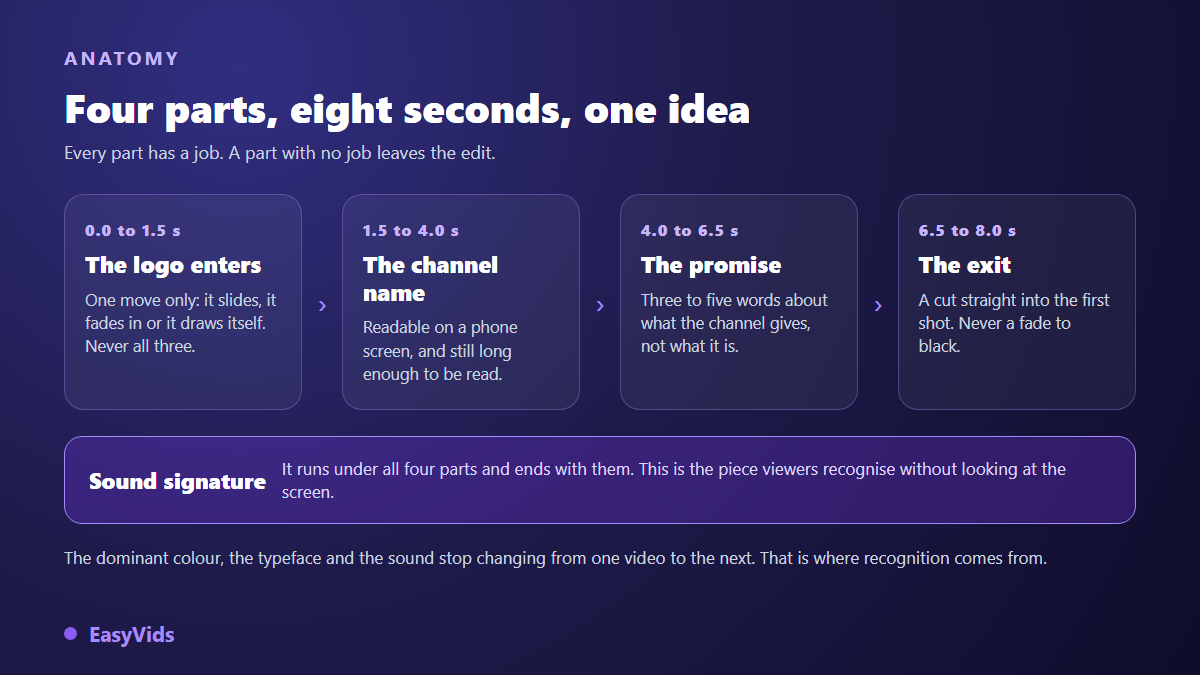
The first part is the logo entrance. One move is enough: it slides, it fades in, or it draws itself. Three moves stacked together read as a tired agency reel. The techniques and timings for that shot are covered in our guide to animating a logo on video, and they apply to the closing signature too.
Then come the channel name and the promise. The name has to stay readable on a phone: large, high contrast, and still long enough to be read. The promise fits in three to five words and says what the channel gives, not what it is. Two recipes every week beats Claire's cooking channel. For the entrance effects themselves, our rundown of animated text effects keeps you clear of text that wiggles for no reason. The fourth part is the exit: it cuts straight into the first shot of the video. A fade to black inserts a pause exactly where you needed momentum.
The sound signature does half the work
Recognition travels through the ear before the eye. A viewer half watching while doing something else identifies a channel by its sound cue without looking up. It is the cheapest piece to produce and the most profitable: a few notes, always the same ones, starting with the picture and ending with it. Our guide to building a recognisable intro track covers how to get that cue and how to adapt it to short formats.
Two mistakes come up again and again. The first lets the music spill over the first sentence of the topic, so the voice sits under a blanket of sound and the viewer reaches for the volume, or leaves. The second changes the cue every season. A sound signature only becomes recognisable through repetition, exactly like a radio ident.
Using a YouTube intro maker without animation skills
An eight second intro has no business taking a week of work or a professional animation suite. The EasyVids motion design engine builds animation from code rather than from a fixed template: you describe what you want, the scene is assembled, and you keep control of every element, from the logo file to the timing of each gesture. The rest of the studio, shown on the EasyVids home page, then handles writing, sound and editing for the video that follows.
- Gather your assets: your logo in the best file you have, the channel's dominant colour, the typeface of your titles.
- Write the promise in three to five words before touching the animation. An intro is designed through its text, never through its effects.
- Animate part by part: logo entrance, name, promise, exit. One move per part.
- Add the sound signature and land its last note on the last frame of the intro.
- Export one master file in 16:9, then derive the vertical and square versions from that same file.
- Drop the intro after the hook, and check the join between its last frame and the first shot of the video.
That master file is then reused without ever reopening the animation. You drop it at the right point of the timeline in an online video editor, which takes seconds per video. That is what makes an intro pay for itself: built once, placed a hundred times.
The same intro in 16:9, 9:16 and 1:1
An intro designed for a wide screen becomes unreadable vertically: the logo shrinks, the name breaks, the promise overflows. Do not crop it, redraw it. The same four parts stack vertically, the name takes two lines, the promise moves up. The duration shrinks further too: what runs five seconds on long form runs two or three on vertical.
Always check the interface zone. On vertical formats, the bottom and right of the screen are covered by app buttons, and a channel name set too low ends up under a subscribe icon where nobody will ever read it. The readability rules are the same as for any text placed on a video: strong contrast, generous margins, enough time to read.
What a long intro does to chapters and ads
A long intro has side effects you do not see coming. According to YouTube's help documentation on video chapters, as published in 2026, the first timestamp must start at 00:00, a video needs at least three chapters, and each chapter must last at least ten seconds. So if your title sequence fills the first twelve seconds, your opening chapter is called Intro, and that is the word displayed under the progress bar instead of a title that might have kept someone watching.
The same logic applies to advertising. Google Ads documentation on skippable in-stream ads states that a viewer can skip after five seconds. If you run a video as an ad, those five seconds are the only thing you are guaranteed. A title sequence spends all of them, and you end up buying a logo impression for someone whose finger is already on the skip button.
Intro and end screen: two pieces, two rulebooks
Intros and end screens look alike, but they do different jobs. An intro obeys no platform rule at all: its length, its content and its position are entirely yours. The end screen is regulated. YouTube's help documentation states that it sits in the last twenty seconds of a video, and that the video must be at least twenty five seconds long to carry one. Our guide to the animated end screen covers what actually gets clicked there. Keep both pieces in the same visual family, same typeface, same colour, same sound cue, and the channel becomes recognisable even to someone watching with half an eye.
Measuring whether your intro earns its place
An intro is judged on data, not on opinion, and the method needs no extra tools. Publish five videos with your intro where it usually sits. Then publish five comparable videos with no intro, or with the intro moved after the hook. Compare retention at fifteen seconds and at thirty seconds in YouTube Studio. Compare like with like: same format, close publishing dates, related topics. A news video and a tutorial never share an opening curve, whatever their intro.
Mistakes that lose viewers before second ten
- The title sequence first, before a single sentence. The most common mistake, and the easiest to fix.
- The welcome back to the channel line glued right after the intro: two delays stacked, still no information.
- Music louder than the voice that follows, which sends the viewer to the volume control in the first second.
- A logo animating for eight seconds when it was already readable at second three.
- A different intro on every video, which cancels the only thing an intro can do: get recognised.
- A fade to black on the exit, killing momentum at the exact point you needed a cut.
- Text too small or too low on vertical, swallowed by the app buttons.
Frequently asked questions
How long should a YouTube intro be?
Three to eight seconds on long form, two to three seconds on vertical, and none at all on a Short or on a tutorial found through search. Past ten seconds an intro stops being a landmark and becomes a toll gate.
Do YouTube Shorts need an intro?
No. Looping playback and swiping make every second decisive, and an intro spends exactly the seconds that decide whether the video gets watched. If you want the channel marked, keep a small logo in a corner for the whole Short instead of giving it a dedicated shot.
Can I make a YouTube intro without animation skills?
Yes, and it is now the common case. A motion design engine builds the movement from a written description, your logo and your colours. You keep control of timing, text and sound without opening animation software or learning easing curves.
Should the intro come before or after the hook?
After, in almost every case. The hook gives the viewer a reason to stay, and the intro then marks the start of the topic. The reverse order asks for patience nobody grants a channel they do not know yet.
How often should I change my intro?
As rarely as possible. An intro becomes a landmark through repetition, and every change resets that work. A refresh every two or three years is plenty, keeping the dominant colour and the sound cue, which are the two things people actually remember.
Take your latest video and do one thing: move the title sequence after the first eight seconds, then cut it in half. The retention curve will answer you before you change anything else. When you are ready to rebuild the intro itself, animated logo, name, promise and sound signature included, create an EasyVids account and build the short version before the long one. The available plans are listed on the pricing page.