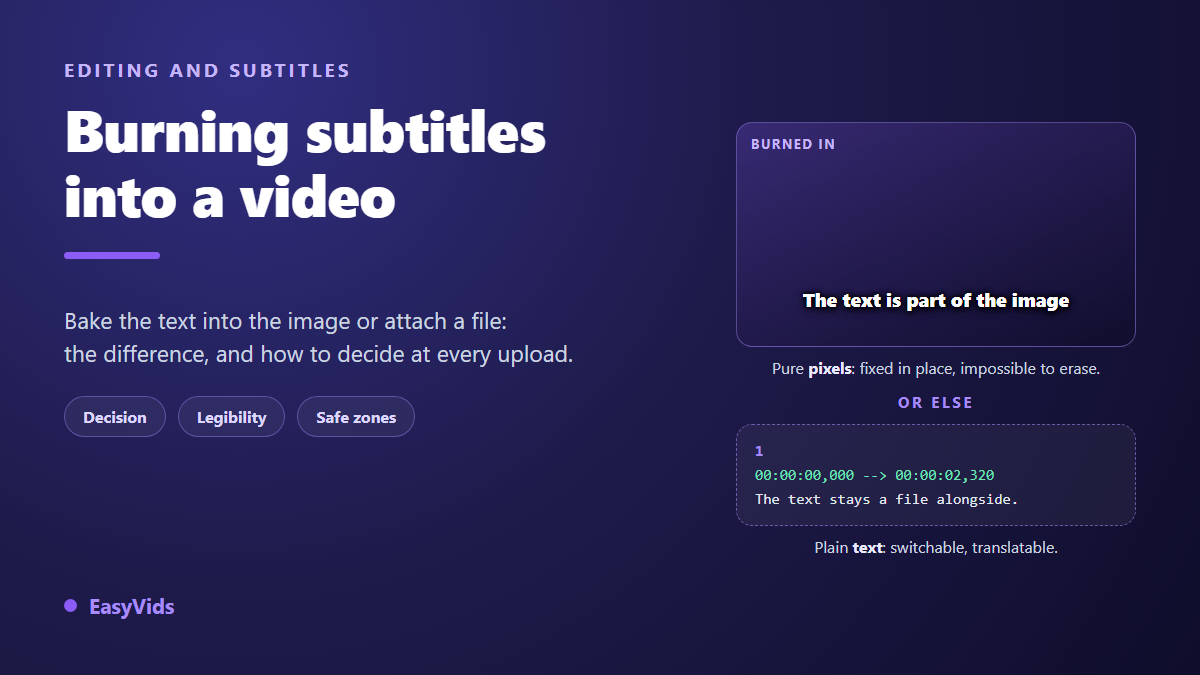
Your edit is done, the audio is locked, and one decision is left. It looks cosmetic and it is not: should you burn subtitles into video, or ship a separate file the player lays over the picture? The words are identical either way. What changes is who reads them, on which screens, in which language, and what you can still fix next week.
A burned-in subtitle is part of the image, exactly like a logo in the corner. An external subtitle stays a timed text file the platform renders at playback. Everything else follows from that single difference. If the text does not exist yet, our guide to automatic subtitles covers transcription and proofreading. This one starts once you already have lines and timecodes.
The short answer
Burn them in when the video is heading for a vertical feed, an ad platform, a third party site, an in-store screen or a repost you do not control. The text is then guaranteed on screen whatever the player. Keep a separate file when the video lives on a platform that knows how to display one, starting with YouTube, because viewers can then switch it off, enlarge it or have it translated. When the same video serves both, do both.
Burned in or separate: what the choice really changes
Burning means engraving. The software draws the text onto every frame, then re-encodes the whole file. At the end there is no subtitle left: there are white pixels shaped like letters. No player can move them, resize them or translate them, because no player knows they are there. The trade calls these open captions, as opposed to the closed captions you can close.
A separate file works the other way round. It is a plain text document, usually SRT, pairing a sentence with a time range. The video stays untouched, the file travels beside it, and the player renders on the fly. Its structure fits in four lines, spelled out in our technical sheet on the SRT file. That lightness is both its strength and its weakness: nothing guarantees the player on the other end will show it.
What burning in buys you
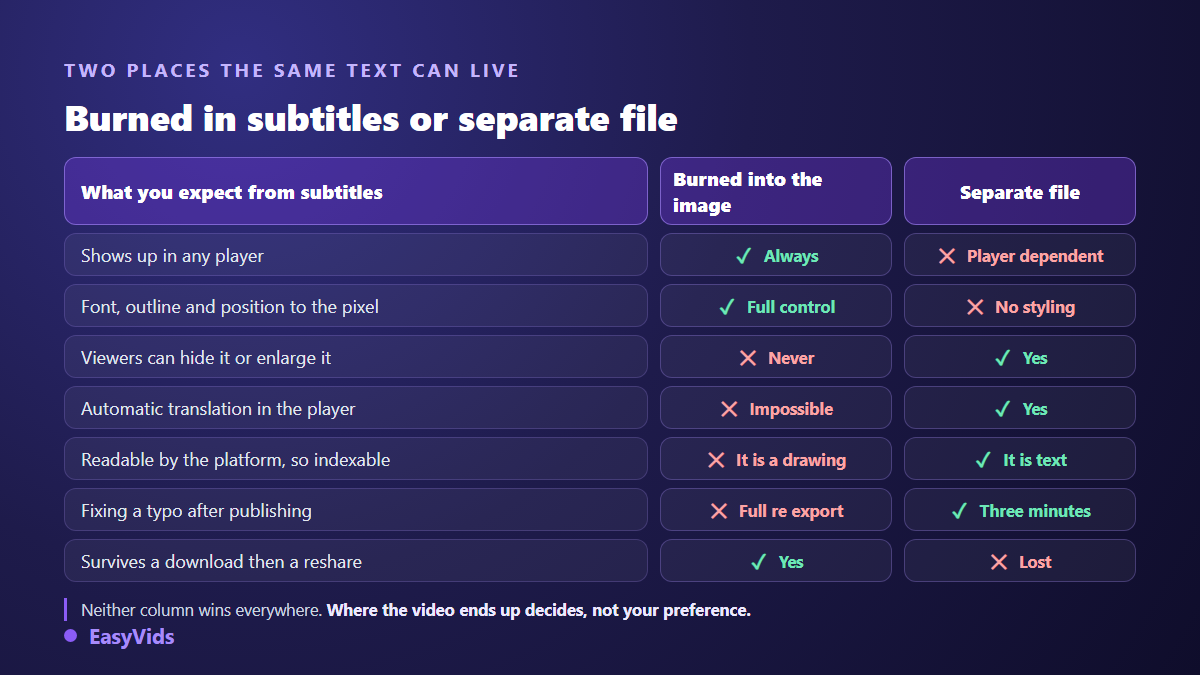
Burning buys one thing, and it is worth having: certainty. Nobody sees the video without the text, and the text looks exactly the way you designed it.
- Display is guaranteed, including in players that ignore subtitle files: messaging apps, slideshows, third party sites, screens with no interface.
- The styling is yours: font, colour, outline, background, position to the pixel. An SRT file carries no formatting at all.
- The text survives resharing. A video saved and reposted elsewhere loses its subtitle file. It keeps its pixels.
- Word by word captions become possible. Animated captions that pop one word at a time can only exist burned into the frame.
- One file to manage, which removes the classic upload mistake of forgetting the second one.
What you give up, and it weighs more than it looks
The bill arrives later, and it is paid in reach. Engraved text is no longer text, it is a drawing. The platform cannot read it, so it cannot index it, translate it, or offer it larger to a viewer who needs that. According to YouTube's help centre, a viewer can ask the player to auto-translate a video's subtitles, provided a file exists. An engraved sentence stays in its original language for good.
The other loss is correction. A typo spotted after publishing takes three minutes to fix in a separate file, without touching the video or losing the views already gathered. The same typo burned in means a new export, a new upload, and usually the loss of the whole post history. None of that is difficult once the workflow is familiar, and the eight moves that make up an edit run through it from the first import. Across a series, that difference outweighs the early convenience.
One word on accessibility, because a common misconception sits here. The W3C accessibility guidelines known as WCAG require captions for prerecorded audio under success criterion 1.2.2, and explicitly accept open captions, meaning burned-in ones. Burning does not put you out of compliance. It does, however, remove the viewer's ability to resize the text or turn it off.
The decision grid, platform by platform
The useful question is not which method is better, it is where this video will live. Three things settle it: does the platform accept a file, does the audience watch without sound, and will the video be reused elsewhere.
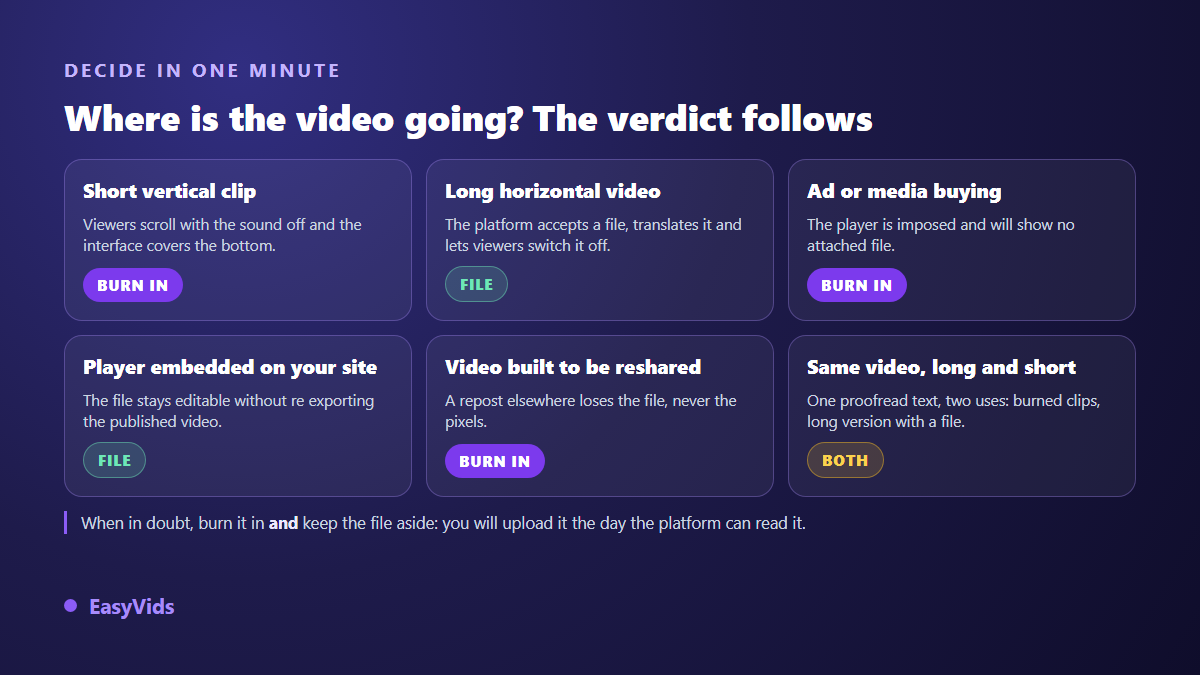
The platform picture is easy to remember. According to YouTube's help centre, a video accepts an uploaded subtitle file in several formats including SRT, on top of the automatic captions the platform produces itself. According to LinkedIn's help centre, an SRT file can be attached to a video uploaded from a computer, though not from every publishing surface. TikTok and Instagram generate automatic captions that viewers can hide from their own settings, according to their respective help centres, so you control neither their accuracy nor their position.
Hence the working rule: on short vertical formats, burn them in, because that is the only way to control what the viewer reads. On long horizontal video, keep the file, because that is where translation and indexing pay off. The same logic drives format choice, which we set out in our guide to video formats per platform.
Making burned-in subtitles genuinely readable
Engraved text gets one attempt. There is no viewer side rescue, which makes legibility settings far more critical than in a file. Netflix's subtitle style guide, widely used as a reference in the industry, caps lines at 42 characters, two lines maximum, and a reading speed of 17 characters per second for adult audiences. Those numbers are a sound baseline well beyond cinema.
- Two lines maximum, never three. A third line eats the frame and reads badly on a phone.
- About one second minimum per caption, even for a single word, or the eye has no time to land.
- A black outline or a drop shadow, every time. White on white always happens eventually.
- A bold, wide typeface. Thin condensed fonts are the first casualties of video compression.
- A width capped around 80 percent of the frame, so text never touches the edges.
- No decorative punctuation: ellipses, all caps and emoji slow reading down instead of helping.
The outline deserves insistence. Platforms re-encode your file at a bitrate they choose, and thin text over a moving background ends up ringed with artefacts. A crisp outline, or a semi-opaque plate behind the line, absorbs that. It is also what separates the animated styles whose mechanics we take apart in our word by word caption method.
The strips the platform interface covers
Here is the most frequent mistake, and the least visible from a desktop: the subtitle sits perfectly in the edit and is completely hidden in the app. Vertical feeds draw their own interface over the video, with the handle, the caption and the action buttons. That interface occupies the bottom of the frame and its right edge.
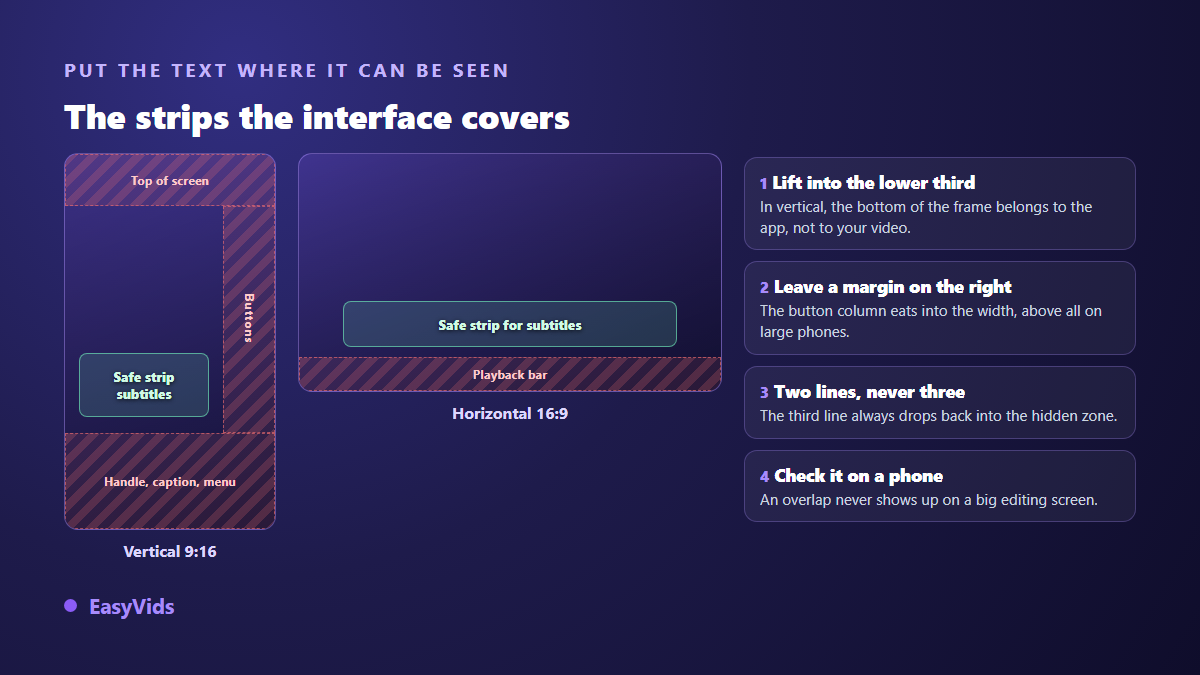
The fix is one sentence: in vertical, lift the subtitles into the lower third rather than pinning them to the bottom edge, and keep a comfortable margin on the right. In horizontal, the bottom stays available as long as you leave roughly five percent of the height as breathing room. Always check on a phone, never on a large screen, because that is where text turns tiny and overlaps show.
Burn after you crop, not before
Order of operations matters. Burn subtitles onto a horizontal version, then crop that video to vertical, and the text is cut off at the sides with no way back. Once engraved, text takes every transformation the image takes. Timing follows the same rule: while the text still lives in a file, a drift is fixed in a few clicks, and our method for resynchronising subtitles saves you an extra export. Decide the final aspect ratio first, burn second. If the same video needs both, keep the project open, change the scene size, let the subtitles reflow, and export twice. That back and forth is exactly what an editor running in the browser makes painless.
How to burn subtitles into a video in the online editor
In the EasyVids studio, burning is not a special operation, it is the default behaviour. The Subtitles panel drops captions onto a text track in the timeline, and everything on the timeline ends up in the exported picture. You do not tick a burn-in box, you export.
- Open the Subtitles panel to the left of the timeline.
- Import your existing file, SRT or ASS, or generate captions from the project audio.
- For generation, pick the spoken language or leave automatic detection. French, English, Spanish, Italian, German, Portuguese, Russian, Japanese and Chinese are offered.
- Captions land on their own text track, one block per line, each of them movable, stretchable and rewritable on its own.
- Apply a style across the set from the text style gallery: crisp outline, solid plate, classic broadcast look.
- Play the timeline back, then export to MP4. The text is baked into the file.
Two honest notes. Transcription runs on our servers and is billed in credits like other generations, with the details on the pricing page. And if you also want the separate file for the YouTube version, keep the SRT you imported: that file is what you upload, not the video.
Frequently asked questions
Can burned-in subtitles be removed from a video?
Not cleanly. The text is part of the image, like the set behind it. Tools that promise to erase it rebuild the missing pixels and leave a blurred or wobbling patch, obvious as soon as the background moves. The only reliable route is a fresh export from the original project, which is a good reason to keep it.
Does burning subtitles hurt video quality?
Slightly, because the operation forces a full recompression. The loss stays invisible on a high quality export at native resolution. It becomes visible if you stack several exports from an already compressed file, or if you drop the resolution on the way. And if the picture already looked soft before any captions were added, re-encoding is not the culprit: our diagnosis of AI video that lacks sharpness traces the problem back to the source instead.
Should I burn subtitles for YouTube?
Usually not for long form: an uploaded file lets viewers switch captions off, enlarge them and auto-translate them. For short vertical formats, burning stays preferable, because display depends on each viewer's settings and the interface can cover the bottom of the frame.
Why do my captions appear twice?
That happens when the platform adds its own automatic captions over yours. The result is unreadable. Before publishing a video whose text is already burned in, open the post settings and turn automatic captions off where the option exists. Otherwise, lift your own captions so they do not sit in the same band.
What text size should burned-in subtitles use?
Think in proportion of frame height, not in points. A character height around four to six percent of the frame height works in most cases, a little more in vertical where the video is watched at arm's length. The decisive test never changes: play it on a phone at real size.
The real subject is not the technique, it is the destination. Once you know where the video will be watched, the choice between engraving and attaching makes itself, and the rest is a legibility question. To try the full chain, from transcription to an exported file with captions in place, creating an account opens the editor and its Subtitles panel.